Request for Quote Template (RFQ): Free Excel Downloads for 2026
This request for quote template comes in three working versions: a single-vendor RFQ you send to a supplier, a multi-vendor comparison that lines up three bids and finds the lowest price and lowest bidder on every line by formula, and an RFQ tracker that logs every request you have out. Each is an .xlsx file with live formulas that opens in Excel and imports into Google Sheets.
A request for quote, or RFQ, is the document a buyer sends to one or more suppliers asking for a price on specific items, in specific quantities, by a specific date. It sits in the middle of the buying process: the supplier answers it with a quote, the buyer compares the quotes and picks a winner, and the winner gets a purchase order. A good RFQ makes every supplier price exactly the same thing, which is the only way the comparison afterwards means anything.
Three RFQ templates, from request to award
All three files follow one fictional coffee roaster buying packaging, so you can see a single purchase move from the request, through the bid comparison, into the tracker. Overwrite the sample with your own items and suppliers; the empty lines under it are ready, and every total picks them up. No email address required.
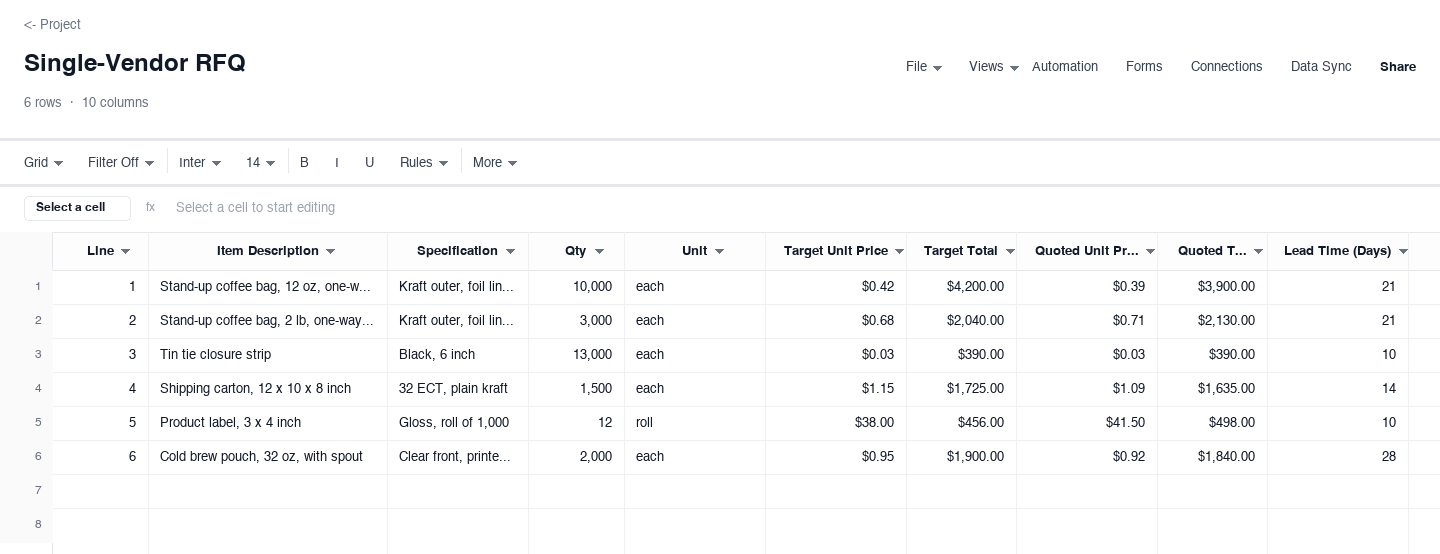
Single-Vendor RFQ
The single-vendor RFQ is the document you send. The header carries the RFQ number, buyer, vendor, ship-to address, issue date and a response window, and Quotes Due By is calculated from those two, so a 10-day window from 2026-10-12 lands on 2026-10-22. Line items carry a description, a specification, quantity and unit, your target unit price, and blank Quoted Unit Price and Lead Time columns for the supplier to fill in. Totals on both sides are formulas: in the sample the target was $10,711.00, the supplier came back at $10,393.00, $318.00 under, with a longest lead time of 28 days.
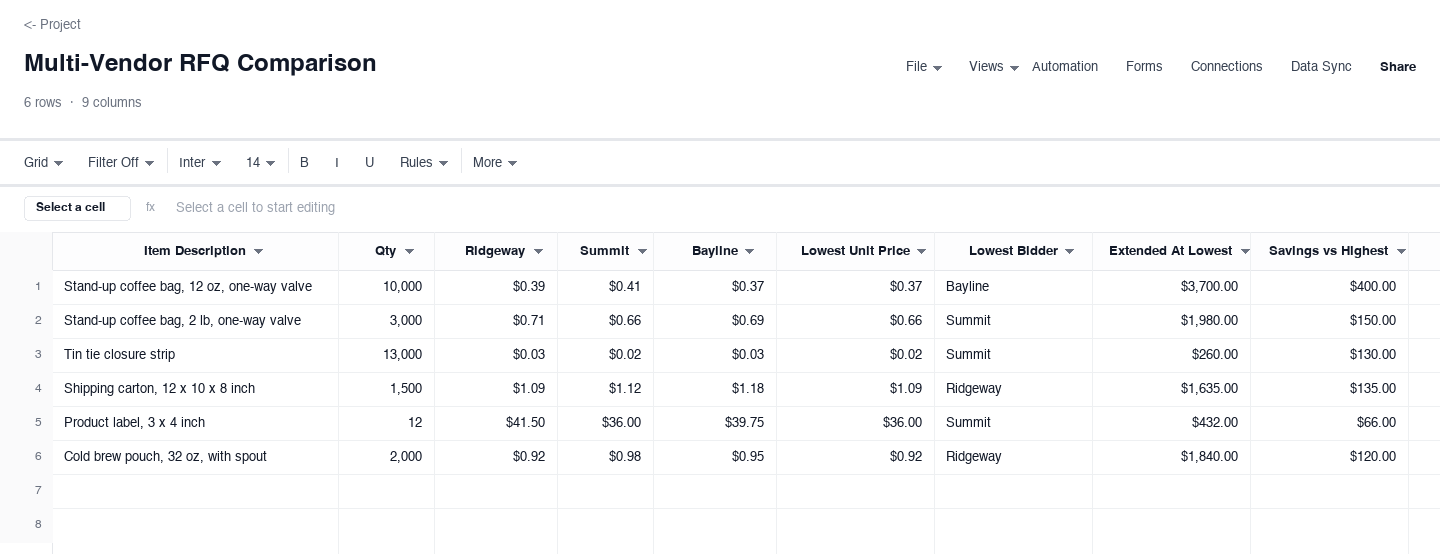
Multi-Vendor RFQ Comparison
The multi-vendor comparison is where the decision gets made. Each supplier gets a price column, and per line a MIN formula finds the lowest unit price while INDEX and MATCH name the vendor who bid it, with the extended cost at that price and the savings against the highest bid beside it. The footer shows what each vendor would cost if awarded everything (a vendor who left any line blank shows Incomplete and cannot win that award): in the sample $10,393.00, $10,412.00 and $10,307.00, so Bayline is the best single award. Splitting each line to its lowest bidder costs $9,847.00 instead, $460.00 less, which is the number to weigh against managing three suppliers instead of one.
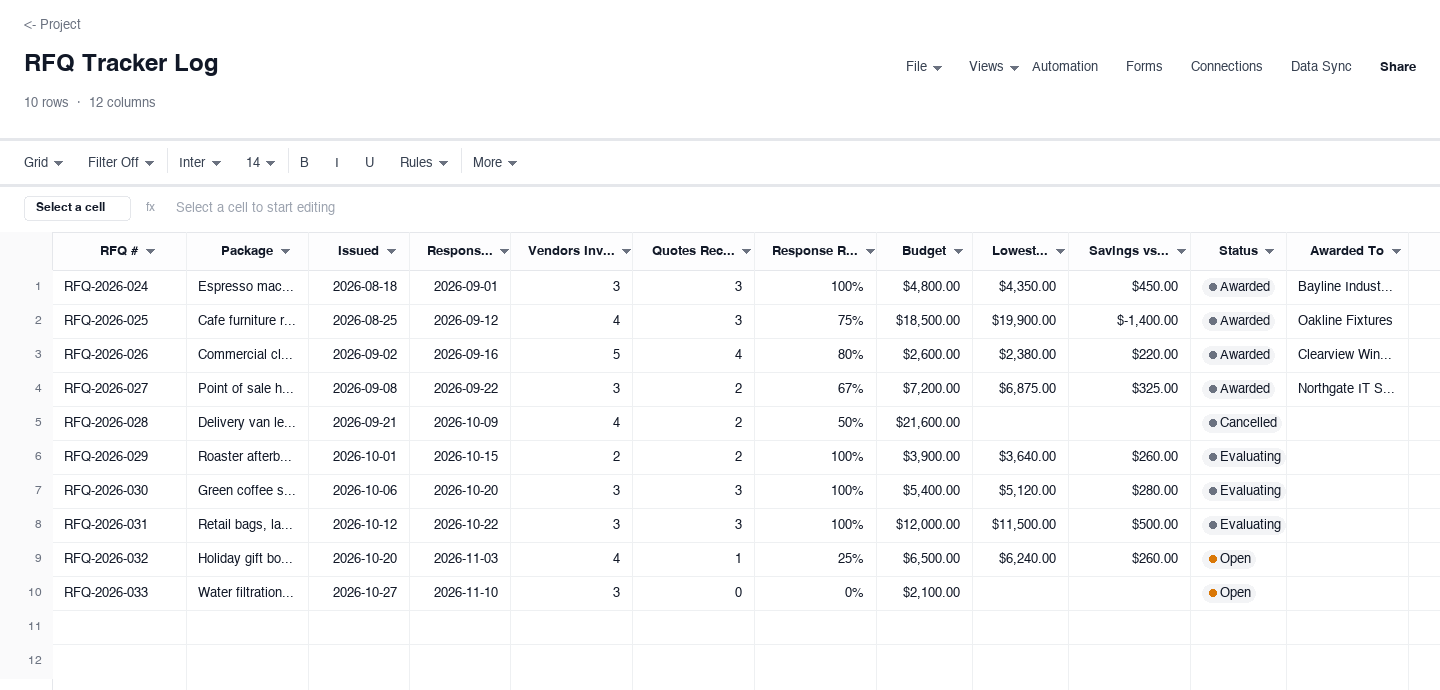
RFQ Tracker Log
The RFQ tracker is the register of every request you have out, one row per RFQ. It records the package, issue date, response deadline, vendors invited and quotes received, with the response rate calculated, then budget against lowest bid with the savings calculated, the status and who won. The sample holds ten RFQs: four awarded for $33,505.00, three being evaluated, two still open and one cancelled. One awarded package came in $1,400.00 over budget, which is why the footer shows awarded savings of minus $405.00 overall: the tracker surfaces it instead of hiding it in a total.
How to write an RFQ that gets comparable quotes back
Specify the item so every supplier prices the same thing
Quotes are only comparable if they price an identical item. Write the description, the specification that matters (size, material, grade, finish, print colors), the quantity and the unit of measure on every line. If one supplier quotes a 2-color bag and another a 4-color bag, the cheaper quote is not a saving, it is a different product. The Specification column exists to prevent that.
Set a response deadline and one channel for questions
Give suppliers a fixed response window and a single contact for questions, and share any answer with every supplier you invited. The single-vendor template calculates Quotes Due By from the issue date and the window, so changing either moves the date. A clear deadline also lets you track response rates, which is how you learn which suppliers actually want your business.
Ask for unit prices, lead times and validity, not just a total
Ask every supplier to fill in a unit price and a lead time per line, and to state how long the quote is valid. Unit prices let you split an award line by line; lead times tell you whether the cheapest bid can deliver by your required date; validity tells you how long you have to decide before prices can move.
Know your target price before quotes arrive
Write down what you expect to pay before you see a single bid. The Target Unit Price column in the single-vendor RFQ keeps that number on paper, and the footer compares the quoted total against it. Without a target you anchor on the first quote that arrives, and a high first quote makes a merely high second quote look like a bargain.
Compare bids line by line, then decide how to award
Put every bid into the multi-vendor comparison. The lowest price per line and the lowest single-vendor total usually point to different answers, and both are legitimate. Awarding everything to one supplier is simpler to manage; splitting by line is cheaper. The template shows both numbers and the difference, so the trade-off is explicit rather than assumed.
Close the loop: award, notify, and issue the purchase order
Record the award in the tracker, tell the winning supplier and thank the others, ideally with a short reason, which earns better bids next time. Then issue a purchase order to the winner that quotes the RFQ number and the accepted prices, so the quote, the PO and the eventual invoice all match line for line.
RFQ vs RFP vs RFI: which one do you need?
Use an RFQ when you already know exactly what you want and price is the main question: packaging, parts, materials, a defined service with a defined scope. Use a request for proposal, or RFP, when the how is open and you want suppliers to propose an approach, so you compare on method, experience and price together. Use a request for information, or RFI, earlier still, when you are learning who can supply something at all.
Many purchases move through more than one: an RFI to find capable suppliers, then an RFQ to the shortlist once the specification is fixed. The templates on this page cover the RFQ stage and the comparison that follows it. If suppliers send you quotes in their own format, copy their unit prices into the comparison sheet so every bid is read the same way.
Collecting quotes in one shared sheet
Emailing a spreadsheet to three suppliers produces three spreadsheets back, each a little different, and someone has to retype them. In Wisegrid you can put a form on a quotes sheet and send suppliers its link: each response lands as a new row with the vendor, item, unit price and lead time in the same columns, ready to sort and compare. The tracker can sit in the same project, so status and award live next to the bids that justified them.
Colleagues who need to see the comparison, such as a finance approver, can be invited as free viewers; editors are $19 a month each. Formulas reference columns by name, like =[Qty]@row * [Unit Price]@row, so they keep working when rows are added or reordered.
Frequently asked questions
What is an RFQ template?
An RFQ template is a ready-made request for quote: a header with the RFQ number, buyer, ship-to, issue date and response deadline, and a table of line items with specifications and quantities for suppliers to price. The single-vendor RFQ on this page is that document, with the deadline and both target and quoted totals calculated by formula.
How do I compare quotes from multiple vendors?
Enter each vendor's unit prices into the multi-vendor comparison. Per line, a MIN formula finds the lowest price and INDEX with MATCH names the vendor. The footer totals each vendor's full bid and the split award. In the sample, the best single vendor costs $10,307.00 and the line-by-line split costs $9,847.00, $460.00 less.
What should a request for quote include?
An RFQ number, your company and contact, the supplier, the issue date and response deadline, the delivery address and required date, and line items with description, specification, quantity and unit. Ask suppliers for a unit price, a lead time and a quote validity period. Payment terms and freight terms belong on it too if they are fixed on your side.
What is the difference between an RFQ and a quote?
The RFQ is the question and the quote is the answer. A buyer sends an RFQ asking for prices on specific items; a supplier replies with a quote stating the prices, lead times and terms it will honor. If you are the supplier, you want the quote template; if you are buying, you want the RFQ templates on this page.
How many suppliers should I send an RFQ to?
Three is a common floor for a meaningful comparison, which is why the comparison template has three vendor columns; add more columns by copying one. Fewer than three makes it hard to know whether the prices are fair. Far more than five wastes supplier effort and yours, and response rates drop when suppliers think their odds are low.
Do the RFQ formulas work in Google Sheets?
Yes. The files use IF, OR, ROUND, SUM, SUMIF, COUNTIF, COUNTA, MIN, MAX, COUNT, INDEX, MATCH and SUMPRODUCT, all of which behave the same in Excel and Google Sheets. Once the file is in your Drive, a double-click opens it in Sheets, and the lowest bid, lowest bidder, totals and due dates keep calculating there.
What happens after I choose the winning quote?
Mark the RFQ as awarded in the tracker and record who won, notify every supplier who bid, and issue a purchase order to the winner that references the RFQ number and the accepted unit prices. The purchase order is the commitment; the RFQ and the quote are the paper trail that shows why you made it.
Run it live instead of in a file.
The downloads above are yours either way. In Wisegrid the same template becomes a working sheet with owner contacts, status dropdowns, reminders, and dashboards. 7-day free trial with $10 of AI credit, card required, cancel before day 7 and you pay nothing.