Free Invoice Template for 2026: Service, Product and Monthly Billing
This free invoice template comes in three working versions: a service invoice that bills hours times a rate, a product invoice that bills quantity times unit price with discounts, tax and shipping, and a monthly invoice log for clients you bill every month. Each one is a real .xlsx file with live formulas, so line amounts, the subtotal, tax, total due and the due date calculate themselves. It opens in Excel and imports into Google Sheets with every formula intact.
An invoice is the document a seller sends after the work is done or the goods are delivered, asking to be paid a specific amount by a specific date. It is the last step of a chain that usually starts with a quote and, on the buyer side, a purchase order. The invoice has one job: make it easy for the customer to pay the right amount on time. Every field in these templates exists to serve that job, and nothing else is in the way.
Three free invoice templates with working formulas
Each download is pre-filled with a realistic sample from a fictional business so you can see a finished invoice before you overwrite it with your own. The formulas are blank-safe: the empty lines under the sample stay empty until you type into them, and the totals pick up every line you add. No email address required, and no watermark on the file.
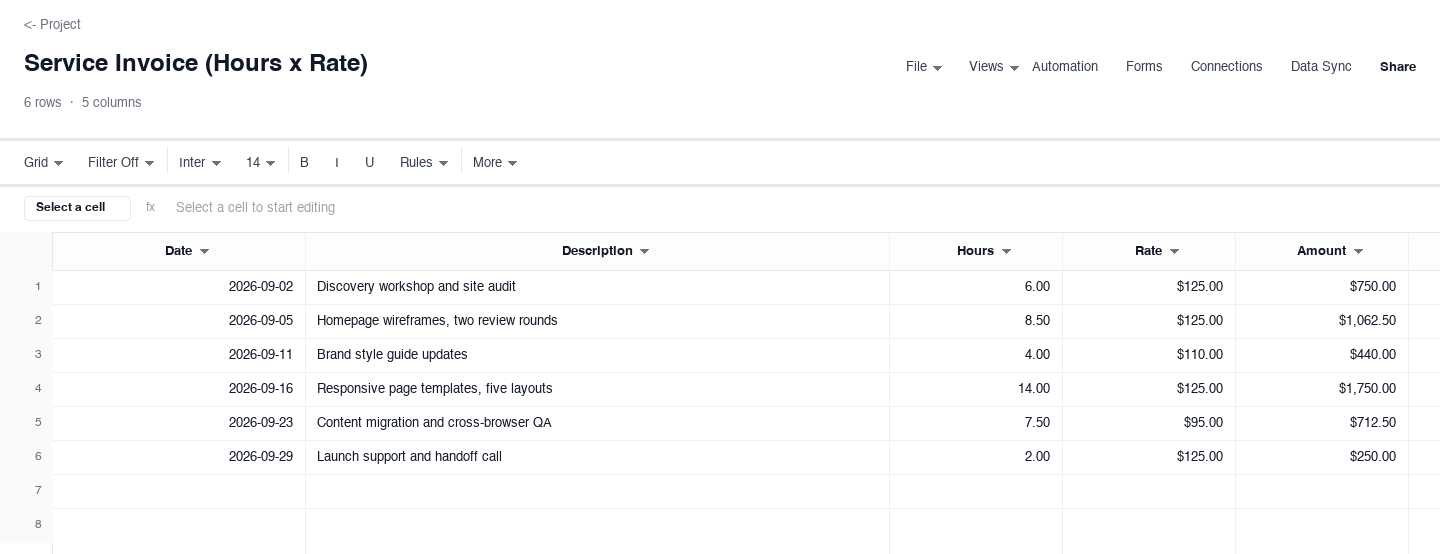
Service Invoice (Hours x Rate)
The service invoice is for anyone who bills time: designers, consultants, bookkeepers, contractors, tutors. Each line carries a date, a description, hours and an hourly rate, and the Amount column multiplies the two with ROUND so cents never drift. The sample is a design studio billing six lines of website work for a total of $4,965.00. Under the lines sit Subtotal, Tax Rate, Tax, Total Due, Amount Paid and Balance Due, all formulas, so a deposit or a partial payment is one number typed into one cell. The Due Date at the top is the issue date plus your payment terms in days, so changing Net 30 to Net 15 moves the date for you.
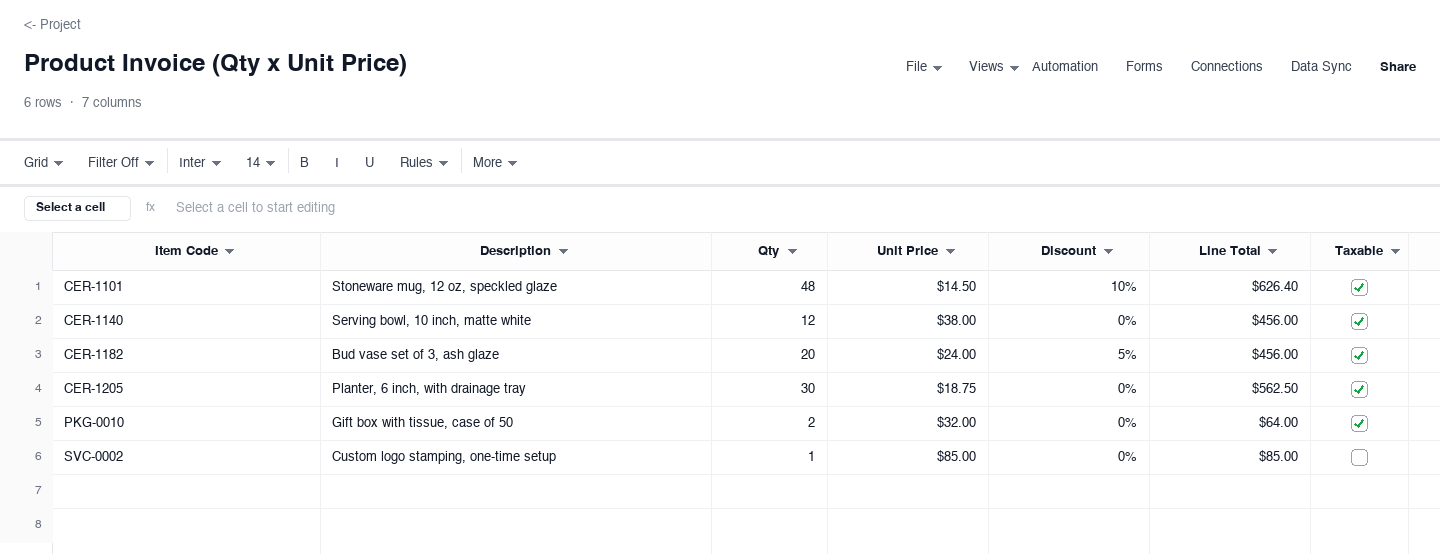
Product Invoice (Qty x Unit Price)
The product invoice is for selling goods: wholesale orders, retail restocks, parts and supplies. Lines carry an item code, quantity, unit price and a per-line discount, and the Line Total formula applies the discount before rounding. A Taxable checkbox on each line feeds a SUMIF, so the setup fee in the sample stays out of sales tax while the goods are taxed at 8.25 percent. The sample bills a gift shop $2,249.90 in goods and setup, $178.60 in tax and $45.00 shipping, for a total due of $2,473.50. There is a Customer PO field at the top, because buyers who issue purchase orders match your invoice against them before paying.
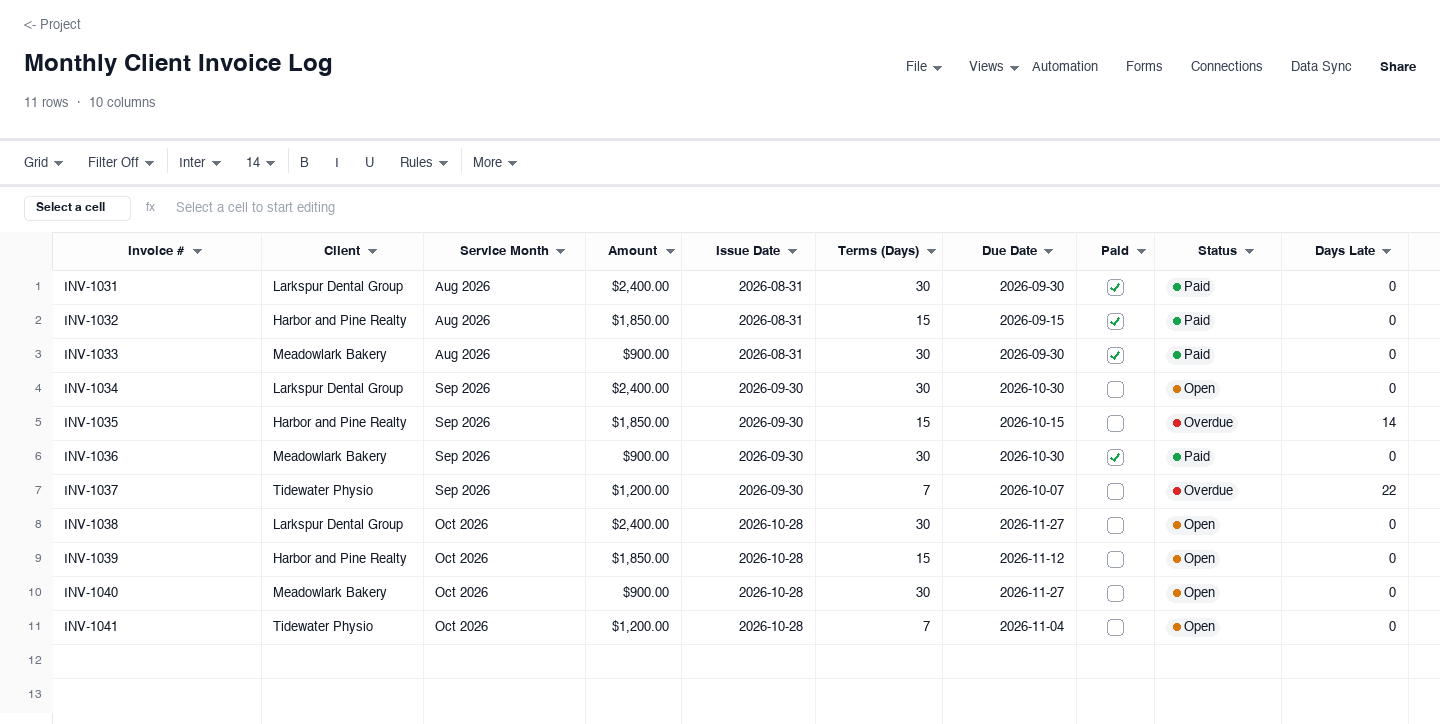
Monthly Client Invoice Log
The monthly invoice log is for recurring billing: retainers, subscriptions, maintenance plans, monthly bookkeeping clients. One row per invoice, with the amount, issue date and terms. The Due Date is calculated, Paid is a checkbox, and Status reads Paid, Open or Overdue from today's date, with a Days Late count beside it. The sample covers eleven invoices across four clients from August to October, $17,850.00 billed in total, and as of the screenshot two invoices were overdue, one by 14 days and one by 22. The footer totals what was billed, what was collected, what is still outstanding and how much of that is late, which is the one number to chase first.
How to fill out an invoice that gets paid on time
Give every invoice a unique, sequential number
The invoice number is how your customer's accounts payable team finds it, how they reference it when they pay, and how you match the payment to the right job. Pick a scheme like INV-1042 and never reuse a number, even for a voided invoice. Sequential numbers also make gaps visible, which is the fastest way to notice an invoice that was drafted and never sent.
Put both parties and the customer reference at the top
Your business name and address, the customer's legal name and billing address, the issue date, and any reference the customer gave you: a purchase order number, a project code, a job number. Larger customers often cannot pay an invoice that does not quote their PO number, and the invoice sits in a queue until someone emails you to ask for it. The templates carry a field for it.
Write line items the customer can check in ten seconds
Each line should say what was delivered in words the customer recognizes, with the quantity or hours, the rate or unit price, and a computed amount. Vague lines such as "services rendered" are the most common reason invoices get questioned, because the approver cannot tell what they are approving. If a quote preceded the work, reuse its wording so the two documents match line for line.
Let formulas do the totals, tax and due date
Typed totals are where invoice errors live. In these templates every amount is a formula: quantity times price, a SUM for the subtotal, tax computed only on taxable lines, and Total Due as the sum of the parts. The due date is the issue date plus the payment terms, so you set Net 15 or Net 30 once and the date follows. If you add a line, the totals include it with no edits.
State payment terms and how to pay, in plain words
Write the terms (Net 30, due on receipt, 50 percent deposit) and the accepted payment methods with the details needed to use them: bank transfer details, a payment link, or a mailing address for checks. Customers pay faster when they do not have to reply to ask how. If you charge a late fee, state the rate on the invoice; a fee that was never stated is hard to collect.
Track every invoice until it is paid
Sending the invoice is half the job. Log it the day it goes out, mark it paid the day the money lands, and look at the overdue list every week. The monthly log template does this with a Paid checkbox, a Status formula that flips to Overdue the day after the due date, and a footer that shows the overdue total, so following up is a five-minute weekly habit instead of a month-end surprise.
Using this invoice template in Google Sheets
To use the invoice template in Google Sheets, download the .xlsx, then in Google Drive choose New, File upload, and open the file with Google Sheets. The formulas convert as they are: ROUND, SUM, SUMIF, IF and TODAY all behave the same, the dates stay dates, and the currency formats carry over. To send an invoice from Sheets, use File, Download, PDF, and set the page to fit width; the files already have their print area and orientation set.
If you invoice more than a handful of clients, keep the monthly log as the master record in the same workbook and copy the service or product sheet for each new invoice. One file then holds every invoice you have sent and the status of each, and the overdue total at the bottom of the log is always current because it reads today's date when the file opens.
When a spreadsheet invoice log stops scaling
A spreadsheet log works until two people need it at the same time, or until the invoice list lives in one file while the job tracker, the timesheet and the quote live in three others. In Wisegrid the same log is a shared sheet: the Paid column is a real checkbox, Status can be a dropdown with colored rules, and formulas read the way you think about them, such as =[Hours]@row * [Rate]@row instead of cell addresses that break when someone inserts a row.
Because each sheet holds up to 1,000,000 cells, years of invoices fit in one log, and it can sit in the same project as the quotes and timesheets the invoices come from. Your bookkeeper can be invited as a free viewer to see the overdue list without editing it; editors are $19 a month each. The download above stays free either way.
Frequently asked questions
Is this invoice template really free?
Yes. All three invoice templates are free .xlsx downloads with no email gate and no watermark. They open in Excel, import into Google Sheets, and keep working if you never create a Wisegrid account. Wisegrid is the paid product, at $19 per editor per month with viewers free, and you only need it if you want the invoice log as a shared, live sheet.
Do the formulas work in Google Sheets?
Yes. Every formula in the three files uses functions that behave the same in Excel and Google Sheets: ROUND, SUM, SUMIF, IF, OR, MAX and TODAY. Drop the downloaded file into Drive, choose Open with, then Sheets, and line amounts, subtotal, tax, total due, due date, status and days late all keep calculating. Nothing in the files depends on macros or add-ons.
How is the due date calculated?
The Due Date is the Issue Date plus the Payment Terms in days. In the service invoice sample, an issue date of 2026-10-01 with 30-day terms gives a due date of 2026-10-31. Change the terms to 15 and the due date moves to 2026-10-16 on its own. The monthly log applies the same formula on every row, so each client can have different terms.
What is the difference between a service invoice and a product invoice?
A service invoice bills time: hours multiplied by an hourly rate, usually with dated lines so the client can match them to the work. A product invoice bills goods: quantity multiplied by unit price, often with item codes, discounts, sales tax and shipping. Many businesses need both, which is why they are separate downloads with the totals logic each one actually needs.
How do I add sales tax to an invoice?
Type your rate into the Tax Rate cell under the line items. In the product invoice, only lines with the Taxable box checked are taxed: the sample taxes $2,164.90 of goods at 8.25 percent for $178.60 and leaves the $85.00 setup fee untaxed. The service invoice ships with a 0 percent rate because many services are not taxed; set it if yours are. Tax rules vary by place, so confirm your rate locally.
What should an invoice include?
A unique invoice number, your business name and contact details, the customer's name and billing address, the issue date and due date, itemized lines with quantities and prices, the subtotal, any tax and the total due, payment terms, and how to pay. Add the customer's purchase order number when they gave you one. The service and product templates carry every one of these fields.
How do I track which invoices are paid or overdue?
Use the monthly invoice log. Each row has a Paid checkbox; the Status formula shows Paid when it is checked, Overdue when today is past the due date, and Open otherwise, and Days Late counts the days. In the sample, $6,050.00 of $17,850.00 billed was collected, and $3,050.00 of the outstanding balance was overdue as of the screenshot date.
Can I turn an invoice into a PDF?
Yes. Each sheet has its print setup done: portrait for the two invoices, landscape for the log, fit to one page wide. In Excel use File, Save As, PDF; in Google Sheets use File, Download, PDF. Most customers want the PDF in their inbox while you keep the spreadsheet as the working copy where the formulas live.
Run it live instead of in a file.
The downloads above are yours either way. In Wisegrid the same template becomes a working sheet with owner contacts, status dropdowns, reminders, and dashboards. 7-day free trial with $10 of AI credit, card required, cancel before day 7 and you pay nothing.