Timesheet Template: Free Downloads and a Fill-In Guide for 2026
A timesheet is the record of who worked, when, and on what. A timesheet template turns that daily habit into a consistent, auditable log: start and end times, breaks, regular hours, overtime, PTO, and the project or task each block of time went to. Done well, it answers the three questions behind every payroll dispute, billing write-off, and compliance headache before they start: how many hours, of what kind, and owed to or billed against whom.
The failure mode is always the same: hours reconstructed on Friday from memory, overtime nobody flagged, and client work logged so vaguely that invoicing becomes a negotiation. A good timesheet template removes each failure point with one column apiece, and the versions below show the right shape for hourly field crews, salaried staff tracking exception hours, and agencies billing by the hour.
Four timesheet templates, free to download
Each version below is a working spreadsheet, not a blank grid with a title row. The fields are pre-filled with realistic example content from a fictional electrical contractor and a fictional design agency so you can see how a finished timesheet reads, then overwrite it with your own details. What you download is an everyday spreadsheet file, compatible with all the usual tools. No email address required.
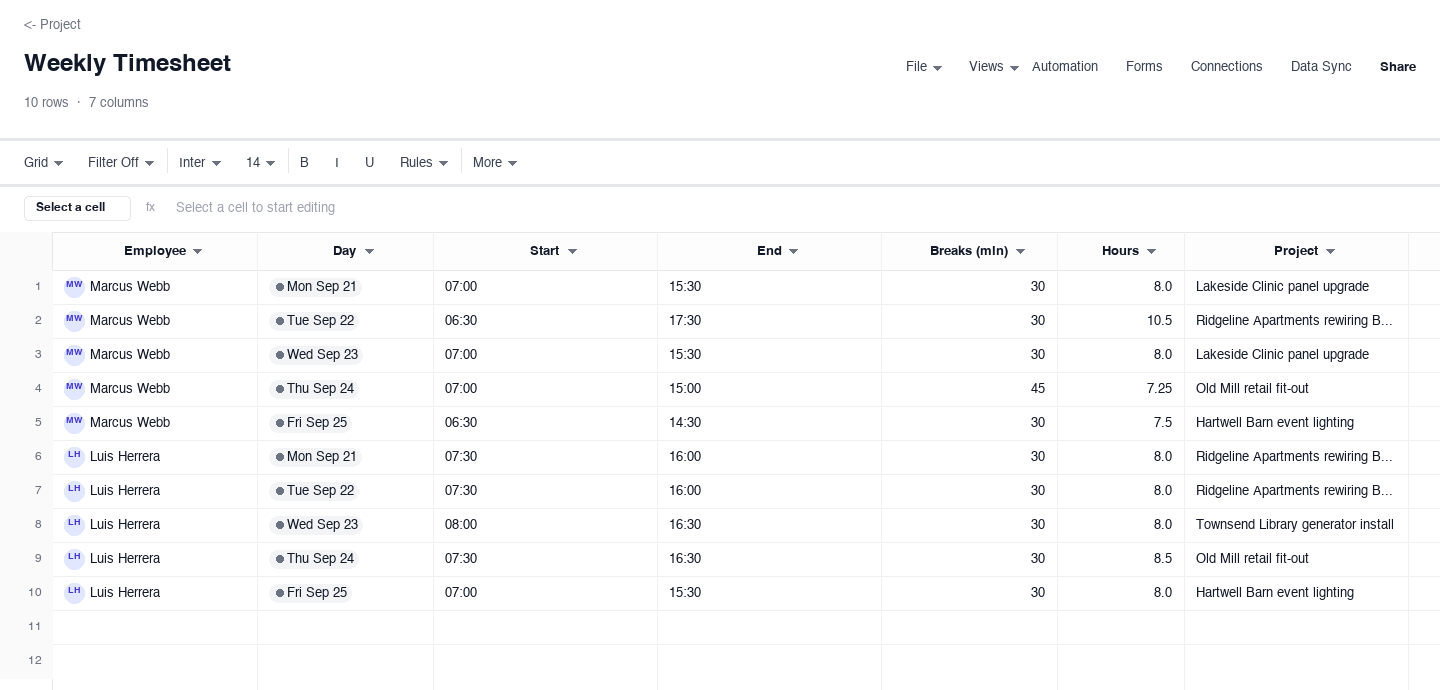
Weekly Timesheet
The weekly timesheet is for hourly employees and field crews who need one row per person per day: start and end times, a breaks column in minutes, computed hours, and the project the day went to. Use it when a week of hourly work has to reconcile against payroll without interpretation. The breaks column in minutes earns its keep every short Friday, because the paid-time math is on the sheet instead of in memory.
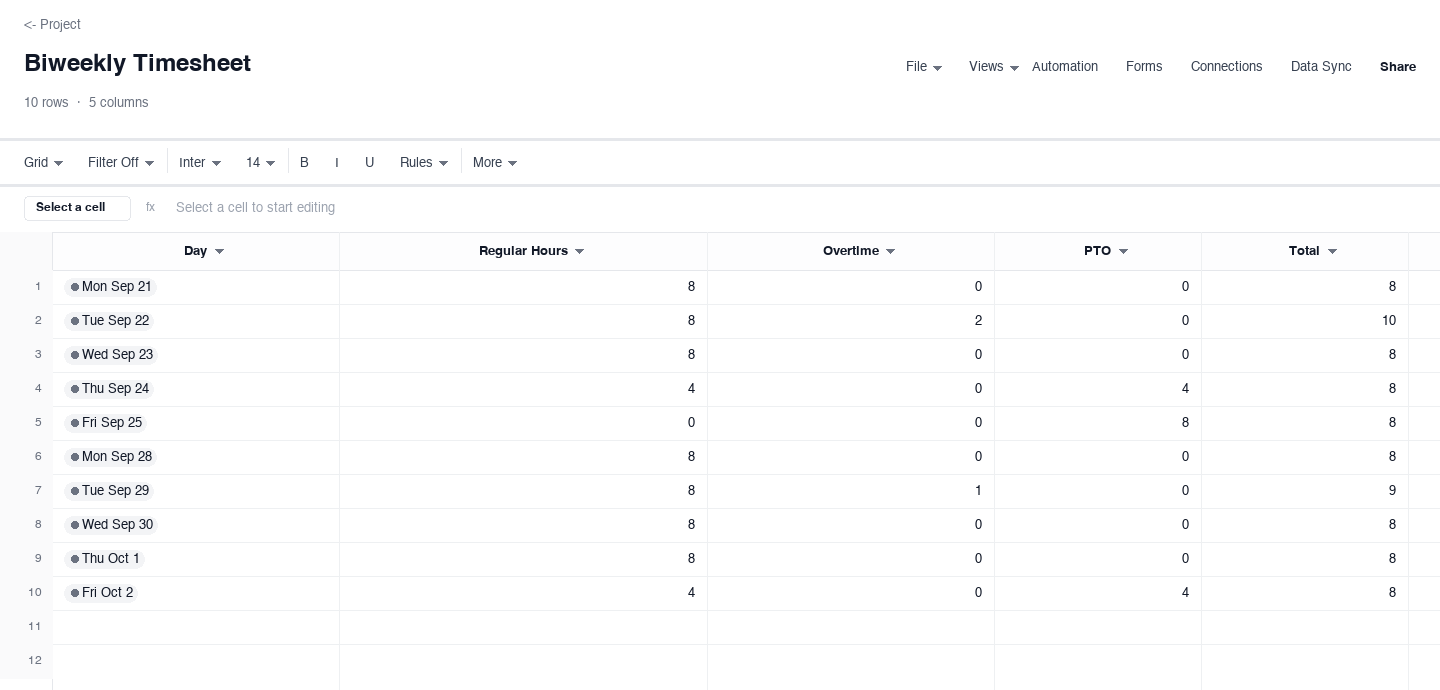
Biweekly Timesheet
The biweekly timesheet matches a two-week pay cycle, splitting each day into regular hours, overtime, and PTO with a total that adds the three. Use it when payroll runs every other week and leave has to stay visible rather than buried in a short-day note. The PTO column earns its keep during holiday weeks, because a four-day week with eight hours of PTO still totals a clean forty instead of looking like slippage.
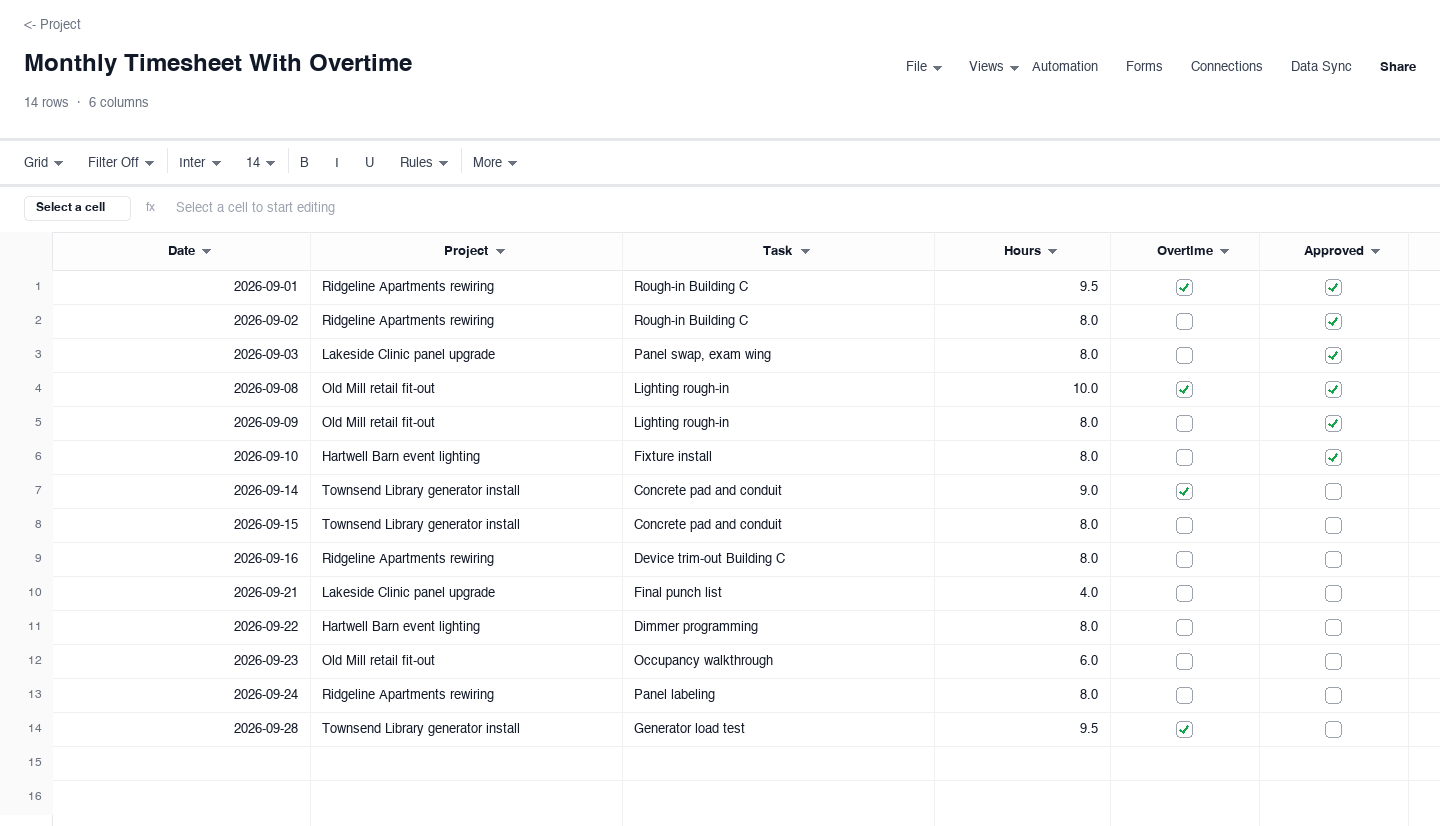
Monthly Timesheet With Overtime
The monthly timesheet with overtime is for people who log against projects all month and flag only the exceptions: date, project, task, hours, an overtime checkbox, and an approval checkbox per row. Use it for crews or contractors where a supervisor signs off before the record becomes an invoice or a payroll run. The approval checkbox is the control that matters, because a row a client or manager has checked is a row nobody renegotiates later.
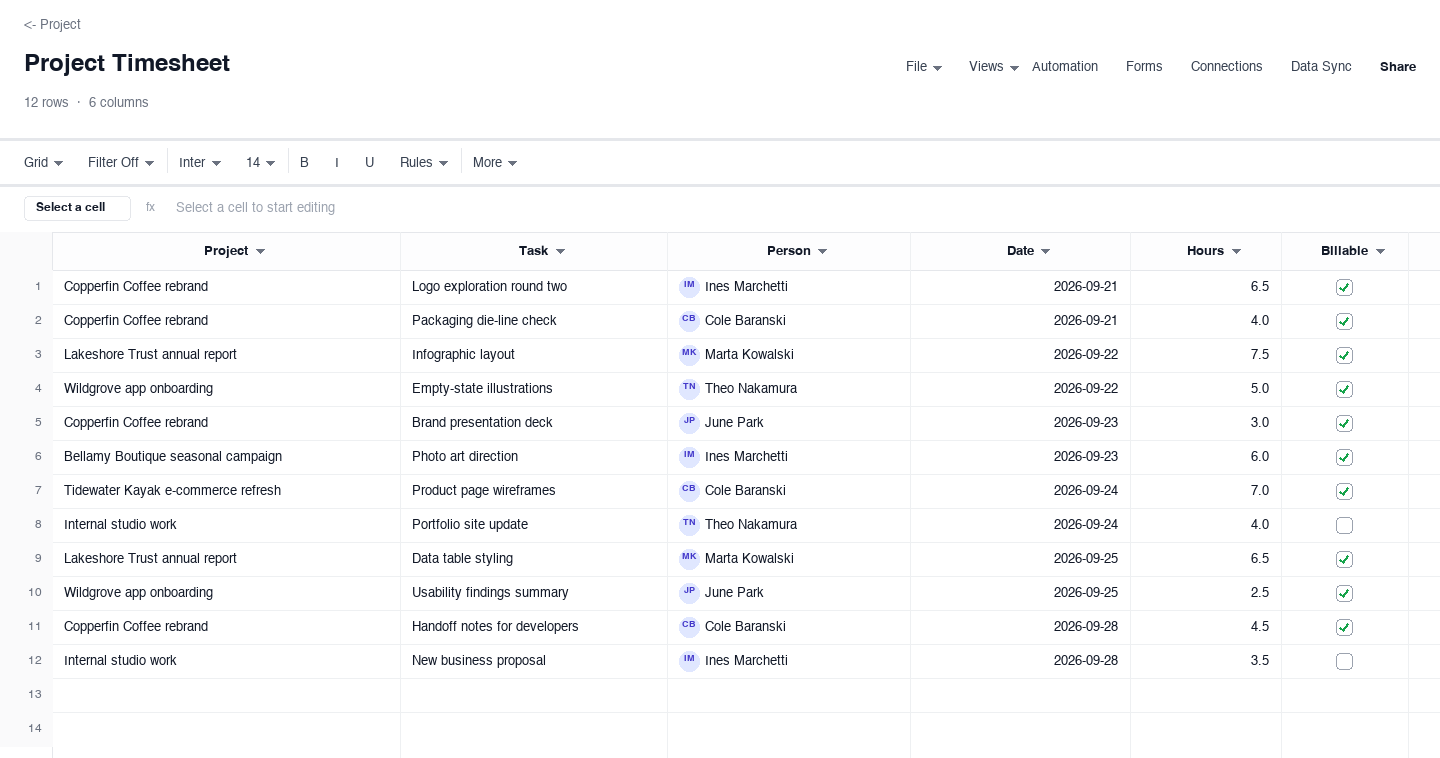
Project Timesheet
The project timesheet is for agencies and consultants billing by the hour: project, task, person, date, hours, and a billable checkbox that splits client work from internal time. Use it when one invoice draws from many small entries across several clients. The billable checkbox earns its keep at month end, because utilization is only honest when the internal rows, the portfolio update, the proposal, stay in the total but out of the invoice.
How to run a timesheet process people actually follow
Make daily entry the rule, not Friday reconstruction
The single biggest source of timesheet error is the Friday afternoon reconstruction, when a week of work gets compressed into guesses. Require entries the same day, while the start time, the breaks, and the project are still certain. Ten minutes at the end of each day beats an hour of archaeology at the end of the week, and the record you get is accurate enough to bill and audit without a second pass.
Set a rounding rule and write it on the sheet
Decide the smallest unit of time you will accept and state it in the header or a note row: six-minute increments, one tenth of an hour, is the common standard for professional services, while field crews often round to the quarter hour. A written rule stops the quiet drift where one employee rounds up, another rounds down, and two identical days land as different hours on the same payroll run.
Give regular hours, overtime, and PTO their own columns
Mixing overtime into a single hours column guarantees disputes: the employee remembers the extra hour, payroll sees forty hours, and nobody can reconstruct which account is right. Split the three categories into separate numeric columns with a computed total, the way the biweekly version above does. Payroll then sums the columns it needs, and the audit trail for an overtime claim is the sheet itself rather than a memory.
Tie every entry to a project and a task
An hours number with no project attached is unbillable and unschedulable: it cannot be invoiced, and it cannot tell a project manager whether the budget is holding. Make the project column mandatory and add a short task description, a phrase is enough. When review time comes, project-tagged entries roll up into job costing and client reporting without anyone re-reading three months of notes to remember what a number referred to.
Route every sheet through an approver before payroll
A timesheet nobody approved is just a claim. Name an approver, a supervisor, project lead, or client, and make their sign-off a checkbox or a status on the sheet, the way the monthly version above carries an approval flag per row. Approval before payroll closes the loop: errors get caught by the one person who knows what the week actually looked like, while corrections are still cheap and the record still fresh.
Lock the submitted sheet and correct with new rows
Once a timesheet is approved and payroll has run, treat it as a record, not a living document. If something was wrong, add a correcting row in the next period with a note referencing the original entry, rather than editing history. Timesheets that stay editable after approval fail every labor audit they meet, because the question is never just what the hours were, it is whether the record was changed after it was signed.
Searching for a time sheet template?
Time sheet written as two words and timesheet as one are the same document, and searchers use both. The one-word spelling dominates payroll software, while the two-word form persists in job postings, government forms, and plenty of company policy manuals. The templates on this page work for either search: the structure is identical, one row per person per day or per task, and nothing about the spelling changes what the columns need to carry for payroll, billing, or audit purposes.
If you arrived from a time sheet template search and work in a regulated environment, check whether your jurisdiction or contract prescribes specific fields. Public works projects, grant-funded work, and some union agreements require documented start and end times, meal breaks, and a signature or certification line. The weekly version above already carries start, end, and breaks, so adding a signature column and a certification row is all most of those requirements ask for.
Frequently asked questions
What is the difference between a timesheet and a time sheet?
Nothing beyond spelling. Timesheet as one word is the standard in payroll and time-tracking software, while time sheet as two words shows up in older policy documents, job postings, and some government forms. Both searches mean the same document, and every template on this page, the weekly, biweekly, monthly, and project versions, works for either term without modification.
Should salaried employees fill out timesheets?
Often yes, even when pay does not change. Salaried staff track time so projects carry their real labor cost, so PTO balances stay accurate, and so exempt status can be demonstrated if it is ever questioned. The monthly version above fits this case well: no clock-in pressure, just a daily row with an overtime flag for the weeks a deadline runs long and the extra hours need to be visible somewhere.
How should I track overtime on a timesheet?
In its own column, never folded into total hours. Payroll needs to see the split between regular and overtime hours at a glance, both to pay correctly and to demonstrate compliance. The biweekly version above splits regular, overtime, and PTO into separate columns with a computed daily total, which is the shape payroll departments ask for. The monthly version carries an overtime flag per row for salaried staff tracking exception hours against specific dates.
What is the difference between billable and non-billable hours?
Billable hours are charged to a client; non-billable hours are real work the company absorbs, such as internal meetings, proposals, and administrative upkeep. The project timesheet above separates the two with a checkbox so invoices draw only on billable rows while utilization reporting still counts everything. Agencies that skip the split routinely discover their effective billing rate sits far below the headline rate they quote, because internal time quietly eats the gap.
Can I use these timesheet templates for payroll?
Yes, provided the columns match what your payroll process requires: employee, dates, regular hours, overtime, and PTO, plus an approval. The weekly and biweekly versions carry exactly those fields, and the daily or weekly total column gives payroll a clean number to import or re-key. Confirm with your payroll provider whether they want hours as decimals, 7.5 rather than 7:30, which is the format every numeric column here already uses, and keep the approved sheet attached as the backup record.
How long should completed timesheets be kept?
Longer than most small companies keep them. Payroll records underpin wage claims, tax filings, and contract audits, and retention requirements commonly run several years from the date of the entry, with the exact number set by your jurisdiction. The practical rule: never delete an approved timesheet, store them in a folder per year and per person, and keep the approval trail attached so any single entry can prove who confirmed it and when.
How do I get a team to actually submit timesheets on time?
Make submission a two-minute job and close the loop same day. The friction is what kills compliance: if entering a week means reconstructing it from memory and a pile of notes, people will postpone it until the numbers are fiction. Keep the sheet to the minimum columns, log time daily rather than weekly, and have the person who needs the numbers, payroll or the billing lead, acknowledge receipt the day it lands. A visible approval status column does most of the work: rows sitting in submitted for a week surface on their own, and a weekly reminder tied to payroll cutoff beats any policy document. The versions above are deliberately small for exactly this reason.
Run it live instead of in a file.
The downloads above are yours either way. In Wisegrid the same template becomes a working sheet with owner contacts, status dropdowns, reminders, and dashboards. 7-day free trial, no credit card required.