Work Schedule Template: Free Downloads and a Shift Planning Guide for 2026
A work schedule template turns staffing from a daily negotiation into a published plan. It shows who works each shift, in which role, under which lead, and for how many hours, so a warehouse floor starts the day knowing who runs the forklift, who picks, and who covers the dock door. The schedule is also a commitment: hours posted in advance let people plan their lives, and people whose lives work show up to work.
The templates below are pre-filled with a fictional logistics warehouse and its shift leads: a fixed employee schedule, a rotating crew grid, a hybrid availability view for the office side, and a month-long shift calendar. Replace the names and patterns with your own and the structure still carries, because coverage math is the same in every operation that runs more than one shift.
Four work schedule templates, free to download
Each version below is a working spreadsheet, not a blank grid with a title row. The fields are pre-filled with realistic example content from a fictional logistics warehouse so you can see how a finished work schedule reads, then overwrite it with your own people, shifts, and patterns. What you download is an everyday spreadsheet file, compatible with all the usual tools. No email address required.
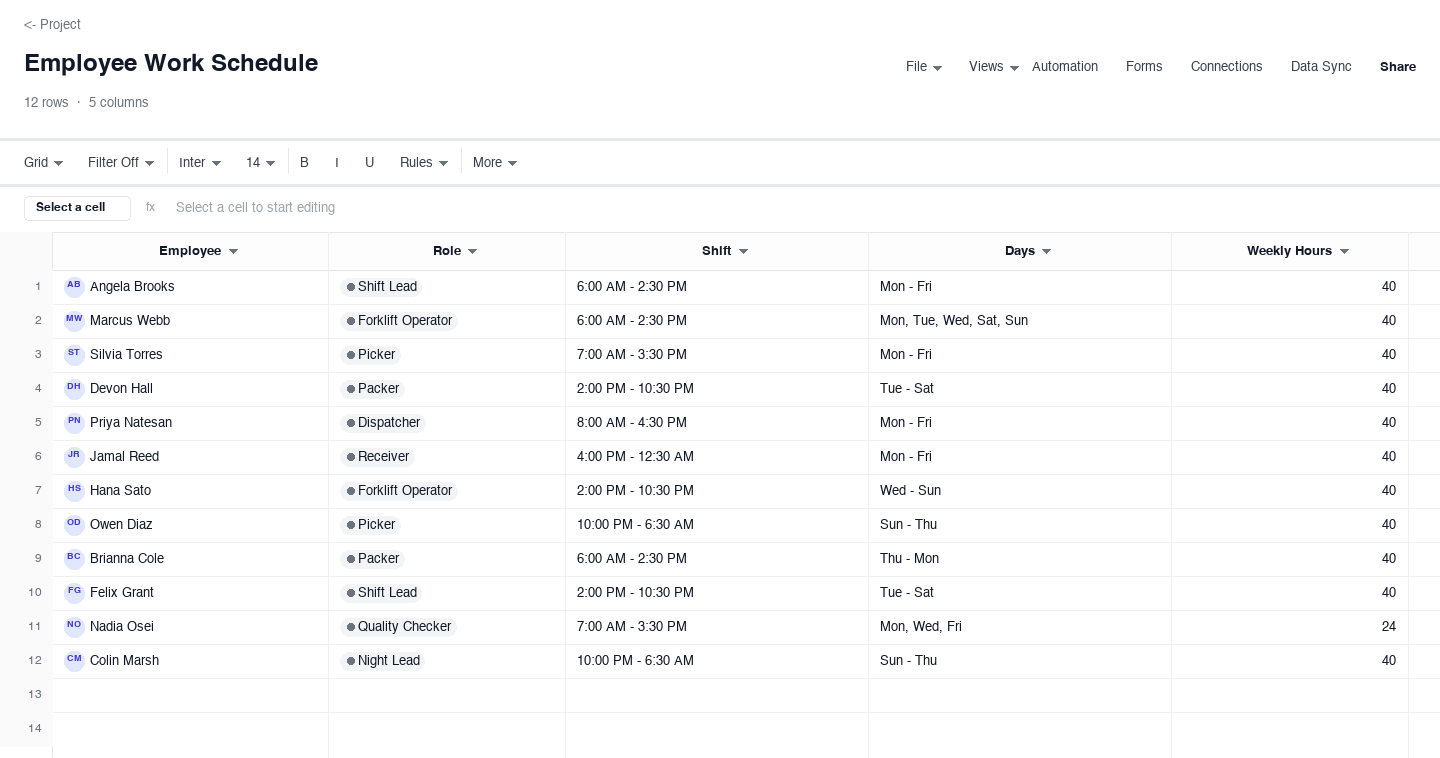
Employee Work Schedule
The employee work schedule is the core version: one row per employee with their role, shift start and end times, the days they work, and weekly hours. Use it when you manage a fixed team with a predictable rhythm, like a warehouse running day and swing shifts, and you need one page that answers who is in today. The days column keeps the sheet compact while the hours column lets you spot overtime creep before it reaches payroll, and employees read their own week by finding their name and reading across.
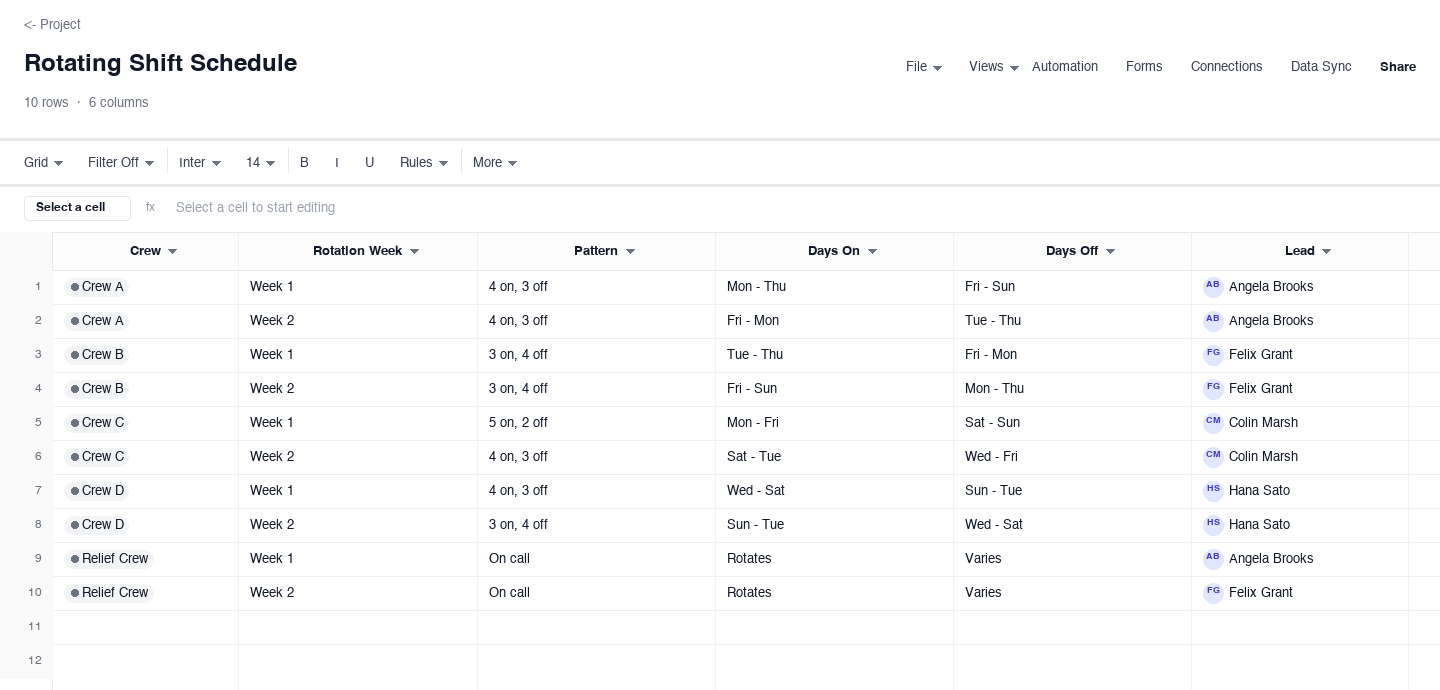
Rotating Shift Schedule
The rotating shift schedule is built for operations that never close: crews, rotation weeks, patterns like four on and three off, and the days each crew works and rests. Use it when a single fixed schedule cannot cover seven-day demand, and fairness matters as much as coverage, because rotation spreads the weekend and night burden evenly across the team. The lead column keeps accountability attached to each crew, so the pattern is never an excuse for a gap on the floor.
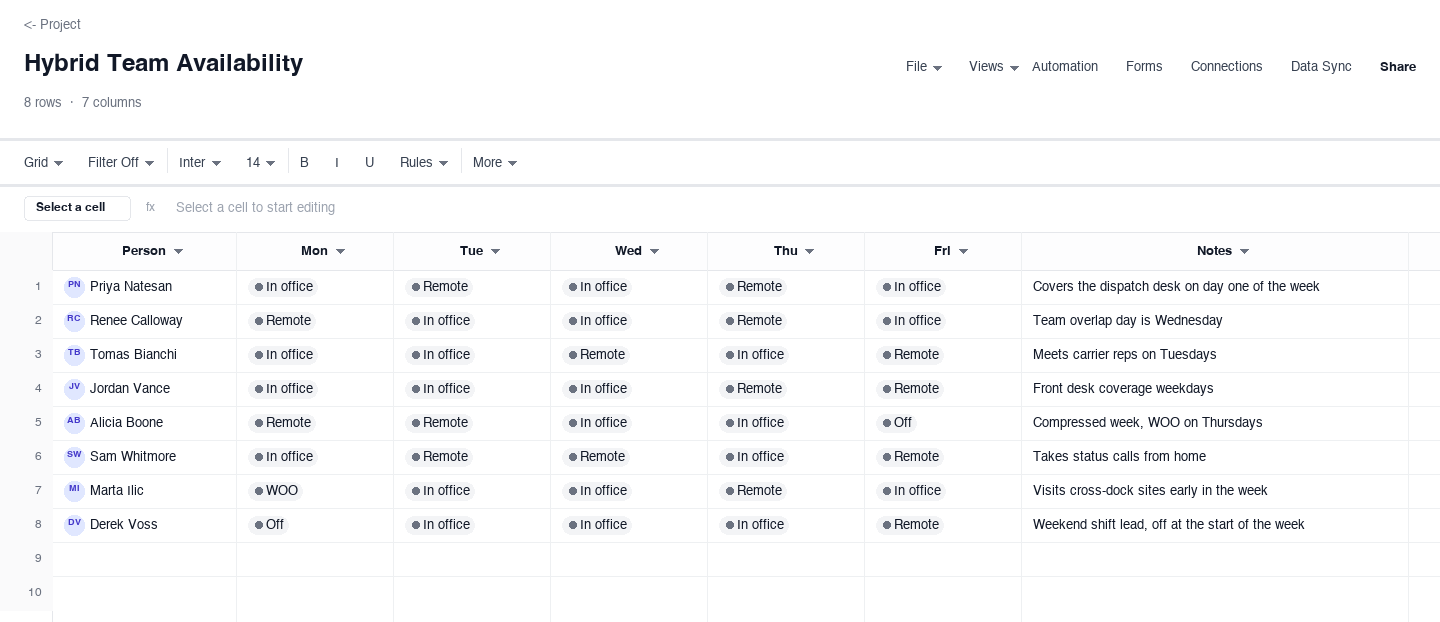
Hybrid Team Availability
The hybrid team availability schedule tracks where people will be, not just when: a person, and a status for each weekday such as in office, remote, working out of office, or off. Use it for the dispatchers, schedulers, and office staff who split time between the warehouse and home, so anyone can see who is on-site before they walk the floor. It also settles the recurring question of which days the whole team overlaps in the office for meetings and training, without a single status message.
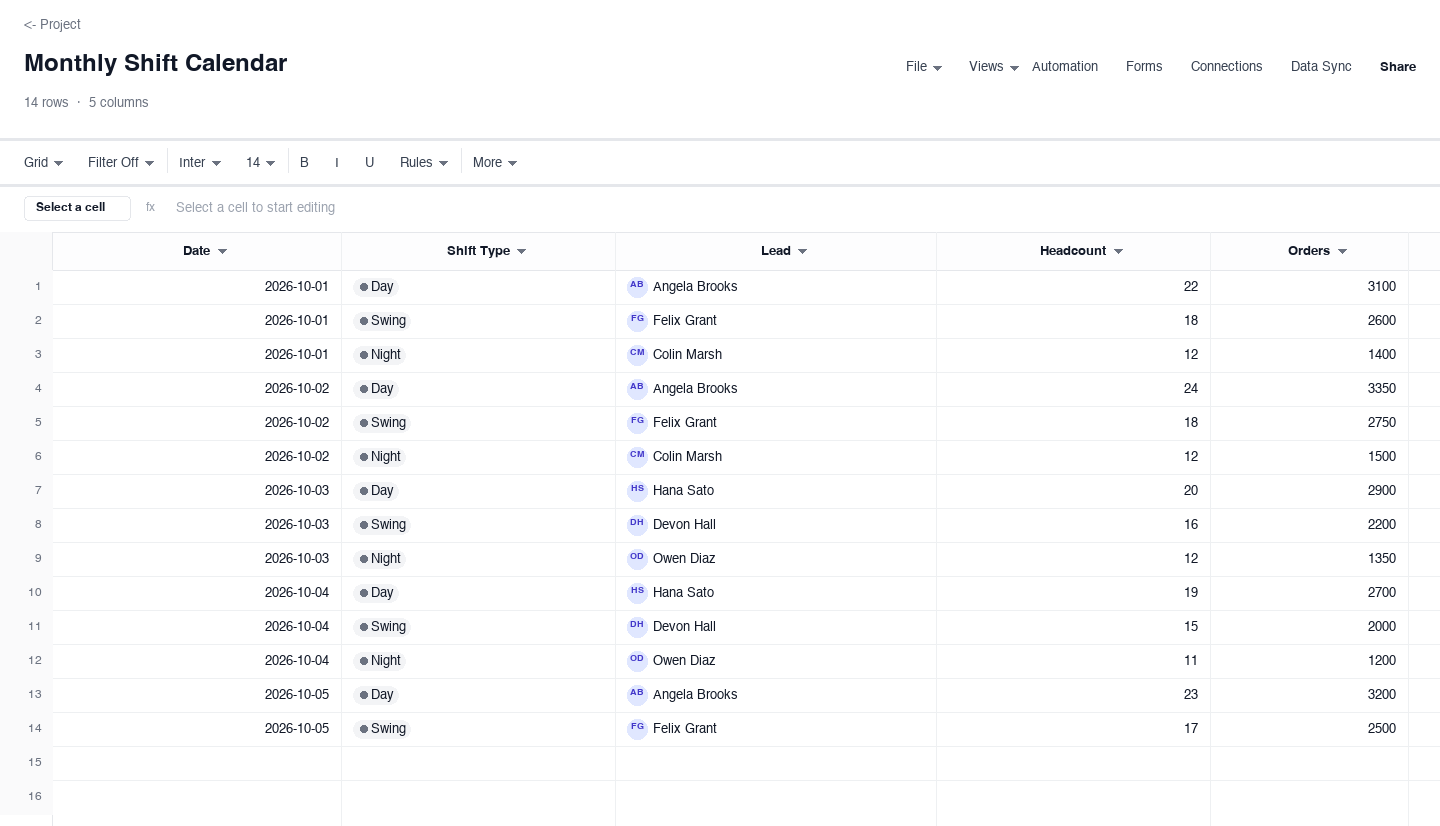
Monthly Shift Calendar
The monthly shift calendar zooms out to a month of dates, each with a shift type, the named lead, headcount, and expected order volume. Use it for capacity planning meetings and for spotting coverage holes across day, swing, and night rotations before they become last-minute scrambles. Pairing headcount with order volume on the same row is the habit that matters: it shows whether the schedule matches the work, or just matches habit, and that distinction is where labor budget is won or lost.
How to build a work schedule that covers demand without burning out the team
Forecast the workload before you write names
A work schedule starts with the work, not the workers. Pull the numbers that drive your operation: order volume by day, receiving appointments, carrier pickup windows, and any seasonal curve you already know. The monthly calendar variant above puts order volume next to headcount for exactly this reason. When the forecast says Thursday needs twenty-four pickers and the schedule offers nineteen, you have found the problem on paper, which is dramatically cheaper than finding it on the floor at four in the afternoon.
Match shift patterns to demand, not to habit
Most bad schedules are last season schedule with new dates. Demand moves: promotions, weather, carrier changes, and school terms all shift when the work actually arrives. Check the pattern against the forecast every month, and be willing to move shift starts by an hour or rebalance crews across the week. The rotating pattern should bend before the people do, because overtime is the tax an operation pays for scheduling from memory instead of from the volume curve.
Name a lead for every shift
A shift without a named lead is a shift where problems escalate straight to you. The lead is the person who makes the small decisions: who covers a no-show, when to call the extra break, whether the line can absorb a late truck. Put the lead name on the schedule itself, not in a separate doc, so a new hire can find it in ten seconds. Then brief your leads weekly on the demand picture, because a lead who knows the plan schedules better than a lead who only knows the roster.
Post the schedule at least two weeks ahead
For shift work, two weeks is the floor and four is better, because your people are arranging childcare, classes, and second jobs around your grid. Predictability is worth more to retention than almost any perk, and it costs nothing but discipline. Lock a publish day, announce it once, and hold it. If the schedule changes after publishing, mark the change visibly rather than silently editing cells, because silent edits are how trust in the schedule dies.
Compare actual hours to scheduled hours every week
The gap between the schedule and the time clock is where labor budget leaks. If one shift consistently runs two hours over, either the forecast is wrong or the staffing is; both are fixable, but only if someone sees the pattern. A ten-minute weekly comparison, scheduled in your own calendar, catches drift while it is still a scheduling problem. Let it go a quarter and it becomes an overtime line item, a burnout resignation, or both, and those are far harder to schedule around.
Write the swap and time-off rules down
Most scheduling friction is not scheduling; it is undocumented policy. Write three rules on the sheet itself or on the tab beside it: how far ahead time-off requests must land, who approves a swap, and what happens when two people want the same day off. Keep the approval rule fair and visible, seniority, first-come, or rotation, because a rule people can read beats a favor system people resent. Fairness in writing is one of the cheapest retention tools a shift-based operation has.
Searching for an employee schedule template or an employee work schedule?
Those two searches land on the same need this page serves, and the employee work schedule above is exactly what you are looking for: one row per person with role, shift times, days, and weekly hours. It reads the way an employee schedule template should: find your name, read across, know your week. Download it, replace the sample crew with your own roster, and the grid does the rest.
Employers and employees use the same page from opposite sides. The employer reads down the columns looking for coverage holes and overtime; the employee reads across looking for start times and days off. A good work schedule serves both readings at once, which is why the single-page grid replaced the bulletin board years ago and keeps beating every fancier alternative for teams of five to five hundred.
Frequently asked questions
Is a work schedule template the same as an employee schedule template?
Yes, for practical purposes. Both names describe the same artifact: a grid that says who works, in which role, at what times, and for how many hours. People search one name when they are building it and the other when they are living inside it, and the employee work schedule variant above serves both. The only real distinction is scope: some employee schedules also carry contact details, skills, or certifications, which the contact columns here leave room to add. If you came in through either search, start with the employee work schedule variant, get the grid working for one week, and expand from there. The page you are on already covers every form the search can take, so there is no wrong door.
How do I make a work schedule for multiple employees?
Start with one row per employee and one column per data point: role, shift start and end, days, and weekly hours. Resist adding columns for things that change daily, like task assignments, because they make the grid stale within a week. Sort the rows by role or shift so coverage gaps become visible as empty bands in the grid. Past roughly forty employees, split by department or location into separate tabs with a summary tab on top, so each lead owns one page and you own the rollup.
What is a rotating shift schedule?
A rotating shift schedule is a pattern where crews take turns covering the unpopular hours: nights, weekends, and holidays rotate through the team on a fixed cycle, like four days on and three off, then slide forward a day next week. It exists to make always-on coverage fair: nobody permanently owns the worst shift. The two rules that make rotation work are a published cycle people can plan months around, and a lead attached to every crew, both of which the rotating variant above carries.
How far in advance should a work schedule be posted?
Two weeks is the accepted floor for shift-based teams, and four weeks or more for operations where people arrange childcare or hold second jobs around your grid. Advance notice is one of the highest-value, lowest-cost retention levers a shift operation has, and erratic posting destroys it faster than any pay issue. Whatever interval you choose, the publish day matters more than the length: a schedule that lands every other Thursday at noon builds the trust that ad-hoc posting spends.
How do I track employee hours from a work schedule?
Keep scheduled and actual hours side by side rather than in separate systems: the schedule carries the plan, and the weekly hours column is where the plan gets checked. For payroll-grade tracking, export the schedule into your timesheet process so clocked time lands next to scheduled time, and flag variances over a small threshold for review. The comparison is the point: scheduled hours alone tell you what you intended, and actual hours alone tell you what happened, but only the pair tells you where to fix the schedule.
How should I handle time-off requests in a work schedule?
Set a submission cutoff well before the schedule is published, require requests in one place instead of by text, and decide conflicts with a written rule like seniority, first-come, or a rotation that reserves high-demand days fairly across the year. The written rule is the important part: even a imperfect rule beats case-by-case decisions, because people forgive rules they can read and predict. Log approvals on the schedule itself so the grid always shows who is actually off, not who was rumored to be off.
Run it live instead of in a file.
The downloads above are yours either way. In Wisegrid the same template becomes a working sheet with owner contacts, status dropdowns, reminders, and dashboards. 7-day free trial, no credit card required.