Weekly Schedule Template: Free Downloads and a Planning Guide for 2026
A weekly schedule template is the one page that answers the question every team asks at the start of the week: what am I doing, and when. It maps people, shifts, tasks, and hours across seven days so a counter crew, a kitchen line, and a delivery van all run off the same plan. Get it right and the week mostly manages itself: everyone knows their start time, every task has an owner, and the hours add up before payroll does. Get it wrong and the gaps appear as missed deliveries, double-booked staff, and overtime nobody approved.
A spreadsheet is the natural home for that plan because the week is already a grid: days across the top, people or tasks down the side. Totals compute, dropdowns keep statuses honest, and one shared file replaces the printed rota taped to the office wall. The templates below are pre-filled with a fictional regional bakery-cafe chain so you can see exactly how a finished week reads, then overwrite them with your own people, hours, and tasks.
Four weekly schedule templates, free to download
Each version below is a working spreadsheet, not a blank grid with a title row. The fields are pre-filled with realistic example content from a fictional regional bakery-cafe chain so you can see how a finished weekly schedule reads, then overwrite it with your own details. What you download is an everyday spreadsheet file, compatible with all the usual tools. No email address required.
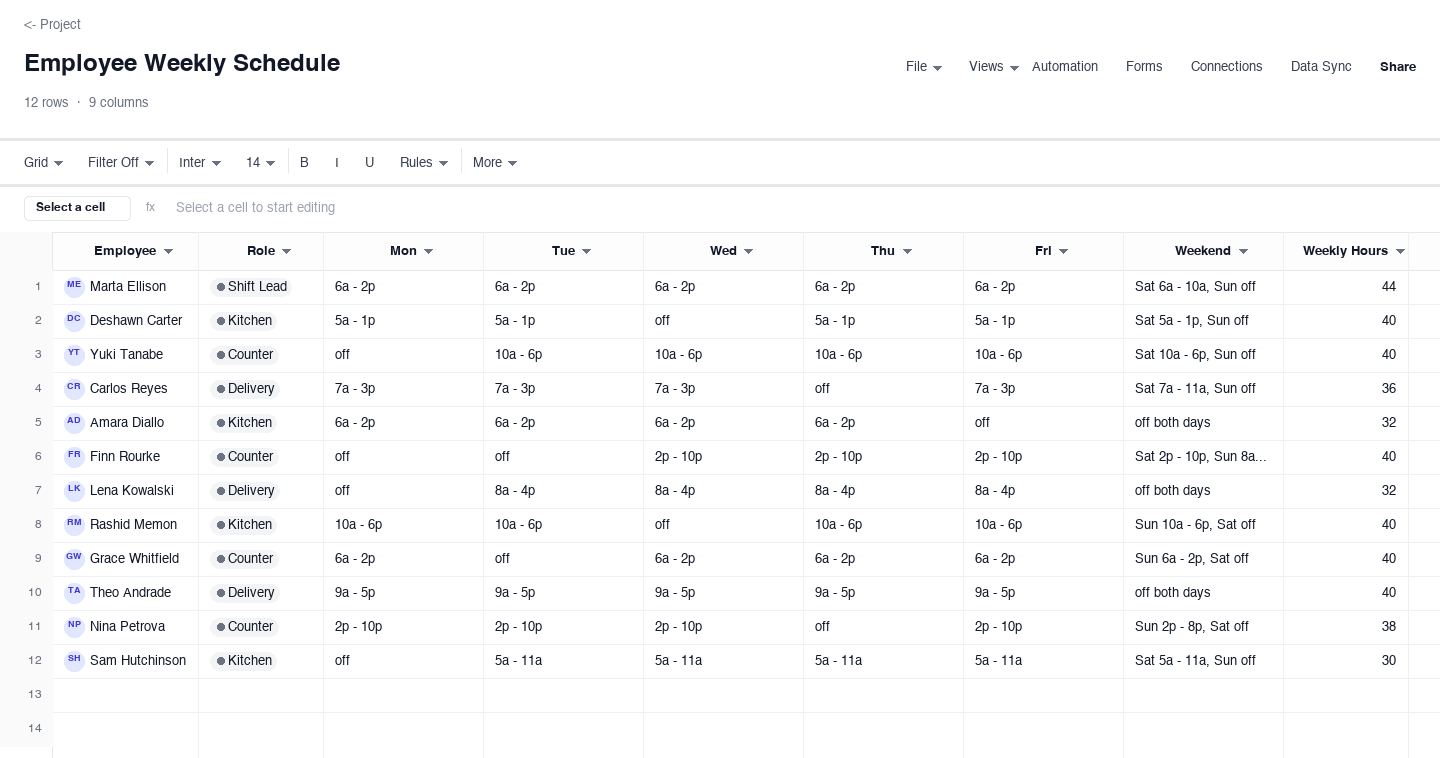
Employee Weekly Schedule
The employee weekly schedule is the staffing grid most managers picture first: one row per person, shift times across the weekdays with a weekend column, the role beside the name, and total weekly hours at the end. Use it when you need coverage clarity across counter, kitchen, and delivery at once. The weekly hours column is the quiet guardrail: it shows who is drifting toward overtime before the week starts, not after payroll runs, and it exposes lopsided schedules where the same two people absorb every opening or every closing shift.
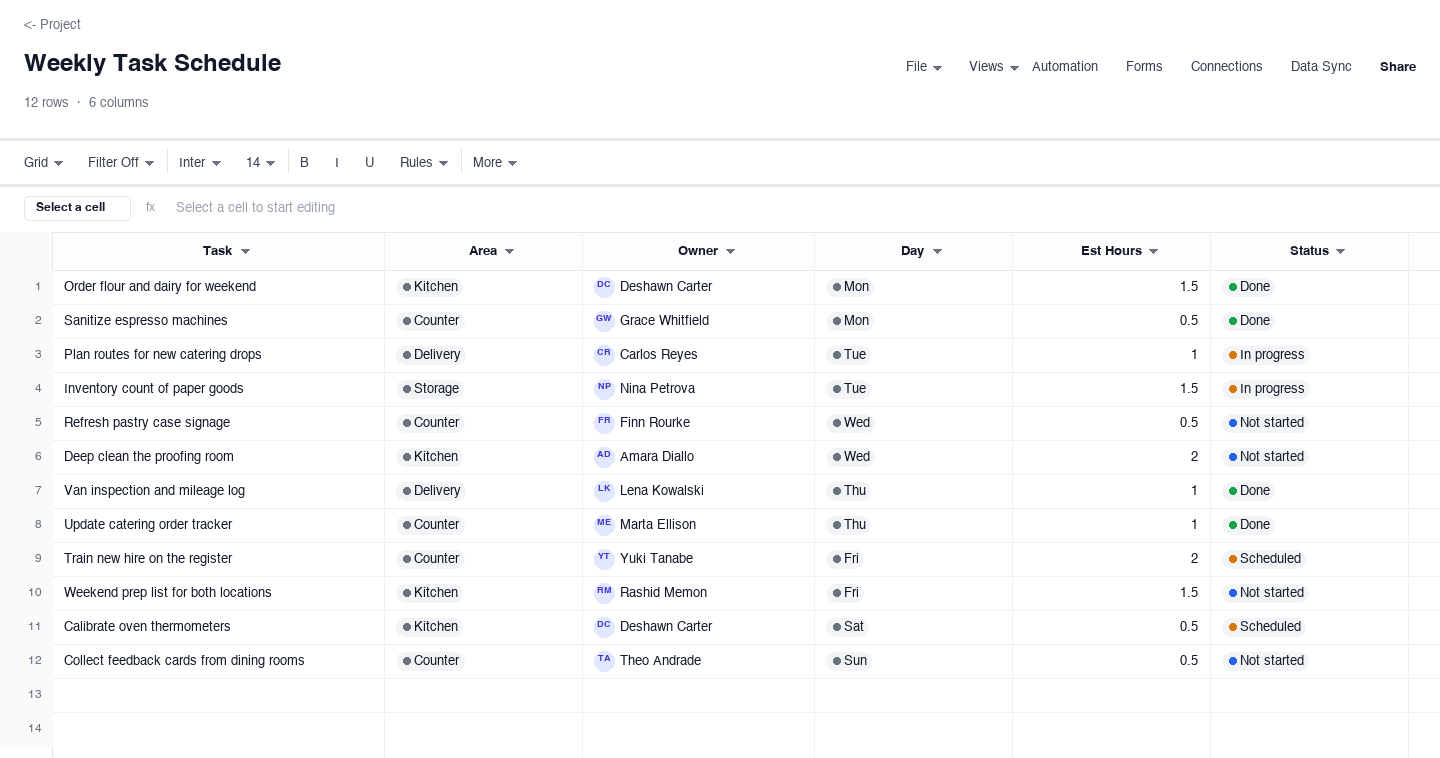
Weekly Task Schedule
The weekly task schedule plans work by activity rather than by person: each row is a task with an owner, the day it lands, estimated hours, and a status that moves from not started to done as the week progresses. Use it for recurring weekly work like ordering, deep prep, route planning, and equipment checks, where the same jobs return every week and the real question is who picks them up, not what they are. The status column keeps a midweek check-in honest and makes Friday reviews a two-minute read.
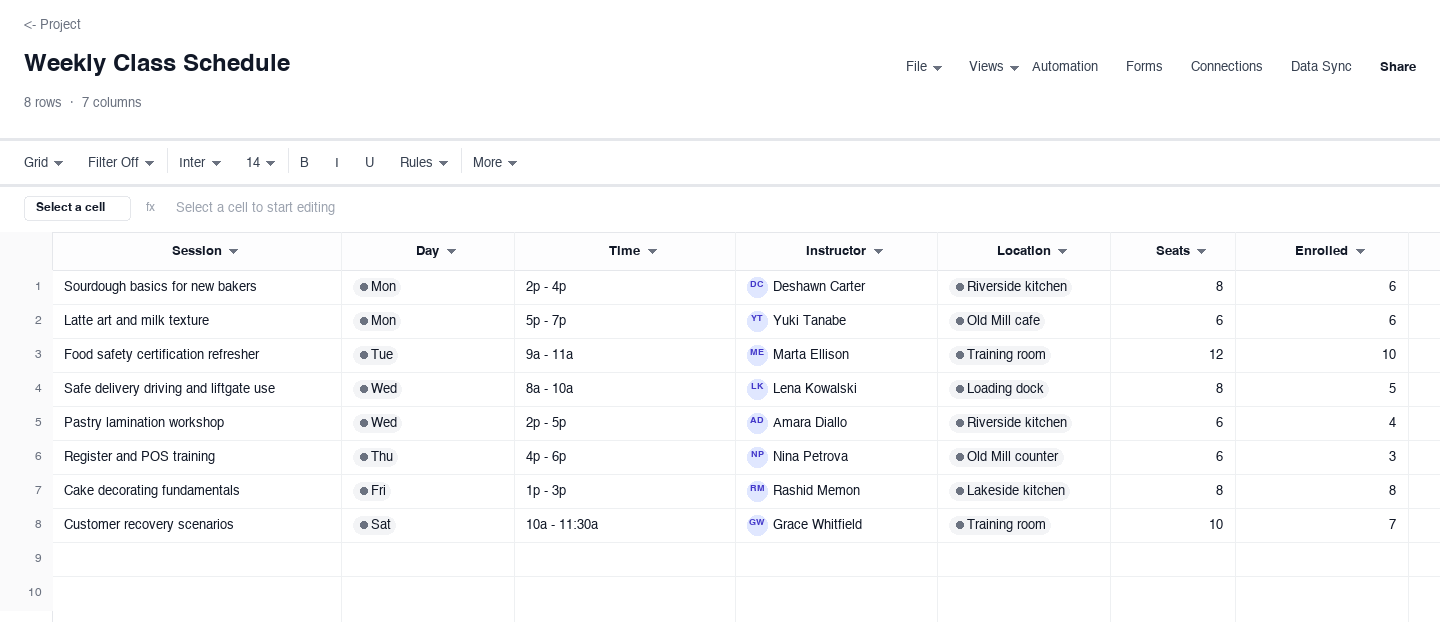
Weekly Class Schedule
The weekly class schedule organizes training sessions by day and time: each row names the session, the day it runs, the time block, the instructor, the location, and how many seats are filled. Use it when you run staff training, certification refreshers, or skill workshops across a week and need enrollments and rooms to line up. Pair it with the employee schedule so nobody is booked to teach a class and close the counter at the same hour, which is the most common scheduling collision in a multi-site operation.
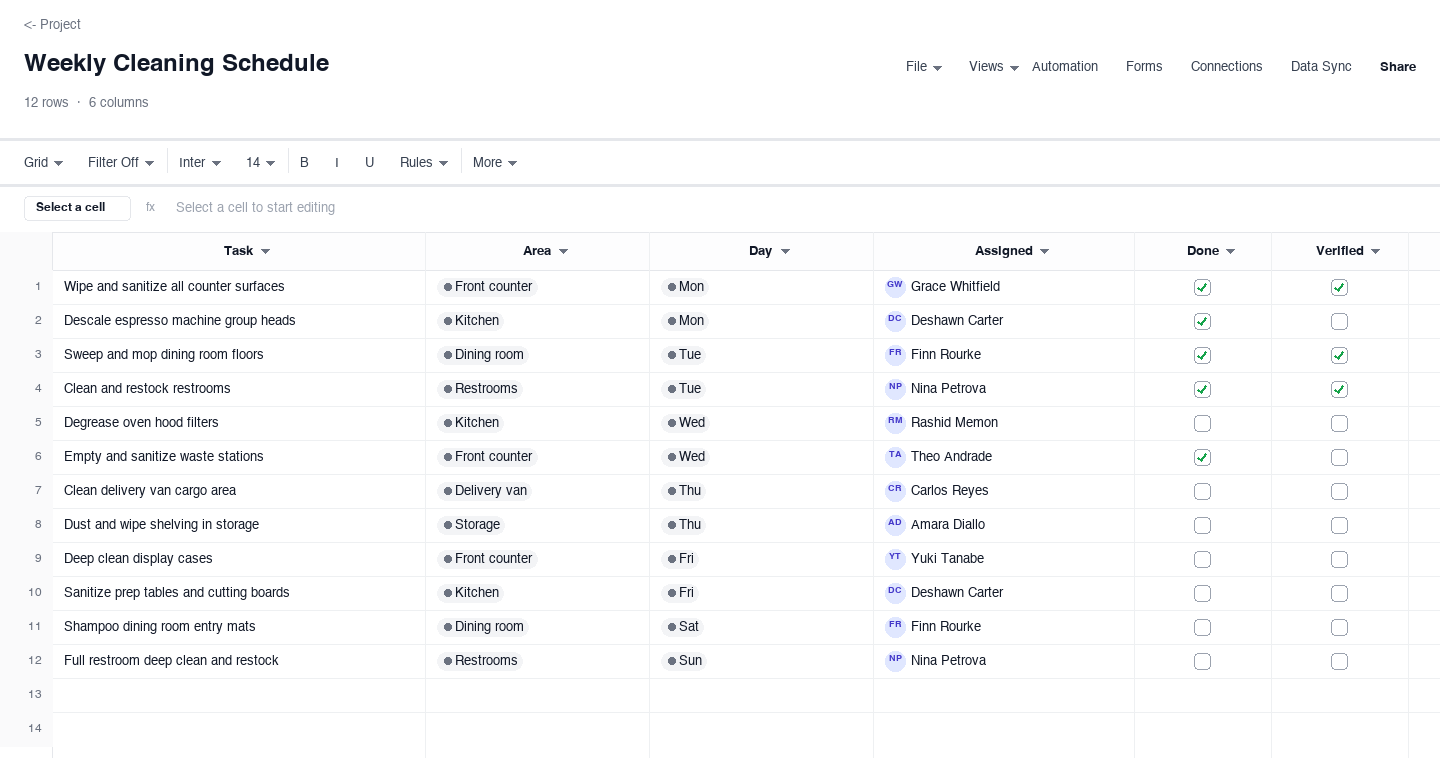
Weekly Cleaning Schedule
The weekly cleaning schedule is the facilities counterpart: tasks by area, the day each is due, the person assigned, and a checkbox for done. Use it for front counters, kitchens, dining rooms, restrooms, and delivery vehicles, where skipped tasks are a food-safety risk rather than a cosmetic one. The done and verified columns turn the sheet into the record a health inspector or a franchisor audit can read in one pass, and they keep cleaning from depending on whoever remembers.
How to build a weekly schedule your team actually follows
Start from the demand the week must serve
Before a single name goes on the grid, write down what the week actually demands: expected customer counts, catering orders, delivery routes, and approved absences. A schedule built from habit protects the mistakes of last week, while one built from demand shows where the hours truly need to be. For a bakery-cafe, weekend mornings get the strongest counter crew, prep days get kitchen hours, and delivery coverage follows route volume. Thirty minutes of demand mapping saves hours of midweek patch-ups.
Write shifts as start and end times, never just totals
A cell that says eight hours is a promise nobody can check; a cell that says 6a - 2p is a plan. Start and end times let staff arrange childcare, transit, and second jobs around the schedule, and they expose the dangerous gaps, like the ninety minutes between the opener leaving and the midday crew arriving. Use one format down the whole column, and treat off as a real value, not a blank, so nobody has to guess whether a blank cell means off or means nobody planned it yet.
Total the hours before the week starts
Add a weekly-hours column and let it sum the shifts, then read it before the week begins, not after payroll closes. It is the cheapest overtime control that exists: a lead at forty-four scheduled hours is a lead at fifty-four real hours once the Saturday rush runs long. Check the column for fairness too, because uneven hours across the same role are how quiet resentment starts, and resentment shows up weeks later as callouts nobody can explain.
Give every task one owner, not a whole department
Tasks assigned to departments are tasks assigned to no one. Every row in the task schedule above carries a single name, and that name is the person who answers for the task at the Friday check-in. Whole-team responsibilities still work: put the team lead in the owner column and let them delegate, but the sheet should show one accountable name. This is the difference between a schedule people read politely and a schedule people act on, and it costs nothing but a column.
Publish at the same time, in the same place, every week
A schedule that appears at random times trains people to make their own plans and tell you about it later. Pick a publish time, usually three to seven days before the week starts, and hold it even when the schedule is not perfect. Post it where everyone already looks, set a cutoff for swap requests, and say what happens to requests that arrive after the cutoff. Consistency matters more than the tool, because a schedule only works when people trust it is current.
Review last week before planning the next
Spend ten minutes on Friday comparing the planned week to the actual one: which shifts ran long, which tasks slipped, which gaps got patched by goodwill and luck. Carry one lesson into the next schedule, not five, because one lesson actually gets applied. Over a month these small corrections compound into a schedule that mostly survives contact with reality, which is the realistic goal. The review also feeds your demand map for the first step, so every week starts a little smarter than the last.
Looking for a weekly calendar or a Google Sheets version?
Searchers often arrive asking for a weekly calendar, and the employee version above is exactly that with structure added: seven days across the top, names down the side, and the whole week in one glance. If you want the calendar view without the staffing detail, the blank calendar template is the lighter starting point, and the task schedule doubles as a shared calendar for a family or a small team with recurring commitments.
The downloads are .xlsx files, which open directly in Google Sheets: upload the file to Drive, open it with Sheets, and the dropdowns, totals, and formats carry over intact. So if you searched for a weekly schedule template for Google Sheets, the Excel downloads above drop straight into your Drive without rebuilding anything, and you can share the live file with the whole team from there.
Frequently asked questions
What is the difference between a weekly schedule and a weekly calendar?
A weekly calendar shows the days of the week and what happens in each one: appointments, shifts, classes, or tasks. A weekly schedule adds the staffing layer on top: who does each thing, at what time, for how many hours, and whether it got done. If you only need to see the week at a glance, the calendar view is enough. The moment you are assigning people, tracking hours, or confirming completion, you need the schedule, and every template above carries both views on the same grid.
Can I use this weekly schedule template in Google Sheets?
Yes. Every download is a standard .xlsx file, and Google Sheets opens those natively: upload the file to Google Drive, choose open with Sheets, and the sheet converts with dropdowns, computed hours, and date formats intact. Nothing needs rebuilding. Once the file lives in Drive you can share it with your team, set view or edit permissions per person, and keep one live copy instead of emailing version twelve back and forth on Sunday night.
How do I schedule employees across multiple locations?
Give each location its own tab inside one workbook, then add a summary tab that rolls up total hours and headcount per site, so one planner can see the whole region at once. Keep role names and shift formats identical across tabs, otherwise the totals stop meaning anything. The employee schedule above works well as the per-location grid, and a shared view lets staff check their own site without paging through everyone else. Plan the region on the summary tab first, then publish each tab locally.
How far in advance should a weekly schedule be published?
Two to three days before the week starts is the common bar for hourly teams, and a week or more where childcare, classes, or second jobs are in play. The publish deadline matters less than its consistency: pick a day and time, tell everyone, and hold it even when the schedule is imperfect. Publishing early also buys you room to handle time-off requests and swaps with data instead of panic, because a request made against a published grid is easy to evaluate fairly.
How do I track overtime in a weekly schedule?
Add a weekly-hours column that sums each person shifts and read it before the week begins. Overtime problems are created during scheduling, not during the work: a lead at forty-four scheduled hours is already overtime once a busy Saturday runs long. If hours keep climbing week over week, the fix is usually in the demand map or the staffing mix, not in asking people to work faster. The hours column turns that conversation from accusation into arithmetic, which is a much easier meeting.
What is the best way to handle shift swaps?
Set a cutoff time, require swaps to be logged on the schedule itself, and make the swapped shift the responsibility of whoever works it, not whoever agreed to it first. A swap scribbled in a notebook is how a Saturday ends up with two openers and no closer. Logging swaps in the sheet gives you the audit trail, and the cutoff gives leads a real deadline for approving coverage. One fairness note: track who takes the inconvenient shifts, so the same two people do not absorb all of them.
Run it live instead of in a file.
The downloads above are yours either way. In Wisegrid the same template becomes a working sheet with owner contacts, status dropdowns, reminders, and dashboards. 7-day free trial, no credit card required.