Daily Schedule Template: Free Downloads and a Planning Guide for 2026
A daily schedule template turns a crowded day into a sequence you can actually follow. Instead of a mental list that evaporates by nine in the morning, you write the day down in order: time slots, activities, owners, and what matters most. The same structure serves a physical therapist moving between patients and a parent moving between school runs, which is the point. One page, one day, every commitment visible at a glance.
The templates below are pre-filled from two fictional universes so you can see finished examples before touching a cell: a physical therapy clinic with a gym floor, treatment rooms, and a front desk, and a busy parent juggling kids, work, and a routine worth protecting. Swap in your own times and tasks and the layout holds, because the day is a grid in any life.
Four daily schedule templates, free to download
Each version below is a working spreadsheet, not a blank grid with a title row. The fields are pre-filled with realistic example content from a fictional physical therapy clinic and a fictional busy parent, so you can see how a finished day reads, then overwrite it with your own details. What you download is an everyday spreadsheet file, compatible with all the usual tools. No email address required.
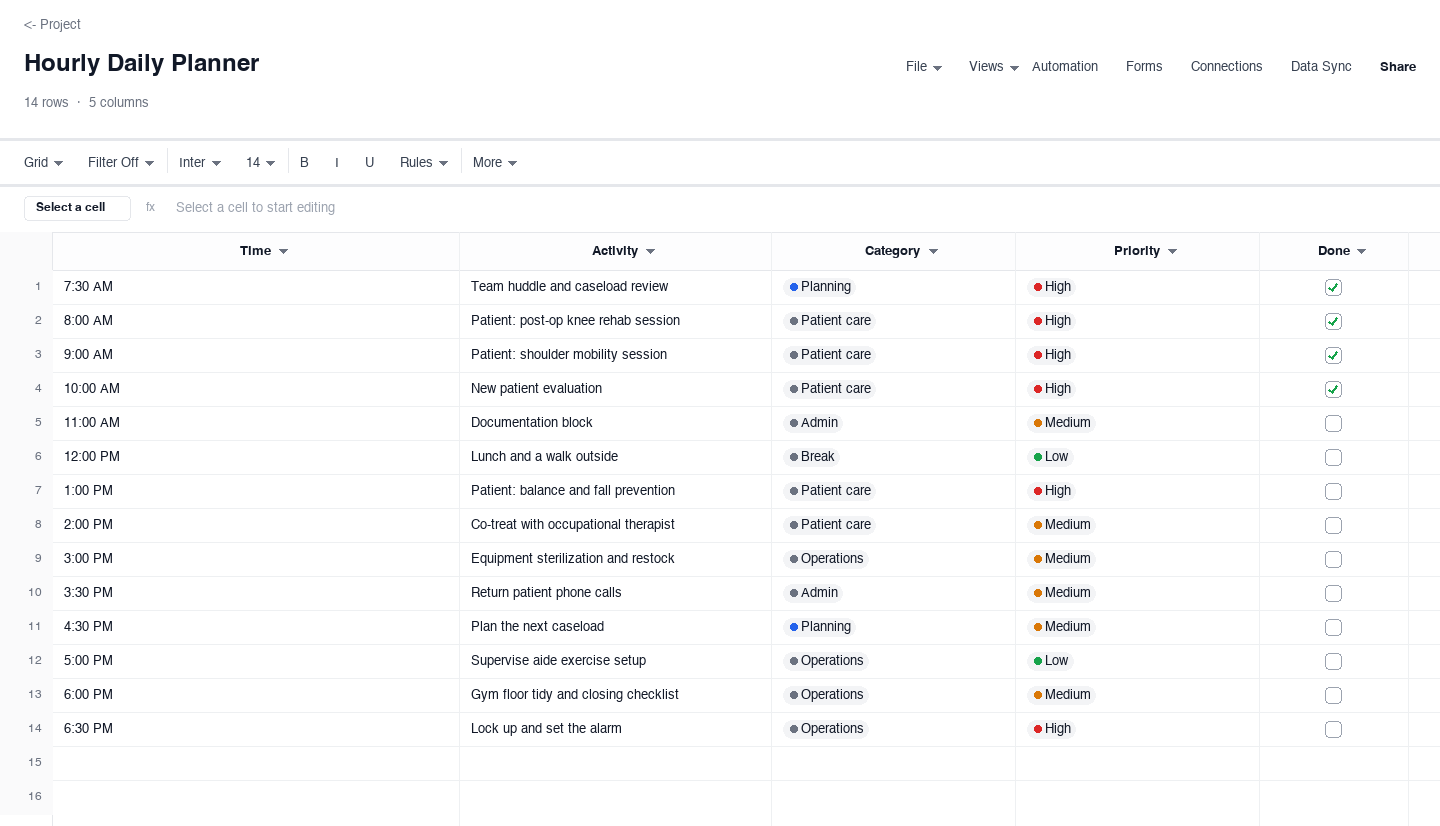
Hourly Daily Planner
The hourly daily planner breaks the day into time slots from the first commitment to the last, each with an activity, a category, a priority, and a done checkbox. Use it on days where the order of events matters and interruptions are guaranteed, like a clinic day packed with patient sessions, documentation blocks, and equipment resets. The priority column is the feature that earns its keep: when the day slips, and it will, you can see at a glance which items move to tomorrow and which ones cannot move at all.
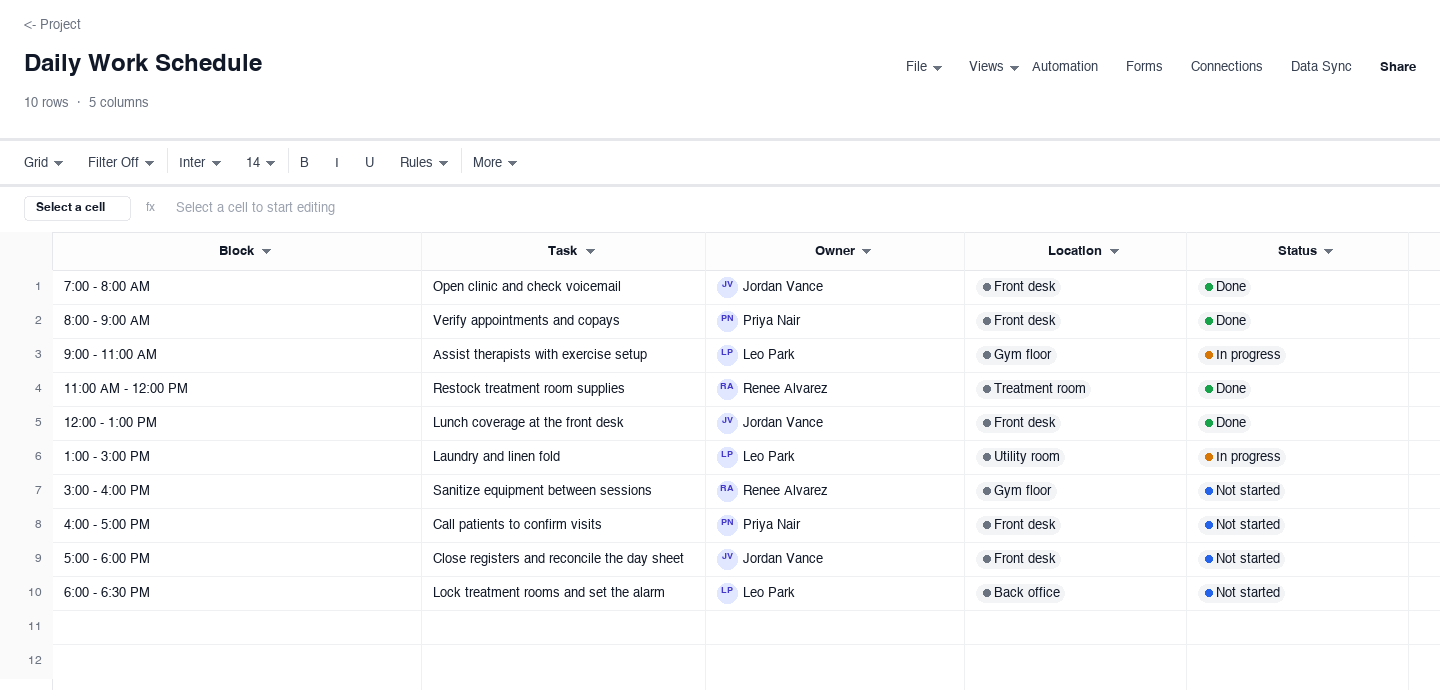
Daily Work Schedule
The daily work schedule organizes a team day into time blocks, each carrying a task, an owner, a location, and a status. Use it for front desks, clinics, and small crews where several people share one space and handoffs matter, so the person closing knows what the opener left behind. Status columns turn the sheet into a living record: anyone walking in mid-morning can see what is done, what is in progress, and what is blocked, without interrupting a single person to ask.
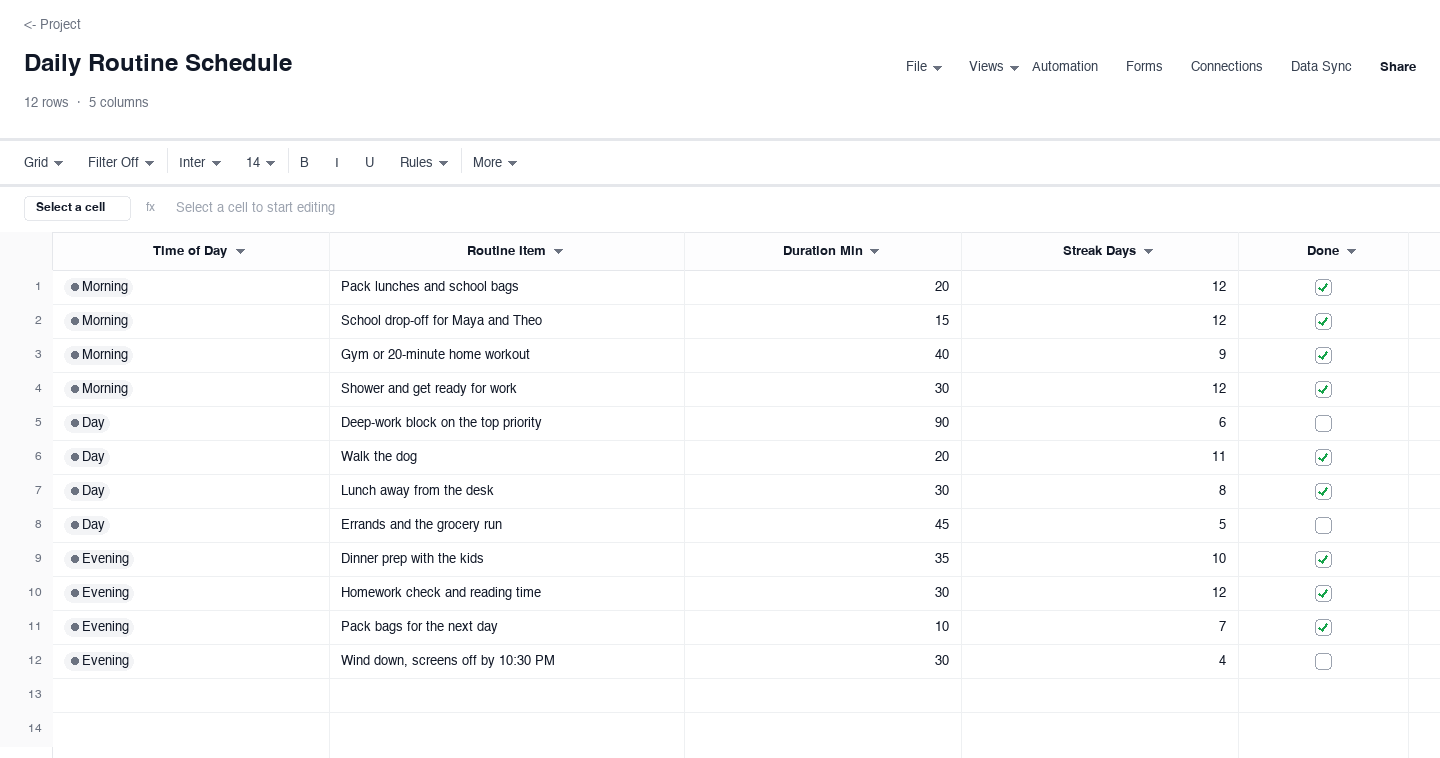
Daily Routine Schedule
The daily routine schedule is built for consistency rather than output: rows grouped into morning, day, and evening, each with a routine item, a duration, a streak count, and a checkbox. Use it for habits you want to make automatic, like school drop-off, a workout, meal prep, or ten minutes of reading with the kids. The streak column borrows the psychology of a paper habit tracker: watching the count grow is the small nudge that keeps a routine alive on tired days, which is when routines usually die.
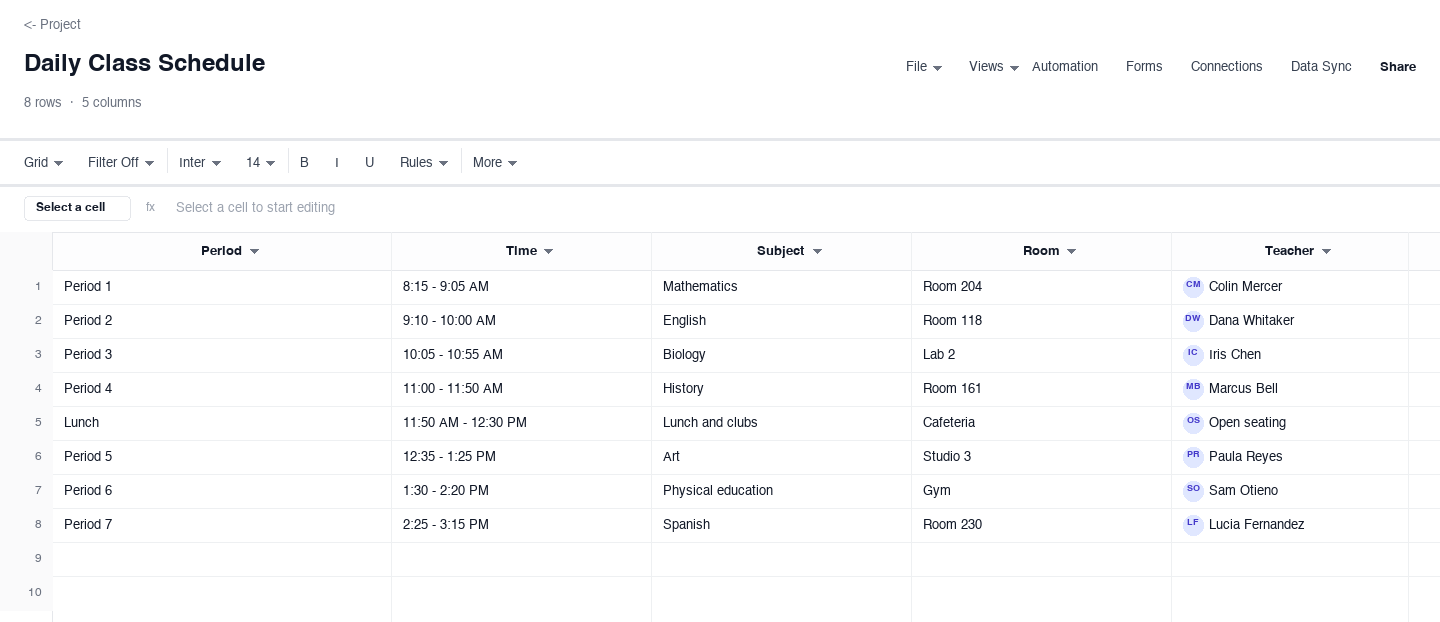
Daily Class Schedule
The daily class schedule maps a school day period by period: each row has the period, the time, the subject, the room, and the teacher. Use it when you need one predictable page for a student day, whether that is a kid heading to middle school or a trainee rotating through stations in a clinic. For parents it doubles as the reference for pickups, early dismissals, and the recurring question of what happens third period, and it prints cleanly for the inside of a locker door.
How to build a daily schedule you will actually follow
Write the schedule the night before
Morning-you is not a planner; morning-you is a reactor. Spending five minutes the evening before, when the day is still an object you can move around, produces a schedule that survives contact with reality. List the fixed points first, drop in the two or three tasks that actually matter, and leave the rest open. The clinic example above was written that way, and the parent one too, because a schedule built in the calm of evening beats a plan improvised in the rush of morning every single time.
Block the fixed points first
Start with what cannot move: the school run, the first patient, the shift start, the pickup time. Fixed points are the skeleton of the day, and everything flexible hangs off them. Writing flexible tasks first and then discovering they collide with the school pickup is how an optimistic schedule becomes a scrambled one by ten in the morning. When the fixed points are on the page, the remaining hours announce themselves, and most people find they have more usable time than the mental-list version of the day suggested.
Give every block one owner and one next action
A block that says work on the thing is a wish, not a plan. Write the next visible action: draft the intro, call the insurer, sterilize the traction table. The owner column matters on shared days too, like a clinic front desk or a two-parent morning, because an unowned block is a block that both people quietly assumed the other one had. One owner and one action per block turns the schedule into instructions instead of intentions, and instructions get finished.
Leave open space between the blocks
A schedule with no gaps is a fantasy with timestamps. Things run long: a patient needs ten extra minutes, a child cannot find a shoe, a call runs over. If the schedule has no slack, the first overrun detonates the rest of the day. Practitioners who plan well leave ten to fifteen unassigned minutes after any block that involves other people, and they bank one genuinely open hour in the middle of the day for whatever the morning generated. The blank space is not wasted; it is load-bearing.
Plan for interruptions, not around them
The day will be interrupted, so schedule the interruption handling instead of pretending it away. Triage incoming items into three buckets: do now because something genuinely depends on it, park in a catch-up block you actually scheduled, or decline. The catch-up block is the trick: by giving stray tasks a legitimate home later in the day, you stop them from evicting the patient session or the gym block that was on the page first. A daily schedule that expects interruption absorbs it; one that denies it collapses at the first phone call.
Close the day with a five-minute review
Before the schedule goes in the drawer, mark what got done, move what did not, and note one thing that took longer than planned. This is where tomorrow evening planning gets its head start: the moved items are already identified, so tomorrow starts from reality instead of from a guess. The review also keeps the streak and checkbox columns honest, and over a few weeks the notes column becomes a personal dataset on your real day, which makes every future schedule a little more accurate than the last.
Want this daily schedule in Google Sheets, or paired with a to-do list?
The downloads are standard .xlsx files, and Google Sheets opens them without conversion work: upload to Drive, open with Sheets, and the time slots, dropdowns, and checkboxes carry over. If you searched for a daily schedule template for Google Sheets, the Excel downloads above drop straight into your Drive, ready to share with a partner, a sitter, or the front desk, and edits stay in sync because everyone works the same live file.
On the to-do side, the pairing works like this: a daily schedule answers when, and a to-do list answers what. Keep the open tasks on one sheet, then pull the two or three that matter tomorrow onto the schedule itself, because a to-do list with no times is a wish, and a schedule with no tasks is a diary. The to-do list template is the natural companion when you want the what side handled with the same discipline.
Frequently asked questions
Can I use this daily schedule template in Google Sheets?
Yes. The downloads are standard .xlsx files, and Google Sheets opens them natively: upload the file to Drive, choose open with Sheets, and the schedule converts with time slots, dropdowns, and checkboxes intact. From there you can share it with a partner, a sitter, or your whole team, set edit or view permissions per person, and keep one live copy instead of re-sending the file every evening when the plan changes.
How is a daily schedule different from a to-do list?
A to-do list says what needs to happen; a daily schedule says when it will happen and, on team versions, who owns it. The list is the capture tool, and it grows without limit. The schedule is the commitment tool, and it holds only what fits in a day, which is exactly why it works. The strongest setup uses both together: keep everything on the to-do list, then pull the two or three items that matter onto the schedule each evening, where they claim a real time block.
What is the best way to plan a workday hour by hour?
Start with the fixed points: shift start, meetings that cannot move, lunch you will actually take. Then assign the two or three tasks that matter most to the hours where your energy is best, usually the morning for most people, and leave ten to fifteen minutes of slack after anything involving other people. End the plan with a short catch-up block for whatever the day generates. That shape, fixed points first, important work early, slack in the middle, beats both the fully booked fantasy and the unplanned drift.
How do I keep a daily routine on track with kids at home?
Anchor the routine to events the household already enforces, like the school run and mealtimes, rather than to clock times that slip the first morning a child refuses shoes. Group the routine into morning, day, and evening blocks like the parent version above, and keep the list short: four or five anchors beat twelve aspirations. The streak column helps here more than willpower does, because a twelve-day streak is something you defend, and defending it is easier than starting it.
How many items should a daily schedule hold?
Fewer than feels productive. A day of time blocks in the hourly-planner shape typically holds ten to fourteen entries, and at least three of those should be meals, breaks, and travel, not work. Past fifteen real commitments, overruns start colliding and the whole page goes fictional by mid-afternoon. If your list of candidates is longer, that is a to-do list problem, not a scheduling problem: keep the overflow on the list and let the evening pull decide what earns a block tomorrow.
Should I plan my day in 30-minute or 60-minute blocks?
Match the block size to the work. Clinical sessions, classes, and meetings map naturally to sixty-minute blocks, while admin, calls, and household tasks fit thirty-minute slots better, because they actually take twenty and the extra ten becomes slack. Many people mix both: hourly skeleton for fixed appointments, half-hour slots for the flexible middle of the day. The one rule that matters is that the block size should make overruns visible early, because an overrun you see at eleven is a planning adjustment, not a lost afternoon.
Run it live instead of in a file.
The downloads above are yours either way. In Wisegrid the same template becomes a working sheet with owner contacts, status dropdowns, reminders, and dashboards. 7-day free trial, no credit card required.