Time Blocking Template: Free Downloads and a Fill-In Guide for 2026
A time blocking template turns a to do list into a day plan. The list says what needs doing; the blocks say when. Each block is a named chunk of the day with a single job and a guard against the interruptions that eat the hours you meant to protect. The practice is simple: decide what each part of the day is for before the day starts.
The templates on this page come from two working lives: a software consultant defending deep work inside a crowded client week, and a graduate student balancing research, coursework, and teaching. Both need the same things from a time blocking template: honest blocks, visible priorities, and a record of what actually happened so tomorrow's plan is smarter than today's. The four versions below cover a single day, a themed week, protected deep work sessions, and a block plan that carries its must do priorities on every row.
Four time blocking templates, free to download
Each version below is a working spreadsheet, not a blank grid with a title row. The fields are pre-filled with realistic example content from a fictional consultant and a fictional graduate student so you can see how a finished block plan reads, then overwrite it with your own blocks. What you download is an everyday spreadsheet file, compatible with all the usual tools. No email address required.
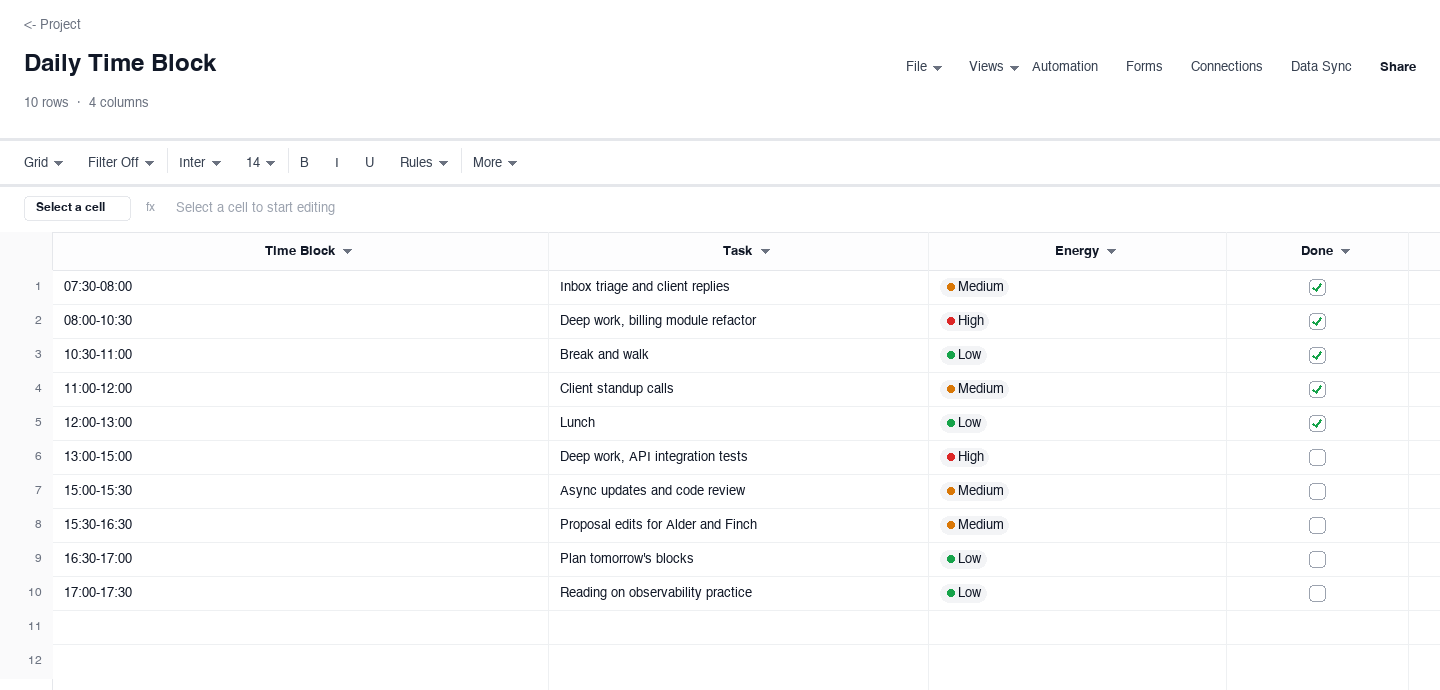
Daily Time Block
The daily time block plan is the entry point: a column of blocks from morning to evening, the task each block carries, an energy level, and a done flag. Use it on days when work splits between deep tasks and shallow admin, and you want the deep hours defended before email starts making claims on them. The done flag at block level, not task level, is what makes the end of day review honest: you see which hours did their job and which ones leaked.
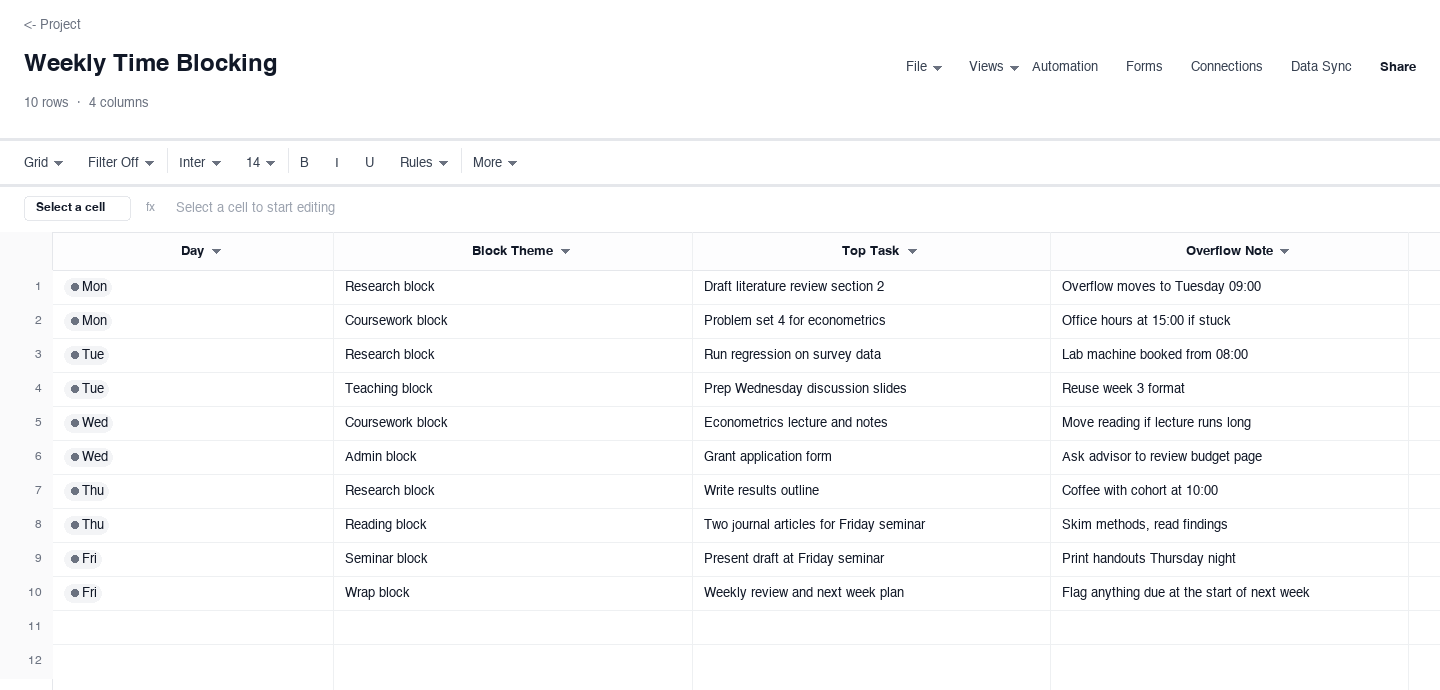
Weekly Time Blocking
The weekly time blocking plan themes each day and names the top task inside each theme: day, block theme, top task, and a note for what overflows. Use it when the week has a rhythm, research mornings and teaching afternoons for example, and you want that rhythm written down so it survives a chaotic start. The overflow note is the realism: blocks slip, and a written home for the spill keeps one late block from quietly eating the next one.
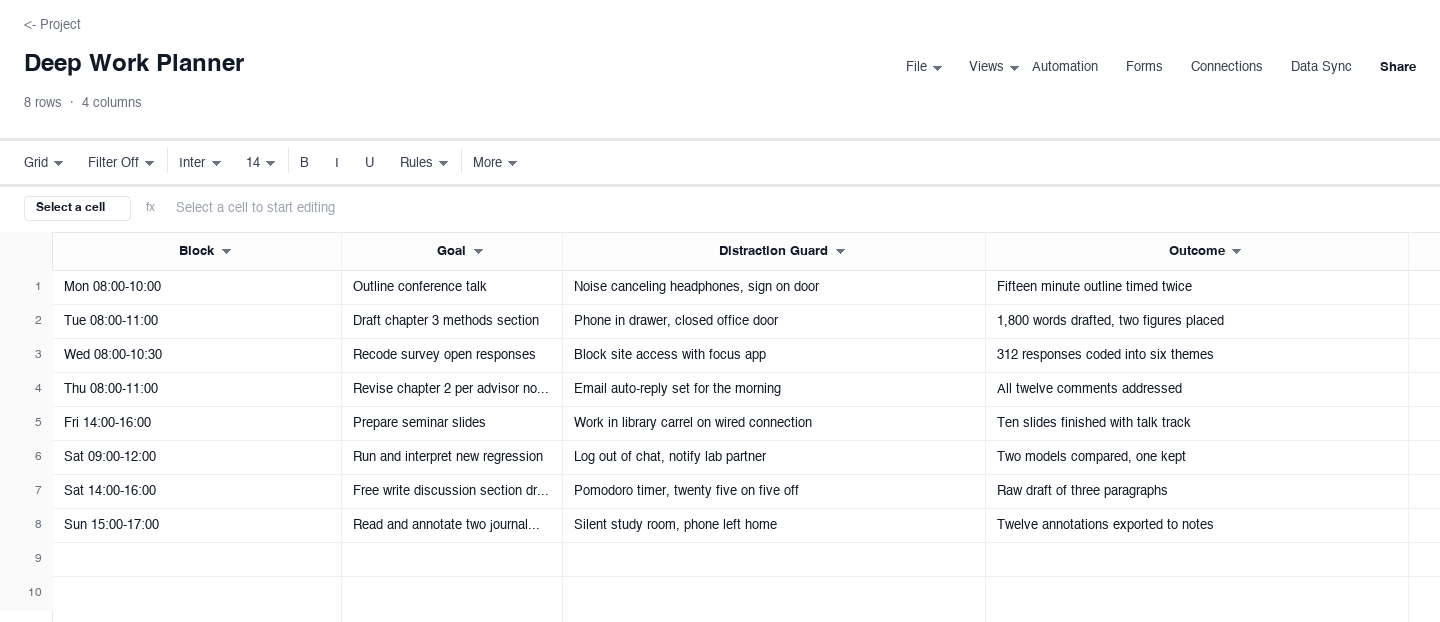
Deep Work Planner
The deep work planner is for the sessions that matter most: each block states a goal, a distraction guard, and the outcome the block produced. Use it for writing, research, analysis, or any work where starting is easy and finishing is not. Naming the distraction guard in advance matters more than it sounds, because a rule set at 07:55 beats the same rule negotiated at 10:40. The outcome column closes the loop and builds a record of what a protected hour actually yields, which is the argument you need the next time someone asks for one.
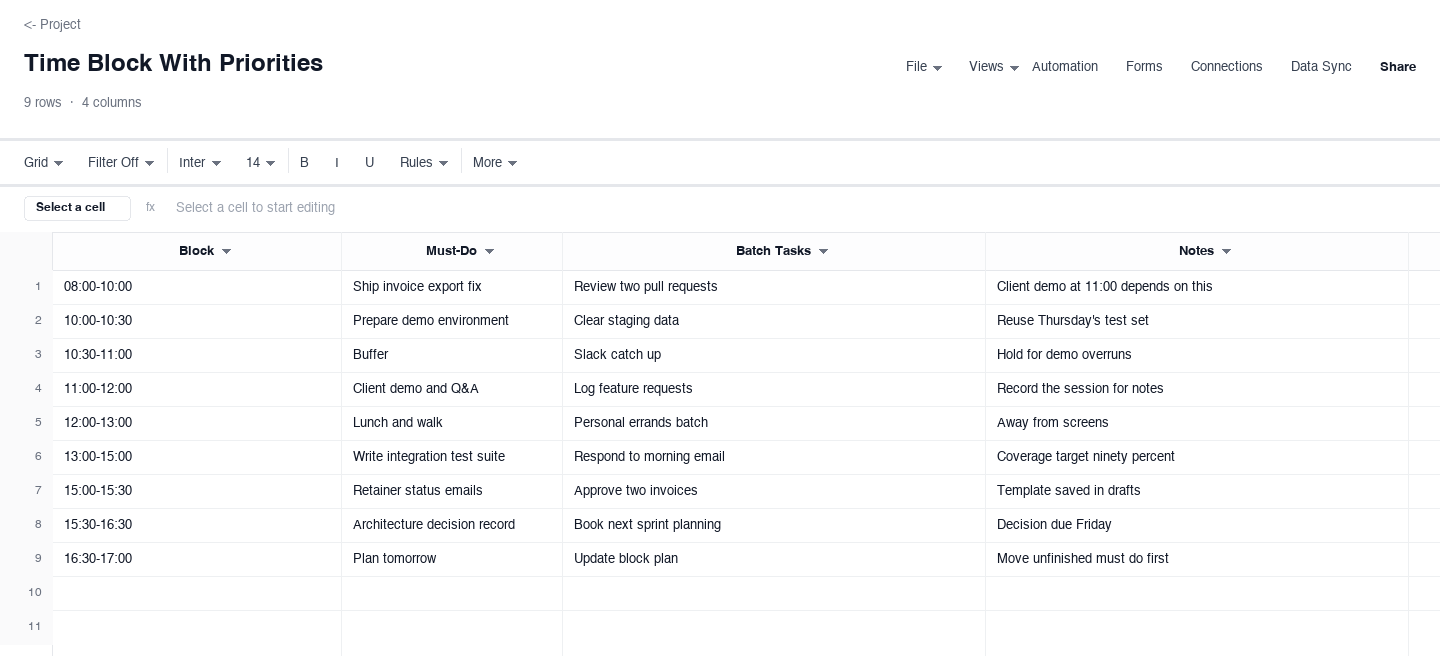
Time Block With Priorities
The time block with priorities plan puts the must do on every row: each block lists its one must do task, the batch of small tasks that can share the block, and a note. Use it on client or class days when the calendar is crowded and the risk is that shallow work crowds out the one thing that had to happen. Writing the must do beside the block keeps the day honest at a glance, and the batch column corrals small tasks so they stop fragmenting the deep hours.
How to start time blocking without overplanning
Block the commitments that already exist
A block plan starts from reality, not from the week you wish you had. Before naming any new blocks, put the fixed ones on the sheet: the client calls, the class schedule, the school pickup, the appointments that already sit in your calendar. These are the load-bearing walls, and they decide how much room is actually left for everything else. Beginners skip this step and wonder why the plan collapses by Wednesday, when the unwritten commitments start colliding with the written ones. An honest block plan drawn around real constraints beats an elegant one drawn around hopes, because only the first kind survives contact with the week.
Give each block one job, written as an outcome
A block without a named outcome is just a span of time, and spans of time get filled with whatever is loudest. The formula is a verb plus a deliverable: "draft the methods section," not "thesis work"; "write the integration tests for the export path," not "coding." The specificity does two jobs. It makes starting frictionless, because you know exactly where the block begins, and it makes the end of day review answerable, because you can say whether the outcome happened. If a block honestly needs two jobs, split it into two blocks. Two jobs in one block is how deep work becomes shallow work with good intentions.
Match blocks to energy, and protect the best hours
Everyone has two or three hours a day when thinking is easier, and the whole point of the energy column is finding them. The consultant sheet puts the billing refactor at 08:00 and the inbox at 07:30, and that ordering is the entire strategy: the work that needs a fresh mind gets the hours where the mind is fresh, and the work that just needs hands fills the rest. Protect those hours physically: silence notifications, close the chat window, and let the urgent things queue up in the shallow blocks you gave them. An hour of real focus moved from your best time to your worst time costs you more than the hour, because the same task then takes two.
Schedule the shallow work deliberately, in batches
Email, messages, approvals, and small admin have one important property: they expand to fill any container. Left unblocked, they drip through the whole day and fragment every deep hour into ten minute slivers. The fix is to give shallow work its own named blocks, a 07:30 triage block, a 15:30 catch-up block, and to hold it there. Batching works because the cost of shallow work is mostly the switching, not the tasks. Twenty emails in one forty minute block consume far less of your day than twenty emails answered the moment each arrives, and the blocks in between stay whole. Shallow work is not the enemy; unscheduled shallow work is.
Plan overflow before you need it
Blocks slip. Demos run long, a regression misbehaves, the seminar discussion runs past the hour. A plan that assumes zero slip is not a plan, it is a wish, and it detonates the first time reality disagrees. So decide in advance where overflow goes: the weekly sheet above carries an overflow note on every themed block, and the priorities sheet keeps a named buffer block after anything involving other people. When a block slips, the displaced work already has a home, and moving it takes ten seconds instead of a small crisis. Buffers are not slack in the bad sense; they are the difference between a plan that bends and a plan that shatters into a week of improvisation.
Review outcomes weekly and adjust the blocks
The outcome column earns its keep on Friday. Compare what each block was supposed to produce against what it produced, and the pattern is usually obvious within two weeks: the blocks you keep honoring are the ones with clear outcomes, and the ones you keep skipping are either too big, too vague, or scheduled against your own energy. Shrink the blocks that always overrun, merge the ones that never fill, and move recurring work to the hours where it actually happens instead of the hours where you wish it would. A block plan you adjust weekly converges on your real week within a month, and after that the Friday review takes ten minutes because the plan is finally describing your life instead of an imaginary one.
Is a time blocking template a time management template?
Yes, and a particularly concrete one. Most time management templates hand you a framework for thinking about time: categories, quadrants, principles. A time blocking template jumps straight to the assignment: this hour is for this outcome, full stop. That is why it tends to work for people who have read plenty of time management advice and still watched their weeks evaporate. The advice was never wrong, it just stopped one level short of the calendar, and the calendar is where time is actually spent.
The one thing time blocking does not do is choose what deserves the hours. For that you still need the upstream step: a to do list to capture everything, and some priority call to decide what makes it into a block at all. Think of the stack this way: the list is the menu, the priority call is the order, and the blocks are the cooking schedule. Skipping the first two does not break the third, but it does mean you end up with a beautifully organized day full of the wrong work.
Time management templates that pair well with time blocking
Three companions cover the gaps a block plan leaves open. A to do list template handles capture: everything that occurs to you lands there first, so it stops interrupting the current block. A priority framework, like the Eisenhower matrix, handles selection: it answers what deserves a block before you start scheduling one. And a daily or weekly schedule handles the wider view, the shape of the whole day or week, which is the layer above individual blocks where recurring commitments like classes, shifts, and family logistics actually live.
The mistake to avoid is adopting all of them at once, because four systems need four times the maintenance and most people maintain none. Start with the block plan alone for two weeks, and add a companion only when you hit the specific problem it solves: tasks interrupting blocks means you need the list, blocks full of wrong work means you need the priority step, and blocks that collide with recurring commitments means you need the wider schedule. Each tool earns its place by fixing a failure you have actually experienced, not one you imagine you might.
Frequently asked questions
What is a time blocking template?
A time blocking template is a sheet that divides your day into named blocks and assigns each block a single job, an energy level, and usually a status or done flag. It is the difference between knowing what you need to do and knowing when you will do it. A to do list holds the tasks; the block plan schedules them, which is the step most planning systems skip. Without it, the list gets worked in whatever order the day's interruptions suggest, and the important items keep sliding to a tomorrow that never has more hours than today.
How is time blocking different from a to do list?
A to do list is a collection of commitments with no time dimension: it tells you what is outstanding, not when any of it happens. A time blocking template adds the when. Every task that matters gets a block with a start and an end, which forces the two decisions a list never makes: how long the task really takes, and which hours of your finite day it will consume. That is why the two tools work best as a pair rather than rivals: capture everything on the list first, then pull the day's work from the list into blocks. The list is the menu, the block plan is the cooking schedule, and a kitchen that only has a menu is called a crowd at the door.
How long should a time block be?
Match the block to the work, not to the clock's prettier fractions. Shallow batch work, like email and admin, fits into thirty to forty five minute blocks. Real focus work, writing, analysis, deep coding, usually needs ninety minutes to two hours before it pays off, because the first fifteen minutes are mostly warming up. The daily sheet above uses two and a half hour deep blocks in the morning and shorter ones later for exactly that reason. Two rules of thumb: never make deep blocks shorter than ninety minutes, because you will spend the whole block entering the work, and never schedule back to back deep blocks without a break, because the second one will happen to your body but not to your brain.
What do I do when a block gets interrupted?
Handle it the same way every time, so interruptions stop being small negotiations. First, decide in ten seconds whether the interruption is genuinely block-worthy; most are not, and those get parked in the next shallow block instead of being allowed to colonize a deep one. Second, if the interruption does take the block, mark the displaced work and give it a named new home immediately, while you still remember what it was, because an unassigned displaced task becomes background anxiety. Third, at the weekly review, look at which blocks keep getting interrupted: a block that is pierced every single week is telling you either the guard is too weak or the block is scheduled at the wrong time, and the fix belongs to next week's plan, not to willpower in the moment.
Can time blocking work for a whole team?
Yes, though the unit changes. Individuals block hours; teams usually block days and half days, because coordinating six people's hours is its own full time job. The pattern that works: shared focus windows, like the consultant sheet's morning deep blocks, where everyone protects the same hours and meetings are banned by agreement, and shared shallow windows in the afternoon where collaboration is expected. The weekly theme version scales well here too: theming days like review days or planning days gives the whole team predictable rhythm without anyone maintaining a master calendar. Two rules keep team time blocking alive: the protected windows have to be honored visibly by leads, because a team blocks what its leaders block, and the plan needs a weekly review or it drifts back to permanent reactivity within a month.
Is the time blocking template really free?
Yes. Every version on this page downloads as a standard spreadsheet file with no email address, no account, and no trial period attached. The files open in Excel, Google Sheets, and the other common spreadsheet tools, and you can edit, duplicate, and share them freely. The sample rows are fictional, so replace them with your own blocks and the plan is ready to run the same day. We publish filled working templates because a real example with real rows teaches the practice faster than a blank grid, and the people who find them useful are often the same people who later want a live plan their whole household, lab, or team can edit together.
Run it live instead of in a file.
The downloads above are yours either way. In Wisegrid the same template becomes a working sheet with owner contacts, status dropdowns, reminders, and dashboards. 7-day free trial, no credit card required.