To Do List Template: Free Downloads and a Fill-In Guide for 2026
A to do list template is the simplest planning tool that actually works, because it does one job: it gets every commitment out of your head and into a list with enough structure to act on. The structure is what separates a list from a pile. A bare list of tasks becomes a list with a priority, an estimate, a deadline, and a done flag, and each of those fields answers a question the bare list cannot: what first, how long, by when, and what is left.
The templates on this page come from two lives: a marketing coordinator balancing campaigns, content, and reporting, and a homeowner steering a renovation with family and trades. One needs speed and triage across a fast week; the other needs shared ownership and due dates that survive a long project. The versions below cover both, from a single-day list to a project list with owners, so you can pick the shape that matches how your work actually arrives.
Four to do list templates, free to download
Each version below is a working spreadsheet, not a blank grid with a title row. The fields are pre-filled with realistic example content from a fictional marketing coordinator and a fictional home renovation so you can see how a finished list reads, then overwrite it with your own tasks. What you download is an everyday spreadsheet file, compatible with all the usual tools. No email address required.
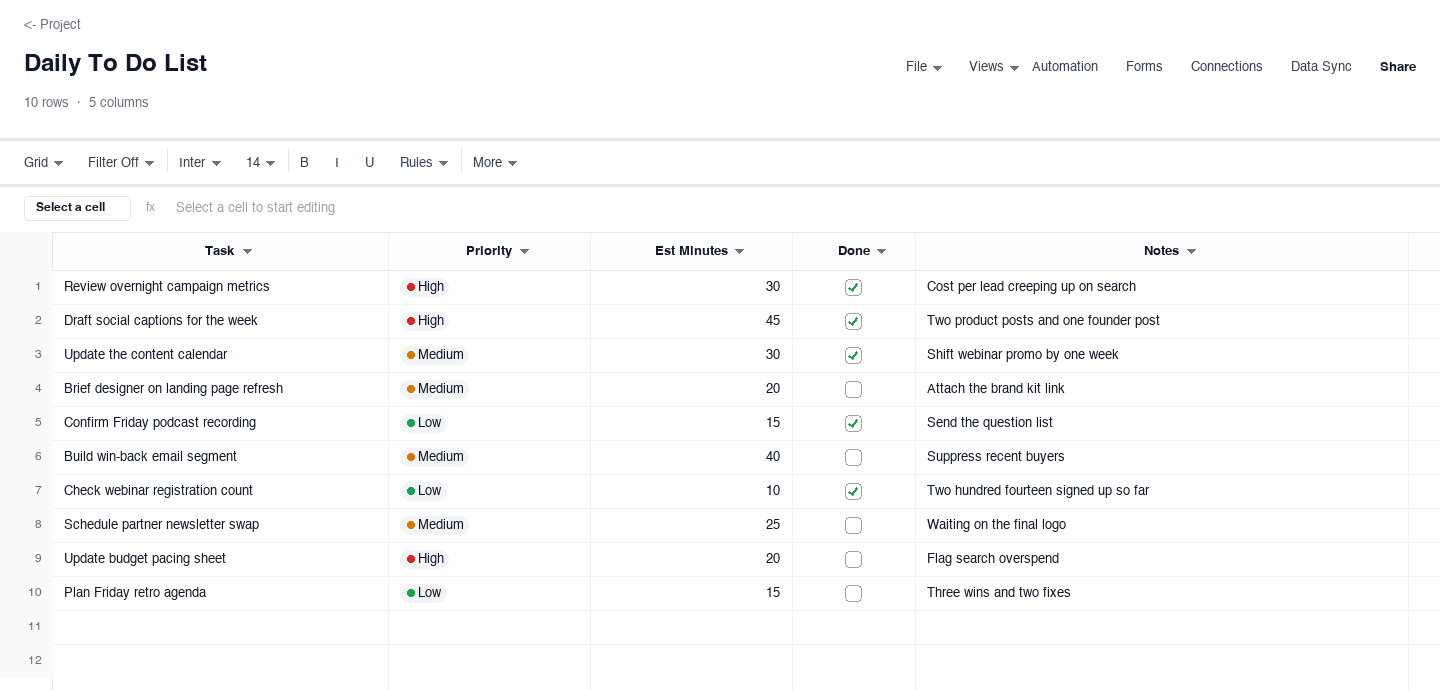
Daily To Do List
The daily to do list is for one day at a time: each task carries a priority, an estimate in minutes, a done flag, and a short note. Use it when your work arrives as a stream of small things and the risk is leaving the day to memory and momentum. The estimate column is the discipline that pays off: once every task has a number of minutes, you can see at a glance whether the list fits the day, and cut it before 16:00 instead of discovering the problem at 18:00.
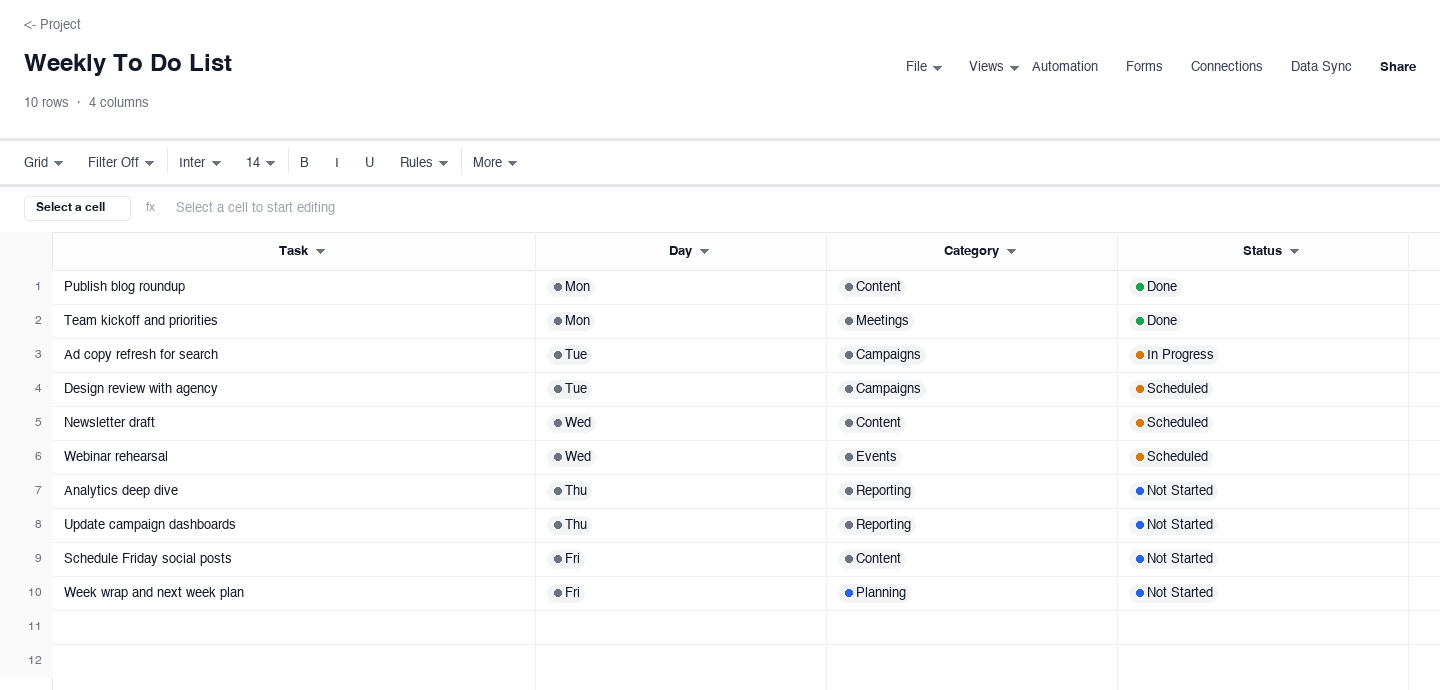
Weekly To Do List
The weekly to do list stretches the same idea across five days: task, day, category, and status. Use it when the unit of planning is the week, the way most marketing and operations calendars actually run, and a flat daily list keeps resetting. Grouping by category keeps content tasks away from reporting tasks, and the day column forces a decision a flat list never makes, which is when each thing will actually happen.
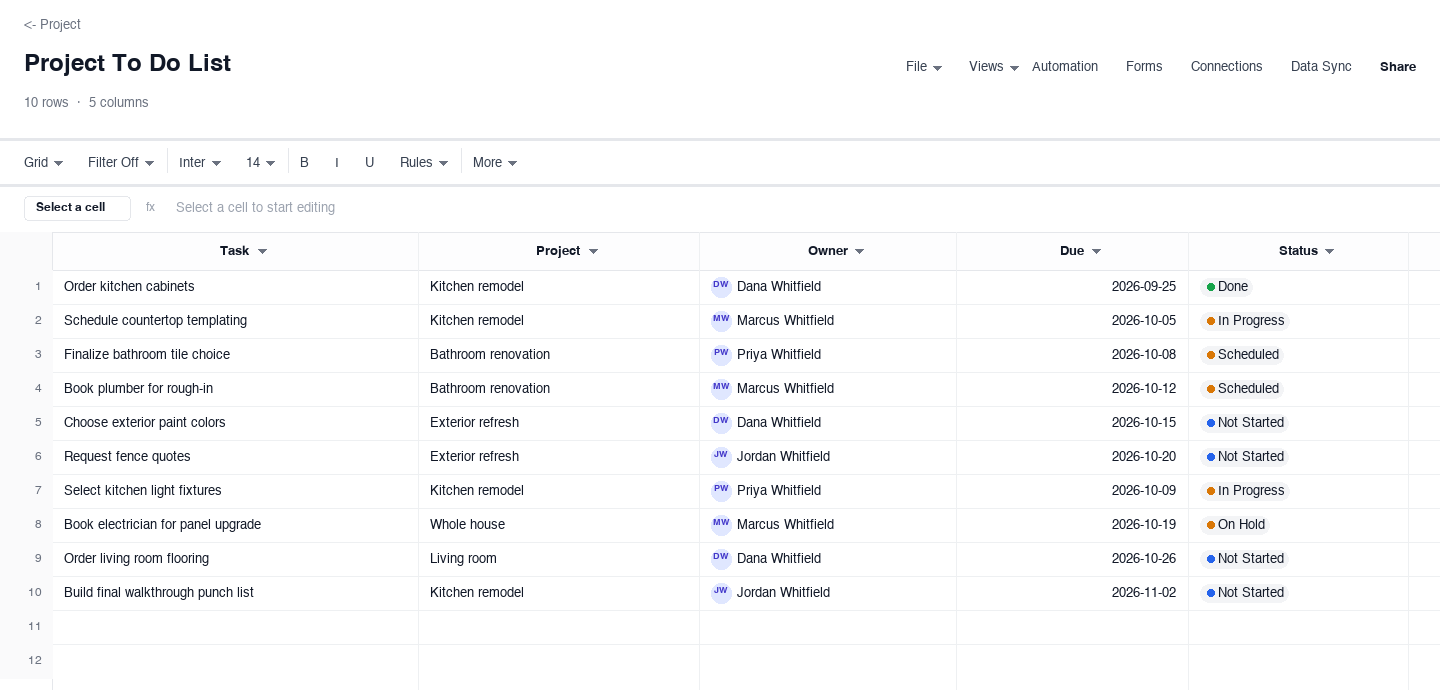
Project To Do List
The project to do list adds ownership: every task has a project, an owner, a due date, and a status. Use it the moment a second person is involved, because an owner and a due date are what turn a wish into a task. It suits renovations, where partners, family, and trades all touch the same project, and work projects the same way. Filtering by owner keeps a shared list fair: everyone can see their own rows and nobody can quietly assume somebody else has it.
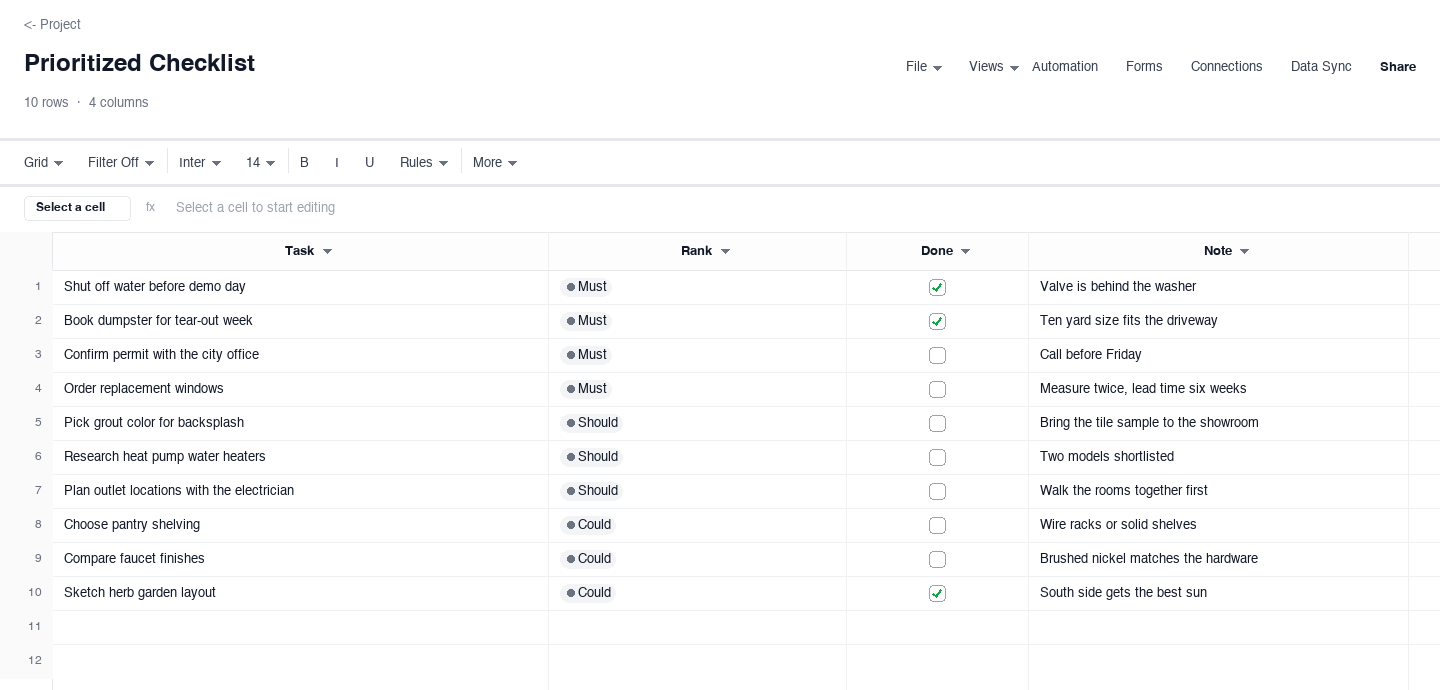
Prioritized Checklist
The prioritized checklist replaces priority labels with a harder question: must, should, or could. Use it when everything feels important and a flat list stops helping you choose. Must rows are commitments with real consequences, should rows move things forward, and could rows only happen if time appears. Ranking the whole list this way makes the cuts obvious before the week starts, and the note column keeps the reasoning visible when a could task gets skipped again.
How to run a to do list you actually finish
Capture everything before you sort anything
The first pass is a brain dump, not a plan. Write down every open loop you are carrying: the email you owe, the part you need to order, the form you need to sign, the thing you have been avoiding. The reason is psychological as much as practical. A task sitting only in your head keeps generating background noise, and you will re-remember it at 2:00 in the morning. Once it is on the list, your brain trusts that it is held somewhere safe and stops surfacing it. Sorting, ranking, and scheduling come after capture, never during it, because editing while you dump is how tasks never get written down at all.
Give every task a verb and a finish line
The single biggest difference between a task that happens and one that circulates forever is how it is written. "Kitchen" is not a task. "Choose the grout color for the backsplash" is, because you know exactly when it is done. The test is simple: read the line and ask whether a stranger could tell you when to check it off. If the honest answer is "when the kitchen is sorted," rewrite it smaller until the finish line is visible from where you stand. Big vague tasks resist starting because they resist finishing, and splitting them into named, finishable lines is most of what a useful to do list does.
Estimate minutes, and let the total veto the plan
Estimates convert a to do list from a promise into a plan you can test. Put a minute estimate on every task, then add them up. If the total exceeds the hours you actually have, the arithmetic, not your mood, decides what gets cut. Most people skip this because estimating feels like overhead, and then their list quietly contains three days of work for one day of time, which is the exact condition that makes lists feel pointless. The estimate column in the daily version exists for this veto. Low-value tasks with big estimates are the first cut, and cutting them on paper at 08:30 beats discovering the overload at 18:30.
Pick one priority scheme and keep it coarse
Three levels is the ceiling, High, Medium, Low, or must, should, could. Four or more levels feels rigorous and behaves like decoration, because you will spend your planning energy arguing whether something is a 3 or a 4 instead of doing it. The real work of prioritization is the forced comparison: when only one task can be High, you have to decide what actually matters today, and that decision is the planning. Whichever scheme you choose, use it the same way every day, because a priority system you re-litigate each morning is not a system, it is a mood. The checklist version on this page uses the coarsest scheme of all and that is its strength.
Assign an owner and a date the moment a second person is involved
"We should fix the grout" is a wish. "Dana chooses the grout by Friday" is a task. The transformation costs two fields, an owner and a due date, and those two fields are the entire difference between a shared list that moves and one that grows. The rule of thumb: if a task involves anyone besides you, it needs a named owner the moment it lands on the list, because "someone" is not a person and tasks owned by someone are owned by no one. Due dates deserve the same discipline. A task without a date is a task you have decided to do never, so either give it a real date or admit it is a someday item and move it off the working list entirely.
Review daily, close loops, and prune weekly
A list you never prune stops being trusted, and an untrusted list stops being used. The daily review is short: check off what finished, reschedule what slipped to a named new day, and carry unfinished High items forward deliberately rather than letting them drift. The weekly review is the deeper cut: delete tasks that have been "not started" for three weeks, because they are either not real or not yours, and downgrade tasks that keep surviving every weekly review without ever being chosen. A healthy list is mostly current commitments with a small someday section, and pruning is what keeps it that shape. Ten honest minutes on Friday saves an hour of dreading on the following one.
Looking for daily to do list templates?
The plural search is telling: most people do not want one perfect daily sheet, they want a fresh one every day without rebuilding it. The daily version above is built for exactly that rhythm. Open the file, save a copy with today's date, fill it in, and tomorrow takes thirty seconds. Keep one blank master you never edit, and the daily copy becomes disposable, which is the correct relationship to have with a day that is already over.
If you prefer paper, the same sheet prints cleanly on one page: set the print area to the task, priority, estimate, and done columns and leave the notes column for handwriting. Either way, the discipline is identical and it is what makes daily lists work where mental lists fail: capture everything, estimate the minutes, let the total veto the plan, and carry the unfinished High items forward deliberately. A fresh sheet every morning is not starting over, it is the mechanism that keeps the list honest.
Frequently asked questions
What is the best to do list template for work?
The one whose time horizon matches how your work arrives. If your work lands as a daily stream of small tasks, the daily version with priorities and minute estimates is the right shape, because its whole job is triage. If you plan in weeks, the weekly version, because the day column forces a decision a flat list never makes. The moment tasks involve colleagues or clients, move to the project version: owner and due date fields are not optional extras in shared work, they are the difference between a task and a wish. Most work teams end up running two of these together, a weekly plan for shape and a project list for accountability.
How many tasks should be on a daily to do list?
Fewer than you think, and the honest number comes from estimates, not ambition. Put a minute estimate on each task and add them up against the hours you actually have: for most knowledge work that lands between five and eight real tasks a day, because meetings, messages, and the inevitable surprise eat the rest. A list of twenty tasks is not a plan, it is a source of guilt, because eighteen of them were never going to happen and you knew it when you wrote them. If your estimates consistently overflow the day, the fix is not a longer day, it is a shorter list with stricter cuts, or a weekly list that spreads the overflow across the whole week.
How do I prioritize a to do list?
Use three levels, never more, and make the levels mean something concrete. High means a real consequence if it does not happen today: a deadline, a dependency, a commitment to a person. Medium means it moves things forward but survives a day. Low means you would happily never do it. The must, should, could scheme in the checklist version is the same idea with blunter language, and blunt is good, because prioritization fails in the fuzzy middle where everything is somehow important. Once you have ranked, protect the ranking: if a new task arrives midday, it takes its place in line instead of jumping it, and the only allowed override is a genuine emergency, which is rarer than the word suggests.
Should a to do list be on paper or in a spreadsheet?
Wherever you will actually maintain it, because a list that is not updated hourly is fiction. Paper wins for focus and for people whose work keeps them away from a screen: it prints from any of these files on one page, and the physical checkbox is satisfying in a way a cursor is not. A spreadsheet wins the moment the list is shared, because a paper list photocopies badly and a shared file carries owners, due dates, and status without a weekly reprint. A spreadsheet also wins when you need the arithmetic: minute estimates and running counts of what is done are what turn a list into a plan you can test. Either medium works with these downloads, so try both and keep the one you update.
How do I keep a shared to do list fair?
Fairness in a shared list comes from visible ownership, not from goodwill. Three rules carry most of it. First, one owner per task, always: tasks assigned to two people are assigned to the more conscientious one, and everyone knows it. Second, due dates on everything, because "whenever" quietly means "whoever cares most will absorb it." Third, a standing review where the list is read together, ten minutes a week, so stalled tasks get reassigned openly instead of festering silently. The project version on this page has exactly the fields those rules need. Filter it by owner and every person sees their own commitments; look at it whole and the workload is visible before it becomes a resentment.
Is the to do list template really free?
Yes. Every version on this page downloads as a standard spreadsheet file with no email address, no account, and no trial period attached. The files open in Excel, Google Sheets, and the other common spreadsheet tools, and you can edit, duplicate, and share them freely. The sample rows are fictional, so replace them with your own tasks and the list is ready to run the same day. We publish working templates because a filled example teaches faster than a blank grid, and the people who get value from them are often the same people who later want a live list their whole household or team can edit together in real time.
Run it live instead of in a file.
The downloads above are yours either way. In Wisegrid the same template becomes a working sheet with owner contacts, status dropdowns, reminders, and dashboards. 7-day free trial, no credit card required.