Action Plan Template: Free Downloads and a Follow-Through Guide for 2026
An action plan template is the shortest path from a decision to a finished result. You write the goal, break it into actions small enough to finish, put a name and a date on each one, and track status until the last row closes. It is the format every committee, retrospective, and strategy session already wants to produce, and the reason it deserves its own template is that the alternative, actions scattered across chat threads and meeting notes, quietly guarantees that the important ones die by Friday.
The versions on this page come from two fictional workplaces: a customer support team fixing slow response times, and a city recreation department planning a season of programs and repairs. The same structures fit a product launch, a hiring push, or a personal goal with real stakes. What you download is an everyday spreadsheet file, and the discipline is in the columns: an action without an owner is a wish, and an action without a due date is a someday.
Four action plan templates, free to download
Each version below is a working spreadsheet, not a blank grid with a title row. The fields are pre-filled with realistic example content from a fictional customer support team and a fictional city recreation department so you can see how a finished action plan reads, then overwrite it with your own actions. What you download is an everyday spreadsheet file, compatible with all the usual tools. No email address required.
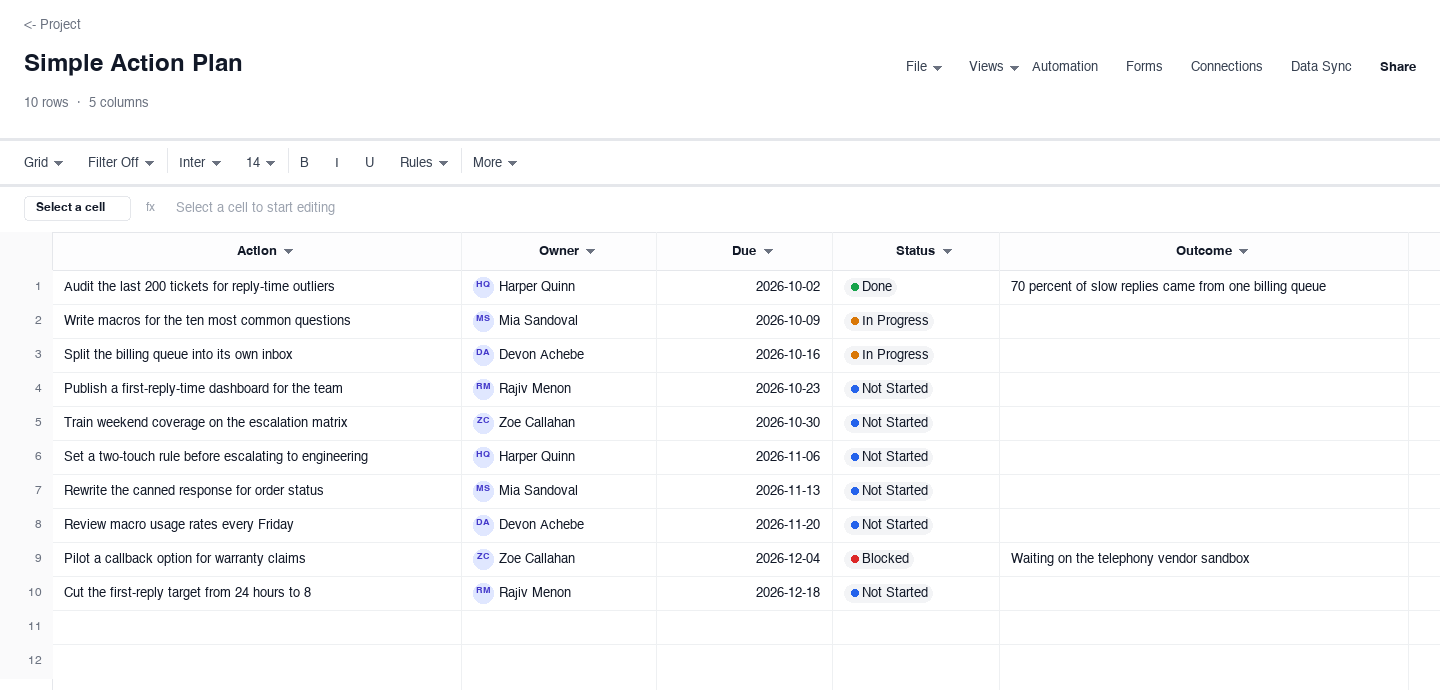
Simple Action Plan
The simple action plan is five columns and no ceremony: action, owner, due date, status, and the outcome once the action is done. Use it for a team that already agrees on the goal and just needs the list to outlive the meeting where it was written. The outcome column is what separates this from a to-do list: when a row closes, it records what actually happened, so the next planning session starts from results instead of memory, and a row that slipped twice is visible before it slips a third time.
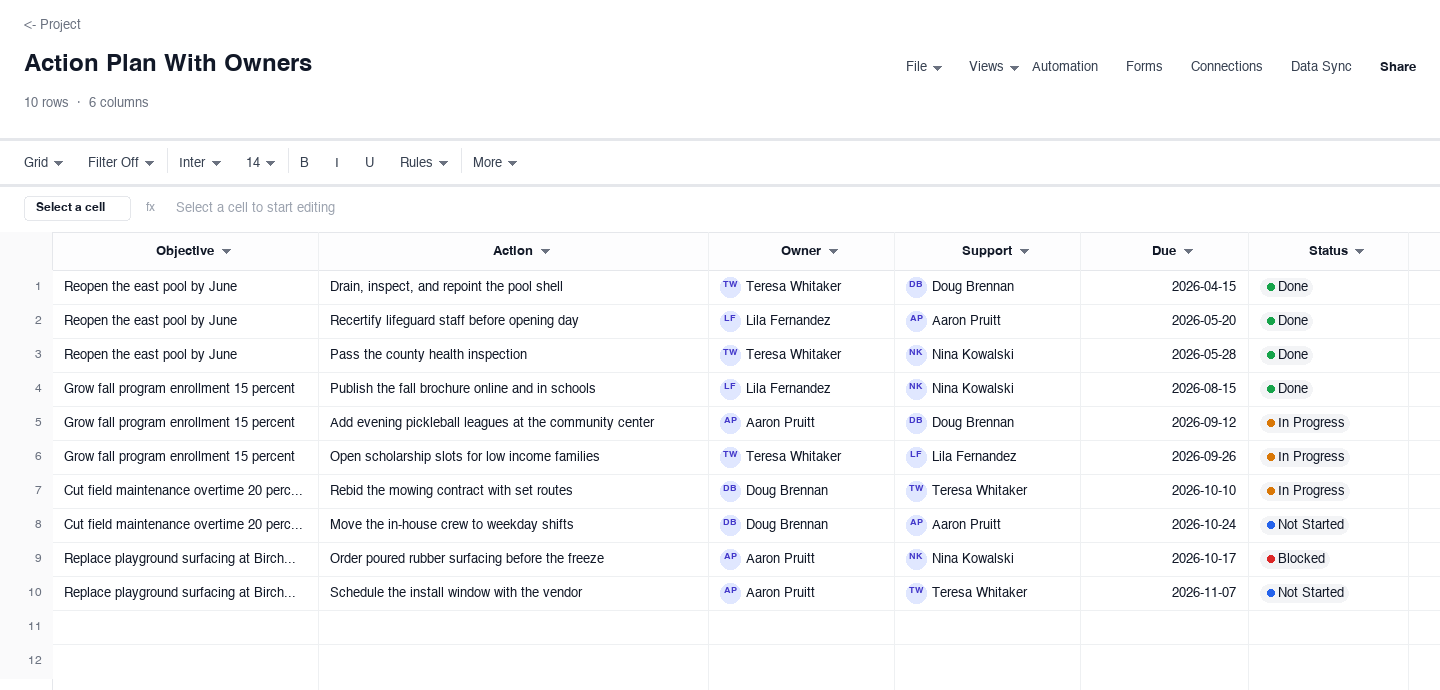
Action Plan With Owners
The with-owners version adds structure for plans where actions support bigger objectives. Each row carries the objective it serves, the action, an owner, a support person, a due date, and a status. Use it when one plan holds several workstreams, like the recreation department example where pool repairs and program enrollment share a sheet. The support column is the quiet innovation: it names who helps, not who is responsible, which keeps owners from going silent while the due date approaches.
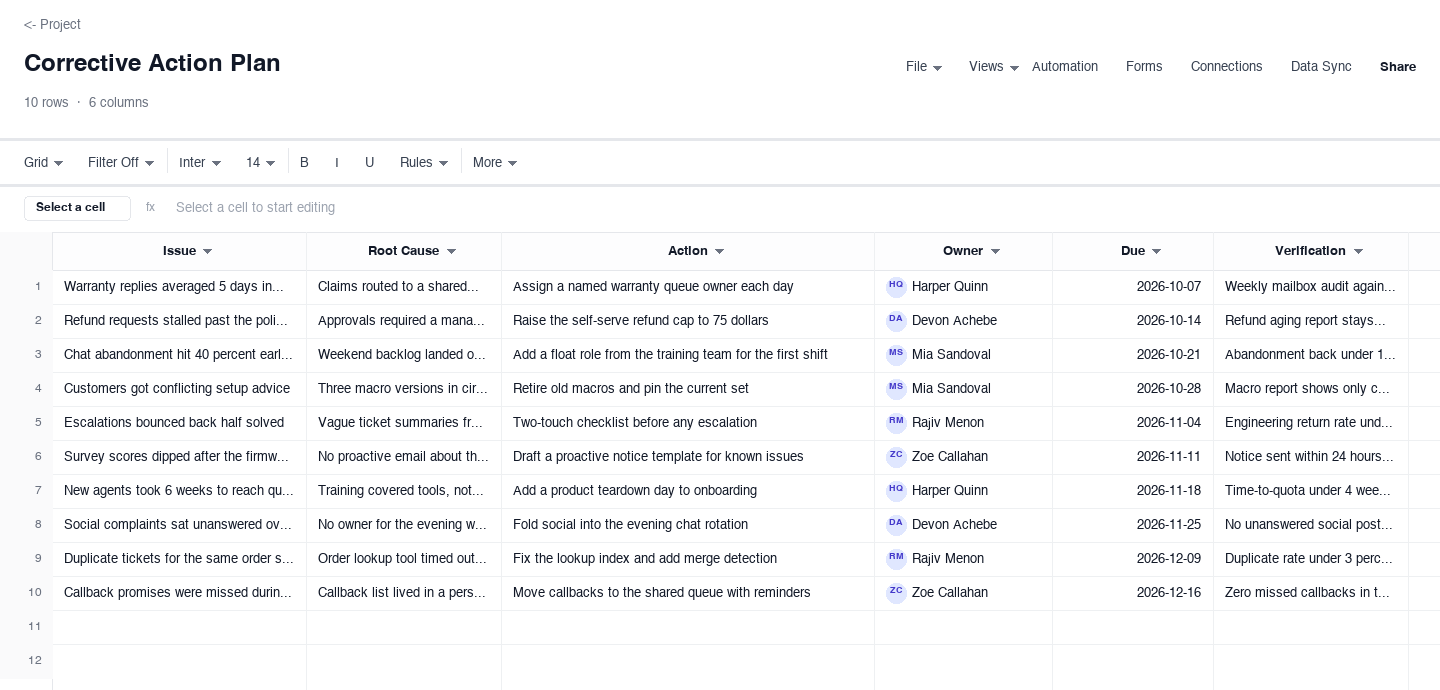
Corrective Action Plan
The corrective action plan is built for problems that already happened: customer complaints, audit findings, missed targets. Each row records the issue, the root cause found by asking why until the answers stop being useful, the action that addresses the cause rather than the symptom, an owner, a due date, and how the fix will be verified. Use it after an incident review or a bad month. The verification column is what makes it corrective rather than hopeful: a fix nobody checked is a rumor.
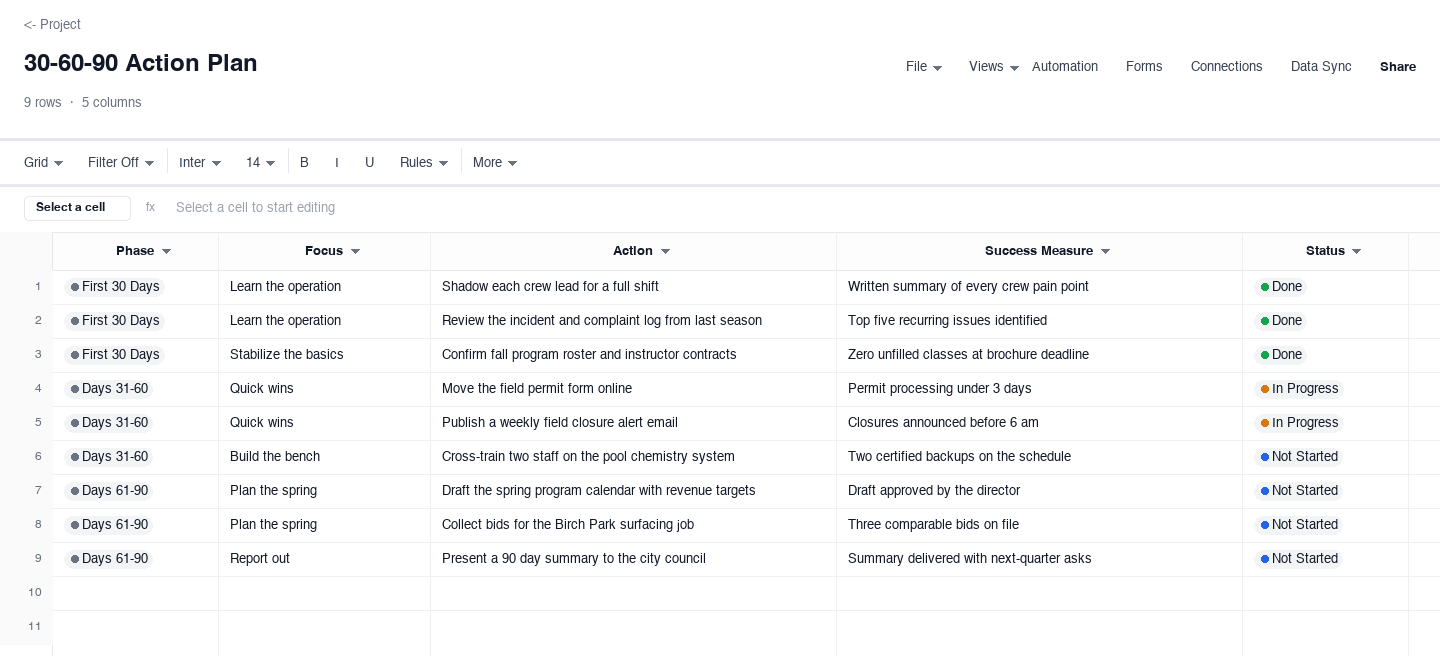
30-60-90 Action Plan
The 30-60-90 version organizes a new role or a new project into three phases: the first 30 days, days 31 to 60, and days 61 to 90. Each row carries the phase, the focus, the action, a success measure, and a status. Use it for onboarding, a leadership transition, or any effort where the right work in month one differs from the right work in month three. The success measure column keeps the plan honest: each phase ends with something observable, like a published roster or a presented summary, not a vague sense of progress.
How to write an action plan that gets finished
Write the goal as a sentence you could show a skeptic
Every action plan starts with a goal, and most goals fail on arrival because they are adjectives: improve response times, modernize programs, get organized. Convert to a sentence with a number and a date, like cutting first reply time from 24 hours to 8 by December 18. The skeptic test matters because the plan will meet skeptics, in a budget review, in a standup, in your own head on a tired Thursday. A measurable sentence gives every later decision, including which actions make the cut, something concrete to serve.
Break the goal into actions that finish in under two weeks
An action is done or it is not, so write actions that can complete: audit the last 200 tickets, not improve ticket hygiene. The two-week rule keeps the plan honest, because anything longer hides inside a status column as in progress for months while it decays. If a real piece of work takes six weeks, split it into verifiable chunks with visible finishes: draft the macro set, review it with two agents, then publish. Small finishes compound; large ones stall, and stalled rows teach the team that the plan is decorative.
Put a name and a date on every action, no exceptions
Shared ownership is how actions go to die, because a row owned by everyone is answered by no one. One name per owner, one date per action, and a support person only when the work genuinely needs two. Dates should be real commitments, not aspirations: an action due Friday that everyone privately knows means someday trains the team to ignore the column. When someone leaves or gets overloaded, reassign the row out loud in the meeting where it is reviewed, so ownership is always current rather than archival.
Review the plan weekly in a meeting that exists for that purpose
An unreviewed plan becomes wallpaper within a month. Fifteen minutes weekly, same slot, same people: walk the overdue rows first, then the ones due this week, and close anything finished by recording its outcome. The review is also where slips get handled honestly, a slipped action gets a new date and a reason in the open, not a silent nudge of the deadline. Teams that review weekly catch a stuck row at one week; teams that review monthly discover it turned into a quarter.
Record outcomes, not just completions
When an action closes, write what happened in the outcome column: the audit found 70 percent of slow replies in one queue, the macros cut handle time noticeably on warranty tickets. Outcomes turn a finished plan into institutional memory, and they are what make the next plan better, because you start from measured results instead of impressions. They also protect the practice itself: a team that can show what last quarter actions produced earns the meeting time this quarter, and a plan that only tracks checkbox completions cannot show that.
Close the loop on slips and failures
Some actions will slip, and a healthy plan treats that as data, not shame. When a row moves dates twice, ask why in the review: was the action too big, the owner too stretched, or the goal less urgent than the day job? Then fix the plan, split the action, reassign it, or delete it with a stated reason. Deleting honestly is a feature: a plan that accumulates zombie actions teaches everyone that rows mean nothing, while a plan that changes on purpose stays a document the team actually steers by.
Is an action plan the same as a to-do list?
No, and the difference is the columns. A to-do list holds tasks without context: call the vendor, order tubes, send the invoice. An action plan holds the context that makes tasks resolvable: the objective each action serves, the owner, the support, the due date, the verification, and the outcome. A to-do list answers what should I do next; an action plan answers why are we doing this, who is accountable, and how we will know it worked when the row closes.
The to-do list is the right tool for personal task capture, and many people keep both, dumping daily tasks into a list while the plan tracks the thirty actions that actually move the quarter. The confusion costs teams when a strategic goal gets managed like a to-do list: no owners, no dates, no review, and the same items copied forward for months. If the work has a goal, stakeholders, and a deadline, it belongs on a plan with these columns; if it is just yours and just today, the list is fine.
Frequently asked questions
What is an action plan template?
It is a pre-built spreadsheet for turning a decision into assigned, dated work: rows for actions, columns for owner, due date, status, and outcome, often with the objective or phase the action belongs to. It differs from a blank sheet because the structure enforces the habits that make plans work, one owner per row, a date on every action, and a record of what happened. You download it, replace the example rows with your own actions, and review it weekly until the goal is done.
How is an action plan different from a project plan?
A project plan covers the whole initiative: scope, schedule, dependencies, budget, and risks, often across months and many people. An action plan is narrower: the list of concrete actions that move one goal, with owners and dates. Most projects contain several action plans, one per workstream, and a small effort may only ever need the action plan. If your question is what happens in what order with what budget, you want a project planner; if it is who does what by when, the action plan is the right weight.
What is a 30-60-90 day action plan?
A 30-60-90 plan splits a new role, project, or transition into three phases: the first 30 days focused on learning and quick stabilizing wins, days 31 to 60 on bigger improvements, and days 61 to 90 on longer-range plans and measurable results. Each phase carries its own actions with success measures, so progress is observable at each boundary rather than only at the end. It is popular in onboarding because it aligns expectations early: the new person, their manager, and their team can all see what done looks like at day 30, 60, and 90.
How many actions should an action plan have?
Fewer than you think: ten to twenty active rows is the practical ceiling for a team reviewing weekly. Past that, the review meeting cannot hold them all and the tail goes unexamined, which teaches the team that rows at the bottom do not count. If you have forty actions, you probably have three plans, or actions that are really projects in disguise and need splitting into phases. Keep the live list short and park the rest in a backlog section, promoted only when a current row closes.
What is a corrective action plan?
A corrective action plan is the version built for problems that already happened: a spike in complaints, an audit finding, a missed target. Its rows carry the issue, the root cause, the action, an owner, a due date, and the verification that will prove the fix worked. The root cause and verification columns distinguish it from a normal action plan, because corrective work that treats symptoms returns, and fixes that nobody verified are assumptions. Use it after incident reviews, customer escalations, or any retrospective that ends with we should fix the process.
How do I keep an action plan from dying after week two?
Three habits do most of the work: keep the list short enough to review in fifteen minutes, hold the review at the same time every week with the same people, and record outcomes when rows close so the plan visibly produces results. Death usually comes from the opposite pattern: forty rows, a monthly review nobody prepares for, and a status column frozen since launch. If enthusiasm fades, shrink the plan rather than abandon it, ten honest rows beat thirty decorative ones, and momentum returns when slips get fixed in the open instead of ignored.
Run it live instead of in a file.
The downloads above are yours either way. In Wisegrid the same template becomes a working sheet with owner contacts, status dropdowns, reminders, and dashboards. 7-day free trial, no credit card required.