Eisenhower Matrix Template: Sort Work by Urgent and Important for 2026
An Eisenhower matrix template sorts a task list by two questions instead of one: is it urgent, and is it important. Urgent means it consequences land soon, today or this week. Important means it moves the goals you would list if someone asked what you are actually trying to do this quarter. The two axes make four quadrants: do first for urgent and important, schedule for important but not urgent, delegate for urgent but not important, and eliminate for neither. The matrix is famous because the second question is the one busy people skip, and skipping it is how the day fills with other people's priorities.
The spreadsheet version beats the napkin sketch in one specific way: the quadrant is computed, not remembered. Each row carries urgent and important flags, and the quadrant name and the action fall out of them, so sorting by quadrant groups the list into the four behaviors automatically. Add a due date and the matrix becomes a weekly review tool: what got done, what drifted into the wrong box, and which commitments survived the week. That record is what turns a clever diagram into a habit.
Four Eisenhower matrix templates, free to download
Each version below is a working spreadsheet, not a blank grid with a title row. The fields are pre-filled with realistic example content from fictional people, a startup founder and an elementary principal, so you can see how a sorted week reads, then overwrite it with your own tasks. No email address required.
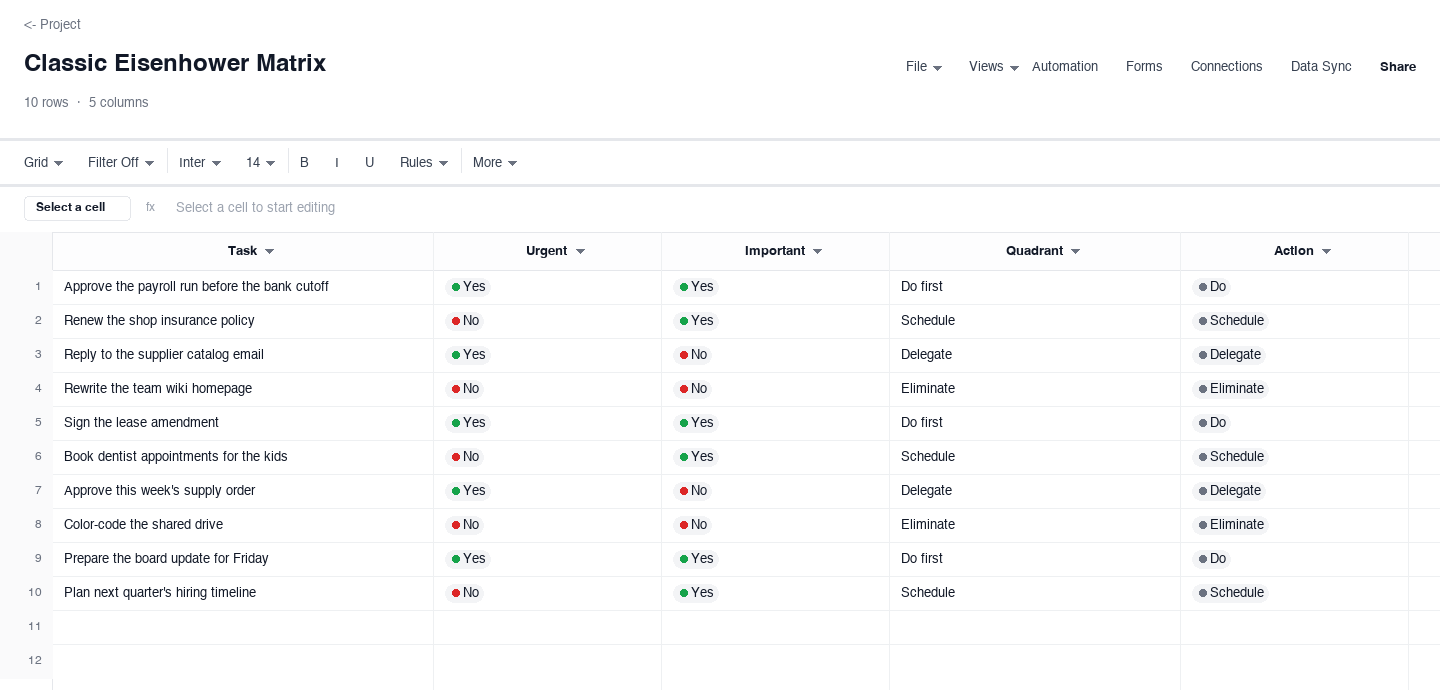
Classic Eisenhower Matrix
The classic Eisenhower matrix is the pure form: each task flags urgent and important as yes or no, and the quadrant name computes from the flags with the matching action beside it. Use it for a personal weekly sort, like the founder week pre-filled here. The computed quadrant column is the feature that earns its keep: there is nowhere to cheat, because a task you mark important and not urgent lands in schedule no matter how loudly it feels like an emergency, which is exactly the drift the matrix exists to catch.
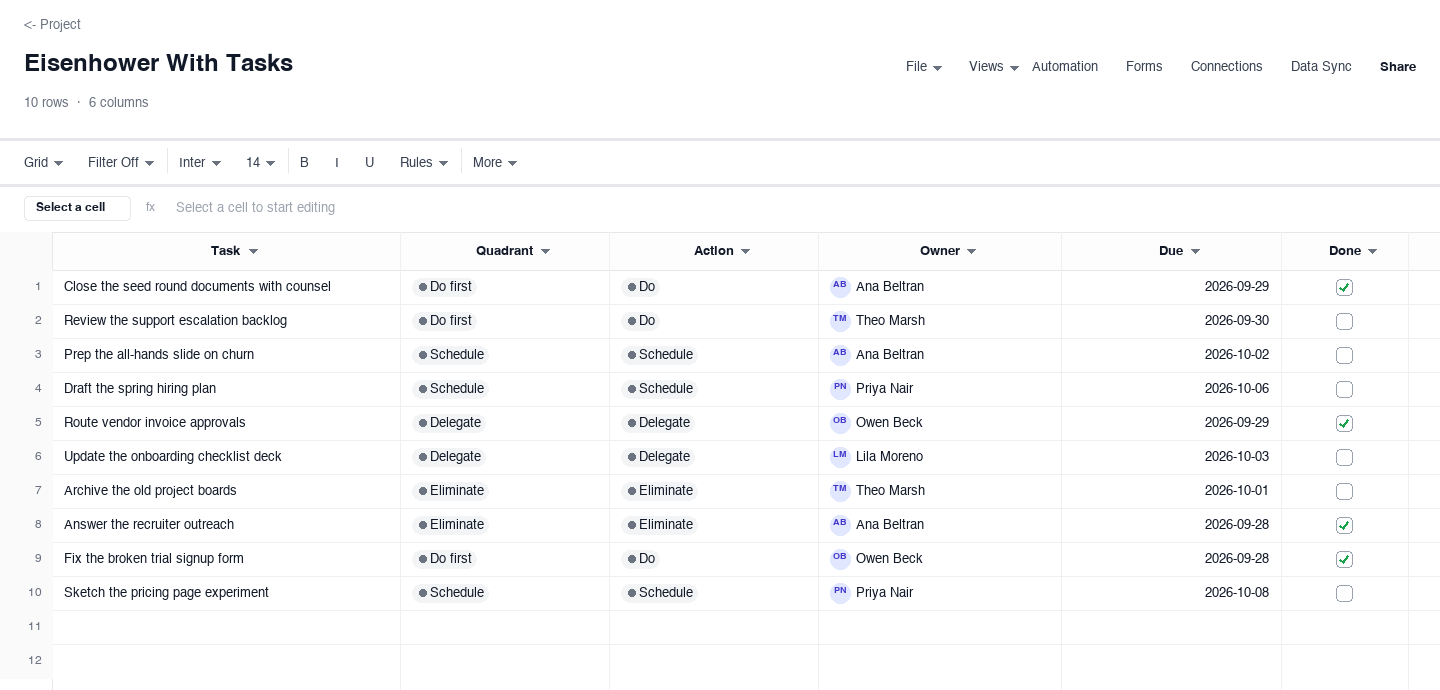
Eisenhower With Tasks
The task tracker version adds the calendar to the sort: every task carries its quadrant, the action it earned, and a due date, so the matrix stops being a diagram and becomes a working list for the week. Use it when the sort itself is easy and the follow-through is where you slip. The due-date column earns its keep on Thursday afternoon, when you filter to what is actually due this week and find that one important, not urgent task you scheduled for the start of the week is still sitting there.
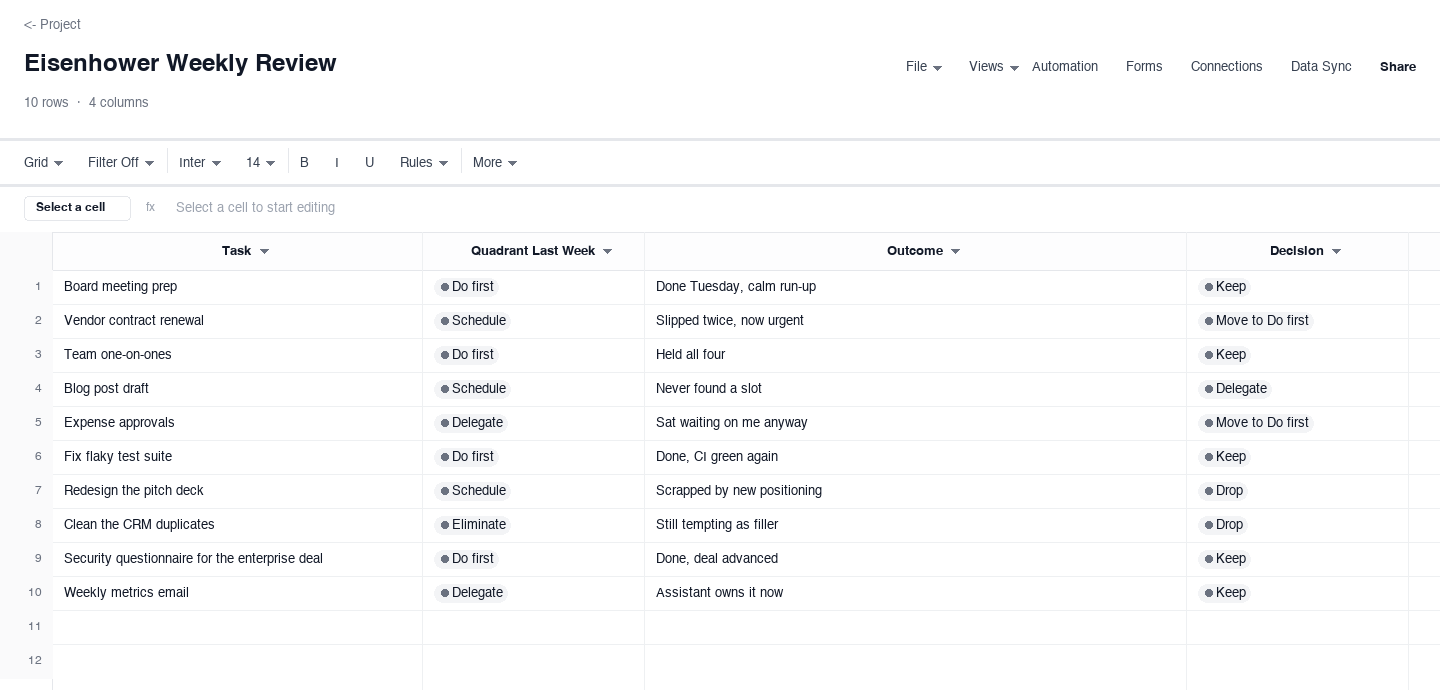
Eisenhower Weekly Review
The weekly review version looks backward instead of forward: each task records the quadrant it held last week, the outcome it actually got, and a keep or drop decision for the coming week. Use it to audit the sort itself, like the principal week pre-filled here. The outcome column is the one that earns its keep, because two weeks of honest entries show your real pattern, usually that quadrant three tasks keep coming back delegated on paper but done by you in practice.
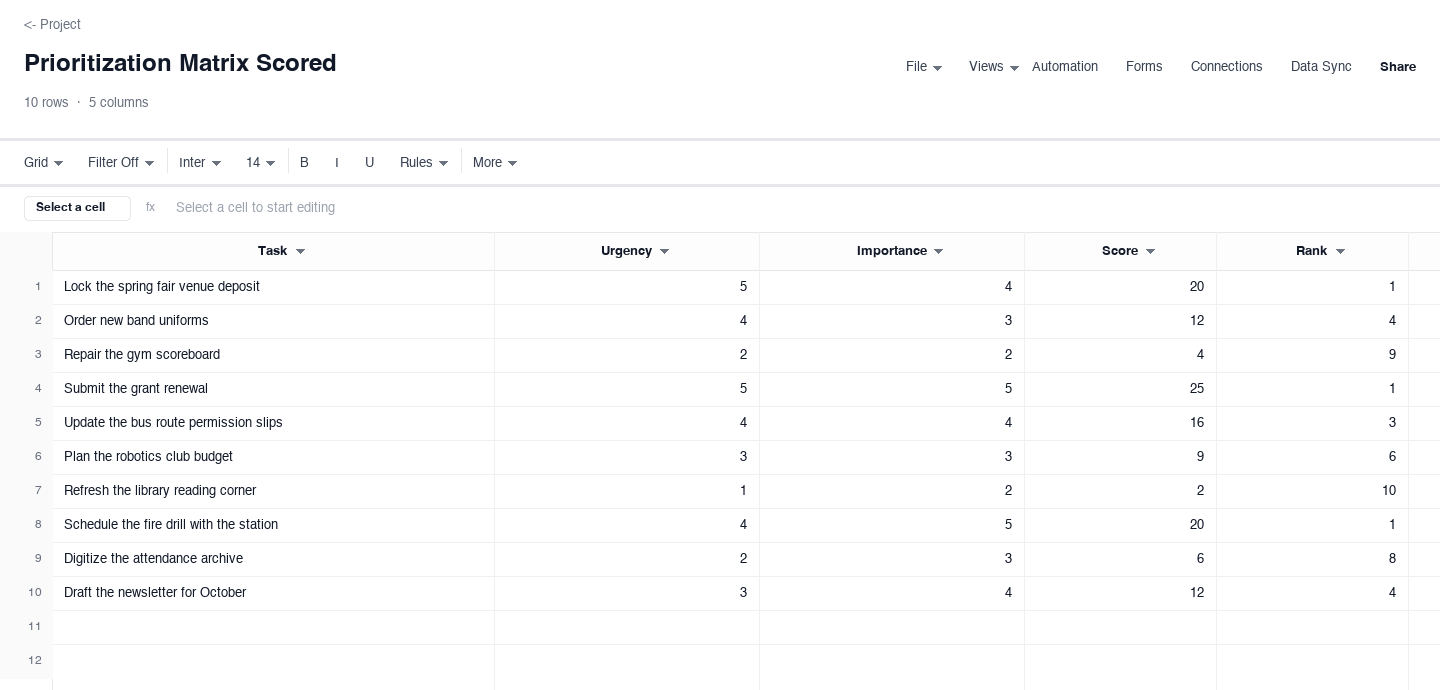
Prioritization Matrix Scored
The scored version is for people who find yes and no too coarse: rate each task one to five on urgency and one to five on importance, multiply for a score, and rank the list. Use it when the do-first quadrant holds eight tasks and you need an order, or when a team sorts shared work and needs to show its reasoning. The rank column earns its keep in the argument it prevents: disagreement moves from whose task is bigger to which score is wrong, and that is a conversation with numbers instead of seniority.
How to sort a week with the Eisenhower matrix
Define urgent and important before you sort
The matrix fails when the words mean whatever the moment needs. Write the definitions at the top of the sheet and hold them for the whole quarter. Urgent: consequences land within forty-eight hours if this does not move. Important: it advances one of the three goals you would list in a performance review. Notice what is not in either definition: how long the task has been sitting there, who is asking, and how it makes you feel. Those three smuggle almost every mis-sorted task into the wrong box, and naming them in advance is the cheapest fix.
Dump every open loop into the list first
Sort nothing while collecting. Brain, inbox, notebook, the sticky note on the monitor: everything competing for time this week goes in as a task row before a single flag gets set. Grocery runs next to board decks. The reason is psychological and practical: tasks you have not written down keep lobbying for attention during the sort, and the flags you assign while distracted are the ones you will defend later instead of reconsider. A clean dump takes ten minutes and pays for itself the first time you find a task that has been running in the background for a month.
Flag each task against the definitions, not the mood
Now set urgent and important for every row, using the definitions from step one. The common traps: tasks that feel urgent because someone senior asked, tasks that feel important because they are pleasant, and recurring meetings that inherit last quarter's flags without asking whether anything changed. If a task genuinely could go either way, that usually means you lack information, and the right move is to flag it provisionally and schedule the ten minutes that resolves the ambiguity, not to leave it unflagged where it will ambush you later.
Do the do-first items in batches, and guard the list
Quadrant one earns its name: do it first, today, before the meetings start fragmenting the day. Batch the quadrant one items into one or two focused blocks rather than sprinkling them across the schedule, because every interruption between them costs the refocus time you did not budget. While you work the list, protect it: new requests that arrive midweek do not get a flag on arrival, they go to the dump from step two and wait for the next sort. Instant flagging is how the loudest voice re-sorts your week for you.
Schedule quadrant two like it is a meeting
Important but not urgent is the quadrant the matrix exists to protect, because it is the first thing urgency crowds out. So do not leave it as a row in a sheet. Move every quadrant two task onto the calendar as a named block this week, strategy Tuesday, deep work Thursday morning, and treat the block like a meeting with your most important client, because it is. When a conflict appears, the quadrant two block moves to another slot this week; it does not disappear. Cancel it twice and the matrix is decorative again.
Delegate quadrant three with instructions, not titles
Urgent but not important is real work that someone else should do, and the difference between delegating and dumping is the handoff note. For every quadrant three task, write two or three lines the delegatee needs: the outcome, the deadline, the decision rule for the common case, and where to escalate the rest. Then actually transfer it: assign it in the tracker, calendar it, and close your own copy. A quadrant three task that stays on your list with a note to delegate is a quadrant one task wearing a costume, and it will collect rent all week.
Review weekly, and drop quadrant four on sight
Friday afternoon, fifteen minutes, three questions. What got done, and did it match the flags? What drifted, and did the task move or did the week? What stays for next week, with keep or drop decisions written down. The drift question matters most: a task that has been urgent and important for three straight weeks is either chronic, which needs a system fix, or mislabeled, which needs honesty. And quadrant four items get dropped on sight, without a trial, because the matrix already tried them and the verdict was neither.
Looking for a prioritization matrix template?
The Eisenhower matrix is a prioritization matrix: it ranks work by two weighted criteria and turns the ranking into an action. The scored variant above is the version most people picture under that name, rate each task on urgency and importance, multiply the scores, and sort by rank. Use it when the do-first quadrant holds more than you can finish and you need an order, or when a team shares one list and needs to show its reasoning to each other.
The difference between the two is what they protect. The quadrant version protects your attention by forcing a binary call that keeps important work from masquerading as urgent. The scored version protects the ranking by making the criteria explicit. If you keep restarting arguments about whose task comes first, start with scores; if you keep finishing Fridays wondering where the important work went, start with quadrants.
Frequently asked questions
What are the four quadrants of the Eisenhower matrix?
Do first: urgent and important, consequences land soon and the task advances a real goal. Schedule: important but not urgent, the strategic work that needs calendar protection. Delegate: urgent but not important, real work that belongs with someone else. Eliminate: neither, dropped without a trial. The two questions sound similar and are not: urgent is about time pressure, important is about contribution. The matrix fails when a team treats them as synonyms, which is exactly when everything becomes urgent and nothing is.
How is this different from a simple to-do list?
A to-do list is one bucket: everything you owe, in no particular order, and the order gets decided by whoever asks loudest. The matrix adds the second dimension before the day starts, so the sort happens on your definitions instead of in the moment. Most people run both: the to-do list template captures everything without judgment, and the matrix assigns each item a behavior. If your list is short and calm, the list alone is fine; add the matrix the week you notice important work sliding.
What belongs in quadrant two, the schedule box?
The work that decides whether next quarter looks like this quarter: planning, hiring conversations, process fixes, relationship building, the project nobody is chasing you about. Quadrant two is where important work lives before it becomes an emergency, which is why it is the first quadrant urgency crowds out. The rule that keeps it alive is mechanical: every quadrant two task gets a named calendar block this week, and the block moves to another slot rather than disappearing. A matrix with an empty quadrant two is not a matrix, it is a diary of other people's priorities.
Is delegating quadrant three just dumping work on others?
It is if you hand over a task title and vanish. Proper delegation transfers the outcome, the deadline, the decision rule for the common cases, and a named escalation path, which is why the how section above says to write the handoff note before you move the task. There is also a fairness test: the task should match the delegatee's role and growth, not just their availability. Urgent but not important work belongs with whoever is set up to do it cheaply, and when no such person exists, that is a staffing signal, not a reason to keep it yourself.
Can I score tasks instead of using quadrants?
Yes, and the scored prioritization matrix variant above is built for exactly that: rate each task one to five on urgency and one to five on importance, multiply for a score, and sort by rank. Scoring pays off when the do-first quadrant holds more tasks than the week can fit, or when a team sorts shared work and needs to show its reasoning. The tradeoff is that scores feel precise, so hold them lightly: a 16 versus a 15 is noise, and the judgment call still belongs to the definitions, not the arithmetic.
How do I stop urgent tasks from taking over every week?
Treat the recurrence as data. If the same class of task keeps landing urgent and important, one of three things is true: the work genuinely spikes, in which case capacity is the fix; the deadlines are manufactured, in which case push one back and see what breaks; or the work is quadrant two that was never scheduled, so it aged into an emergency. The weekly review exists to tell these apart. Fix the systemic source and the urgent column shrinks; keep fighting task by task and it refills every week.
Run it live instead of in a file.
The downloads above are yours either way. In Wisegrid the same template becomes a working sheet with owner contacts, status dropdowns, reminders, and dashboards. 7-day free trial, no credit card required.