Hourly Schedule Template: Free Downloads and a Fill-In Guide for 2026
An hourly schedule template breaks a day into single hours and gives each hour a job. That sounds rigid until you notice what it replaces: the vague intention to do something in the morning, the appointment that only exists in someone's head, the production target nobody checks until end of day. When every hour carries its own task, owner, and status, a day becomes a set of concrete commitments you can scan in ten seconds and defend when something slips.
The templates on this page come from two working environments: a beauty salon juggling appointments, walk-ins, and the daily opening routine, and a manufacturing floor where every hour of line time has a target. Whether you plan people, machines, or your own day, the structure is the same. One column for the hour, one for what happens in it, and enough status fields that you can see which hours are on track and which need attention before the day gets away from you.
Four hourly schedule templates, free to download
Each version below is a working spreadsheet, not a blank grid with a title row. The fields are pre-filled with realistic example content from a fictional salon and a fictional manufacturing floor so you can see how a finished hourly schedule reads, then overwrite it with your own hours. What you download is an everyday spreadsheet file, compatible with all the usual tools. No email address required.
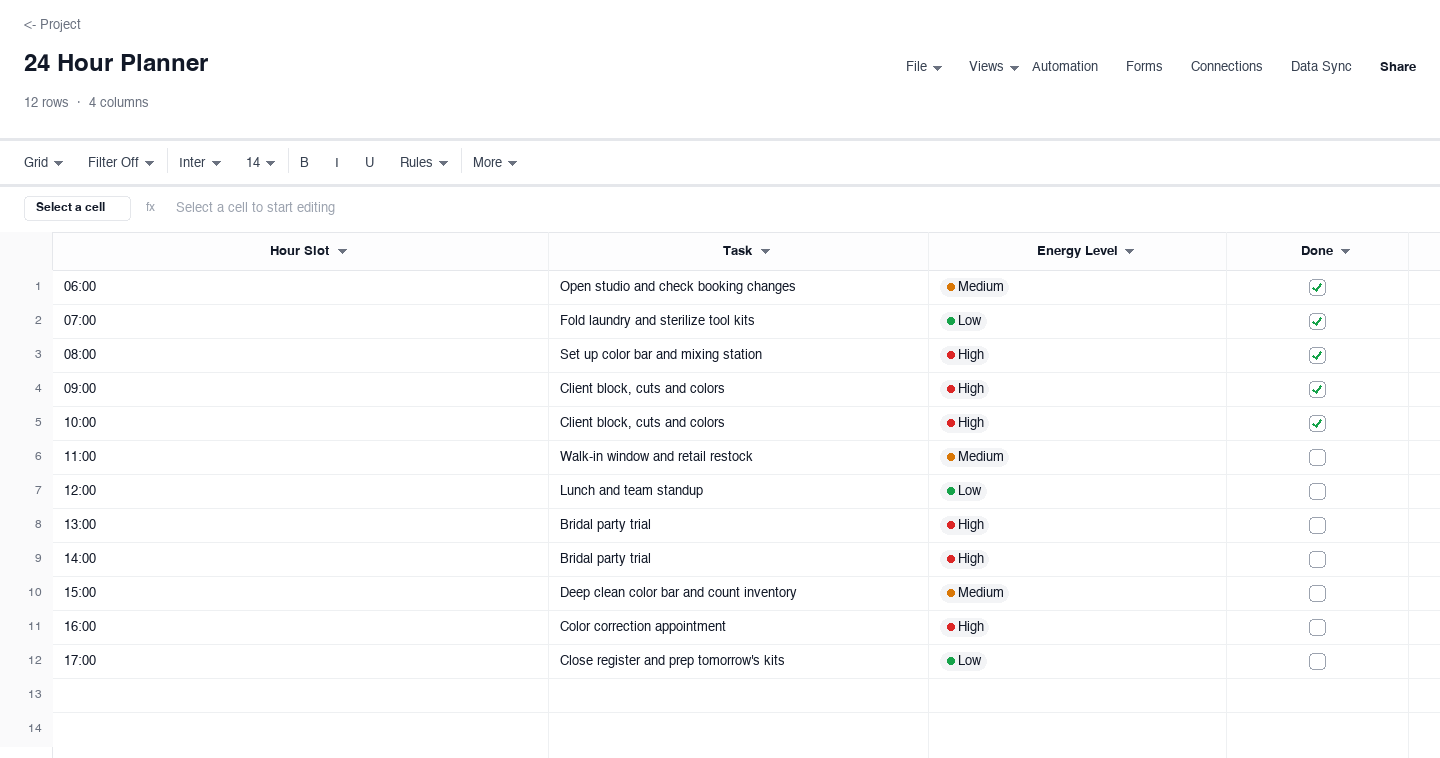
24 Hour Planner
The 24 hour planner is a single sheet that maps one full day, hour by hour, with a task, an energy level, and a done flag for each slot. Use it when your day mixes routine opening work, focused client blocks, and cleanup, and you want the shape of the day visible before it starts. The energy column is the quiet advantage: it pushes high-focus work into the hours where you actually have focus, which turns the plan into a realistic one instead of an optimistic one.
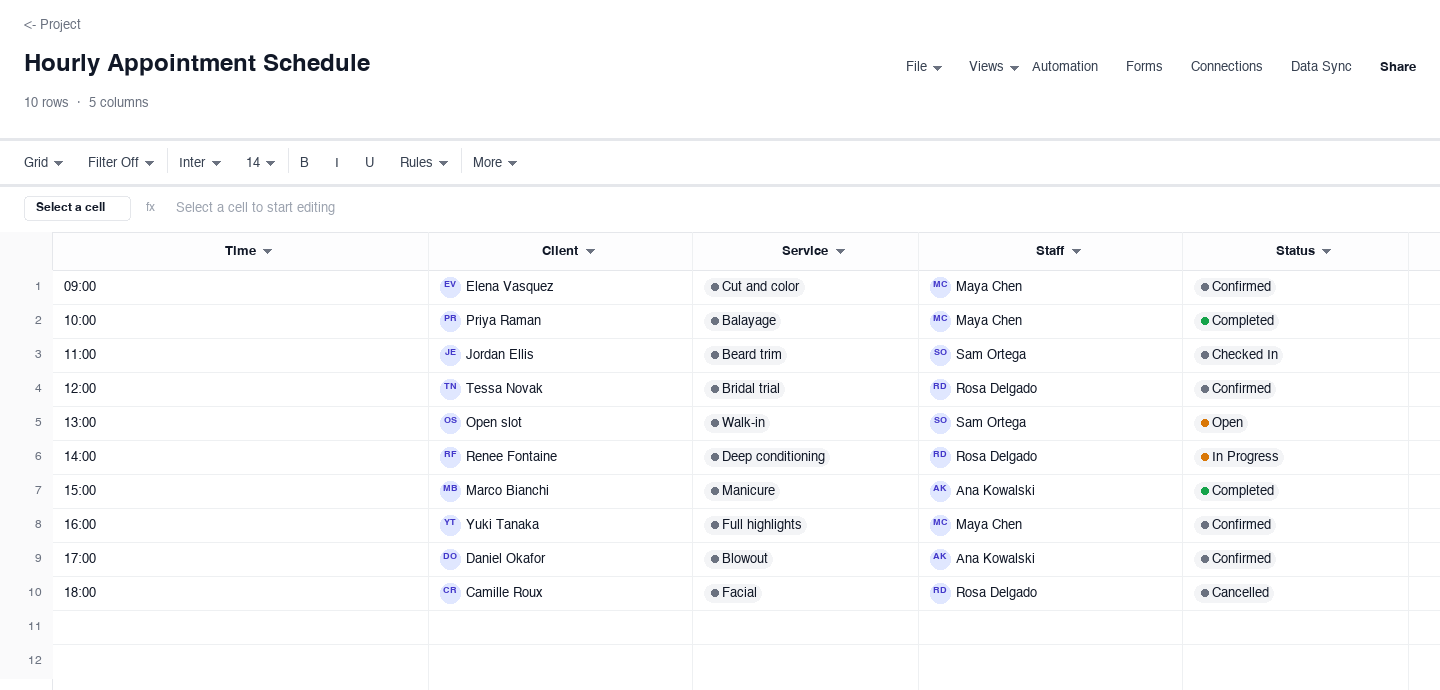
Hourly Appointment Schedule
The hourly appointment schedule is the front desk view of a service day: one row per hour, with the booked client, the service, the staff member assigned, and a status that moves from confirmed to checked in to completed. Use it in any appointment business to stop double bookings and to see the gaps where a walk-in or a stand-by client fits. The open slot row is the feature staff love, because it turns an empty hour into a visible opportunity instead of dead time.
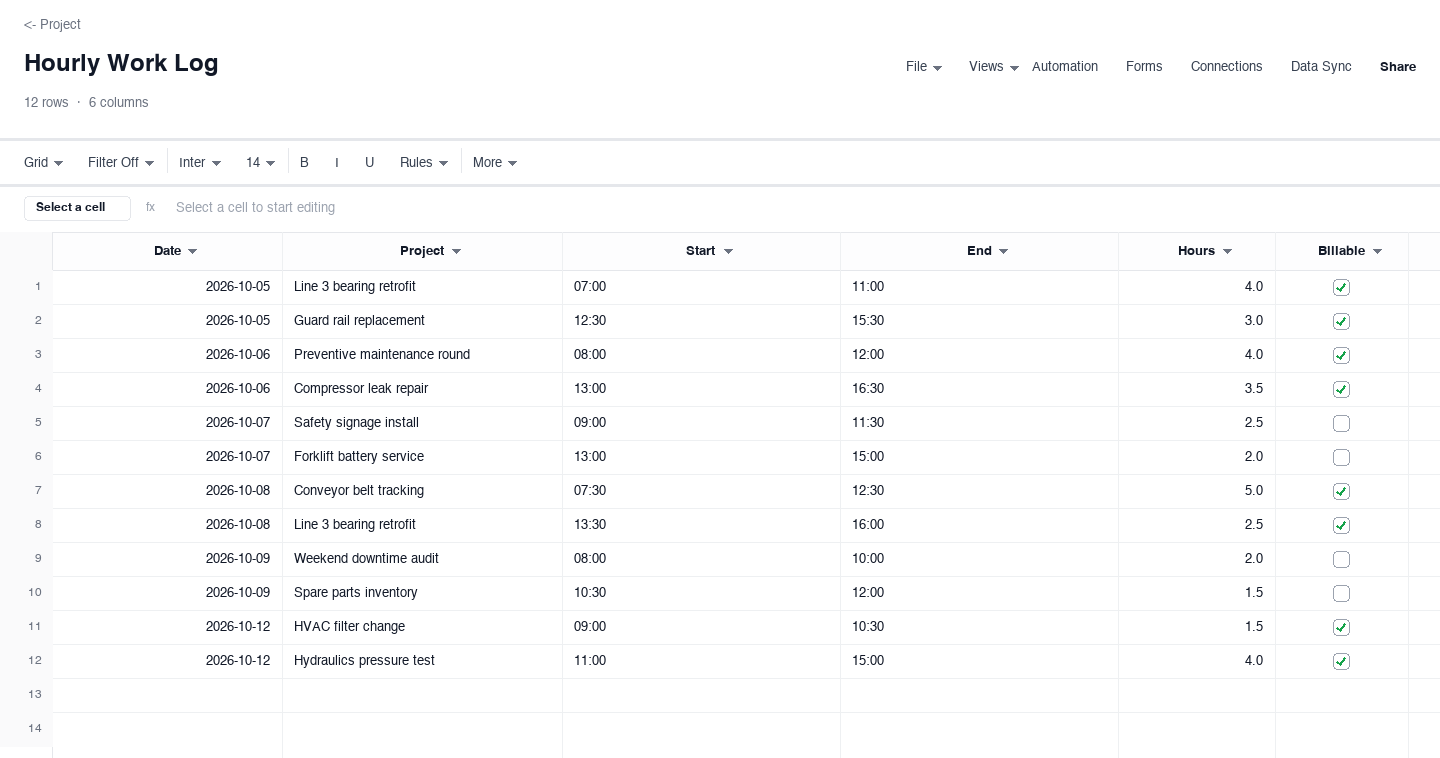
Hourly Work Log
The hourly work log is a running record of work by the hour: date, project, start and end time, hours worked, and whether the time is billable. Use it for contractors, maintenance crews, or anyone whose week needs to be explained to a client or a payroll clerk. Keeping the billable flag on every row is what turns the log into an invoice-ready record, and a running total of hours per project answers the question every manager asks, which is where the time actually went.
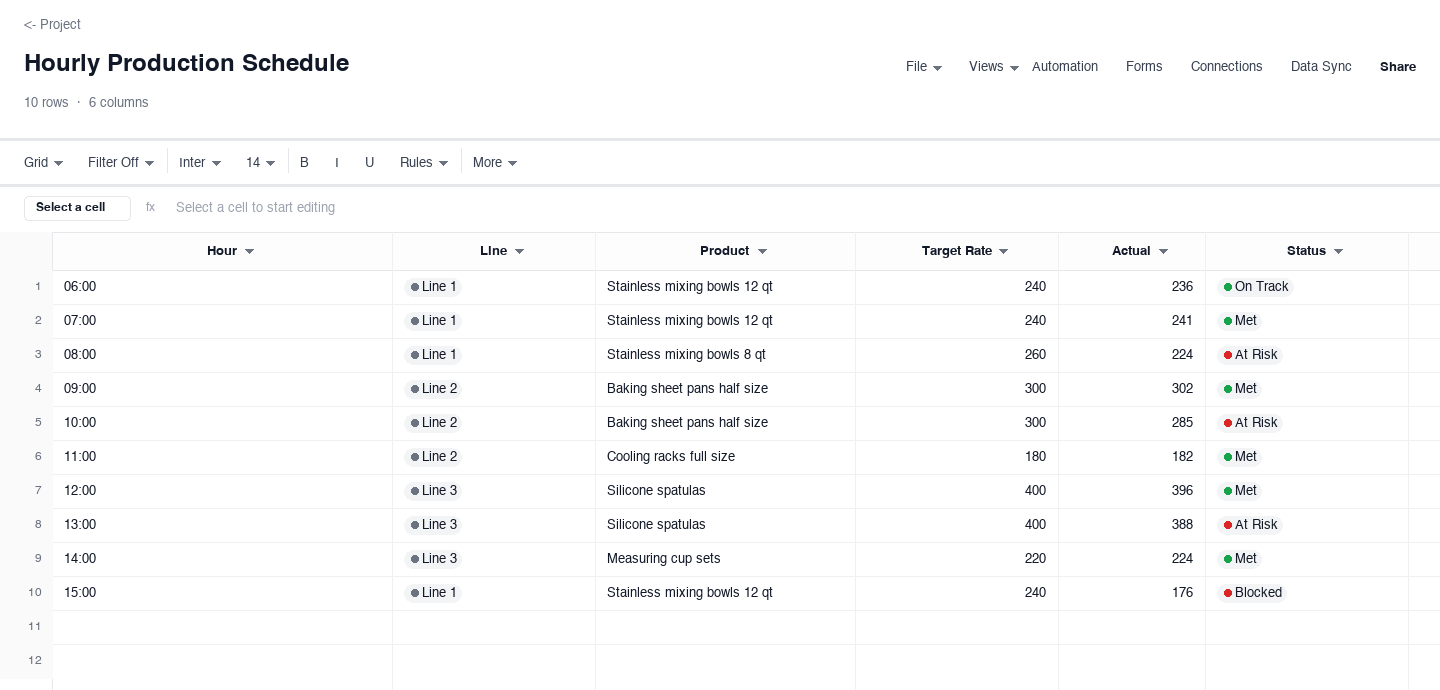
Hourly Production Schedule
The hourly production schedule is the floor supervisor's plan for each line: the hour, the line, the product running, a target rate, the actual count, and a status per hour. Use it where output is measured per hour and falling behind is expensive, because it shows a line off pace within the hour it happens. The comparison between target and actual is the whole point: it tells the crew when to rebalance, call maintenance, or escalate while the hour is still recoverable.
How to plan a day with an hourly schedule
Start from the fixed points, not the blank page
Before you write a single task, put in the hours that do not negotiate: the first appointment, the shift start, the standing meeting, the pickup time, the line changeover. These anchors are the skeleton of the day, and everything flexible hangs off them. Planners who start with a blank grid and a full task list consistently overbook the morning, because the fixed points only become visible once they are written down. Lock the anchors first and the remaining hours reveal themselves, including the ones that were never really available.
Write one clear task per hour
An hour deserves a verb and an object. "Work on marketing" is not an hourly task, because you cannot tell at 10:30 whether the hour did its job. "Draft Tuesday's captions" is, because it has a finish line. If a real task needs three hours, give it three consecutive rows and say what each hour produces, so progress is visible without asking anyone. The one-task-per-hour rule also exposes the day's true capacity: when each hour has a single named job, the schedule tells you plainly that the day holds six real tasks, not the fourteen on your wish list.
Match the task to your energy, not just the clock
Not every hour is worth the same. Most people carry two or three genuinely sharp hours a day, and the planner version above has an energy column precisely so you can find yours. Put the work that needs judgment, writing, or careful technique into High hours, and push laundry, filing, and inbox clearance into the Low ones. On the salon sheet that means color corrections land in the morning and restocking lands after lunch. A schedule that ignores energy looks productive on paper and collapses by mid-afternoon in practice, because it spends your best hours on your cheapest work.
Leave real gaps between blocks
A schedule with no slack breaks by 10:00, because work expands into every gap you give it and appointments run late on their own schedule. After any block that involves other people, a client, a vendor, a delivery, plan a fifteen minute buffer before the next commitment. The appointment schedule above keeps a visible open slot for exactly this reason: it absorbs the overrun without cascading into the rest of the day. Buffers are not wasted time. They are the difference between a schedule that bends and one that shatters, and they cost you nothing on the days everything runs on time.
Mark status as you go, not at the end of the day
An hourly schedule is a steering tool, not a diary. If you only update it at 17:00, it told you nothing all day. Check off hours as they complete, mark the ones that slip, and move a slipped hour to a visible new home while the context is still in your head. On the floor, that means the production sheet gets actual counts every hour, not a reconstructed estimate at shift end, because a line that is forty units behind at 09:15 is a problem you can still fix. A schedule you steer hourly is an instrument; one you annotate nightly is a eulogy.
Review the week and adjust the template itself
Every Friday, spend ten minutes with the finished schedules before you reuse them. Which hours always slip? Which buffers always absorb overruns and which sit empty? Which tasks consistently need more time than you gave them? Fold those answers back into the template: widen the blocks that always overrun, shrink the ones that never fill, and move recurring work to the hours where it actually fits. A schedule template you adjust weekly converges on your real day within a month, and after that the plan mostly maintains itself because it was built from evidence instead of hope.
Is a time schedule template the same thing?
People search for a time schedule template when they want the same tool this page offers: a grid that assigns each slice of the day a named job. The phrasing differs, the need is identical. If you landed here looking for a time schedule template, any of the four versions above will do the work, and the fill-in guide applies word for word. The only real choice is the unit of time: hours, when the day has moving parts that need watching, or whole days, when it does not.
The giveaway for which one you need is how often your plan breaks. If the day falls apart inside individual hours, double bookings, missed coverage windows, lines falling behind, you need hourly rows. If it falls apart across days, everything landing on the same afternoon, a week with no room for the important work, a daily or weekly schedule page is the better fit. Start at the level where your problems actually live, and only go finer when the coarse grid stops explaining your days.
Frequently asked questions
What should an hourly schedule template include?
At minimum: a column for the hour or time slot, a column for what happens in that hour, and a status field so you can see at a glance which hours are done, which are in progress, and which slipped. Beyond that, add the fields your environment actually uses: an owner or staff name when more than one person works the schedule, an energy level when you plan your own day, a target and an actual when the hour produces something countable. The versions on this page show each combination, and every field earns its place by answering a question you would otherwise have to ask someone.
How is an hourly schedule different from a daily schedule?
A daily schedule plans the day in blocks or sections, morning, afternoon, a lunch break, and it suits days with a few big commitments and long stretches of flexible time. An hourly schedule goes one level finer: every single hour has a named job, which is what you need when hours themselves are the scarce resource, like appointment slots, line time, or coverage windows. The tradeoff is maintenance. Hourly plans need to be updated as the day moves, while a daily plan can survive on a single morning glance. Pick hourly when the extra detail prevents a real, recurring problem.
How do I keep an hourly schedule from falling apart by noon?
Three habits fix most collapses. First, leave a buffer after anything involving other people, because appointments and meetings run late on their own schedule, and an unbuffered schedule cascades the first delay into every later hour. Second, put only one task per hour, because two tasks in one hour really means neither gets finished. Third, steer the plan hourly: when an hour slips, decide where it goes right then, while you still remember the context, instead of letting it pile up into an afternoon that no longer resembles the plan. The schedule is a steering tool, and tools only work while your hands are on them.
Can I use an hourly schedule for a whole team?
Yes, and it is often the best format for shared coverage. The pattern that works: one row per hour, a column for the person assigned or a column per person on duty, and a status the whole team can read. A salon front desk and a manufacturing floor supervisor run the same shape, the only difference is whether the hour produces a service or a count. Two rules keep a team hourly schedule honest: assign one owner per row so nobody assumes somebody else has it, and review the finished sheet together at the end of the week so the next version reflects what the team can actually sustain.
How do I handle interruptions in an hourly schedule?
Plan for them, then process them the same way every time. Planning for interruptions means keeping at least one open hour or buffer in the day, because a schedule booked to one hundred percent has no capacity for the urgent thing that will, with certainty, arrive. When an interruption does land, the rule is simple: finish or park the current hour visibly, slot the interruption into a buffer or an open slot, and move the displaced task to a named new home rather than letting it hover. The visible moves matter more than the moves themselves, because an hour whose new location is written down stops generating background anxiety.
Is the hourly schedule template really free?
Yes. Every version on this page downloads as a standard spreadsheet file with no email address, no account, and no trial period attached. The files open in Excel, Google Sheets, and the other common spreadsheet tools, and you can edit, duplicate, and share them as much as you like. The example rows are fictional, so replace them with your own hours and the sheet is ready to run. We publish templates this way because a working example beats a screenshot, and the people who find them useful are usually the same people who eventually want a shared, live version their whole team can edit at once.
Run it live instead of in a file.
The downloads above are yours either way. In Wisegrid the same template becomes a working sheet with owner contacts, status dropdowns, reminders, and dashboards. 7-day free trial, no credit card required.