Expense Report Template: Free Downloads and a Fill-In Guide for 2026
An expense report template is the small contract between a company and the people who spend its money on the road: spend what the trip needs, record it the same week, prove it with a receipt, and get paid back without a chase. When the template is right, the whole cycle is boring, which is the goal. When it is wrong, the failure modes are predictable: receipts lost in wallets, mileage reconstructed from memory, and a month-end pile that takes a day to untangle.
The four versions below are built around a fictional consulting firm whose staff live on client sites. There is a simple report for single trips, a mileage log for the drives between offices, a travel report that separates client-billable costs from reimbursable ones, and an approval-routed version for when the founder is no longer the only person allowed to say yes. The examples are pre-filled so you can see a finished report before you overwrite it with your own.
Four expense report templates, free to download
Each version below is a working spreadsheet, not a blank grid with a title row. The fields are pre-filled with realistic example content from a fictional consulting firm with traveling staff, so you can see how a finished expense report reads, then overwrite it with your own details. What you download is an everyday spreadsheet file, compatible with all the usual tools. No email address required.
Simple Expense Report
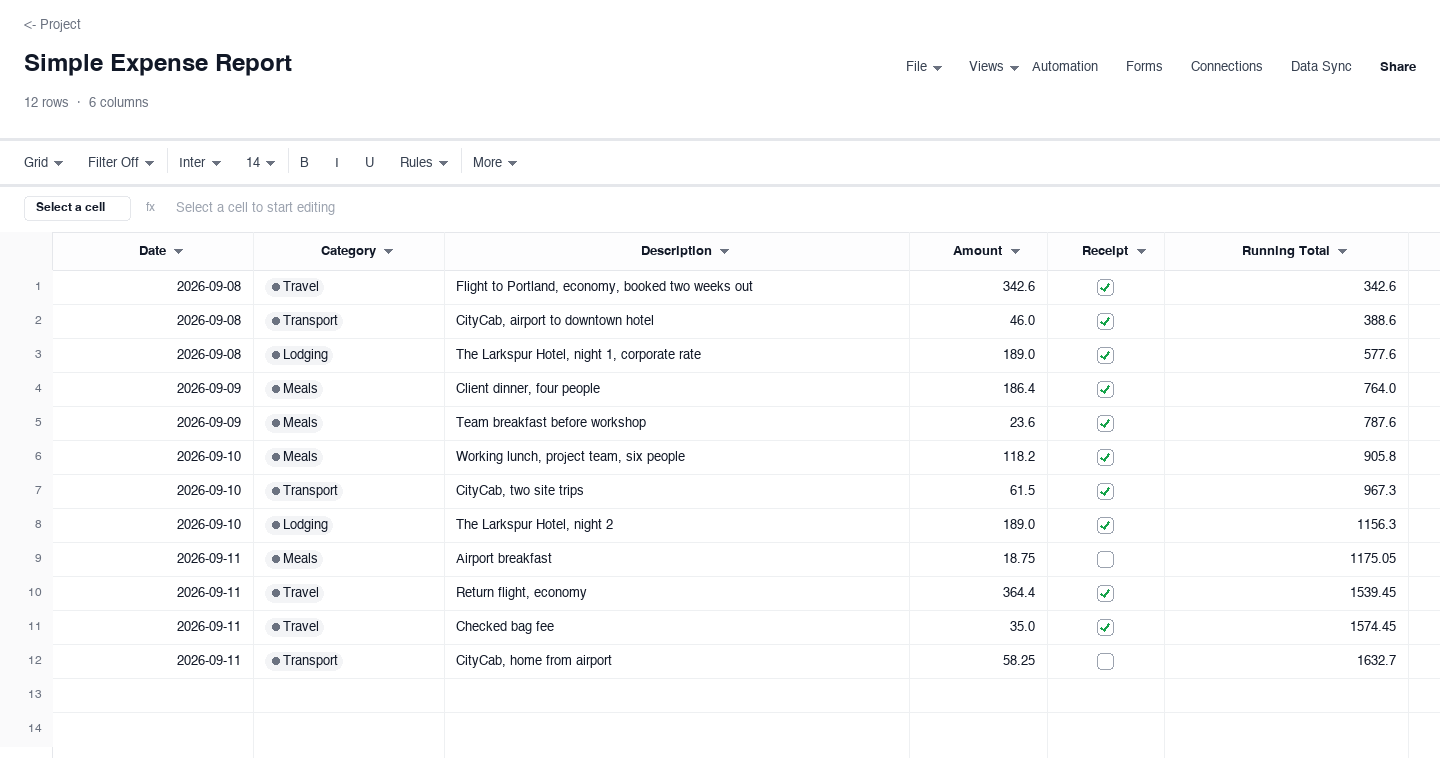
The simple expense report is what a traveling consultant fills in Friday: date, category, what it was, the amount, a receipt flag, and a running total that keeps pace down the column. Use it for single trips and everyday reimbursement. The running total is the small feature that earns its keep, because it reconciles against the card statement at a glance and a missing row shows up as a gap in the math.
Mileage Expense Report
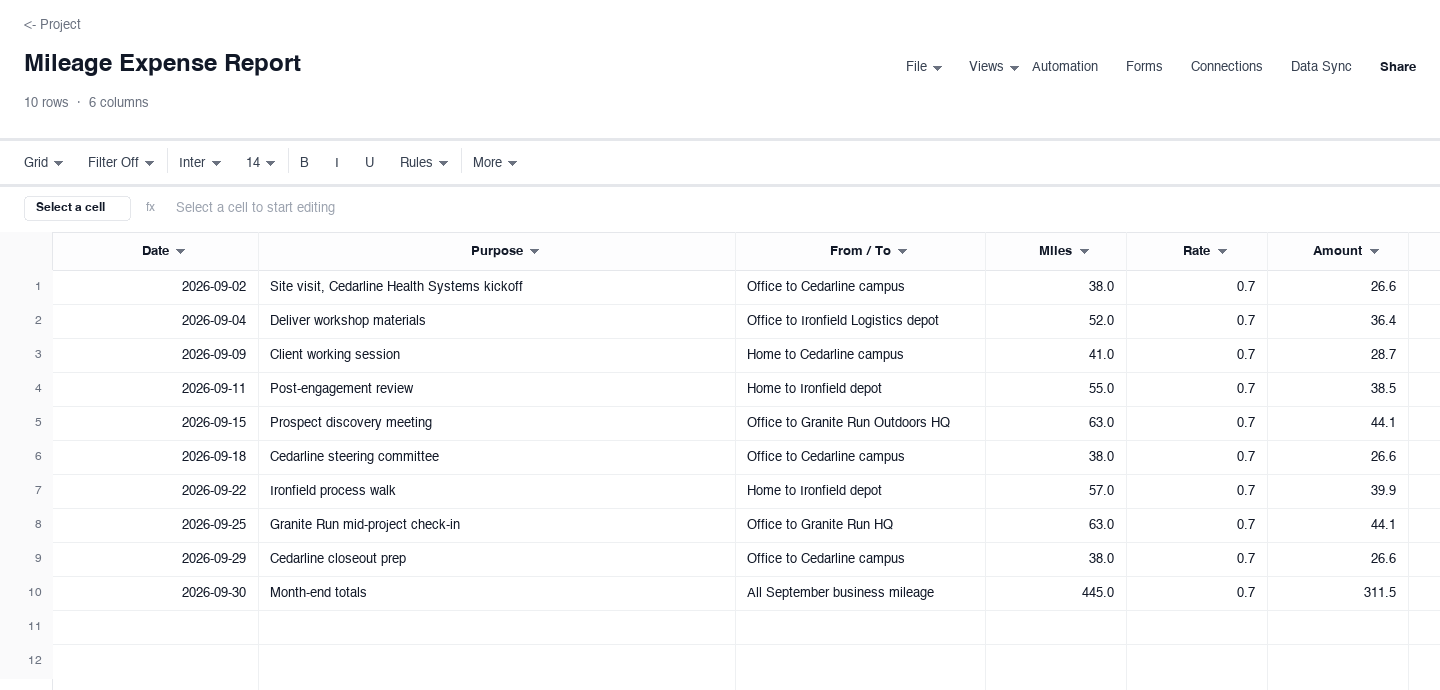
The mileage version is for the miles between offices: date, purpose, the from-and-to, miles driven, the reimbursement rate, and the computed amount. Use it when staff drive their own cars to client sites and the company reimburses per mile rather than per tank. The purpose column is what makes the log defensible, because "client working session" tied to a date and a route reads as business mileage in any audit, while a bare odometer number does not.
Travel Expense Report
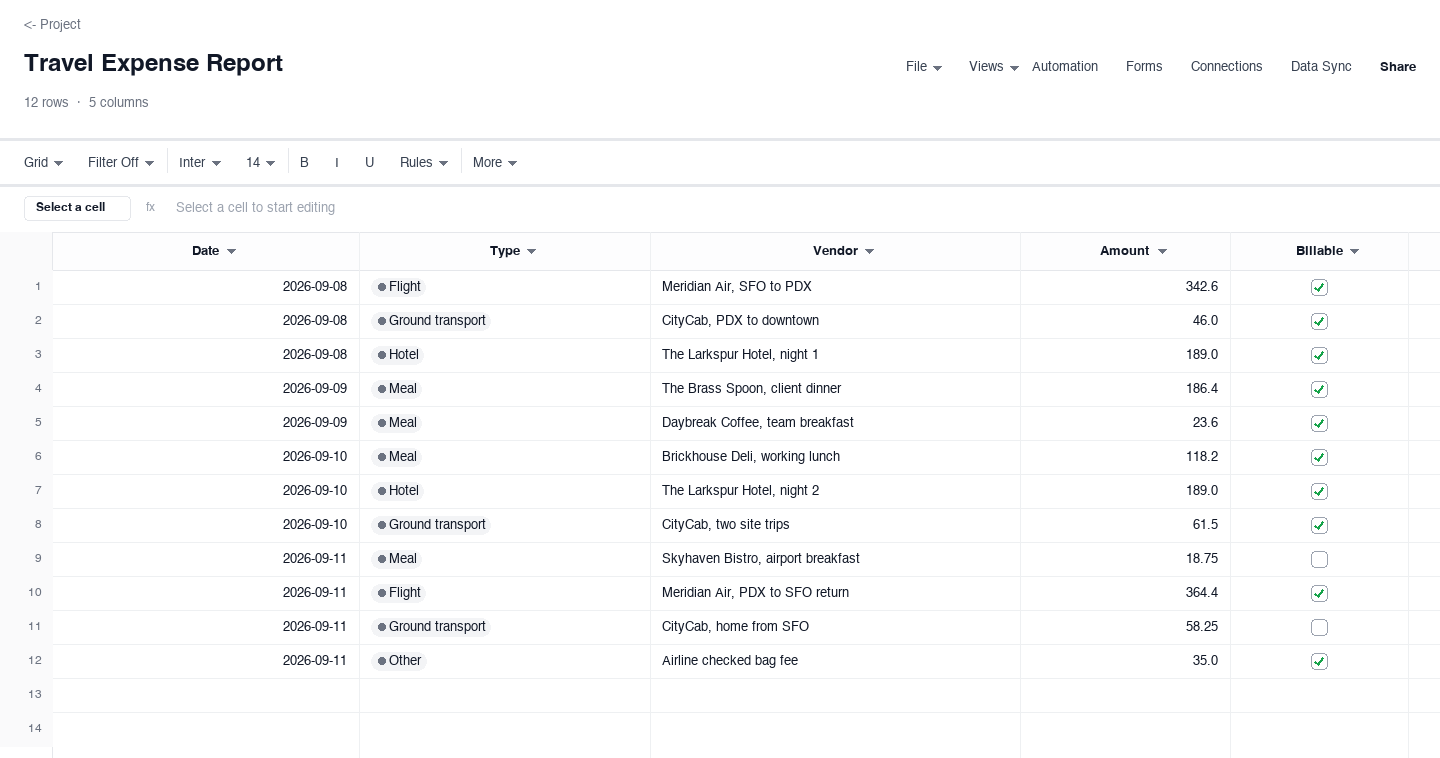
The travel version is built for multi-day client trips: date, expense type such as flight, hotel, or meal, the vendor, the amount, and whether the cost is billable to the client. Use it when the trip mixes personal spend with client pass-throughs and the invoice needs to separate them. The billable flag is the control that earns its keep, because marking it at entry, in the taxi, beats reconstructing it from memory when the client invoice goes out three weeks later.
Expense Report With Approval
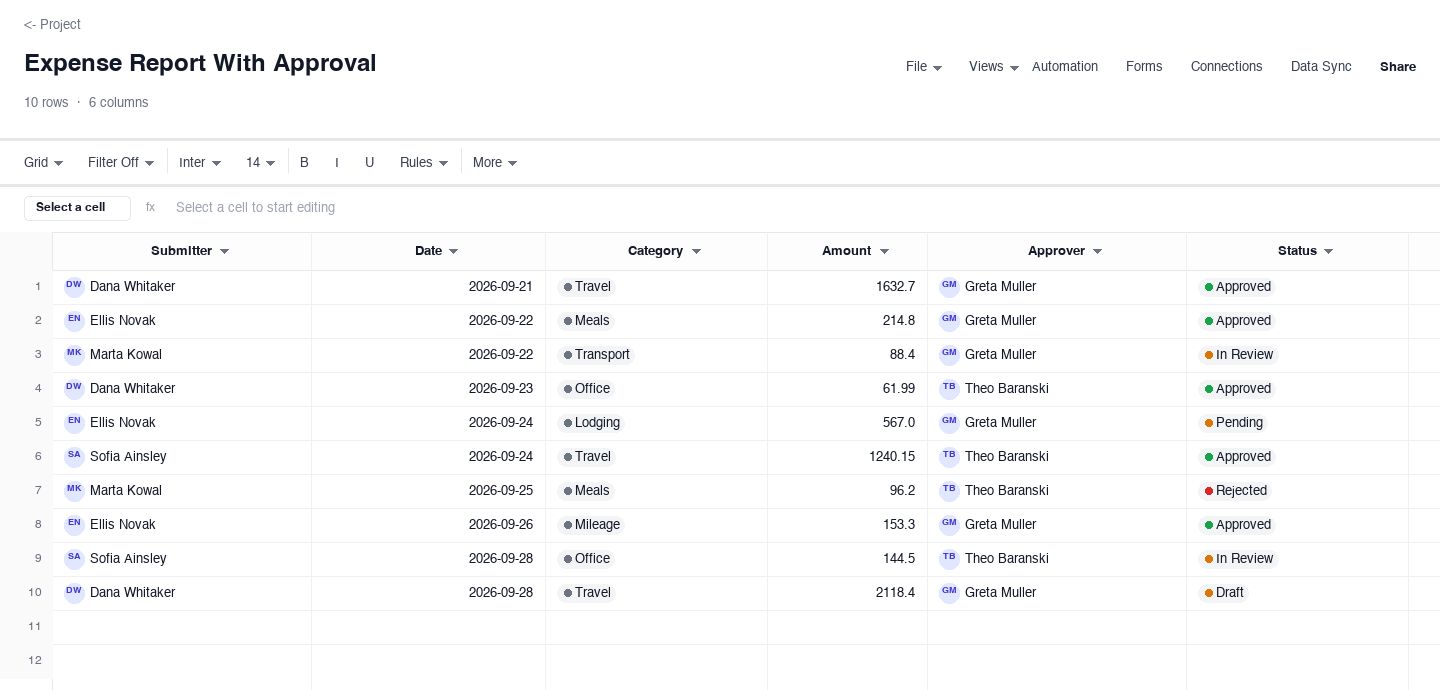
The approval version is for firms where spend needs a second pair of eyes: submitter, date, category, amount, the named approver, and a status that moves from pending through approved or rejected. Use it the moment reimbursements outgrow a single inbox, because the status column turns a pile of emails into a queue. The named approver matters: a rejected line with a person attached starts a conversation, an unnamed no starts a grudge.
How to run an expense report process people actually follow
Set one submission deadline per week and pay on a fixed cycle
Reimbursement speed decides whether the process gets followed. Pick one day, Friday at three works widely, as the cutoff for that week expenses, and a fixed pay date, the second and fourth payroll runs, so a late report simply waits. Publish both dates where travelers can see them. The running-total column in the simple variant means the report is already written by Friday: the week rows accumulate themselves, and submission becomes a review, not a reconstruction. The worst system is month-end submission with vague payment, because it trains people to batch, forget, and estimate.
Require a receipt for anything above a written floor
Every policy needs a floor, a dollar amount under which no receipt is required, written down and applied without exception. Common choices fall between ten and twenty-five dollars. Above the floor, no receipt means no reimbursement, with no exceptions for seniority, because the exceptions become the policy. The receipt checkbox in the simple variant is the enforcement point: it is checked when the receipt is photographed and filed, not when the money was spent. Photograph paper receipts the same day; thermal paper fades to blank inside a year, and faded paper is how legitimate claims die.
Log mileage the day of the trip, at one fixed rate
Mileage claimed from memory at month end is always wrong, usually high, and sometimes by a lot. The log works when it happens the day of the drive: date, purpose, from, to, miles. One company rate, applied to everyone, ends every argument about whose car costs what; the mileage variant multiplies miles by rate automatically and the amount column needs no judgment. Commuting never qualifies, and a purpose like client working session, tied to a calendar entry, is what makes the line defensible years later when someone asks why it was business.
Flag billable expenses at the moment of spending
A billable expense that is not flagged at entry is donated margin. The traveler knows whether dinner was with the client; three weeks later, at invoicing, everyone guesses. The travel variant billable checkbox takes ten seconds in the taxi and saves the finance person an email chain per line. Then the rule is mechanical: flagged costs invoice to the client at cost or at the stated markup, unflagged costs stay with the firm. Review the split monthly, because systematic over-flagging has a cost too: clients who audit pass-throughs and find a personal dinner stop trusting every line.
Route every report through one visible approval queue
Approval by chat message does not scale past about five travelers: requests drown, and nobody can say what is waiting on whom. The with-approval variant puts submitter, amount, approver, and status in one queue, newest on top, and the rule is one business day to approve or reject with a reason. Rejection with a name attached starts a conversation about policy; rejection by silence starts a grudge. Once a month, the approver should read the aggregate, category totals by person, because one traveler running triple the meal spend of peers is a coaching conversation, not a policy change.
Reconcile the reports against the card and bank statements monthly
The control that closes the loop: each month, total the approved reports and compare them to the reimbursement run in the bank feed, line for line by person. Duplicate submissions, a hotel charged to both card and report, cash advances never settled, all show up here, and they are cheap to fix at month end and expensive at audit. The running totals in the simple and travel variants make the comparison almost mechanical. When the two numbers agree without heroics, the process is honest; when they disagree by a recurring amount, find the habit causing it before it compounds.
Looking for an expense report template in Excel?
The downloads above are Excel-ready spreadsheet files, so searching for an "expense report template excel" lands in the right place. Open the .xlsx in Excel and the columns, the receipt checkboxes, and the running totals all work as expected, with no macros and nothing locked. The same file opens in the other usual tools, so the traveler can keep the log and the office can review it in whatever they run.
Two habits make the spreadsheet version better than a printed form. First, keep one file per person per month and let the running total column accumulate, so the report builds itself through the month instead of being reconstructed from a shoebox of receipts. Second, export to PDF only at submission, so the approver reads a frozen copy while the working file stays alive for corrections.
Is a business expense spreadsheet the same as a business expense template?
Nearly. A business expense template is the blank structure: the columns, the categories, the approval flow. A business expense spreadsheet is that structure loaded with a month of actual spending, yours or a sample like the fictional consulting firm above. The template is the mold; the spreadsheet is the cast. Most people searching either phrase want the same deliverable: a file they can open, understand in one glance, and start entering receipts into.
The four variants above cover both intents. If you want the mold, take the simple version and clear the example rows. If you want to see the mold working, study the travel version, where the billable flag splits reimbursable spend from client pass-throughs. Either way you end up with the same artifact: one sheet where every dollar of company spending has a date, a category, and a receipt state.
Frequently asked questions
What should an expense report include?
At minimum: the submitter, each expense date, a category, a description specific enough to recognize, the amount, and receipt status. Amounts should match receipts exactly, including tip, and the report should total itself. The simple-expense-report variant above carries all of that plus a running total, and the travel version adds a billable flag for costs the client will reimburse.
What receipts do I need to keep for expenses?
Keep a receipt for anything the company reimburses, and flag it on the report the day you spend it. Paper fades, so photograph receipts into a folder named by month before they go in the wallet. Finance teams typically set a floor, no receipt under some small amount, and auditors accept that, but they expect the floor to be written down and followed. The receipt checkbox column above is the habit that makes the policy real.
How are mileage expenses calculated?
Miles driven times the company reimbursement rate. The mileage variant above multiplies the two for you and shows the math in its own columns: date, purpose, from and to, miles, rate, amount. Log the mapped distance the day of the trip, because reconstruction a month later is where inflated mileage claims come from, honest or not. Personal commuting never belongs on the log, and the purpose column is what keeps the rest defensible.
What is the difference between billable and reimbursable expenses?
Reimbursable means the company pays the employee back; billable means the client pays the company. A consultant hotel night is usually both: the firm reimburses the traveler, then invoices the client at cost or with a markup. The travel-expense-report variant above keeps the two concepts separate with a checkbox, which matters because unmarked billables are quietly donated margin, and marking them at entry is the only reliable moment.
How do I stop expense reports from piling up at month end?
Move the deadline forward and shrink the unit of work. A weekly submission day, with the running-total log above acting as the always-ready draft, turns month end into a review of four finished weeks instead of an archaeological dig through a wallet. Reimburse on a fixed cycle, twice monthly works, so submitting late means waiting, which is the gentle pressure that keeps the habit alive.
Can I download the expense report template in Excel?
Yes. Every variant above downloads as an .xlsx file that opens directly in Excel, with the receipt checkboxes, running totals, and approval statuses intact and no macros involved. The same file opens in the other common spreadsheet tools, so a traveling team can keep logs on whatever they have and the office can consolidate without conversion.
Run it live instead of in a file.
The downloads above are yours either way. In Wisegrid the same template becomes a working sheet with owner contacts, status dropdowns, reminders, and dashboards. 7-day free trial, no credit card required.