Purchase Order Template: Free Downloads and a Fill-In Guide for 2026
A purchase order is the document a buyer sends a supplier that says: we agree to buy these items, in these quantities, at these prices, under these terms. Once the supplier accepts it, it becomes a binding commitment on both sides, which is exactly why a good purchase order template matters. It turns an informal request into a structured record that finance can audit, receiving can match deliveries against, and both companies can point to when a shipment or an invoice does not match what was agreed.
It is not an invoice and it is not a payment. The purchase order comes first: it authorizes the spend before money changes hands. The invoice comes later, and the three-way match between what you ordered, what you received, and what you were billed is the control that stops overbilling dead. A well-built purchase order template carries every field that match needs: item details, quantities, unit prices, delivery terms, and the approval that authorized it.
Four purchase order templates, free to download
Each version below is a working spreadsheet, not a blank grid with a title row. The fields are pre-filled with realistic example content from a fictional catering company so you can see how a finished purchase order reads, then overwrite it with your own details. What you download is an everyday spreadsheet file, compatible with all the usual tools. No email address required.
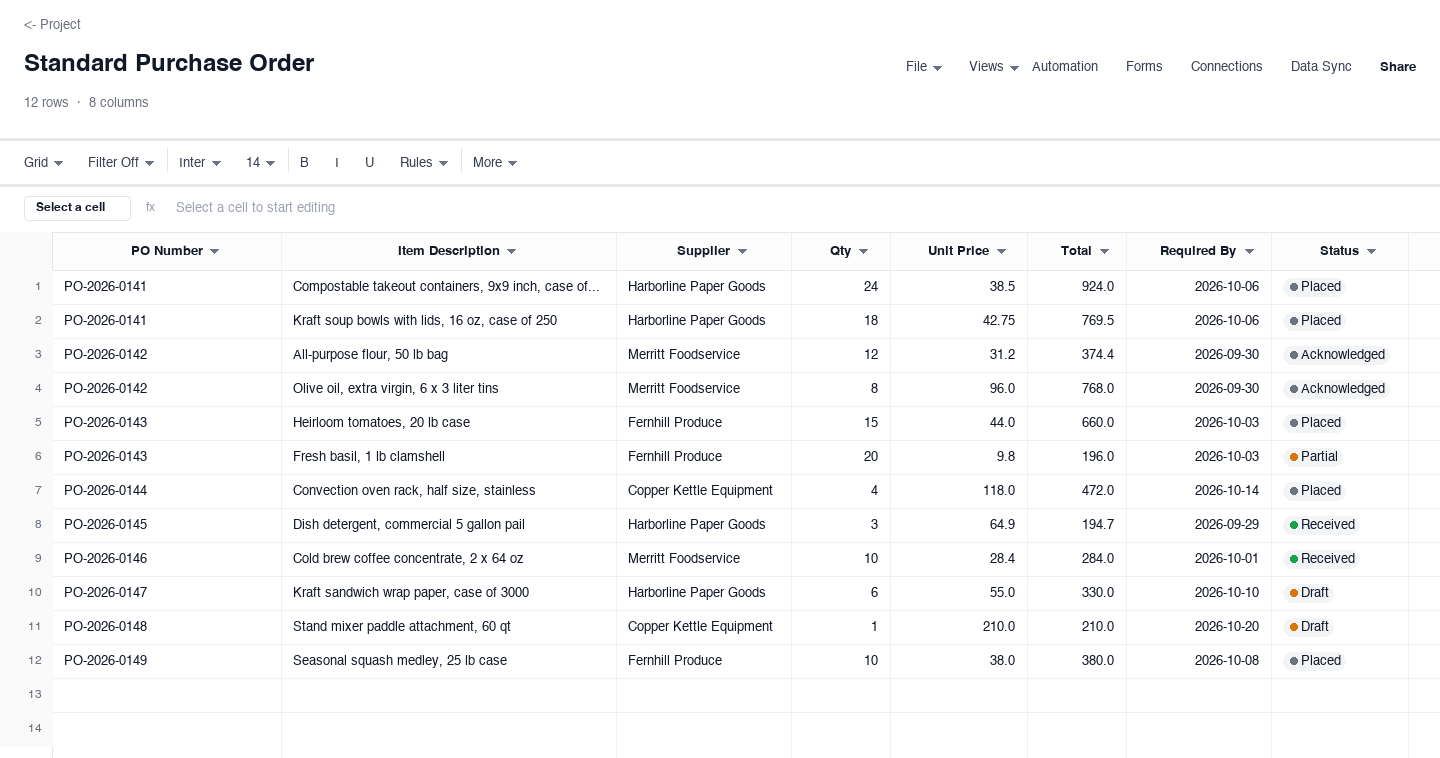
Standard Purchase Order
The standard purchase order is the version most businesses should use for everyday buying: line items with descriptions, quantities, unit prices, extended totals, a required-by date, and a status column that tracks each line from placed through received. Use it when you know exactly what you need, from whom, and by when, and you want one document that receiving, accounts payable, and the supplier can all work from. The per-line status column is the small feature that earns its keep during a busy receiving week, because it shows which lines are still open without a phone call to the vendor.
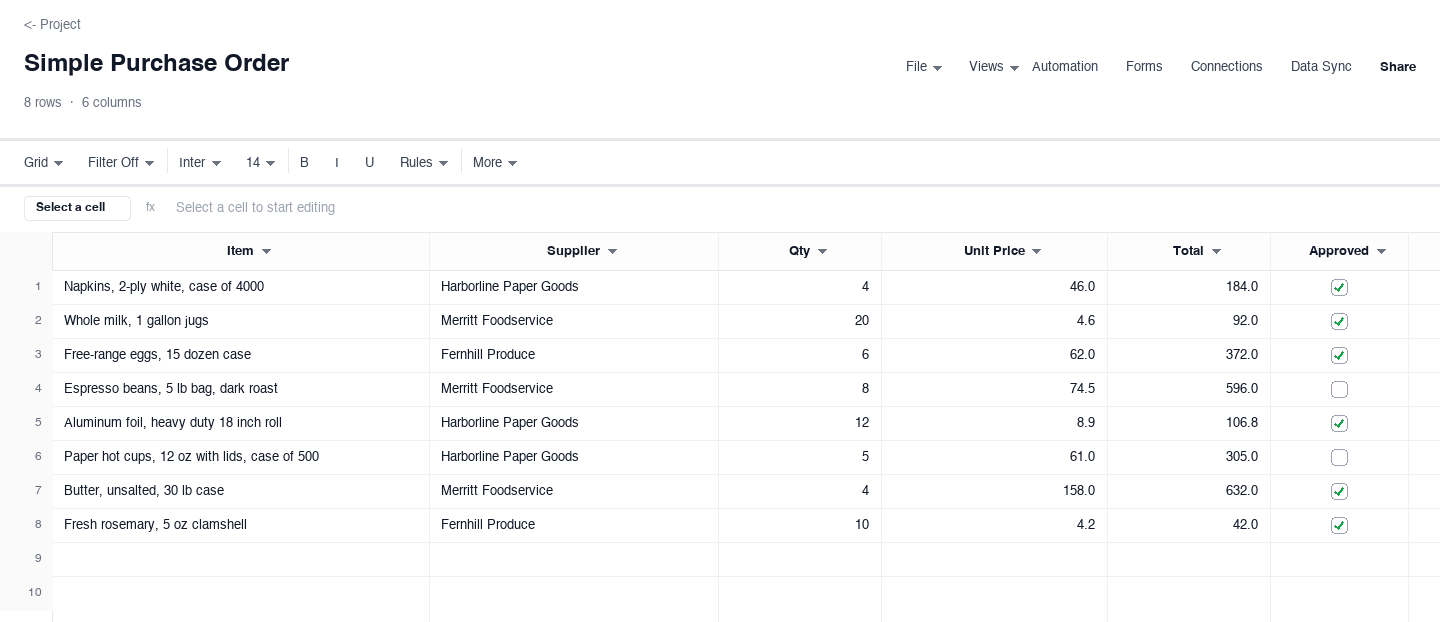
Simple Purchase Order
The simple purchase order strips the document to what a small order actually needs: item, supplier, quantity, unit price, total, and an approved flag. Use it for straightforward repeat purchases where a full formal document would slow everyone down, or as the internal request form a manager fills in before finance generates the formal version. Nothing computes beyond the line total, nothing needs configuring, and a first-time user can complete it correctly in five minutes, which is the entire point of the simple version.
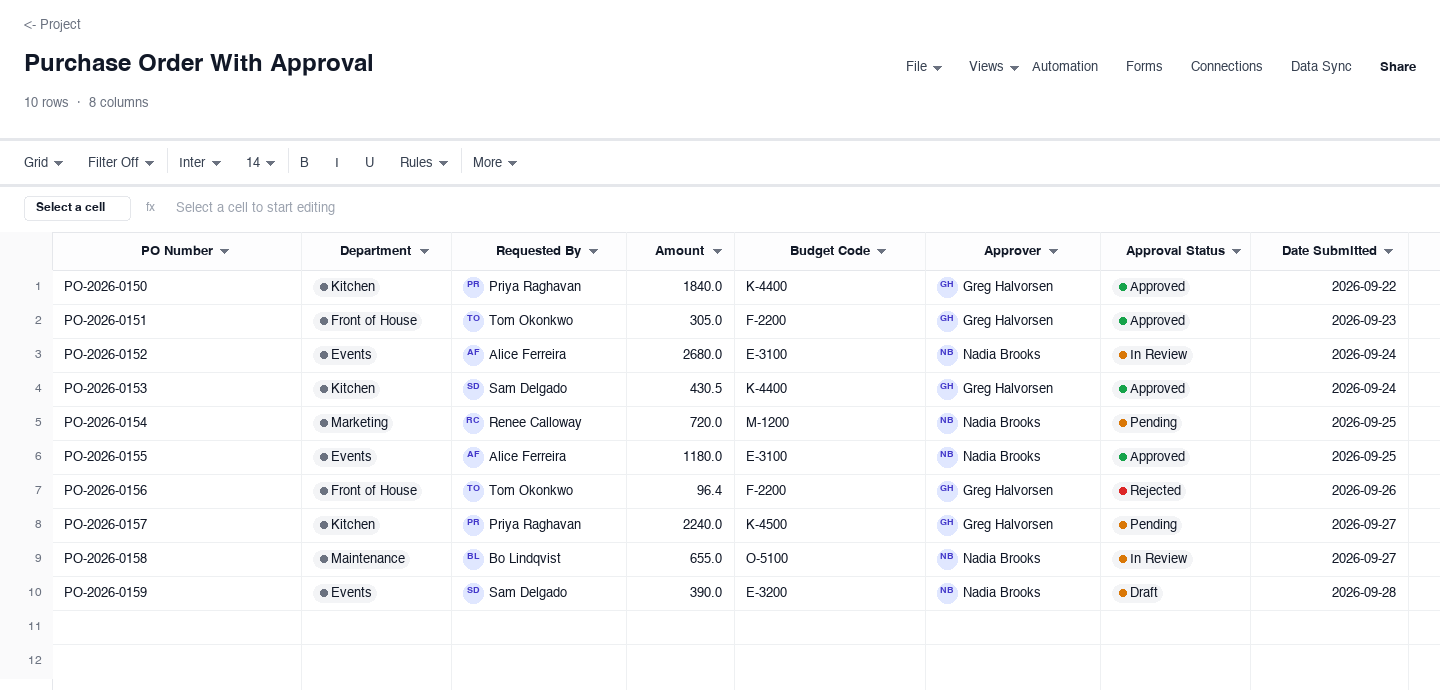
Purchase Order With Approval
The approval purchase order is for organizations where nothing gets ordered until someone with budget authority says yes. Every request carries its department, requester, amount, budget code, named approver, and an approval status with the date it was submitted, so the queue of pending orders manages itself. Use it the moment more than one person can spend money, because it replaces the chat message approval trail with a record finance can actually audit, and it shows every requester exactly where their order stands.
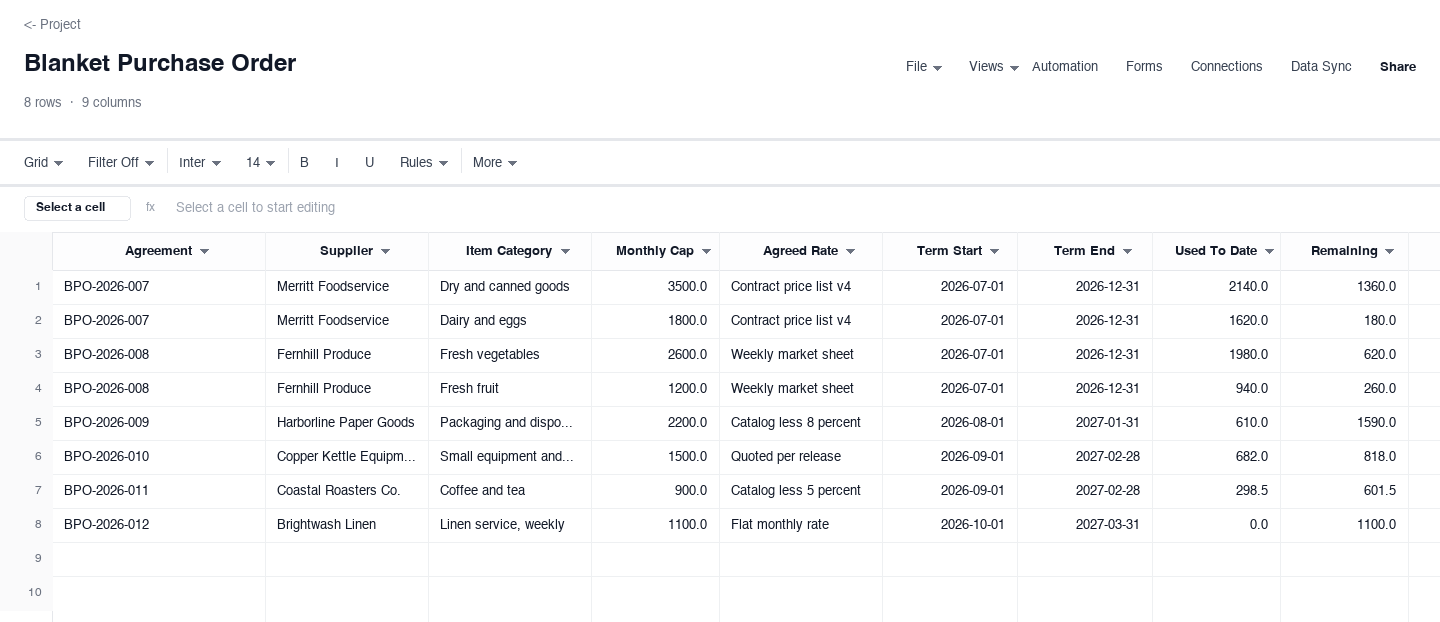
Blanket Purchase Order
The blanket purchase order covers recurring purchases under one agreement instead of a fresh order every time: a supplier, an item category, a monthly cap, an agreed rate, and running totals of what has been used and what remains. Use it for consumables you reorder constantly, like packaging, ingredients, or office supplies, where negotiating once and releasing against the agreement saves administrative effort on both sides. The remaining-balance column is what makes it safe: you can see the cap approaching before you order, not when the invoice arrives.
How to write a purchase order that gets accepted the first time
Give every purchase order a unique number
The PO number is the reference every later conversation hangs on: the delivery note, the invoice, the payment, the dispute. Pick a scheme and never reuse one, even for cancelled orders. A simple running sequence with a year prefix works for most small businesses, and larger ones often encode department or location. Whatever the scheme, the rule is the same: one number, one order, forever, so a buyer and a supplier can always land on the same document when they say the number aloud.
Describe items the way the supplier catalogs them
The fastest way to get a purchase order bounced is a vague line item. Write the supplier part number when you have it, then the description, unit of measure, and quantity: cases, each, pallets, hours. If the item has a specification that matters, like a size, a grade, or a color, put it in the description rather than in a separate email. The test is whether a receiving clerk who has never spoken to you could match the delivery against the line without calling anyone.
State prices as unit prices, and make totals compute
Every line should carry a unit price and a computed extended total, with the order total at the bottom. Unit pricing matters because quantities change: a supplier quoting a lump sum hides what a partial delivery actually costs you. Put the subtotal, any tax, and the grand total in their own rows, and let the spreadsheet do the arithmetic. A purchase order whose totals were typed by hand is where pricing errors and quiet overbilling live.
Write the delivery terms into the order, not around it
Ship-to address, required-by date, delivery method, and who pays freight belong on the purchase order itself. Vague delivery terms are how urgent orders quietly become expedited freight charges that nobody approved. If partial shipments are acceptable, say so; if they are not, say that instead. The receiving team also needs the required-by date in advance so they can plan space and staffing, and the date on the PO is the reference they plan against.
Get approval before you send it, and record it on the document
The purchase order is a commitment of company money, so the person with budget authority should approve it before it leaves the building, and that approval should be visible on the document: approver name, date, and a status that says approved rather than implied. Retroactive approvals are how maverick spend happens, and they collapse the moment finance asks who authorized a charge. The approval column in the with-approval version above exists for exactly this control.
Match deliveries and invoices against the PO every time
The purchase order earns its keep after the order, in the three-way match: ordered versus received versus billed. When a delivery arrives, check it against the PO lines and mark what came in. When the invoice arrives, match it against the same lines before paying. Any mismatch, wrong quantity, wrong price, early delivery, is a conversation to have with the supplier, not a difference to absorb. Companies that match consistently stop overpaying almost immediately; it is the cheapest control in procurement.
Need a purchase order template in Word or PDF?
Plenty of suppliers and franchisors still ask for the purchase order as a Word document or a PDF, usually because it gets attached to a vendor onboarding pack or routed for a signature. The downloads above are .xlsx files by design, because a spreadsheet keeps quantities, unit prices, and totals computing correctly, but they convert cleanly: open the file, set the print area, and export or print to PDF directly, which is the format most suppliers actually want anyway.
If your organization keeps a Word purchase order as the format of record, a practical split is to maintain the working version in the spreadsheet, where the totals stay honest and the status column tracks receiving, then save a PDF copy for the vendor file. You keep one living source of truth and still hand suppliers the artifact they can file, and the PO number ties every version together.
Frequently asked questions
What is the difference between a purchase order and an invoice?
A purchase order is sent by the buyer before the purchase: it commits the company to buy specific items at specific prices under specific terms, subject to the supplier accepting it. An invoice is sent by the seller after delivery: it requests payment for what was actually supplied. The two meet in the three-way match, where what you ordered is compared against what you received and what you were billed, and any difference is resolved before payment goes out.
Is a purchase order legally binding?
Once the supplier accepts or acknowledges it, yes: a purchase order is an offer to buy, and acceptance forms a contract between the two companies. That is why approval discipline matters so much. The person whose name sits on the approval has committed company funds. Until it is accepted, either side can usually walk away, which is why prompt supplier acknowledgment is worth asking for on orders that matter.
What is a blanket purchase order?
A blanket purchase order is one agreement that covers many deliveries over a period of time: a supplier, a category of goods, an agreed rate, and a spending cap, with individual releases drawn against it as needed. It suits consumables you reorder constantly, where negotiating once beats negotiating every time. The controls that keep it safe are a written cap, running totals of what has been used, and a check against the remaining balance before each release, all of which the blanket version above carries.
What information must a purchase order include?
At minimum: a unique PO number, the buyer and supplier names and addresses, order date, line items with descriptions and quantities, unit prices and extended totals, the order total, delivery address and required-by date, payment terms, and an authorized signature or approval. Buyers and suppliers both do better when freight terms and partial-shipment rules are stated explicitly rather than left to habit, because assumptions on those two points cause most of the disputes that slow paying.
Do small businesses really need purchase orders?
The moment more than one person can spend money, or the first time an invoice arrives that does not match what you thought you agreed, yes. Small businesses often start with verbal orders and goodwill, and it works until it does not: a forgotten price, a duplicate delivery, a card charge nobody recognizes. A one-page purchase order is the lightest control that fixes all three, and the simple version above takes less time than the chat thread it replaces.
How does a purchase order work with inventory tracking?
The purchase order is the first half of the inventory story and receiving is the second. Ordered quantities tell you what is coming, so available stock plus on-order stock is the real picture of what you can promise customers. When deliveries arrive and are checked against the PO, the same lines update what is actually on hand. Keeping the purchase order lines and the inventory sheet consistent, by PO number, is what makes stock counts trustworthy without a periodic surprise.
Run it live instead of in a file.
The downloads above are yours either way. In Wisegrid the same template becomes a working sheet with owner contacts, status dropdowns, reminders, and dashboards. 7-day free trial, no credit card required.