Estimate Template: Free Downloads and a Pricing Guide for 2026
An estimate template is the document a contractor, landscaper, or service business sends a client before any work starts: what will be done, in what quantity, at what price, and until what date the price holds. It sits between a conversation and a contract. Done well, it shows the client exactly what they are buying, line by line, and it gives the business a record of what was promised when scope questions come up after the work begins.
It is not an invoice and it is not a contract. The estimate comes first: it prices the work before anyone commits. The work order follows when the client says yes, and the invoice comes after delivery. A well-built estimate template carries every field that chain needs: line items with quantities and unit costs, computed totals, a section or category column that separates labor from materials, and a validity date so the price does not drift when material costs move.
Four estimate templates, free to download
Each version below is a working spreadsheet, not a blank grid with a title row. The fields are pre-filled with realistic example content from a fictional remodeling contractor and a landscaping crew so you can see how a finished estimate reads, then overwrite it with your own details. What you download is an everyday spreadsheet file, compatible with all the usual tools. No email address required.
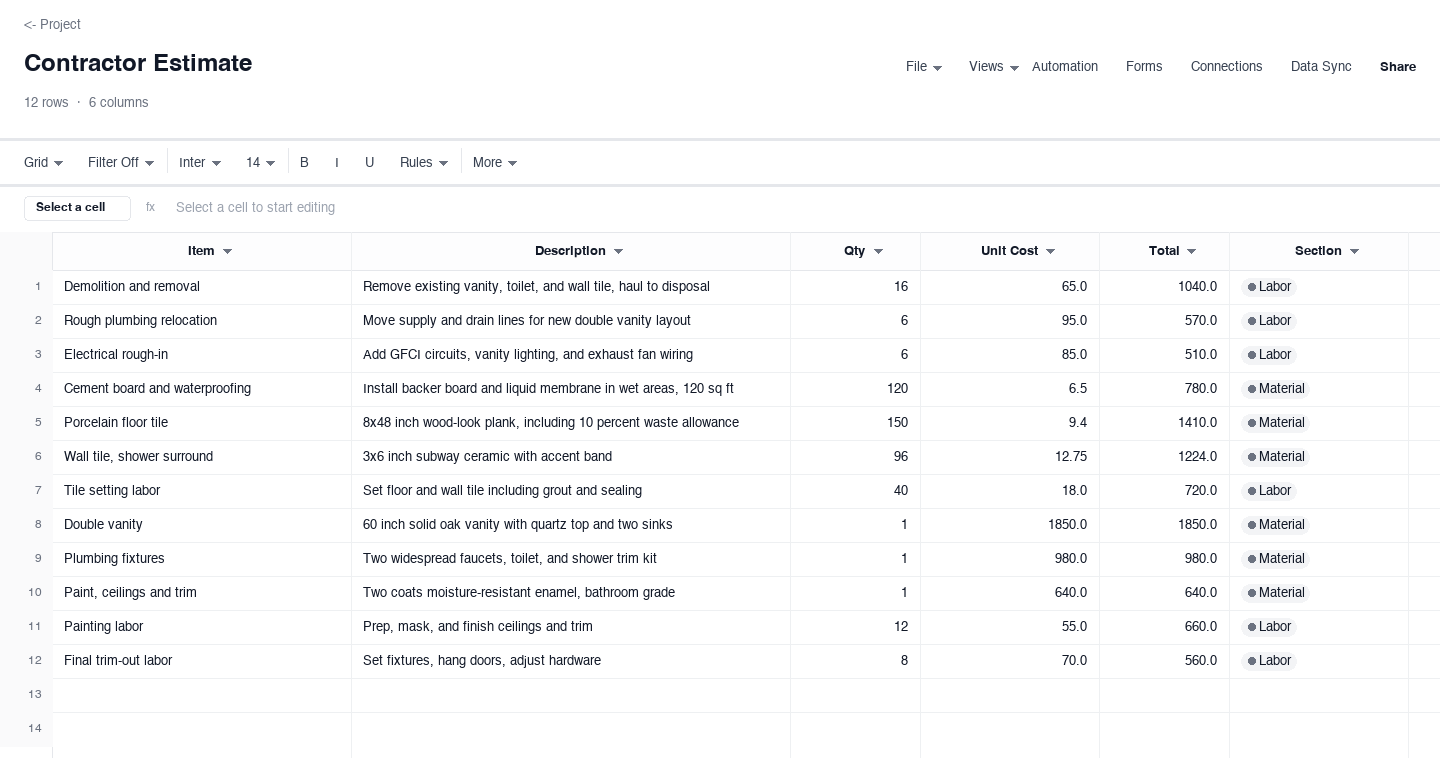
Contractor Estimate
The contractor estimate is the everyday version for remodelers and trades: line items with descriptions, quantities, unit costs, computed totals, and a section column that splits every line into labor or material. Use it when you price scoped work for a homeowner and need the client to see where the money goes. The labor and material split is the column that earns its keep, because clients accept a higher total when they can see the material share sitting beside the hours.
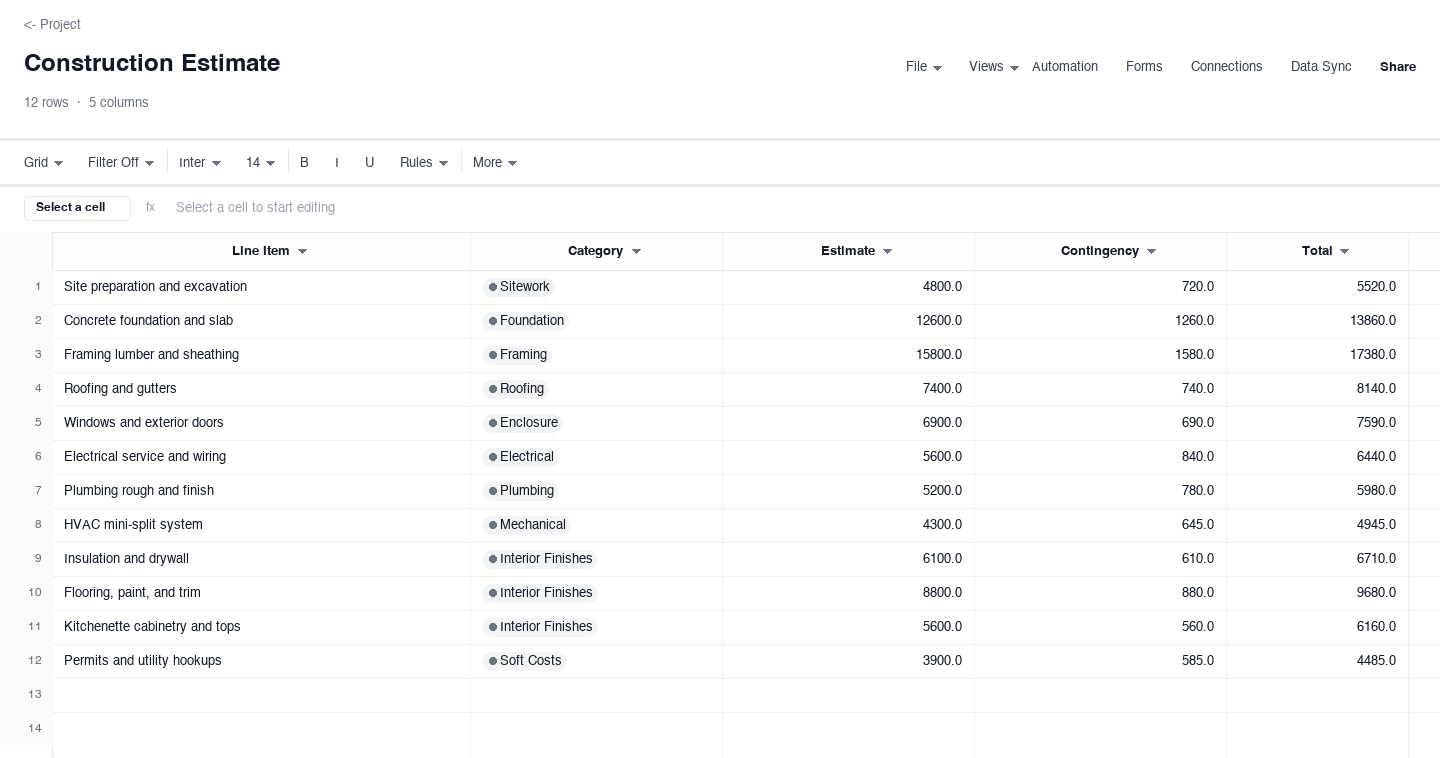
Construction Estimate
The construction estimate is for larger jobs priced by category rather than by one long list: sitework, foundation, framing, and the rest, each with an estimate, a contingency allowance, and a computed total. Use it when the job has phases that carry different risk, so the contingency can sit where surprises actually happen. The contingency column earns its keep when lumber or copper moves mid-job, because the allowance is already agreed instead of becoming a change order conversation.
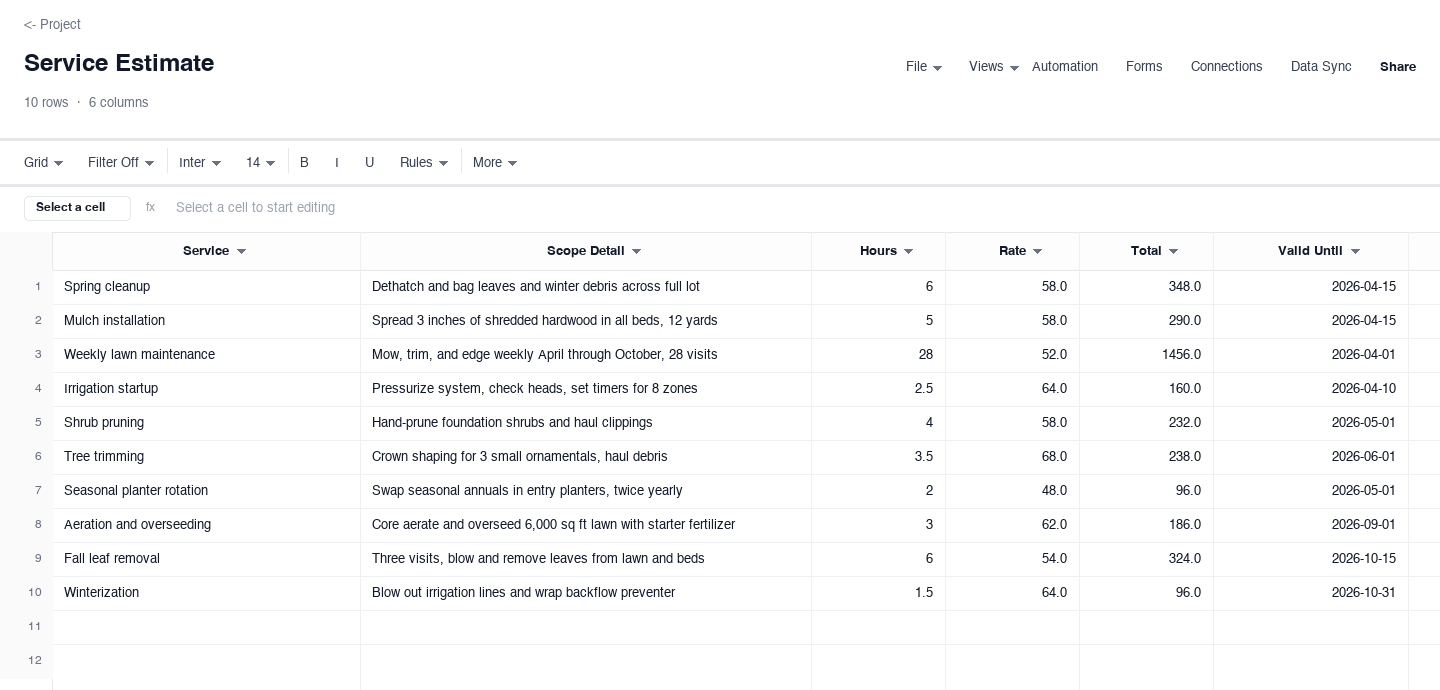
Service Estimate
The service estimate fits businesses that sell time: a service, a scope detail, estimated hours, an hourly rate, a computed total, and a valid-until date. Use it for cleanup visits, maintenance plans, and small jobs where the price is mostly labor and the client wants to see the hourly logic. The valid-until date earns its keep in the spring rush, because it gives a busy crew a polite way to expire prices when the schedule fills and rates move.
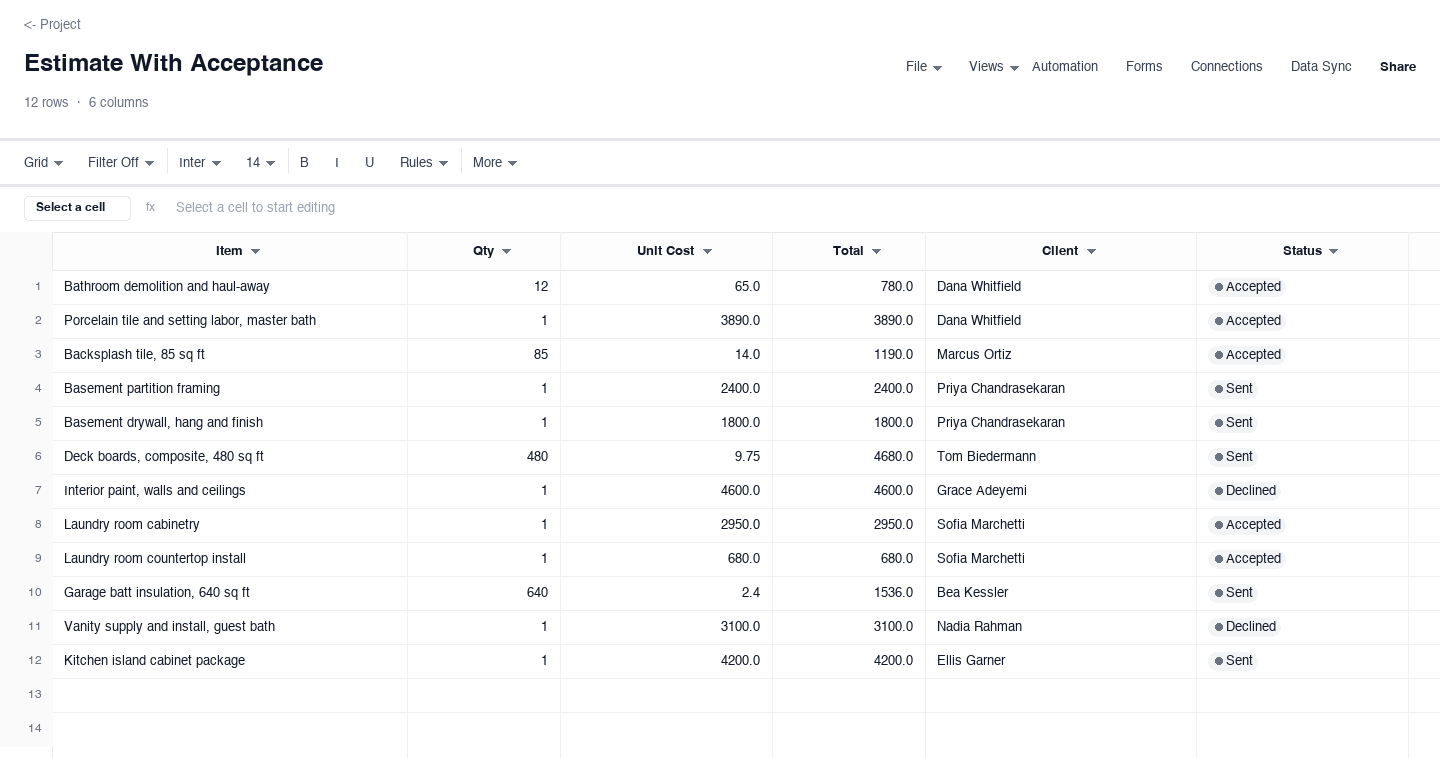
Estimate With Acceptance
The estimate with acceptance tracks the estimate after it leaves your outbox: every line carries the client and a status of sent, accepted, or declined. Use it when you run several estimates at once and need to see which clients said yes without digging through a sent folder. The status column earns its keep at the weekly review, because one sort shows every open estimate and every declined one, which tells you exactly which pipeline numbers to trust.
How to write an estimate that gets accepted without a haggle
Scope the work before you price a single line
Walk the site, measure, and write the scope in plain language before you open the spreadsheet. An estimate written from a phone photo misses the rotted subfloor behind the vanity, and that miss becomes a change order that erodes client trust. List everything you will do and, just as important, what you will not do, like moving furniture or pulling permits, so the client cannot add those tasks later for free.
Write line items a client can read and picture
Every line should carry a quantity and a unit cost, never a lump sum, because quantities change and unit pricing shows the client the math. Break the job into lines a non-tradesperson can picture: demolition, rough plumbing, tile and setting labor, trim-out. Vague lines like misc or labor invite the client to negotiate the whole number instead of questioning one line, and they make your total impossible to compare against the next bid.
Separate labor from materials in their own sections
Clients accept totals more readily when they can see the split. Materials pass through at cost plus a stated markup, and labor carries your loaded hourly rate. The split also protects you when material prices move: update the material lines alone and reissue, while labor stays fixed. It also matches how careful clients compare bids, line by line, so your estimate reads fairly next to a competitor lump sum that hides the same numbers.
Add contingency where the risk actually lives
On renovation work the unknowns hide behind walls and under floors, so state a contingency as its own figure, not buried in unit prices. Ten percent on demolition and structural work, five on finishes, is a defensible spread. When the surprise arrives, you spend the allowance the client already agreed to instead of writing a change order, and the conversation stays calm because the buffer was on the document they signed.
Put a validity date on every price you send
Material prices move, and an estimate with no expiry is an open-ended promise that a busy season will force you to break. Thirty days is the common window for residential work, sixty when lead times stretch the job. If costs rise before acceptance, issue a revised estimate that references the original number, so the client sees the market movement instead of suspecting a price change. The service version above carries the valid-until column for exactly this.
Turn the accepted estimate into a work order
The estimate is the first half of the paper trail. When the client accepts, carry the accepted lines into a work order that names the crew, the schedule, and the materials, so the person doing the work prices against the same numbers the client approved. The acceptance-status version above exists for that handoff: one row per priced line, one status per client, and a record of exactly which estimate became which job.
Looking for a construction estimate template or a contractor estimate template?
The two searches land on the same sheet family. A construction estimate template and a contractor estimate template are the same document with the lines grouped differently: by trade category for larger construction work, or by labor and material sections for a remodeling job. The contractor-estimate and construction-estimate versions above cover both, so pick the shape that matches how your jobs break down rather than the wording of the search you typed.
If you run a remodeling or small construction business, start with the contractor version, because its labor and material sections match the questions clients actually ask. If you price ground-up or multi-phase work, the construction version gives each phase its own estimate, contingency, and total, which survives a scope conversation better than one long list. Both keep the math live, so a quantity change ripples through the totals without a calculator.
Is a construction bid template the same as an estimate template?
In residential work, yes: the two terms usually mean the same document, and searching for a construction bid template should end at the same downloads. A homeowner wants a written price, a scope, and a validity date, whether the header says estimate or bid. The distinction only becomes expensive in commercial work, where a bid is a firm commitment to a defined scope, sometimes with penalties attached, and it should never be issued casually from a ballpark-pricing sheet.
For a small contractor the practical rule is simple: your estimate becomes your bid the moment the client accepts it, so write every estimate well enough to survive that moment. Give each line a quantity and a unit cost, state what is excluded, and record the acceptance. The estimate-with-acceptance version above carries a status column for exactly that, so the trail from first conversation to committed job stays in one sheet.
Do I need construction estimating software, or is a spreadsheet enough?
For most small contractors, a spreadsheet does the math that matters: extended line totals, a contingency that adds correctly, tax, and a grand total. That answers the searches for free construction estimating software in Excel, because the downloads above are exactly that, working estimators with the arithmetic already in place rather than static forms. Dedicated estimating software earns its keep later, when saved assemblies and a live material price database start saving real hours every week.
The honest signal to upgrade is repetition. If you re-price the same twenty assemblies every week, a tool with a saved assembly library pays for itself quickly. Until then, the category-based version above behaves like the simple end of those products, one row per phase with a contingency column per category. Keep your price list on a second tab and the spreadsheet stays fast, free, and entirely yours.
Frequently asked questions
What is the difference between an estimate and a quote?
In everyday contracting the words overlap, and many clients treat them as identical. Strictly, an estimate is a considered projection of cost, and a quote is a fixed offer the client can accept to lock the price. Our quote template page covers the fixed-price format, while the versions on this page carry quantities, unit costs, and a validity date. If your number must hold once the client says yes, write it as a quote and treat the acceptance as binding.
Is a construction bid template different from a construction estimate template?
For residential work, no, they are the same document with a different header, and the downloads above serve both searches. The distinction matters in commercial work, where a bid is a firm commitment to a defined scope and carries real liability. For a small contractor the rule is to write every estimate well enough to survive becoming a bid: quantities, unit costs, exclusions, and a recorded acceptance.
How should I price labor on an estimate?
Charge your fully loaded hourly rate, not the wage you pay the crew. That rate covers wages, payroll taxes, workers compensation, insurance, vehicles, and a share of overhead, and most contractors land somewhere between 50 and 90 dollars an hour for skilled trades, depending on region and specialty. The labor section in the contractor-estimate version keeps those hours visible, and the valid-until date protects the rate when your schedule fills up.
Should materials be shown at cost or marked up?
Markup on materials is standard practice, and clients rarely object when it is visible. Show the material lines at the price you charge, and if a client asks, explain that the markup covers ordering, hauling, storage, and the risk that a price moves before the job starts. Hiding markup inside labor rates looks worse when it eventually surfaces. The labor and material split in the contractor version keeps the conversation honest and keeps your bid comparable against the next one the client collects.
How long should an estimate stay valid?
Thirty days is the common window for residential work, and sixty for jobs where material lead times stretch the schedule. State the valid-until date on the estimate itself, because the date converts an open-ended promise into a firm one. If material costs move before acceptance, issue a revised estimate that references the original number, so the client sees the market movement instead of suspecting a price change. The service-estimate version carries the date column for exactly this.
What do I do with an estimate a client declined?
Record the declined status and move on, but keep the row. Declined estimates are pricing data: a pattern of declines on the same line tells you where your number sits against the market, and one follow-up question usually reveals whether the issue was price, timing, or scope. The estimate-with-acceptance version keeps sent, accepted, and declined rows side by side, so the weekly review shows your real close rate without reconstructing a sent folder from memory.
Run it live instead of in a file.
The downloads above are yours either way. In Wisegrid the same template becomes a working sheet with owner contacts, status dropdowns, reminders, and dashboards. 7-day free trial, no credit card required.