Quote Template: The Best Way to Price and Win the Work in 2026
A quote tells a customer exactly what you will do and exactly what it will cost, at a price firm enough to be accepted on the spot. A good quote template turns that from a nervous email into a standard document: line items with quantities and rates, a subtotal that computes itself, tax, a validity date, and the terms the price depends on, all laid out so the customer can approve it without a second meeting.
The quote is also the first professional artifact most customers see from you, and it quietly sells. An itemized, dated, clearly bounded quote signals that the work will be run the same way, a vague total in an email signals the opposite. The versions below are working spreadsheets with realistic example content, so you can see how a finished quote reads before you overwrite it with your own numbers.
Free quote templates to download
Each version below is a working spreadsheet with live totals, not a blank grid with a logo box. The line items are pre-filled with realistic example content so you can see how a finished quote reads, then replace it with your own work. Nothing proprietary in the files. They behave like any spreadsheet you have ever opened. No email address required.
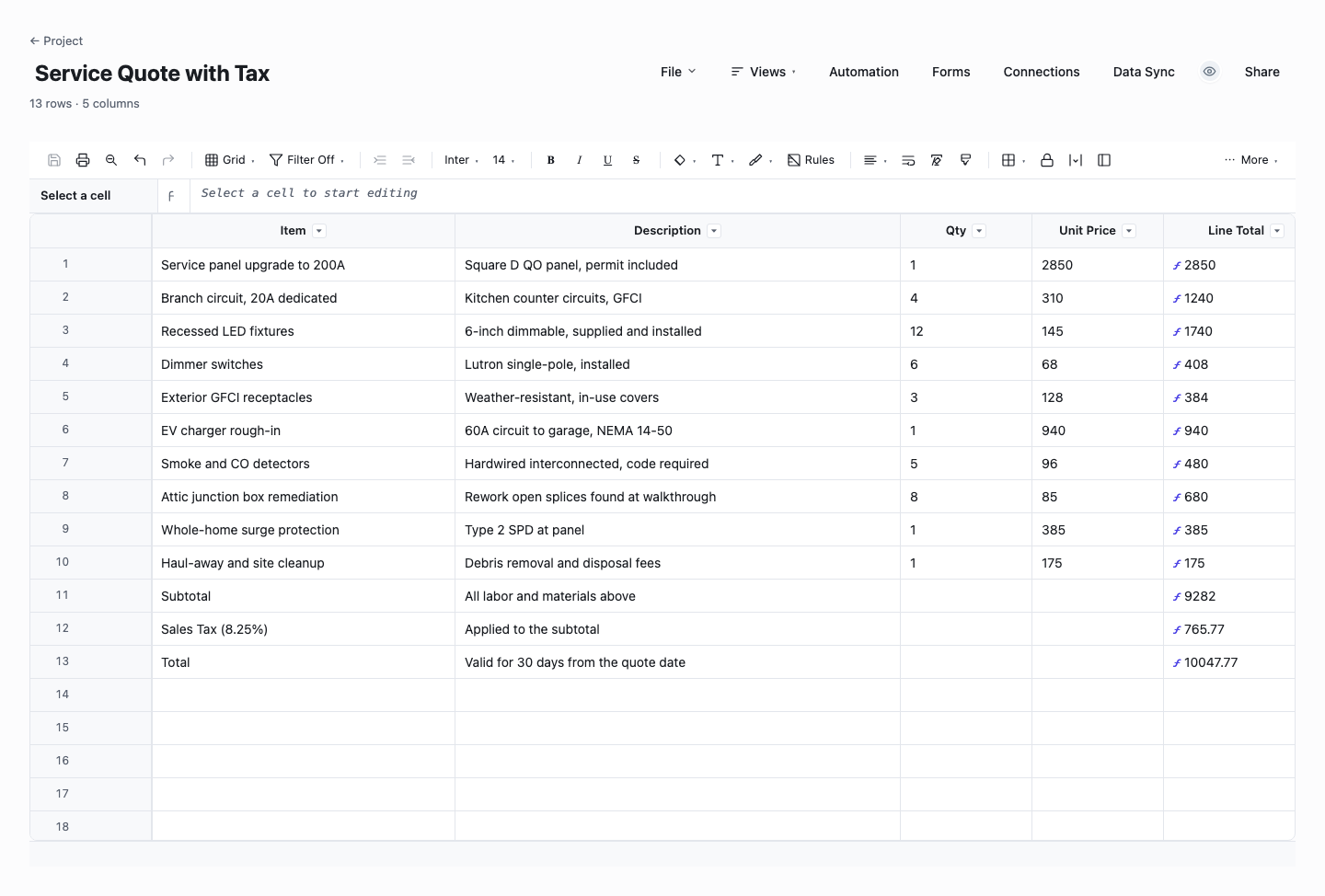
Service Quote with Tax
The service quote is the version most service businesses should start with: itemized lines with quantities and unit prices, and a subtotal, sales tax, and grand total that are all live formulas, so editing a quantity reprices the whole document instantly. Use it when the work breaks naturally into visible line items a customer can read and trim, which is most maintenance, installation, and professional services work. It is also the cleanest starting point to adapt, because tax handling is already wired in.
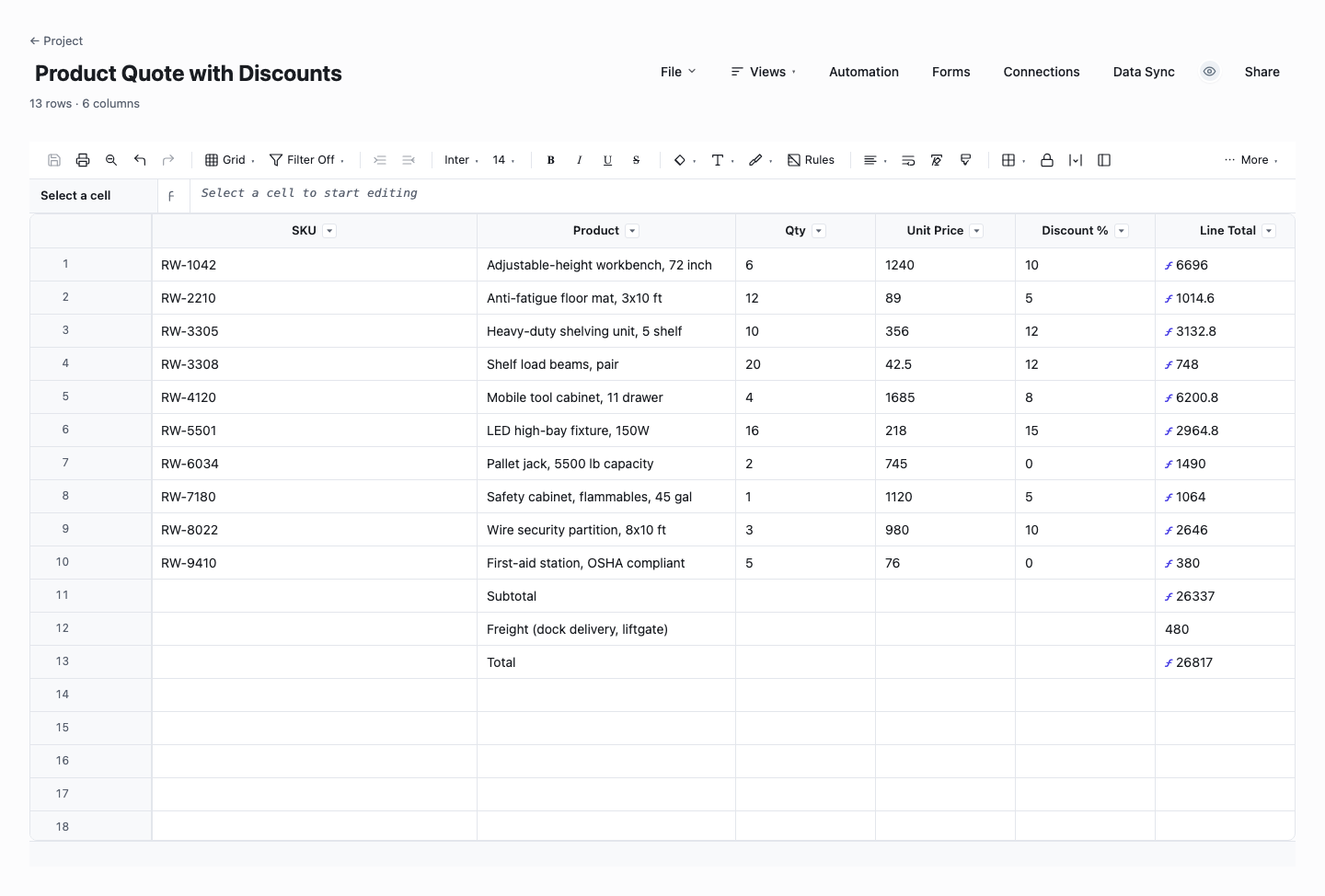
Product Quote with Discounts
The product quote adds a SKU column and a per-line discount, with the line total netting the discount out automatically. Use it when you quote physical goods and volume pricing is part of the conversation, because showing the discount per line keeps the concession visible instead of buried in a massaged unit price. Customers see what they are getting off list, you keep a record of exactly how much margin each deal gave away, and the totals never drift from the side math.
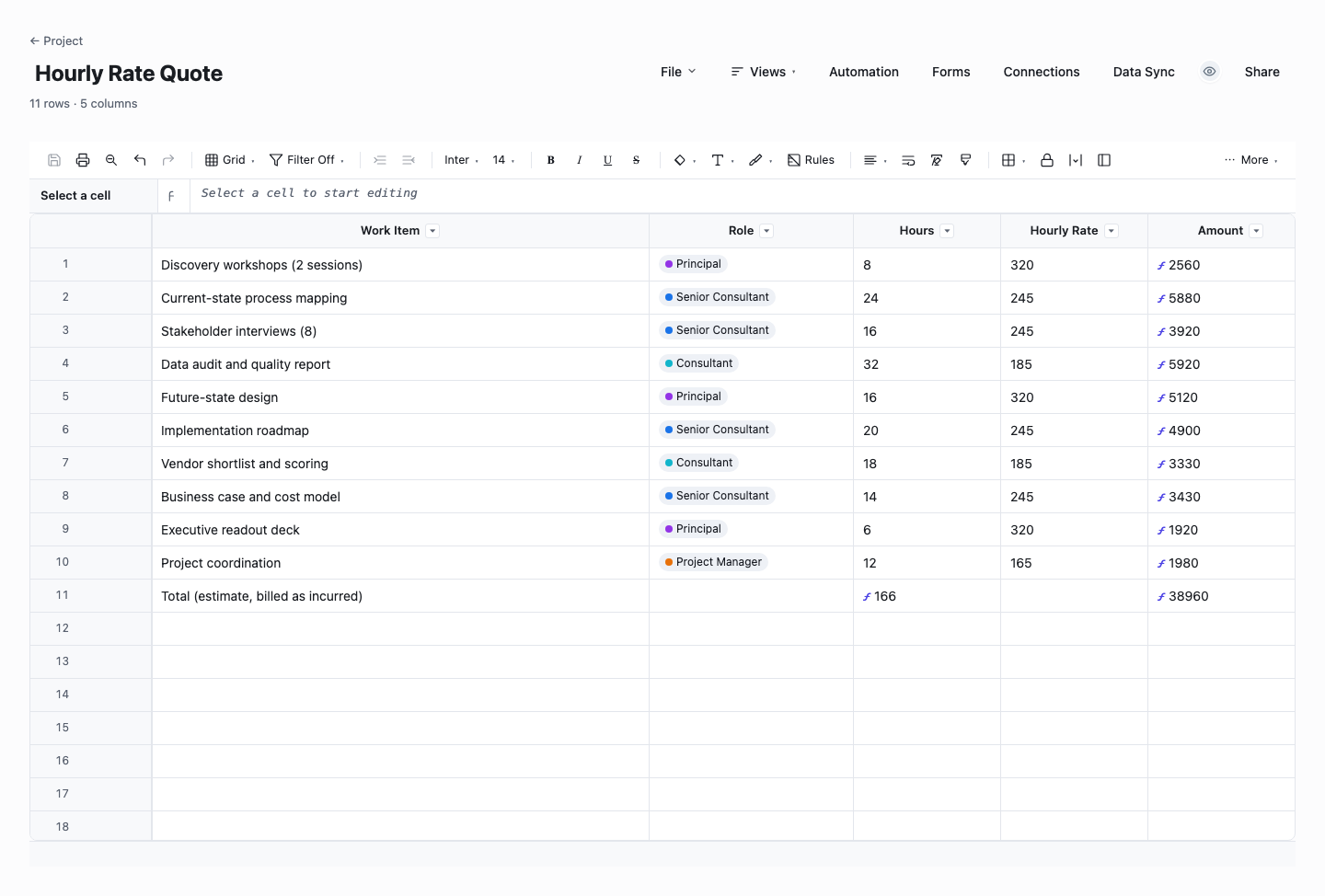
Hourly Rate Quote
The hourly rate quote prices time instead of things: each work item carries a role, estimated hours, and that role’s rate, and the amounts and project total compute themselves. Use it for agency, consulting, and trades work where the honest unit is the hour and the customer wants to see where the hours go. The role column quietly matters, because pricing senior and junior time at one blended rate is how estimates end up subsidizing the hardest work in the job.
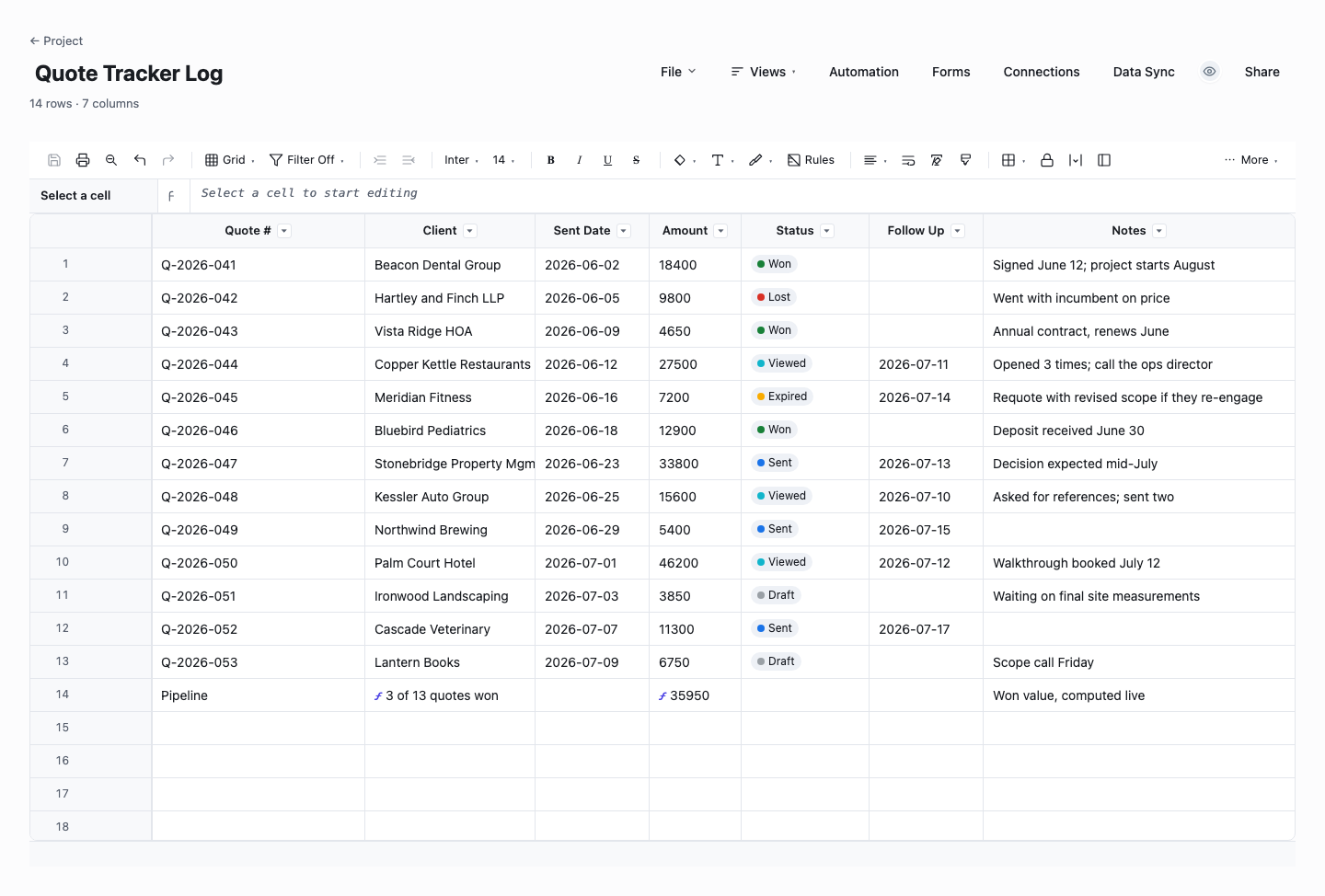
Quote Tracker Log
The quote tracker is not itself a quote. It is the register that manages all of them. Every quote you send becomes a row with its number, client, amount, sent date, status, and follow-up date, and a live summary row totals the value of won work. Use it from your very first quote, because the two dates it tracks, follow-up and validity, are where pipeline quietly dies, and the win-rate picture it builds is the best pricing feedback a small business can get for free.
How to write a quote that wins the work at a price you can keep
Scope the job before you price a line of it
Every bad quote starts the same way: pricing began before the work was understood. Walk the job, ask the questions, and write down what is included in enough detail that a stranger could tell what is not. If the customer cannot describe the outcome they want, the quote is premature, and the honest move is a paid discovery step or an estimate clearly labeled as one. The scope section of the quote is where disputes go to be prevented.
Choose line items or lump sum deliberately
Itemized quotes build trust and make approval easier, because the customer can see what drives the cost and cut scope instead of negotiating your rate. Lump sums protect you when your efficiency is the product and you do not want each hour inspected. A useful middle path is itemizing by deliverable or phase rather than by task: enough detail to show the shape of the work, not so much that the quote becomes an invitation to micro-negotiate.
Price from your costs, not from your nerves
Build each line from labor hours at a loaded rate, materials with their real current prices, and a margin you choose on purpose. The number that feels safe in the moment is usually the number that hurts for three months. Where a cost is genuinely uncertain, say so in the quote: a provisional line item, an allowance with a stated basis, or an explicit exclusion is far better than padding everything and losing the job to a sharper bid.
Put a validity date on every quote
Material prices move, calendars fill, and a price that was safe in March can be a loss in June. State plainly that the quote is valid for a fixed window, commonly 14 to 30 days, and re-issue rather than resurrect anything older. The validity date also gives your follow-up a legitimate reason to exist: checking in before the price expires is service, not pestering.
Write the terms you will want later
The terms block is where future arguments are settled in advance: deposit and payment schedule, what happens to out-of-scope requests, who supplies access and materials, and the assumptions the price rests on. Keep it short and human. A wall of borrowed legalese goes unread. Every assumption you write down converts a potential dispute into a documented change conversation, which is exactly what the change order process downstream is for.
Make the yes easy
End the quote with a clear acceptance step: a signature line, a named person, and what happens next once they accept. If there are genuine options, present at most two or three as clearly priced alternates rather than a menu of maybes. Customers stall on quotes that require them to do design work, and they accept quotes where the remaining decision is yes or no.
Follow up on a date, not on a feeling
Decide when you will follow up before you send the quote, and put the date in the tracker column of the template. A short check-in a few days before the validity date, asking whether anything needs clarifying, wins real work that silence loses. Track the outcome of every quote too, because your acceptance rate by job type is the single most useful pricing signal you own, and it costs one column to collect.
Quote vs estimate vs invoice: which document when
A quote is a firm offer: a fixed price for defined work, open for acceptance until its validity date. An estimate is an informed approximation given before the work is fully scoped, and it should say so loudly, because a customer who reads an estimate as a quote will remember only the number. An invoice is a request for payment for work already agreed or delivered. The three documents mark stages of the same relationship, and trouble usually comes from letting one impersonate another.
The practical rule: send an estimate when the customer needs a ballpark to decide whether to proceed, and label every number in it as subject to scoping. Send a quote once you know the work well enough to hold the price, and treat what it says as a commitment. Invoice against the accepted quote, referencing its number and line items, so the customer recognizes exactly what they agreed to when the bill arrives.
Keeping the sequence honest also keeps your pipeline readable. A tracker of open quotes with validity dates and outcomes tells you what is likely to land next month. A pile of estimates dressed as quotes tells you nothing, because none of those numbers were ever real commitments.
One document deliberately bridges the gap: the deposit invoice. When a customer accepts a quote that carries a deposit term, invoice that deposit immediately, referencing the quote number, and treat payment as the real start signal. Plenty of accepted quotes die between the yes and the schedule. A paid deposit is the difference between a commitment and a polite intention, and it earns the job its slot in your calendar.
Frequently asked questions
What should a quote include?
Seven things: your business details and the customer’s, a unique quote number and date, a description of the work with enough scope detail to bound it, itemized prices with quantities and rates where itemizing helps, tax handled explicitly, a validity date, and the terms the price depends on, including deposit and payment schedule. An acceptance line with a name and date turns the document from information into an agreement, so the strongest quotes always end with one.
How long should a quote be valid for?
Two to four weeks is the common range, and the right answer depends on how fast your costs move. If materials reprice weekly, quote seven days and say why. Customers respect a stated reason. What matters more than the length is that the date exists and is enforced: honoring a six-month-old price to be polite is how profitable work quietly becomes unprofitable. Re-issuing an expired quote takes minutes with a template and resets the terms cleanly, and it is a natural moment to reprice anything your suppliers have moved underneath you.
What is the difference between a quote and an estimate?
Commitment. A quote is a fixed price for defined work, and once accepted you are expected to hold it. An estimate is an informed guess offered before full scoping, usually as a range, and it should be labeled so plainly that nobody can mistake it. Use an estimate to help a customer decide whether to proceed, then quote once the scope is firm. Sending a quote when you have only estimate-level knowledge is the most common way small services businesses donate their margin.
Is a quote legally binding?
In general, an accepted quote can form a contract: you offered defined work at a price, and the customer accepted it. The details vary by jurisdiction and by what your terms say, which is why the terms block and the acceptance line matter more than any other part of the document. Treat every quote as if you will be held to it, price accordingly, and put anything you are not committing to in writing as an exclusion or allowance. For contracts of real size, have a professional review your standard terms once. Cheap insurance.
Should I number my quotes?
Yes, from the first one. A simple sequential scheme with the year, like Q-2026-014, makes every later conversation unambiguous: the invoice references the quote, the change order references the quote, and a dispute two years later can be resolved by pulling one document. Numbering also makes your pipeline countable, because open, accepted, and declined quotes become rows you can filter rather than emails you have to remember. If you revise a quote, keep the number and add a revision suffix, so Q-2026-014-R2 visibly supersedes R1 instead of competing with it.
How do I track the quotes I have sent?
Keep one register with a row per quote: number, customer, amount, sent date, validity date, follow-up date, and outcome. Review it weekly and act on the two dates. This is also where a live sheet earns its keep over a folder of files: in Wisegrid the same register gets status dropdowns, a reminder before each validity date, and a dashboard of win rate by job type, so pricing decisions stop being guesses. The downloadable register version above does the same job in Excel, just without the automations.
Run it live instead of in a file.
The downloads above are yours either way. In Wisegrid the same template becomes a working sheet with owner contacts, status dropdowns, reminders, and dashboards. 7-day free trial, no credit card required.