Change Order Template: The Best Way to Handle Scope Changes in 2026
A change order is the written amendment that keeps a construction contract honest when the work changes: what is different from the original scope, what it costs, how it moves the schedule, and the signatures that make it part of the contract. A change order template standardizes that document so a foreman can raise one from the truck, the office can price it the same way every time, and nobody performs changed work on a handshake.
Unmanaged change is the most common way profitable jobs turn into unprofitable ones. The change itself is rarely the problem, the problem is doing the work first and negotiating the paperwork after, when your leverage is gone and memories disagree. A disciplined change order habit protects both sides, because the owner gets a priced decision before the money is spent, and the contractor gets paid for what was actually built.
Free change order templates to download
Each version below is a working spreadsheet pre-filled with a realistic example change, so you can see how a complete, signable change order reads before you write your own. The downloads are ordinary spreadsheet files, at home in Excel on the office machine or Sheets on a phone at the site. No email address required.
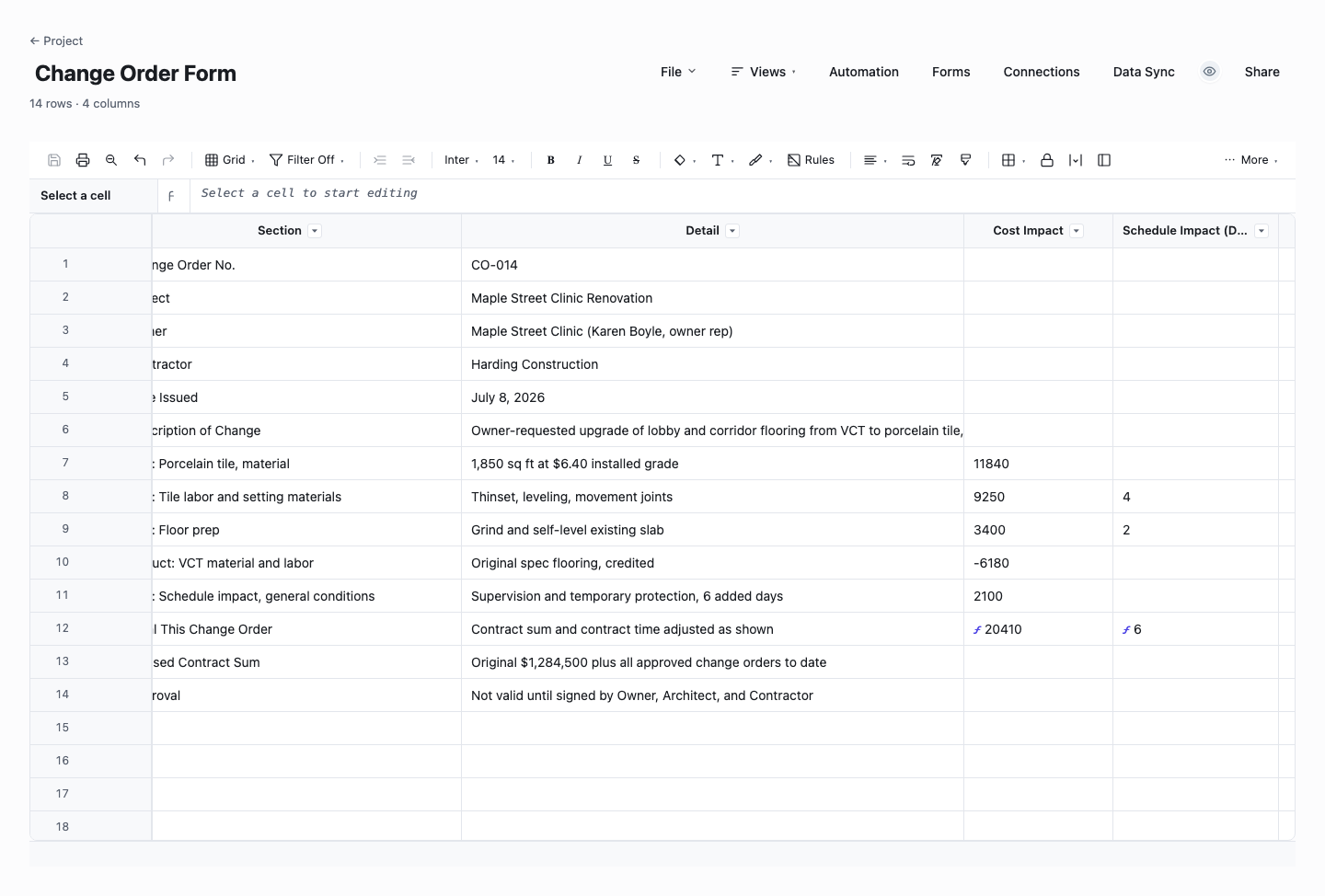
Change Order Form
The change order form is a single change, ready to send: reference details up top, the change line items below, and live totals for cost impact and schedule impact in days. Use it as the document you actually put in front of the client when scope moves, because a change presented with its own itemized price and schedule consequence gets decided on facts. The impact totals update as you edit lines, so revising the change during negotiation never breaks the math.
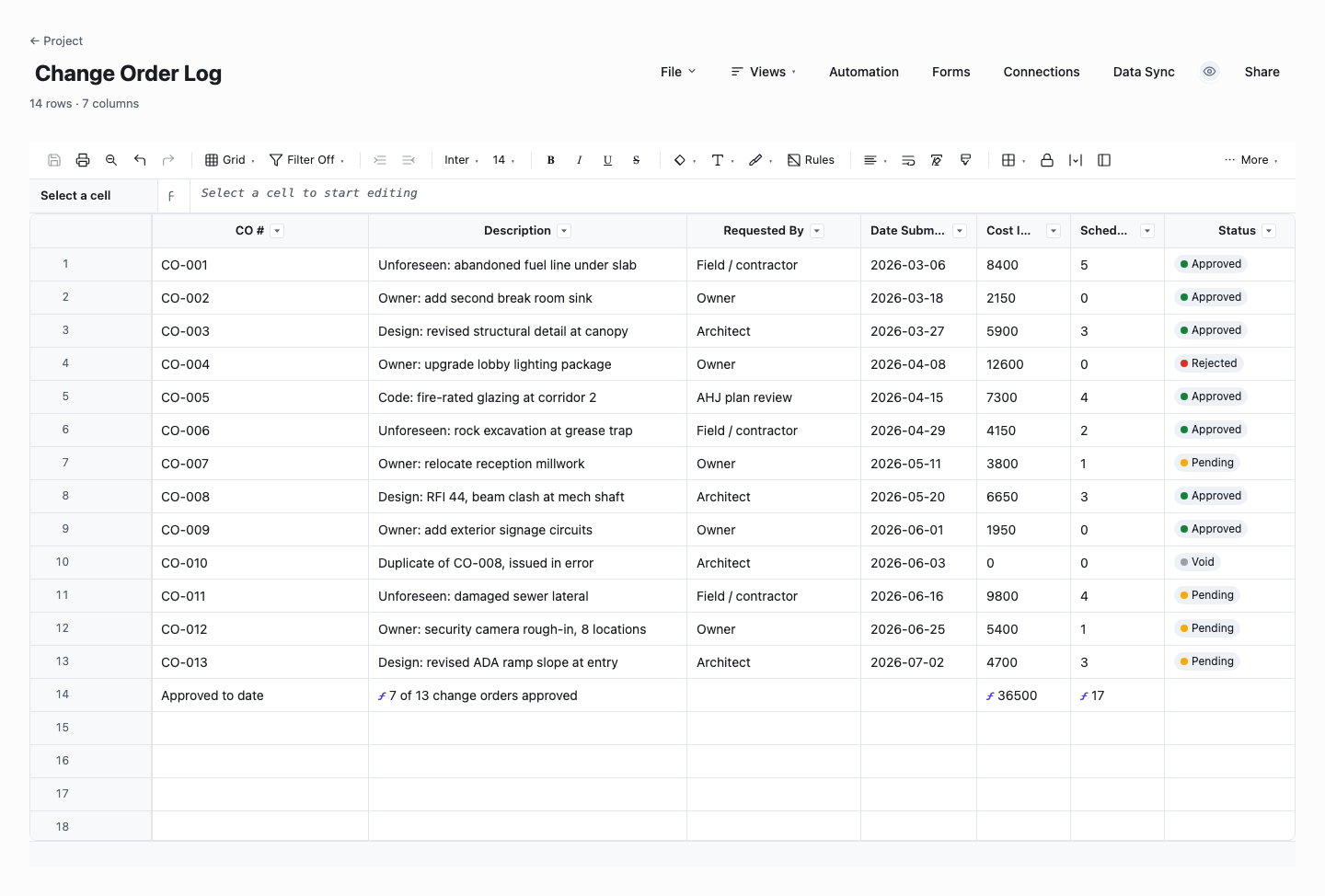
Change Order Log
The change order log is the running register of every change on the job: number, description, who requested it, when it was submitted, its cost and schedule impact, and its status, with a live summary row totaling the approved cost impact. Use it on any project with more than a couple of changes, because the current contract value is the number everyone eventually argues about, and a log that computes it continuously ends the argument before it starts.
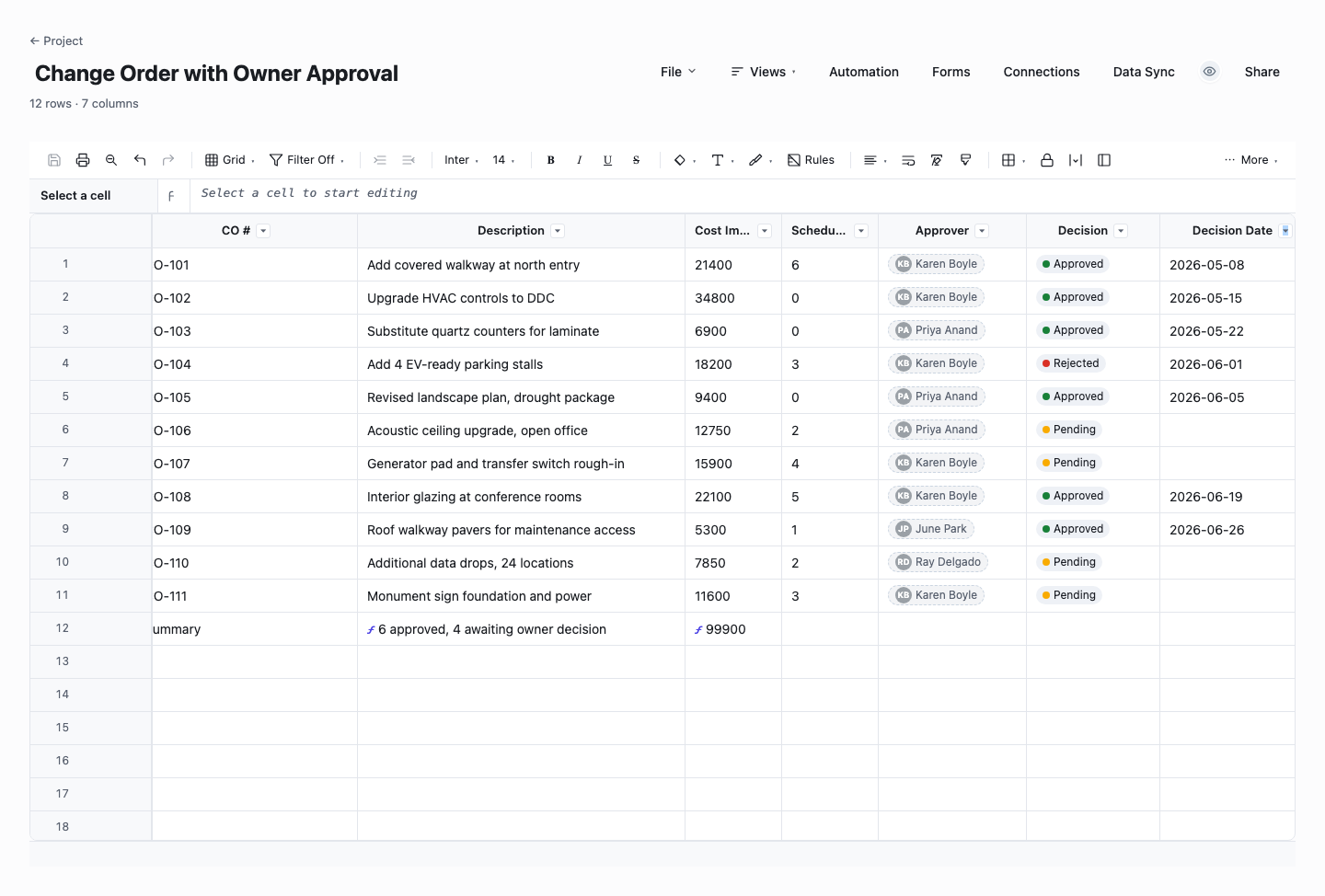
Change Order with Owner Approval
The owner-approval version adds the decision trail: every change order carries its approver, the decision, and the decision date, with an automatic count of approvals still outstanding. Use it on contracts where the owner or their representative must sign each change, which is most formal construction contracts, because unapproved changes you built anyway are the classic way contractors finance other people’s projects. The outstanding-approvals count tells you exactly how much of the job you are carrying on trust.
How to run change orders that get signed and paid
Put the change process in the original contract
The best change order is one both parties expected. The original contract should say how changes are raised, who can approve them and up to what amount, how they are priced, and that changed work does not start until the order is signed. When that clause exists, a change order is routine administration. When it does not, every change is a fresh negotiation held at the worst possible time.
Write it before the work, not after
The sequence is the discipline: identify the change, price it, get it signed, then build it. Doing changed work on verbal approval feels cooperative in the moment and reads as a gift at final account. If genuine urgency forces work to start, document the direction in writing the same day, state that a priced change order follows, and get at least the scope acknowledged before the concrete goes in. Give every submitted change order a response deadline as well, because an unanswered change order is a slow no that you are financing.
Describe the change against the original scope
A change order that says "additional electrical work, second floor" invites a dispute. A good one cites the contract document or drawing it modifies, states what was included, and states what is now different, in language a third party could follow. The test is simple: could someone who was not in the meeting read the description and know exactly where the original scope ends and the change begins?
Show the price as a breakdown, not a number
One lump figure invites suspicion and line-by-line negotiation of the total. A short breakdown of labor hours and rates, materials, equipment, subcontractor quotes, and a stated markup reads as a calculation rather than an opinion, and it gets approved faster. The template computes the totals live, so the arithmetic is never the thing the owner finds wrong.
State the schedule impact every time, even when it is zero
Cost gets all the attention, but the days are where disputes compound, because delay flows into every other trade and into liquidated damages clauses. Every change order should carry a time impact line: zero days, five days, or a note that impact will be assessed by a stated date. Writing "no schedule impact" when true is cheap. Discovering an unclaimed three-week slip at the end of the job is not.
Get the signature from someone with authority
A change order signed by whoever happened to be on site can be repudiated later. The contract names who can commit each party and up to what value. The template carries name, role, signature, and date blocks for both sides so the question gets asked every time. If the owner’s representative cannot approve the amount, you want to learn that before the work, not after.
Keep a numbered log and track the revised contract sum
Individual change orders are half the system. The other half is a running log with a row per change: number, description, status, amount, days, and the revised contract sum after each approval. The log answers the question every project meeting eventually asks: where does the contract stand today? In Wisegrid the same log becomes a live sheet with status dropdowns, a formula-driven running total, and a reminder when a submitted change order sits unanswered past its response date.
How to price a change order fairly
Fair pricing starts with actual cost: the labor hours the change genuinely requires at your loaded rates, materials at current supplier prices with waste factored, equipment time, and any subcontractor quotes attached as backup. Resist the temptation to bury contingency inside inflated quantities. A padded change order that gets scrutinized once poisons every one that follows it on the job.
Markup goes on top, visibly. Most contracts cap change order markup, commonly in the range of 10 to 20 percent for overhead and profit, and stating yours as a labeled line inside the cap builds more trust than hiding it. Where the change also consumes general conditions, supervision, temporary works, or extended site time, price those days explicitly rather than absorbing them, because absorbed days are the most common silent loss on changed work.
Credit changes deserve the same rigor in reverse. When scope is removed, the owner is entitled to the cost that goes away, but not to the margin on work you mobilized for. Most contracts recognize this by crediting cost while letting reasonable overhead stand. Pricing deductive changes carelessly, in either direction, is how goodwill dies mid-project.
Whatever the numbers, attach the backup: the supplier quote, the takeoff, the labor calculation. A change order that arrives with its evidence gets approved in days. One that arrives as a bare total gets questioned, and every question adds a week. The template keeps a reference column per line so the backup is findable when the final account is settled months later.
Frequently asked questions
What is a change order in construction?
A change order is a written amendment to a construction contract that documents a change to the original scope of work and its effect on the contract sum and schedule, signed by both parties. Once executed it becomes part of the contract, with the same force as the original documents. Changes arise from owner requests, unforeseen site conditions, design clarifications, and code requirements, and the change order is the mechanism that converts each of them from a conversation into a priced, authorized piece of work.
Who signs a change order?
Someone with contractual authority from each party: typically the owner or the owner’s authorized representative, and a principal or project manager for the contractor, with the architect or engineer certifying where the contract requires it. The original contract should name these people and any approval limits. The practical risk is signature by someone convenient rather than someone authorized, which is how a contractor ends up holding an approved change the owner refuses to honor.
Are verbal change orders enforceable?
Sometimes, eventually, at great cost. Courts have enforced oral changes and conduct-based changes in some circumstances, but most contracts require changes in writing, and relying on an exception means litigation rather than payment. Treat verbal direction as a trigger, not an authorization: confirm it in writing the same day, follow with a priced change order, and hold changed work until it is signed unless the contract’s emergency provisions apply. The template makes the paperwork fast enough that there is no excuse to skip it.
What is the difference between a change order and a change directive?
Agreement. A change order records a change both parties have agreed to, including its price and time impact, before or as the work proceeds. A construction change directive, used in many standard contract forms, is the owner’s instrument for ordering changed work to proceed when the parties have not yet agreed on price or time. The cost is worked out after, by the method the contract prescribes. Directives keep the job moving during a disagreement, but every directive should still convert into a signed change order once the numbers settle.
How does a change order affect the contract sum?
Each approved change order adjusts the contract sum by its stated amount, up for additive changes and down for deductive ones, and the running result is the revised contract sum that progress billing should reference. This is why the numbered log matters as much as the individual documents: at any moment you can show the original sum, every approved adjustment, and the current figure. Payment applications that cite an out-of-date contract sum are a classic source of slow payment and end-of-job disputes.
How many change orders are normal on a project?
It varies with project type and design completeness, and the count matters less than the pattern. Renovation work on old buildings generates more changes than new construction from a complete design. A project whose changes are mostly owner upgrades tells a different story from one whose changes are all design gaps. What the log gives you is the evidence: if the same root cause keeps appearing, that is a conversation to have with the design team or the estimator, backed by rows instead of impressions. Owners read the log too: a clean, well-documented change history is one of the strongest credibility artifacts a contractor can carry into the next negotiation.
Run it live instead of in a file.
The downloads above are yours either way. In Wisegrid the same template becomes a working sheet with owner contacts, status dropdowns, reminders, and dashboards. 7-day free trial, no credit card required.