Client Onboarding Checklist Template: The Best Way to Onboard New Clients in 2026
A client onboarding checklist is the ordered list of everything that must happen between a signed contract and a client who is getting value: the welcome email, the kickoff call, the access and assets you collect, the internal setup, and the first deliverable. Each task has an owner, a due date, and a phase, so at any moment you can answer the two questions every new client silently asks: is anything falling through the cracks, and what happens next?
The checklist matters because onboarding is where trust is won or lost. The client just paid and has seen nothing yet, every missed handoff in the first month confirms their worst fear about the decision. A written, repeatable checklist is the cheapest fix in client services: it turns your best onboarding, the one your most careful person runs, into the one every client gets.
Four client onboarding checklists, free to download
Each version below is pre-filled with realistic tasks, phases, owners, and relative due dates, so you can see a complete onboarding sequence before you adapt it to your own. These are regular spreadsheet files. Open them in whatever your team already uses. No email address required.
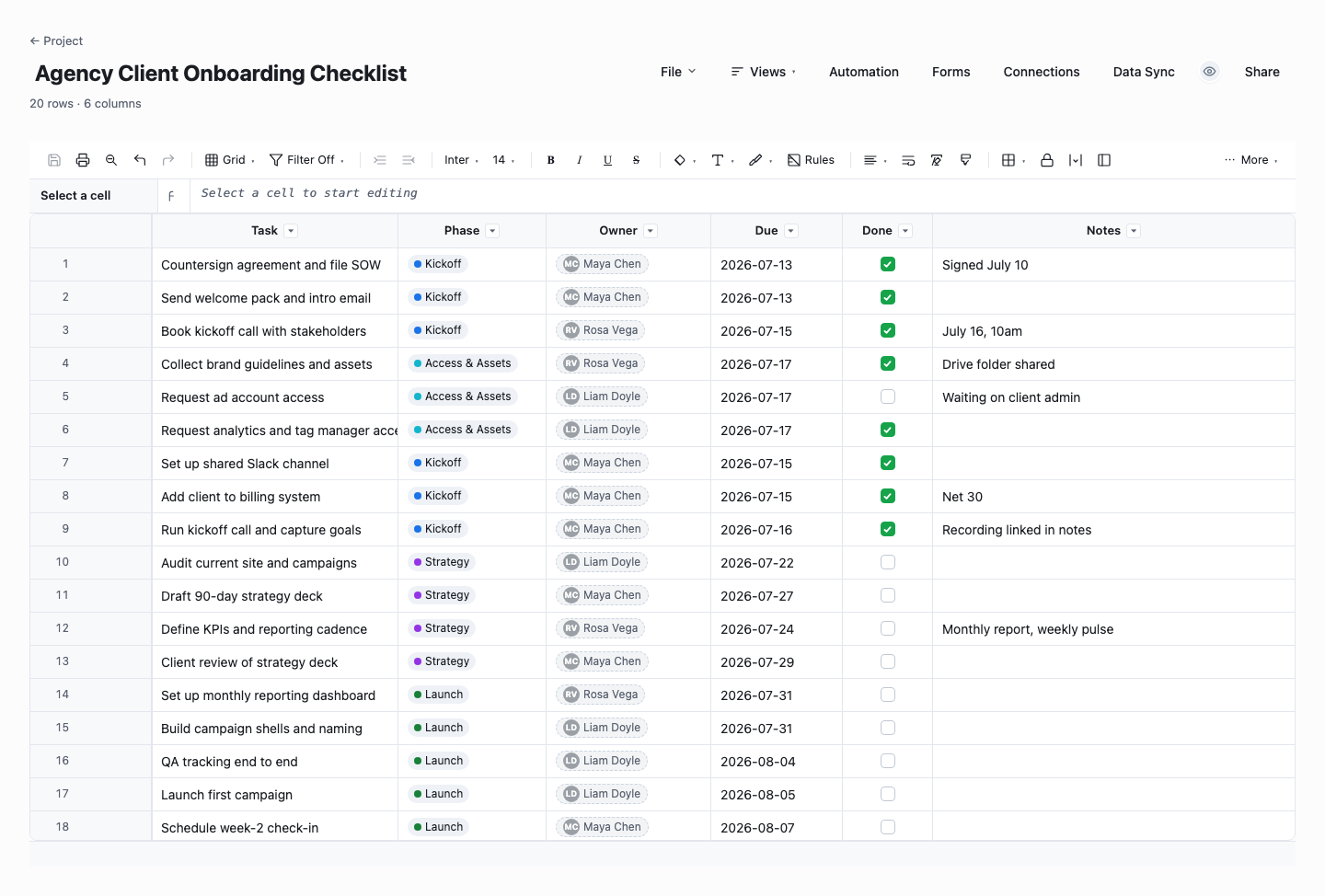
Agency Client Onboarding Checklist
The agency checklist runs a new client from countersigned contract to first deliverable, with phases keeping kickoff, access, strategy, and launch work separated, and a task, phase, owner, due date, done flag, and notes column per row. Use it for marketing, creative, or development agencies onboarding retainer clients, where the real risk is the awkward silent gap between the signature and the first visible work. The phases give the client a story they can follow week by week.
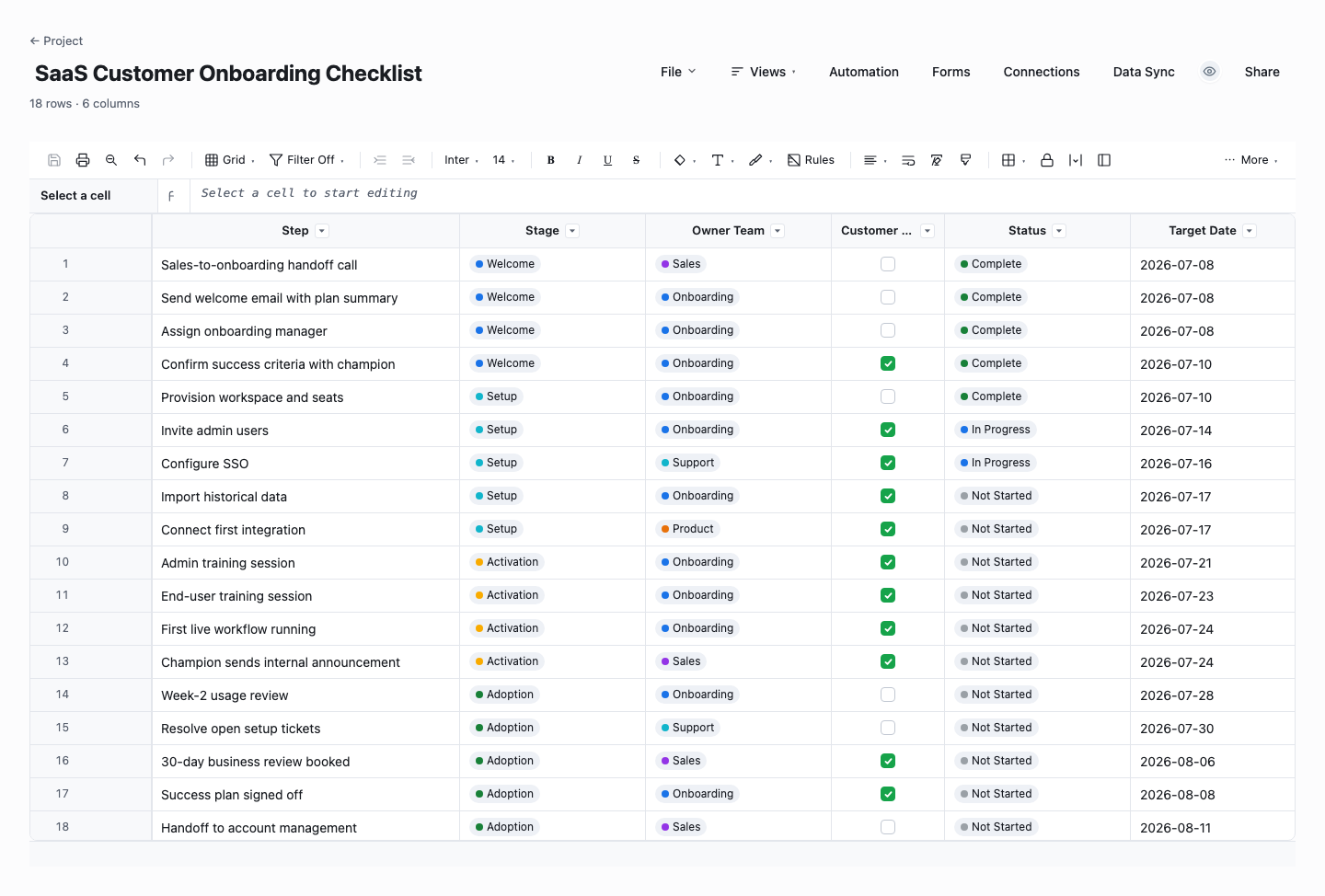
SaaS Customer Onboarding Checklist
The SaaS checklist tracks the handoff from sales through activation: each step carries its stage, the owning team, a customer-action flag for the items only the customer can do, a status, and a target date. Use it when onboarding a new customer onto software, where the finish line is not "the account exists" but "the team is using it in their real workflow." The customer-action flag is the column that pays rent: half of onboarding delay is politely waiting on customer inputs nobody is chasing, and this makes them visible.
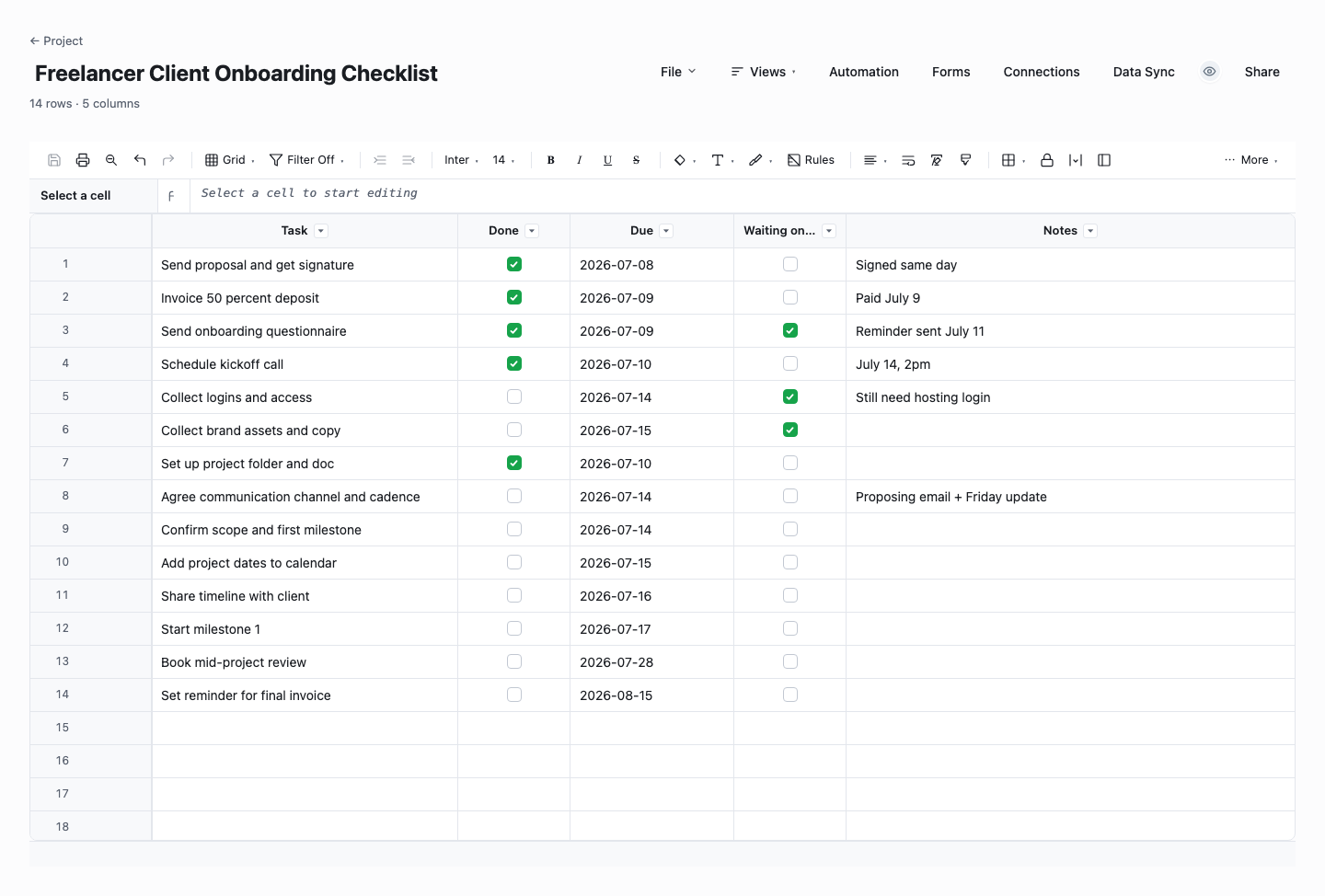
Freelancer Client Onboarding Checklist
The freelancer checklist strips onboarding to about fourteen essential tasks with a done flag, a due date, a waiting-on-client marker, and notes. Use it if you are a solo operator or a two-person shop where the entire process is you: it exists so nothing depends on memory during the busiest week of a client relationship. Start here, and when you notice yourself adding the same custom rows for every client, graduate to the agency or phased version.
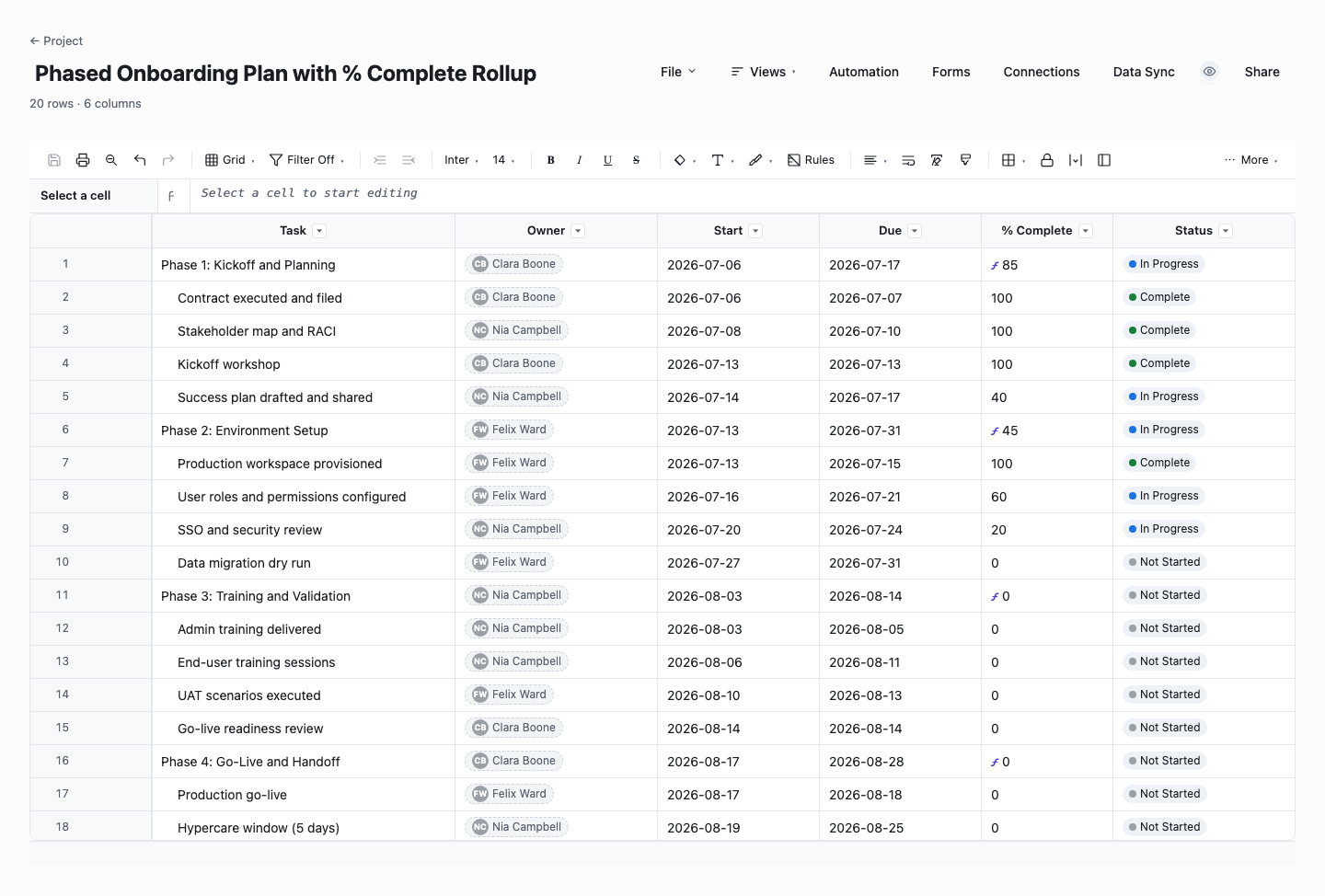
Phased Onboarding Plan with % Complete Rollup
The phased plan is built for longer enterprise onboardings run in named phases with start and due dates per task. Child tasks carry the percentages, and each phase row computes its own completion automatically with a live rollup formula, so "how far along is onboarding" is a number you read, not a number you assemble before every status call. Use it when onboarding runs a quarter or longer and someone senior, on either side, expects a percent-complete answer on demand.
How to build a client onboarding process around the checklist
Map the journey from signature to first value
Before editing any template, write down what happens with your best client: every email, call, access request, and internal handoff between contract and the moment the client first sees value. That last milestone is the finish line of onboarding, and it is different for every business: the first campaign live, the first report delivered, the team logging in daily. Work backwards from it and the checklist writes itself.
Phase the work so the client always knows where they are
Group tasks into three to five named phases: welcome, kickoff, setup, first delivery, review. Phases are for the client as much as for you. "we are in the setup phase, kickoff is Thursday, first deliverable lands on the 20th" is the sentence that makes a new client relax. Inside each phase, order the tasks by dependency, and mark which ones the client will actually see.
Assign one owner per task, including client-side tasks
Onboarding fails at handoffs, so every row needs exactly one named owner, and the tasks the CLIENT owes you belong on the list too: brand assets, account access, a named point of contact, approval of the plan. Half of onboarding delay is politely waiting for client inputs nobody is chasing. When those are visible rows with dates, the chase becomes a status update instead of an awkward email.
Anchor due dates to the start date, not the calendar
Write due dates as offsets: welcome email day 1, kickoff by day 5, access collected by day 10, first deliverable by day 30. Offsets make the checklist reusable for every client, and they expose unrealistic promises early. In a spreadsheet, a start-date cell plus a formula per row does this, in Wisegrid the checklist becomes a Gantt view with dependencies, so a slipped kickoff reschedules everything downstream automatically.
Run the kickoff call from the checklist itself
The kickoff call sets the tone for the engagement, so walk the client through the actual checklist: the phases, the dates, what you need from them and when, and who to contact for what. This is more persuasive than any slide deck because it is operational proof that you have done this before. End the call by confirming the client-side tasks and their owners, and send the list as the follow-up.
Close onboarding deliberately, then improve the template
Onboarding should end with an explicit review: did we hit the dates, is the client getting value, what did they wish had gone differently. Fold every answer back into the master checklist so the process compounds. The template you download today should look different in six months because ten clients taught you things. Teams running this in Wisegrid save the refined checklist as a blueprint, so each new client project starts from the current best version instead of a copy of last year’s.
Frequently asked questions
What should a client onboarding checklist include?
At minimum: a welcome touchpoint, contract and billing confirmation, a kickoff meeting with agenda, collection of assets and access, internal team setup, a communication plan naming channels and cadence, the first deliverable with its date, and a review that formally closes onboarding. Each task needs one owner and a due date. The most commonly missed items are the client-side tasks, the things you are waiting on them for, which is exactly why they belong on the checklist with everything else.
How long should client onboarding take?
For most agencies and service businesses, two to six weeks from signature to first delivered value, software implementations often run thirty to ninety days depending on data migration and training. The number that matters is the one you commit to and hit. Pick a target for time-to-first-value, put it in the checklist as the final milestone, and measure each onboarding against it. Shortening that number over time is one of the highest-leverage improvements a client business can make, because it compresses the anxious period when the client has paid but seen nothing.
What is the difference between a checklist and an onboarding plan?
The checklist is the reusable master list of tasks every client goes through. The onboarding plan is one client’s instance of it, with real names, real dates, and the custom rows their engagement needs. Keeping the two separate is what makes the process improve: lessons from each plan flow back into the master checklist. In practice that means never editing your only copy, duplicate the template per client, or in Wisegrid provision each client project from a blueprint so the master stays clean.
How do I automate client onboarding without making it impersonal?
Automate the mechanics, never the relationship. Reminders when a task is due, status changes when a form is submitted, notifications when a client-side item goes overdue: all of that is bookkeeping, and automating it frees attention for the calls and the work. In Wisegrid, an intake form can create the client record, a blueprint can provision the project with the checklist pre-loaded, and automations can handle the nudges. The client should feel a more attentive team, not an email robot.
Should the client see the onboarding checklist?
The client-facing parts, yes. Showing them is one of the cheapest trust builders available. A client who can see the phases, the dates, and their own outstanding tasks stops wondering whether anything is happening, and chases their own side without being nagged. Keep internal rows internal: staffing notes, margin discussions, and team assignments do not belong in the client view. That is why the SaaS checklist above carries a customer-action flag, and why teams running this in Wisegrid share a filtered view of just the client-facing rows instead of exporting copies that go stale the day they are sent.
When is onboarding actually done?
When the client is receiving the value they bought and knows how the ongoing relationship works: who to contact, what cadence to expect, where to see status. Define that end state as an explicit checklist item with criteria, such as first deliverable accepted and the client attending the regular cadence call. Without a defined end, onboarding fades out instead of finishing, and nobody notices the client who quietly never got fully set up until the renewal conversation.
Run it live instead of in a file.
The downloads above are yours either way. In Wisegrid the same template becomes a working sheet with owner contacts, status dropdowns, reminders, and dashboards. 7-day free trial, no credit card required.