RAID Log Template: The Best Way to Track Risks, Assumptions, Issues, and Dependencies in 2026
A RAID log is a single working list of the four things most likely to derail a project: Risks (problems that might happen), Assumptions (things you are treating as true without proof), Issues (problems that are happening now), and Dependencies (work or decisions you need from someone else). Each entry gets an owner, a status, and a next action, and the log is reviewed on a regular cadence, usually weekly. A good RAID log template ships that structure ready to use, which is what the four versions below are.
A RAID log is an early-warning system. The paperwork part is incidental. Risks get watched before they become issues, assumptions get tested before they quietly fail, and dependencies get chased before they block the critical path. Teams that keep one working log consistently spend their status meetings deciding things instead of reconstructing what happened.
Try this RAID log live. No signup.
This is a real, editable RAID log, not a screenshot. Change a type, flip a status, edit an owner or an entry. Your changes stay in this tab. When you want to keep it, one click makes it yours.
| Type | Entry | Owner | Impact | Status | Due |
|---|---|---|---|---|---|
Sandbox only, edits don't persist. Want to keep your work? Start your 7-day free trial →
Four RAID log templates, free to download
Every version below ships with realistic example entries across all four RAID types, so you can see how a well-written risk differs from a well-written issue before you log your own. Each download is a spreadsheet file in the format everything opens, from Excel to the free browser tools, with no email gate in front of it.
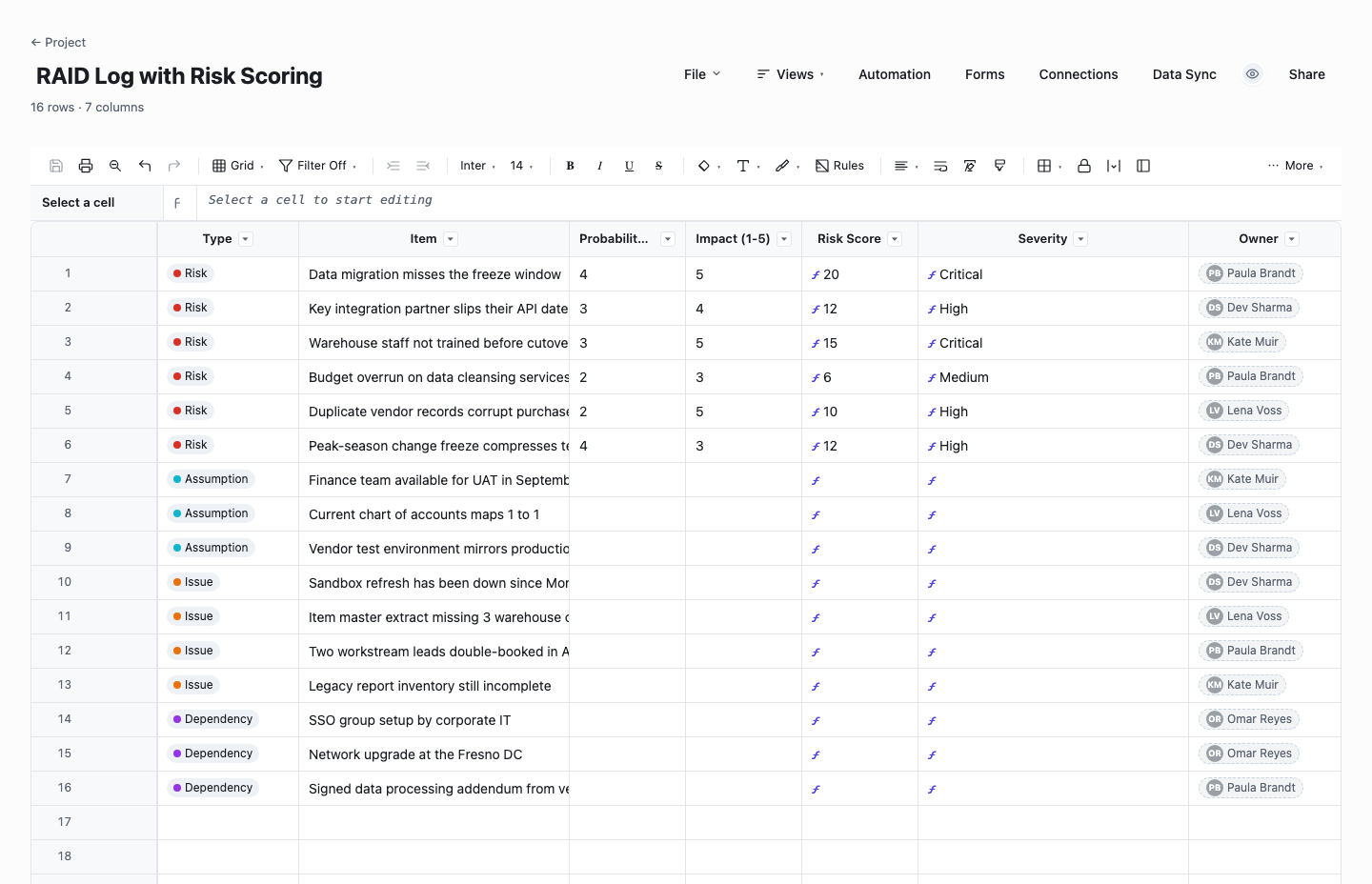
RAID Log with Risk Scoring
The scored RAID log is the full working version for an active project: every entry gets a type, an owner, and for risks a probability and impact rating from 1 to 5. The risk score computes itself with a live probability-times-impact formula and auto-labels each entry from Low to Critical, so the register ranks itself as you type instead of waiting for someone to re-sort it. Use it when the project is big enough that you must rank risks rather than just list them, or when a PMO or client expects quantified exposure.
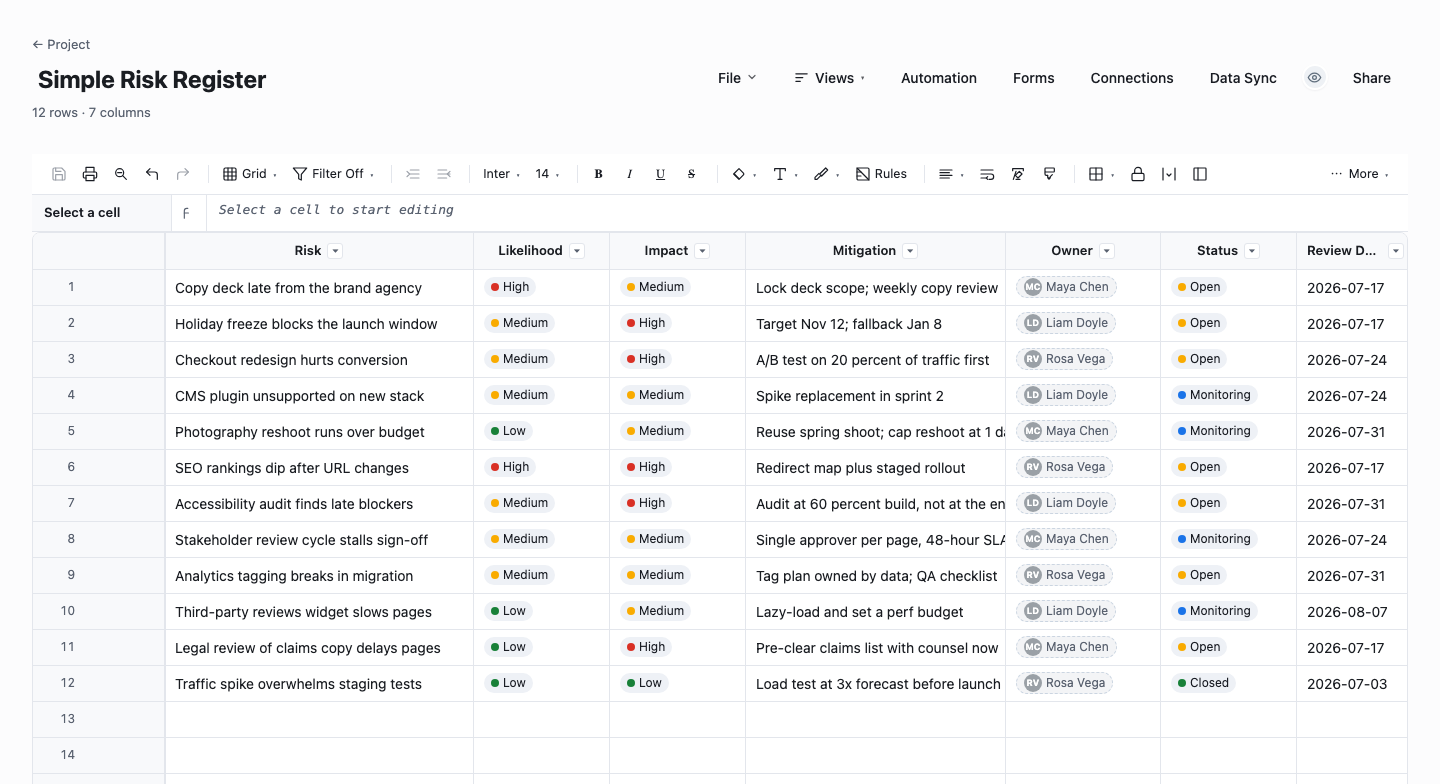
Simple Risk Register
The simple risk register drops the A, I, and D and tracks risks alone: likelihood, impact, mitigation, owner, status, and a review date per row. Use it for small projects where a full RAID log is overkill but "what could go wrong and who is watching it" still deserves a written answer. The review-date column is the quiet discipline here. A register where every row has a next-look date never silently rots. Graduate to the scored RAID log when issues and dependencies start slipping through.
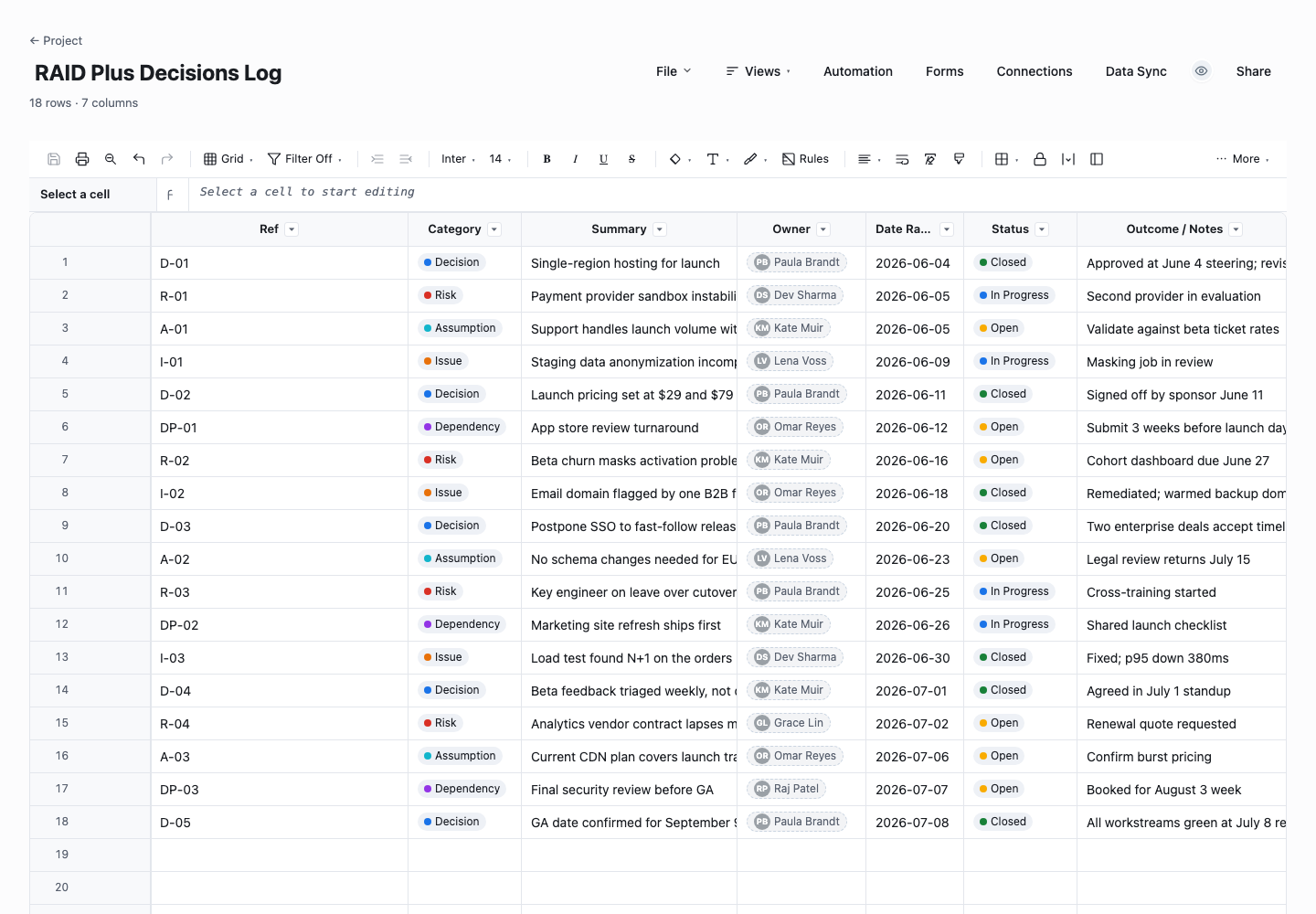
RAID Plus Decisions Log
The RAID plus decisions log adds a fifth category, Decisions, with a reference id, date raised, and an outcome column per entry. This is the one for steering meetings that keep asking what was decided, and by whom. The log becomes the single audit trail that answers in ten seconds. Recording decisions next to the risks and issues that prompted them also preserves the context, which is what you will want six months later when someone asks why the project went the way it did.
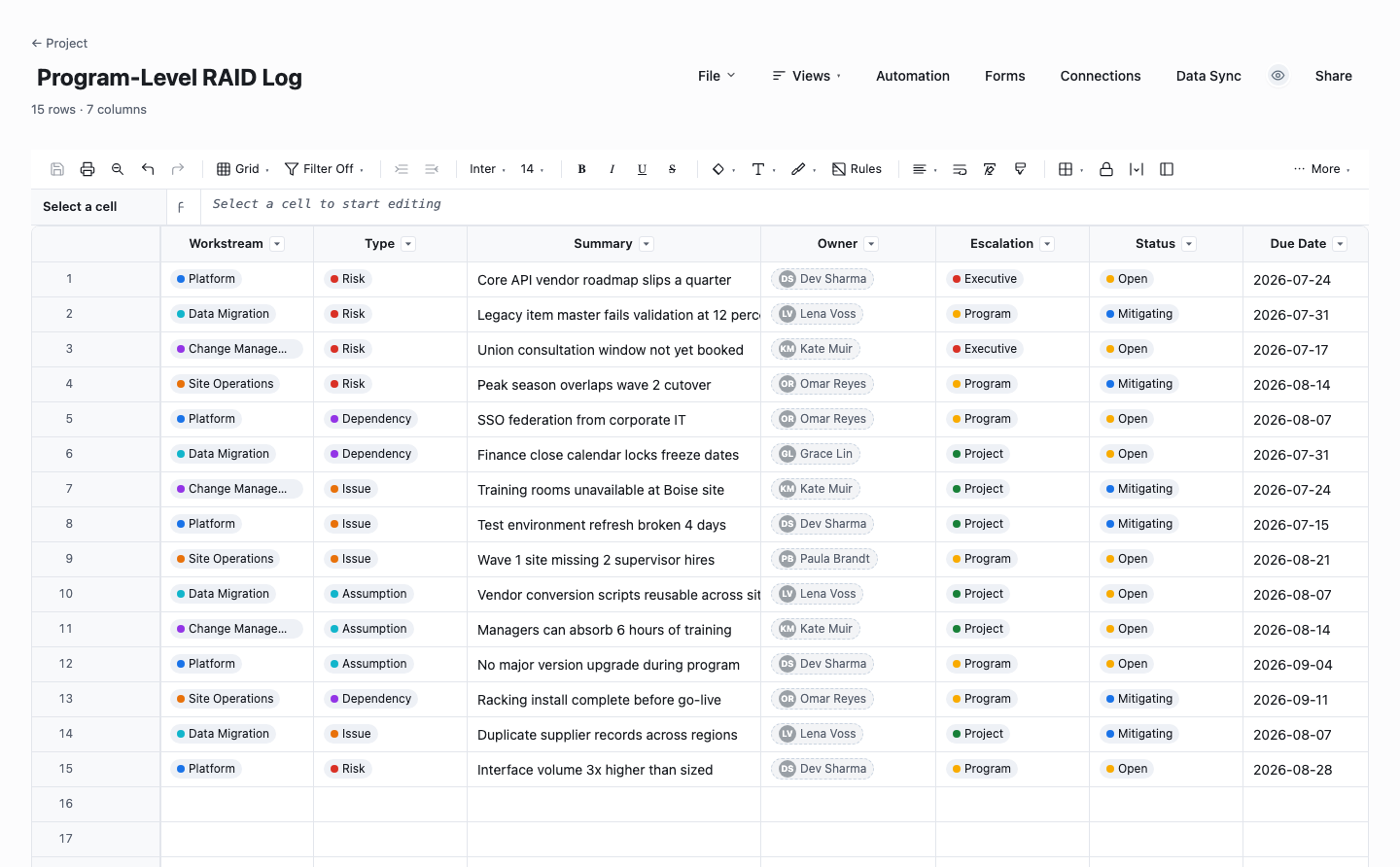
Program-Level RAID Log
The program-level RAID log tags every entry with a workstream and an escalation level so one log can roll up several projects for a program office. Reach for it when you run multiple related workstreams and need one view of the risks and dependencies that cross them, because cross-project dependencies are precisely the ones no single project manager owns. Program reviews then filter straight to the escalated entries, which keeps the steering meeting focused on the short list that needs executive attention.
How to use a RAID log without it becoming a graveyard
Know what goes in each of the four buckets
A risk is a specific future event with a consequence: the vendor may miss the March delivery, which would slip launch by a month. An assumption is something you are relying on but have not verified: we assume the legal review needs two weeks. An issue is a risk that came true or any live problem: the staging environment is down. A dependency is anything you need from outside the team: security sign-off from IT before go-live. If an entry does not fit one of those definitions, it is probably a task, and it belongs in the plan instead.
Write entries someone else could act on
The difference between a useful log and a graveyard is specificity. "Resourcing risk" tells nobody anything. "our only DBA is on leave for all of August and the migration is scheduled for August 12" can be acted on. A good entry names the event and its consequence, with the time window, in one or two sentences. If you cannot state the consequence, you have not understood the risk yet, and the log entry is where you find that out cheaply.
Give every entry exactly one owner and a next action
An entry owned by "the team" is owned by nobody. Assign each row to one named person, and record the next action and its date, even when the action is just "check again at the end of the month." The owner does not have to be the person who fixes the problem. Their job is making sure it never gets forgotten. Ownerless entries are the first thing to fix in any inherited RAID log.
Review on a cadence, in a meeting that already exists
A RAID log dies the week it stops being read. Put a ten-minute pass through the log into a meeting the team already attends, weekly for most projects, and walk it in priority order: what changed, what is stale, what escalates. Close entries aggressively when they resolve, and date every update so staleness is visible. Twenty well-tended entries beat two hundred abandoned ones.
Test assumptions instead of just recording them
Assumptions are the most neglected letter in RAID. Each one is a bet, so treat the log as the place you track whether the bet is still safe: who can confirm it, by when, and what happens if it proves false. An assumption that stays unverified past its check-by date should convert into a risk automatically in your review. Most nasty mid-project surprises were sitting in the assumptions column the whole time, politely waiting to be read.
Keep one log, where the team already works
A RAID log split across a slide appendix, a spreadsheet on someone’s desktop, and a chat thread is three logs, which is zero logs. Keep a single copy in a place the whole team can open and edit, link it from the project home, and make it the artifact the weekly review actually scrolls through. This is also where a live sheet beats a static file: in Wisegrid the same log gets owner contacts, dropdown types and statuses, and date columns you can sort, and everyone is looking at the current version rather than an attachment from three Tuesdays ago.
Escalate through the log, not around it
When an entry needs leadership attention, mark it escalated and bring the log entry itself to the steering meeting: the event, the consequence, the options, the decision you need. This keeps escalations factual and traceable, and it trains sponsors to trust the log as the single source of truth. In Wisegrid you can share a filtered view showing only escalated items, so leadership sees the short list without wading through the working log.
Watch: the RAID log in 2 minutes
Frequently asked questions
What does RAID stand for in project management?
RAID stands for Risks, Assumptions, Issues, and Dependencies. Risks are potential future problems. Assumptions are things treated as true without verification. Issues are problems already happening. Dependencies are anything the project needs from outside the team. Some teams swap Assumptions for Actions or Dependencies for Decisions, and a few track all six. The acronym matters less than the habit: one log, four kinds of trouble, reviewed on a schedule.
What is the difference between a RAID log and a risk register?
A risk register tracks only risks, usually with probability and impact scoring, and it is often a formal governance artifact. A RAID log is broader and more operational: it adds assumptions, issues, and dependencies so the team has one place to look for everything that threatens the plan. On large programs the two coexist, with the register holding the formally assessed risks and the RAID log running the week-to-week working list. On most projects a single RAID log with a scored risk section does both jobs.
What is the difference between a risk and an issue?
Time. A risk is a problem that might happen. An issue is a problem that is happening. "The vendor may miss the March delivery" is a risk. "the vendor missed the March delivery" is an issue. The distinction matters because they demand different responses: risks get mitigation plans and watch dates, while issues need immediate action and often escalation. When a risk materializes, close the risk entry and open an issue that references it, so the log tells the story of what you saw coming.
How often should a RAID log be updated?
Update it whenever something changes, and review it as a team once a week for a typical project. Fast-moving projects near a launch may walk the log daily in standup. Slower programs may manage with a fortnightly pass plus monthly steering review of escalated items. The honest answer is that cadence matters less than consistency. A log reviewed every single week for ten minutes will catch more trouble than one audited quarterly in depth.
Who owns the RAID log?
The project manager owns the log itself: keeping it honest, keeping the cadence, killing stale entries. But each individual entry needs its own named owner, who is accountable for progressing that item and reporting changes. Spreading entry ownership across the team keeps the log from becoming one person’s private notebook, and it means the review meeting is a series of thirty-second updates from people who actually know, rather than the PM guessing on everyone’s behalf.
Should small projects bother with a RAID log?
Yes, in proportion. A two-person, six-week project does not need scoring formulas or escalation workflows, but it still has a vendor who might slip, an assumption about the data, and a sign-off it is waiting on. A dozen rows in the simple risk register above, glanced at once a week, covers that. The overhead is minutes, the payoff is that when something goes wrong, it is a line item you saw coming rather than a surprise.
What columns does a RAID log template need?
Seven columns do the job in the scored version above: Type (risk, assumption, issue, or dependency), a one-line item summary, Probability and Impact on 1-to-5 scales, a computed Risk Score, Severity, and an Owner. The simpler variants trade the scoring columns for a status and a review date. Whatever the set, the two non-negotiables are one named owner per entry and a column that says when the entry will next be looked at.
Is this RAID log template free to download?
Yes. All four versions download as .xlsx files with no email gate and no signup: a scored RAID log, a simple risk register, a RAID-plus-decisions log, and a program-level log with an escalation column. Each comes pre-filled with a dozen or more realistic example rows, so the format is legible before you replace them with your own entries.
Run it live instead of in a file.
The downloads above are yours either way. In Wisegrid the same template becomes a working sheet with owner contacts, status dropdowns, reminders, and dashboards. 7-day free trial, no credit card required.