Inventory Template: Free Downloads and a Stock Control Guide for 2026
An inventory template is the sheet a business keeps so it always knows what it has, what it is running low on, and what it just sold twice by accident. At its simplest it is a list: item, SKU, category, how many are on hand. Add a reorder point and it becomes a buying tool that tells you when to order before the shelf empties. Add supplier lead times and unit costs and it starts to manage cash, because stock sitting on a rack is money that could be working somewhere else.
The versions on this page are built from two fictional businesses: a bike shop tracking tubes, tires, and brake pads, and a commercial bakery tracking flour, butter, and packaging. The same structures fit any small operation that keeps physical stock, from a parts room to a coffee cart. What you download is an everyday spreadsheet file, ready to overwrite with your own items, and every version pairs with the stocktake sheet for the day the computer and the shelf disagree.
Four inventory templates, free to download
Each version below is a working spreadsheet, not a blank grid with a title row. The fields are pre-filled with realistic example content from a fictional bike shop and a fictional commercial bakery so you can see how a finished inventory sheet reads, then overwrite it with your own stock. What you download is an everyday spreadsheet file, compatible with all the usual tools. No email address required.
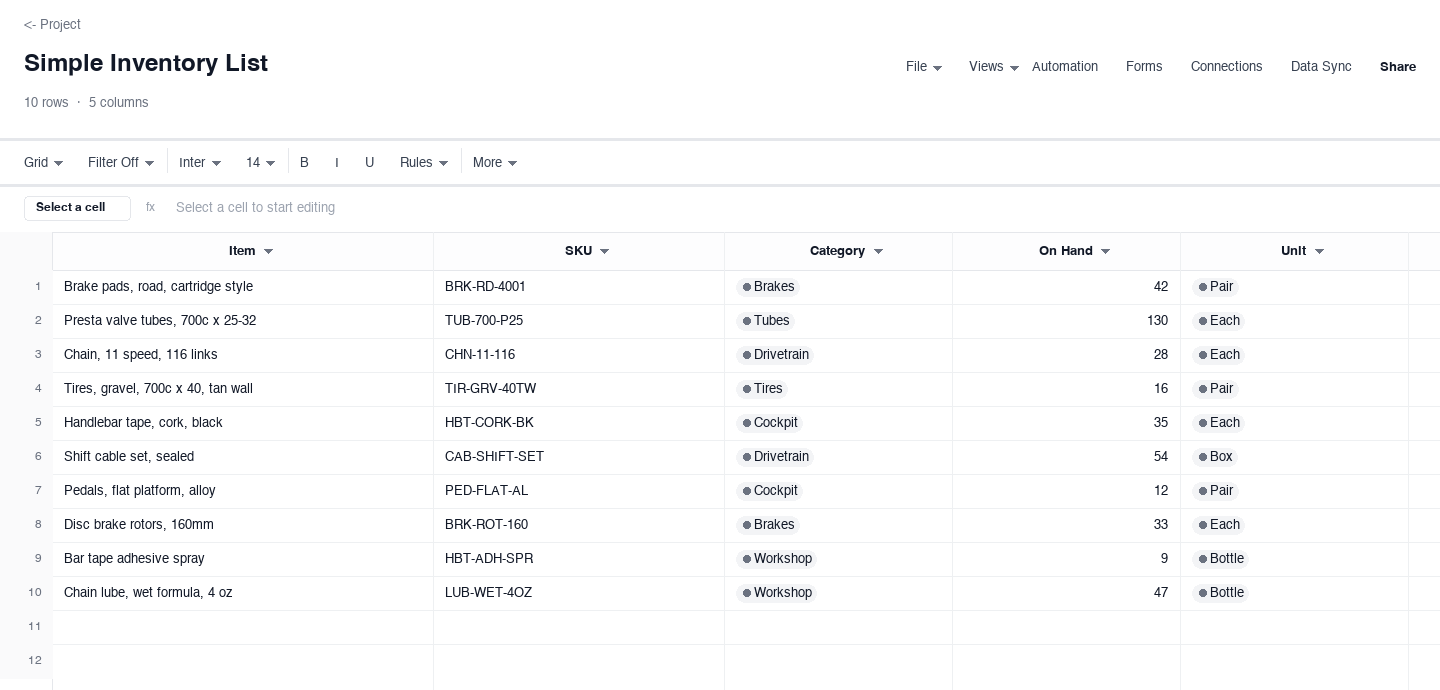
Simple Inventory List
The simple inventory list is the starting point every small stockroom needs: item, SKU, category, on hand, and unit, nothing computed and nothing to configure. Use it when you first bring order to a shelf, a closet, or a van that has been managed by memory. It answers the only question that matters early: what do we actually have. Keep the SKU column strict even here: short unique codes are what make the list sortable later.
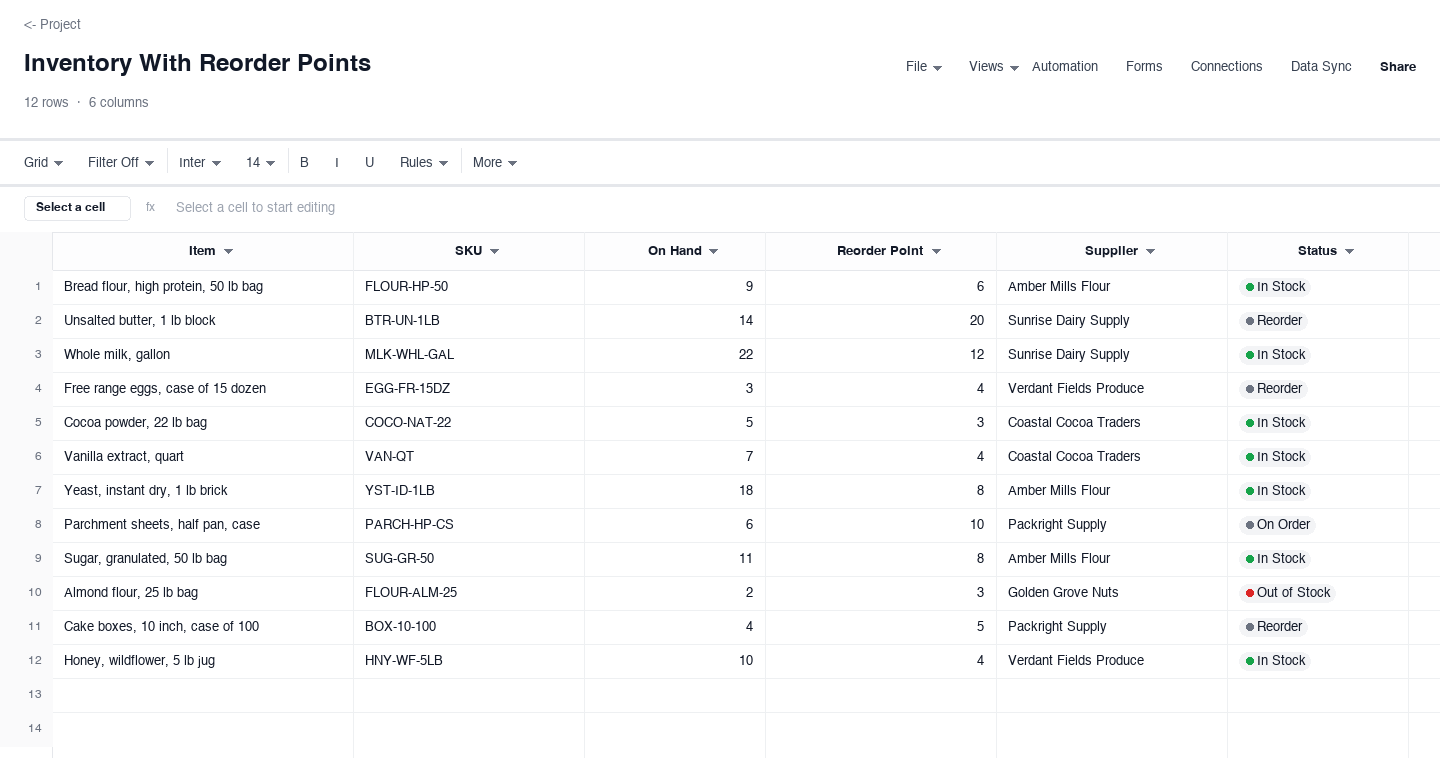
Inventory With Reorder Points
The reorder point version turns the list into a buying tool. Each item carries an on-hand count and a reorder point, the level where waiting any longer risks an empty shelf, plus a supplier and a status that says whether the item is in stock, needs reordering, is on order, or is out. Use it the moment stockouts start costing sales. The status column earns its keep during a busy week: one glance shows what needs a purchase order today.
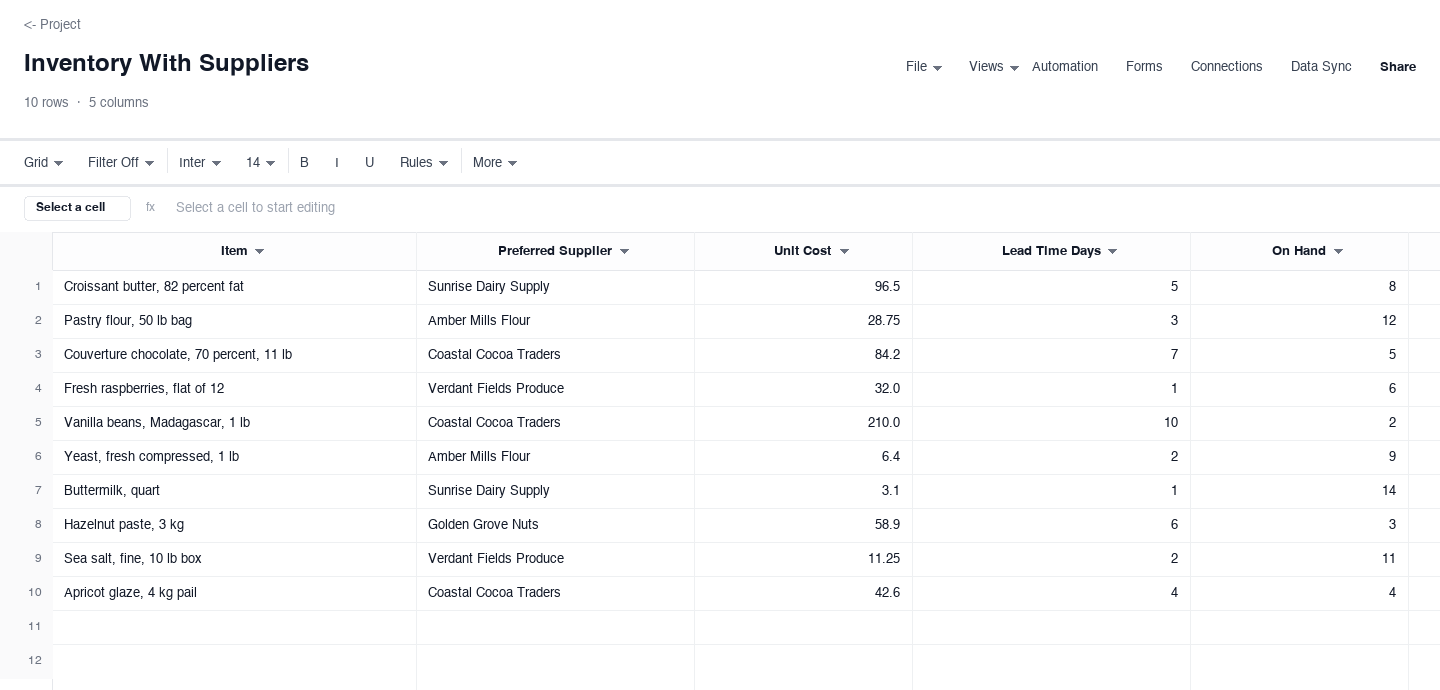
Inventory With Suppliers
The supplier version is built for the buying conversation. Each item names its preferred supplier, unit cost, lead time, and on-hand count. Use it when lead times differ enough that on-hand count alone lies to you. Three on hand with a two-day lead is calm; three with a three-week lead is a stockout in progress, and the lead time column separates them before the shelf is empty.
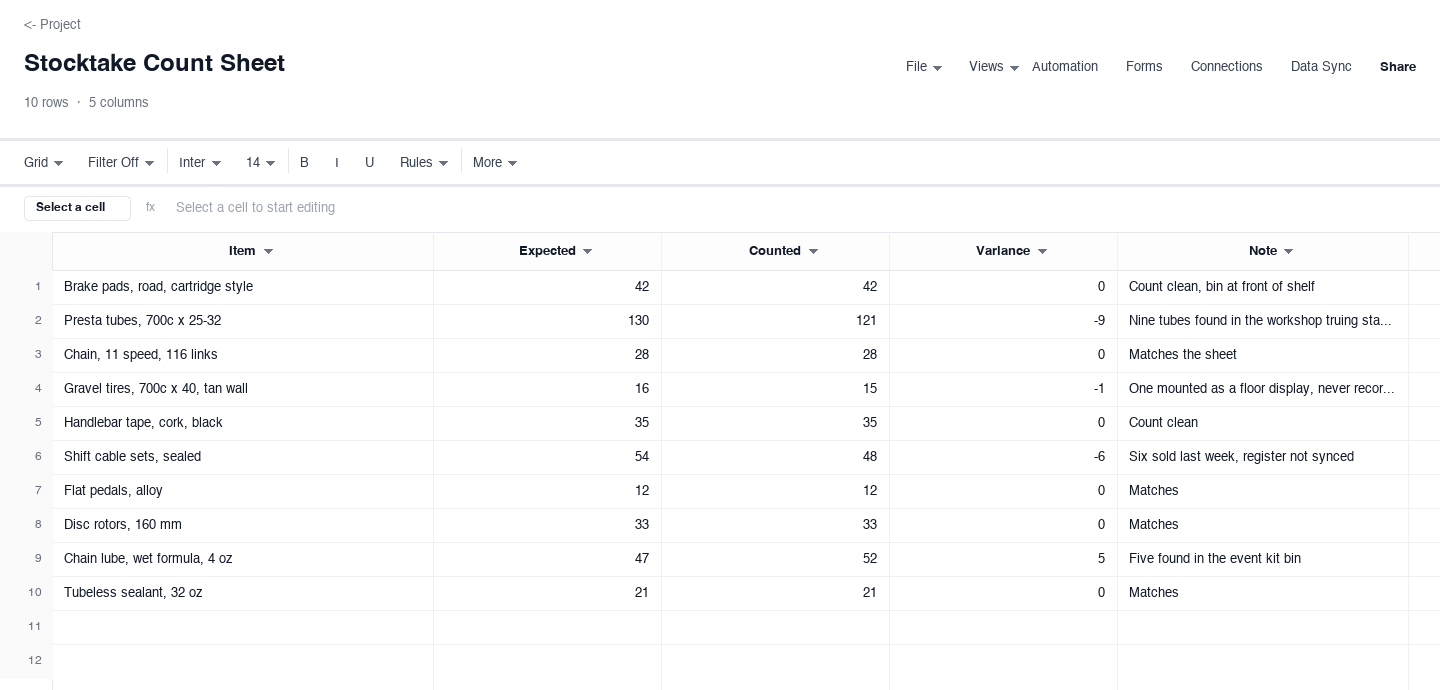
Stocktake Count Sheet
The stocktake sheet is for reconciliation day, when you count the shelf and compare it against the system. Each row carries the expected count, the counted count, the variance, and a note that explains any gap. Use it monthly or quarterly. The note column is where the value hides: a variance with a written explanation, like six units sold but not synced, becomes something you can fix, while a bare number is a discrepancy that repeats next time.
How to keep an inventory sheet the shelf actually agrees with
Give every item a SKU and never reuse one
The SKU is the key the whole sheet hangs on: two items sharing a code will merge in pivots, sorts, and purchase orders, and the merge is silent. Use short unique codes with a category prefix, like BRK for brakes or FLOUR for bakery staples, and never recycle a code even after an item is discontinued. Apply the same discipline to names: pick one canonical name per item and use it on every row, or your counts will split across three lines that mean the same thing and no total will be trustworthy.
Count by location, and write the location down
Most count errors are really location errors. Stock lives in the stockroom, on the sales floor, in the workshop, in the event kit, and in the returns bin, and a count that walks only the stockroom misses everything else. Walk one location at a time, record where you counted, and put anything found outside its home into the note column. Nine tubes in the truing stand drawer is a finding, not a counting mistake, and it explains the variance better than any recount of the shelf would.
Set reorder points from lead time, not from fear
A reorder point should be roughly what you can sell or use during the supplier lead time, plus a small safety buffer. If you sell five tubes a week and restocking takes two, a reorder point around twelve covers the gap; set it at fifty and you are hoarding cash on a shelf. Start from a reasonable estimate, then adjust after the first stockout or the first overstock, and write the reasoning in a note so the next person who inherits the sheet knows why the number is what it is instead of changing it blindly.
Reconcile variances the day you find them
A stocktake that ends with a variance column nobody investigated is just an exercise. Every nonzero variance deserves a note and an owner within the same day: received but not entered, sold but not synced, damaged and written off verbally. Unexplained variances compound, and within two cycles your sheet is fiction with formatting. The note column turns the gap into a task, and the fix is usually a process tweak, like syncing the register before closing, rather than another walk down the aisle.
Keep suppliers and lead times current on the sheet
The supplier columns are only trustworthy if someone maintains them. Preferred suppliers change after a bad quarter, lead times stretch around a holiday, and a unit cost from last year quietly poisons your margin math. Review supplier, cost, and lead time columns on the same rhythm as your stocktake, and date any change so a stale number is visible at a glance. When an item has one supplier and a two-week lead, that fact belongs on the row where the buying decision happens, not in a head or a supplier folder.
Run full counts on a schedule, spot counts between
Full physical counts are the reset button: every item counted, every variance explained, the sheet trusted again. Most small businesses need one monthly or quarterly depending on volume, plus cycle counts in between, where a fast-moving category like tubes or flour gets counted every week while slow movers wait for the full pass. Tie the full count to a quiet day and freeze sales entries during it, or the register drifts mid-aisle and the variances become artifacts of timing instead of real gaps.
What is an inventory sheet?
An inventory sheet is the working document behind your stock count: the rows and columns that record what you carry, how much is on hand, and the details that keep it accurate, SKUs, reorder points, suppliers, and count notes. Searches for an inventory sheet template and an inventory template land on the same need, a structured grid instead of a notebook, and the downloads above serve both. The difference between a sheet and a list is usually just the columns: add reorder points and suppliers and the same rows start managing themselves.
A good sheet stays boring. Counts agree with the shelf, reorder points have reasons, suppliers have current lead times, and the variance column from the last stocktake is empty because everything was explained. That state is achievable at small scale with the versions on this page: start with the simple list, add reorder points once the shelf tells you to, and fold the whole thing into the stocktake rhythm so accuracy is a schedule instead of a hope.
When is an inventory list template enough?
A list is enough when your questions are simple: what do we have, and roughly how much. A workshop with forty consumables, a school drama closet, a coffee cart with a dozen ingredients, none of them need reorder logic to answer that, and the simple version above is built for exactly that stage. It stays honest because there is little to drift: short list, one counter, one location, and a monthly glance catches problems early.
The honest signal to graduate is when you start losing sales or padding orders because the list cannot tell you timing. If you have ever stood in the stockroom wondering whether six is enough, you have outgrown the list and want the reorder point version. Keep the simple sheet around anyway: it is the clean base you export for an insurance schedule, a lender conversation, or a handover, because a one-page list of everything you own is a document people actually read.
Can I use this inventory template in Google Sheets?
Yes. The downloads are .xlsx files, and the usual tools open them directly: upload the file to Google Drive and open it with Google Sheets, and every column, date, and checkbox carries over. Whether you searched for a Google Sheets inventory template or an inventory template for Google Sheets, the sheet you end up with is the same grid, and it stays compatible if you move it back out again. The reorder point and status columns work the same way in both, because the logic lives in plain cells, not in a feature of one app.
The reason to keep the file portable is the people you share it with. The shop owner lives in Excel, the bookkeeper lives in Google Sheets, and the warehouse laptop might run either. A plain spreadsheet file keeps one source of truth that all three can open, instead of three versions drifting apart in different apps. The one habit that keeps any shared copy honest: one person owns the count, and everyone else views or comments but does not edit.
Is there an Excel inventory template?
The downloads above are Excel files by design: .xlsx, opened by every version of Excel from the last decade, with the header row bold and the first row frozen so the column names stay visible while you scroll. If you searched for an Excel inventory template or an inventory Excel template, these are those files, and nothing about them requires an account, a plugin, or a newer version than the one you already have.
Excel earns its place for inventory because the work is tabular: sorting by status, filtering to one supplier, and simple formulas for variance and reorder flags are all native. The one thing a spreadsheet cannot do is count the shelf for you, which is why the stocktake sheet exists and why the schedule matters more than the app. Keep the file in a shared folder with a dated copy at each full count, and any version from any month is recoverable.
Frequently asked questions
What is the difference between an inventory sheet and a stocktake?
The inventory sheet is the running record of what you believe you have: items, SKUs, counts, reorder points, and suppliers, updated as goods arrive and sell. The stocktake is the periodic physical count that tests the record against the shelf. The two meet in the variance column: expected versus counted, with a note explaining every gap. Run the stocktake on a schedule, monthly or quarterly for most small operations, and the sheet stays trustworthy; skip it, and within a few cycles the numbers are fiction that nobody will reorder from.
How do I set reorder points?
A reorder point is roughly what you will use during the supplier lead time, plus a safety buffer. Multiply average weekly usage by lead time weeks: five tubes a week with a two-week lead gives ten, and a buffer of half a week puts the reorder point around twelve. Then adjust from evidence: the first stockout says the buffer was thin, the first overstock says the usage estimate was high. Write the reasoning in a note so the number is a decision someone made, not a guess someone inherited, and review it seasonally for items with busy periods.
Can I use this inventory template in Google Sheets?
Yes. Upload the .xlsx to Google Drive and open it with Google Sheets; columns, dates, checkboxes, and statuses all carry over, and the file stays exportable back to Excel if you need it there. Sharing works like any other Google file: view or comment access for most people, edit access for the one person who owns counts. The logic in these templates lives in plain cells rather than app-specific features, so nothing depends on which tool opened it, and the same file serves an Excel shop and a Google Sheets bookkeeper at once.
What is an SKU and does my small business need one?
SKU stands for stock keeping unit, the short unique code that identifies each item on your sheet, like TUB-700-P25 for a 700c tube. You need one as soon as two items could be confused: suppliers quote by code, purchase orders match by code, and counts stop merging the wrong things. Keep codes short, readable, and never reused, even for discontinued items. If a code carries meaning, prefix it with the category, but never encode the supplier or the price, because both change while the item stays the same.
How often should I count inventory?
Full physical counts monthly or quarterly for most small businesses, with weekly cycle counts of your fastest movers in between. The right rhythm is the one that keeps variances explainable: if your last stocktake produced forty unexplained gaps, count more often; if it produced two, you can stretch the interval. Always freeze sales entries during a count, or the register drifts while you walk the aisle. And schedule the full count for a quiet period, because counting during a rush is how the same box gets counted twice.
How do I handle inventory for items I make, not buy?
Track the ingredients as inventory and the finished goods as a second list, then connect them with a simple usage ratio. A bakery counts flour, butter, and packaging as purchased inventory, counts finished loaves and cakes as production inventory, and writes ingredients off into each bake. The reorder points belong on the ingredient rows, because that is where stockouts bite. Keep the ratio in a note next to the finished item, twenty loaves per bag of flour, and the sheet tells you when to order ingredients from the counts you already keep.
Run it live instead of in a file.
The downloads above are yours either way. In Wisegrid the same template becomes a working sheet with owner contacts, status dropdowns, reminders, and dashboards. 7-day free trial, no credit card required.