Google Sheet Budget Template: Free Downloads and a Fill-In Guide for 2026
A Google Sheet budget template is a monthly money plan built as a working spreadsheet: income at the top, spending categories below, and a difference column that computes itself so the plan survives contact with real spending. Google Sheets earns its place here because a budget is a living document: it is easy to share with a partner, open on a phone in a store aisle, and revise mid-month without reprinting anything. The versions below download as a spreadsheet file that opens in Sheets through import and in Excel directly.
The arithmetic is the easy part; the habit is the hard part. A budget works when actual spending is recorded against the plan every week, not reconstructed from memory at month end. The four versions below cover the shapes people actually need: a simple monthly budget for a first honest look, a savings-goals sheet so the goals stop competing with each other, a household budget split into needs, wants, and savings, and a business budget with revenue estimates and variance for a freelancer or small studio.
Four budget templates, free to download
Each version below is a working spreadsheet, not a blank grid with a title row. The fields are pre-filled with realistic example content from a freelance graphic designer and a two-income household so you can see how a finished budget reads, then overwrite it with your own numbers. What you download is an everyday spreadsheet file that opens in Google Sheets and Excel. No email address required.
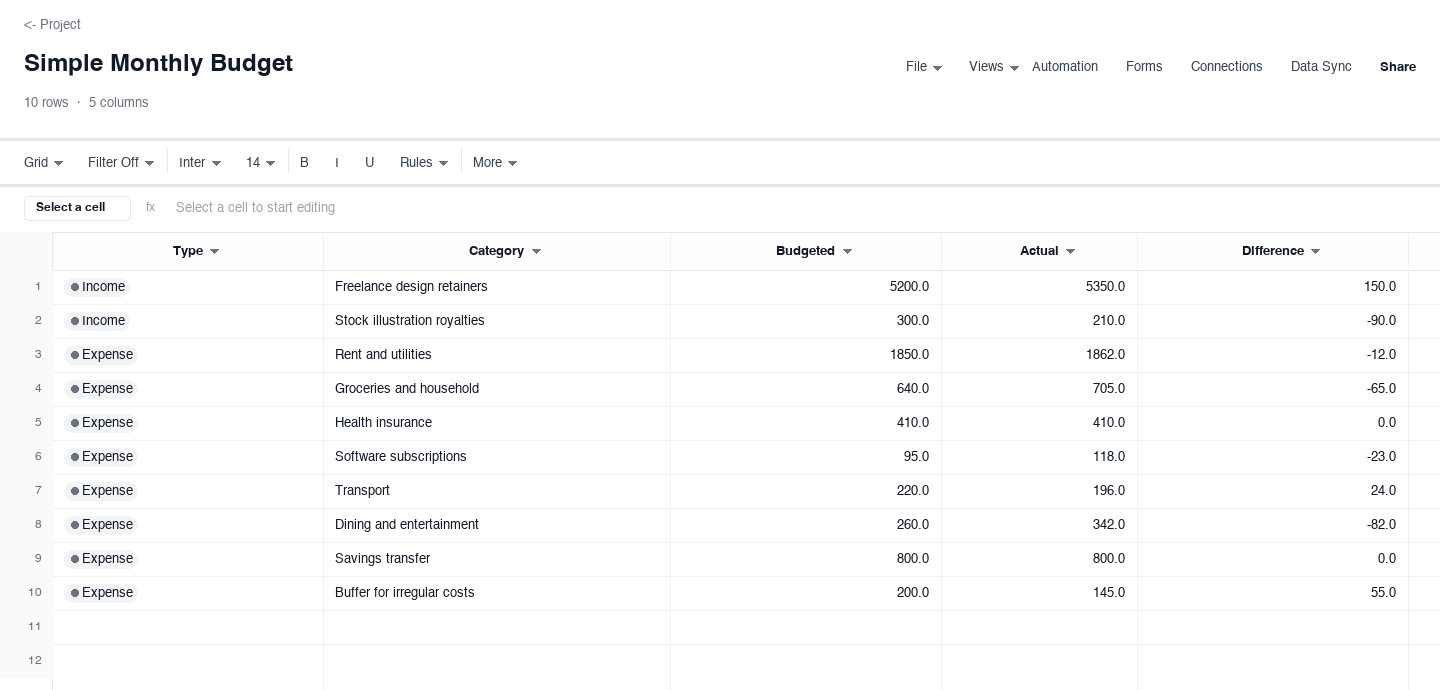
Simple Monthly Budget
The simple monthly budget is the starter version for one person or one household getting a first real look at where the money goes. Rows split into income lines at the top and expense lines below, each with a budgeted amount, the actual spent or earned, and a computed difference. Use it for a month before trying anything fancier, because the honest actuals are the entire point. The difference column is what earns its keep: it quietly shows the two or three categories that drift every single month, so the next budget starts from evidence instead of hope.
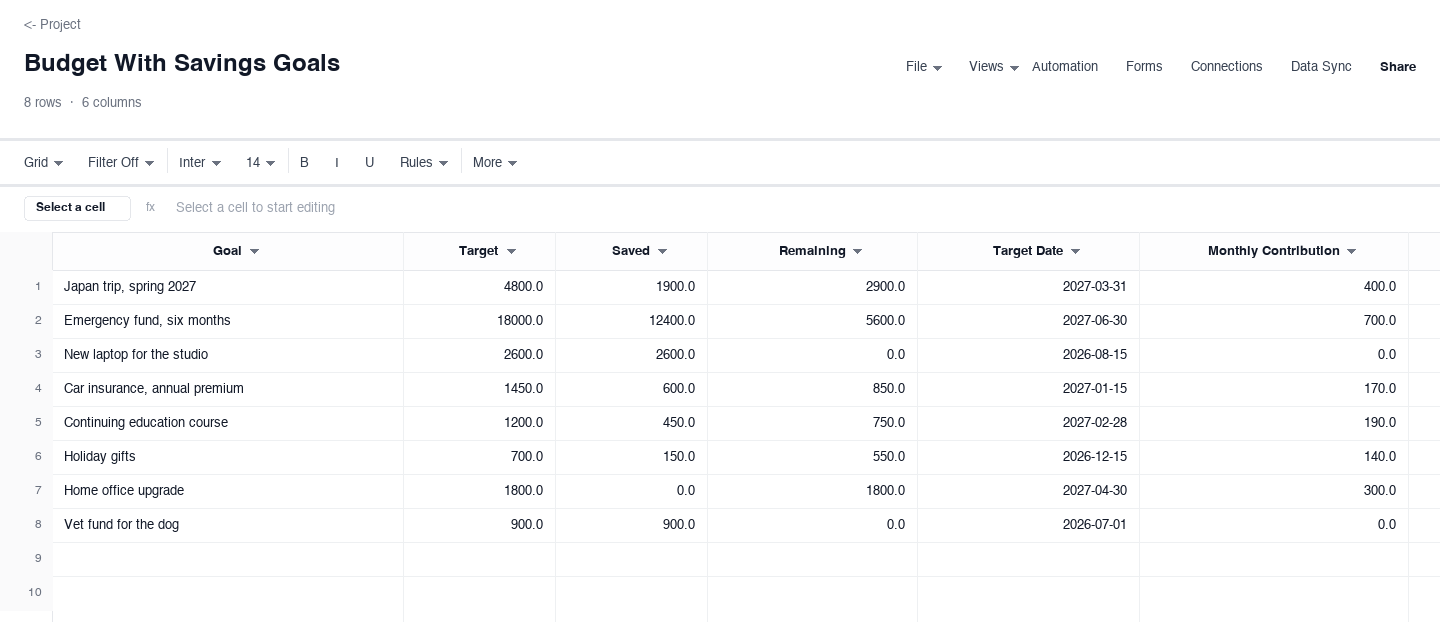
Budget With Savings Goals
The budget with savings goals turns wishful thinking into line items: each goal carries a target amount, what has been saved so far, what remains, and a target date, so the vacation and the emergency fund stop competing for the same leftover dollars. Use it when income is steady but savings never seem to accumulate. The remaining column is what earns its keep: divide it by the months until the target date and the transfer for this payday becomes a number instead of a feeling.
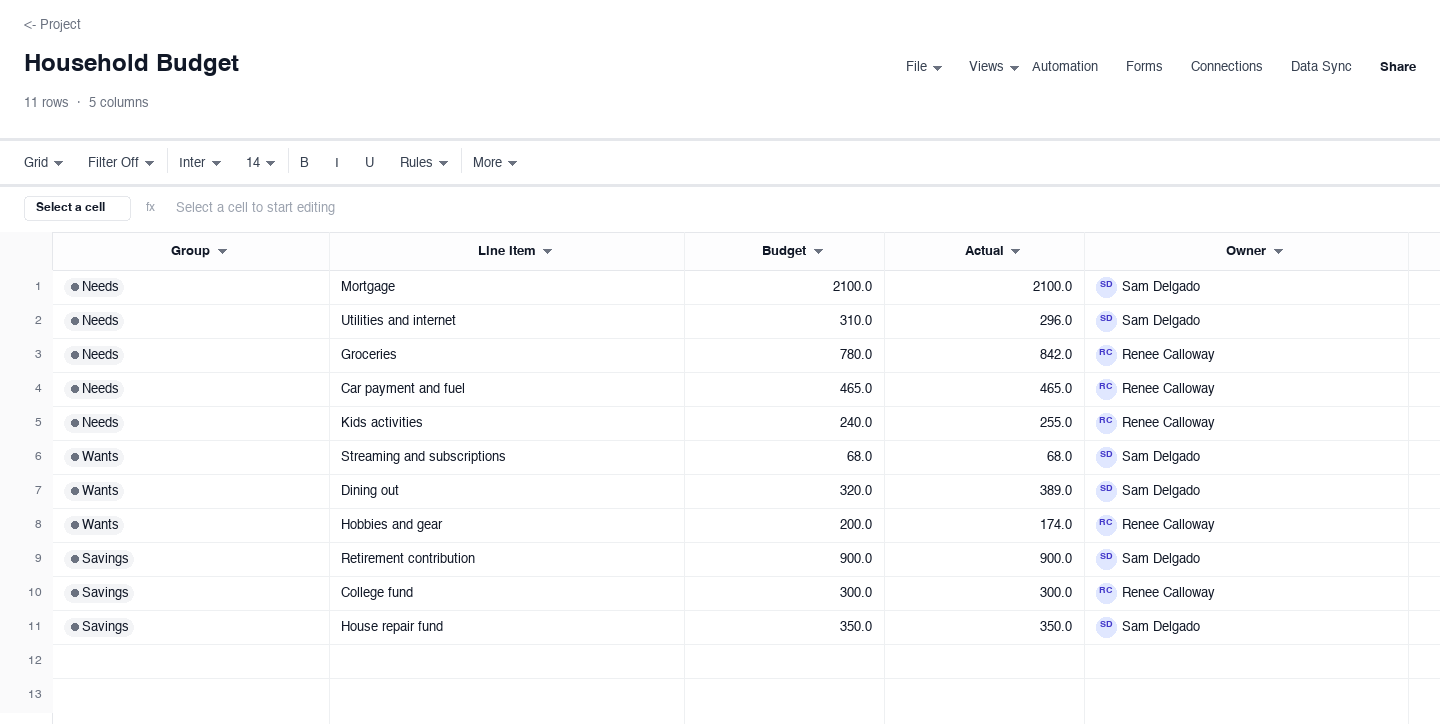
Household Budget
The household budget is built around the needs, wants, and savings split that keeps a shared budget honest. Every line is tagged as income, need, want, or savings, with budgeted and actual columns for each. Use it when two adults share spending decisions and need one sheet both can check before payday. The split tags are the feature that earns their keep, because they make the trade-offs visible: a month heavy on wants shows the savings line shrinking before the month is even over.
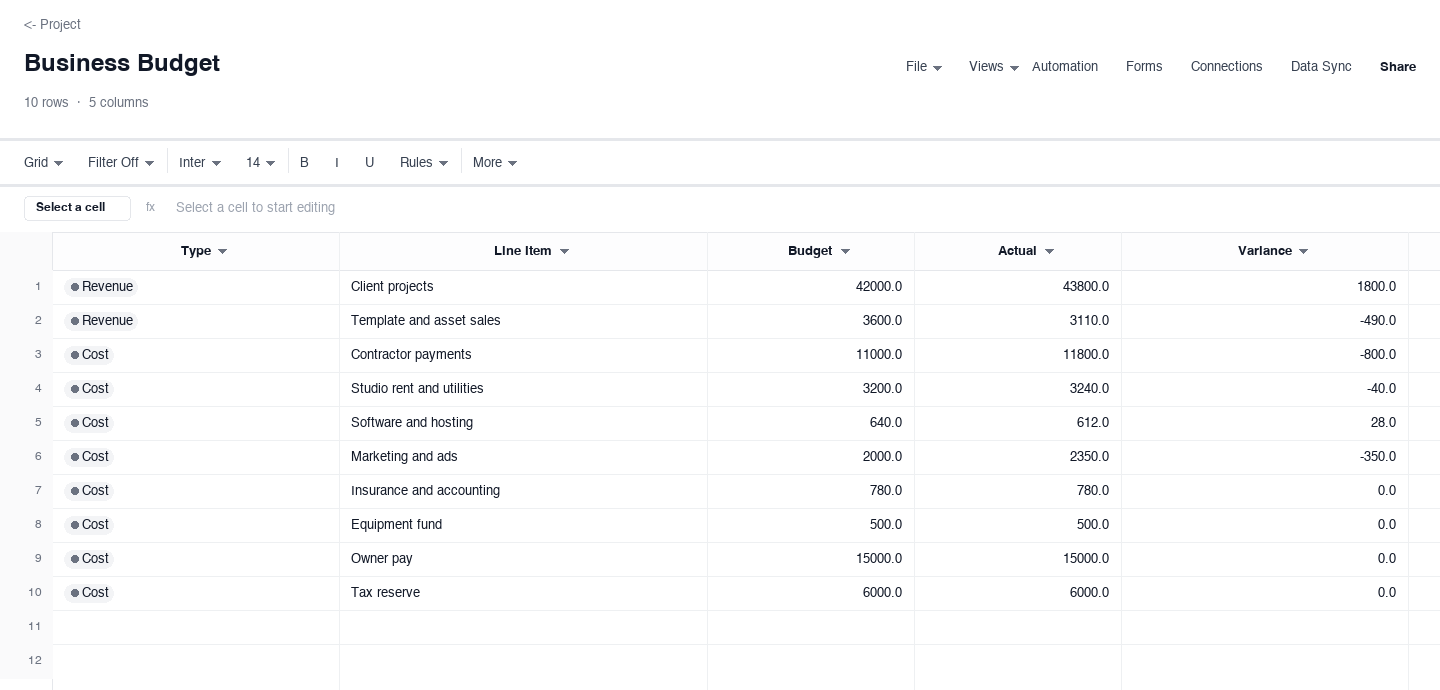
Business Budget
The business budget is for a freelancer or small studio planning a quarter: estimated revenue lines first, then cost categories, each with budget, actual, and variance computed as actual minus budget. Use it when client income varies and spending has to flex around it. The variance column is what earns its keep at the midpoint of the quarter, because a red cost line or a soft revenue line with ten weeks left is a plan you can still change.
How to build a monthly budget you will actually keep
Start from last month, not from your goals
Pull last month bank and card statements and categorize every transaction before you write a single budget number. The result is your real baseline, and it is almost always different from the guess: groceries run higher, subscriptions quietly multiply, and the guessed number for dining out is usually half of the truth. A budget built on hope collapses within three weeks, while a budget built on statements is a description of your life that you adjust on purpose. The simple monthly budget version above is pre-filled to show this baseline-first layout.
Give every dollar a job before the month starts
Income goes at the top, and then assign it downward until nothing is unassigned: needs first, then savings, then wants. A budget with unassigned money has a leak, because unassigned money spends itself. Put savings on a line of its own with a transfer date, not in a vague resolve to save what is left, because nothing is ever left. The budget-with-savings-goals version above treats each goal as its own row with a target, a saved amount, and a remaining amount, so this payday transfer is a computed number, not a mood.
Tag every line as need, want, or savings
The 50/30/20 rule says roughly 50 percent of after-tax income to needs, 30 to wants, 20 to savings, and the exact ratios matter less than the visibility. Tag each line, then look at the real split for your household: a high-rent month might read 62/25/13, and that is fine as long as you can see it. The household budget version above tags every row as income, need, want, or savings, which turns the abstract should we cut back question into a concrete one about specific rows you can point at and decide on together.
Record actuals weekly, not at month end
Fifteen minutes a week keeps the actual column honest; a month-end reconstruction from memory is fiction with a total. Pick a fixed day, pull the transactions since the last check-in, and type them in. Weekly cadence is also when drift is still fixable: a grocery line overspent in week one can shape weeks two through four, while the same number discovered on the 31st is just a regret. If you share the budget with a partner, this check-in is also the meeting that stops one person from silently carrying the whole plan.
Investigate any category that drifts by more than ten percent
A difference column exists to be read, not admired. When a category runs more than about ten percent off its budget for two straight weeks, either the budget is wrong or the behavior is, and only one of those can be fixed with a number. Raise the budgeted amount where the spend is real and intentional, and cut the behavior where it is not; pretending a drift is a one-time thing is how a 50 dollar category quietly becomes a 200 dollar category. Small variances are normal. Unexplained ones are the ones that compound.
Duplicate the sheet each month and revise the plan
At month end, save the sheet as history and start a fresh copy with the lessons baked in: the categories that drifted get realistic numbers, and the goals that moved get new target dates. Keeping each month as its own file builds a record you can compare across a quarter, which surfaces patterns no single month reveals, like the annual insurance bill that always lands in the same underfunded category. A budget is a living document, not a verdict; the people who keep one for a year are the ones who treat the first draft as a draft.
Looking for a simple budget template in Excel?
If you searched for a simple budget template in Excel, you are in the right place: every download above is an .xlsx file that opens directly in Excel and imports into Google Sheets in one step. The spreadsheet beats paper for one reason that matters more than any feature: the difference column computes. When you type what you actually spent, the over- or under-budget number appears on its own, and a budget spreadsheet in Excel or Sheets that does its own arithmetic is the version people actually maintain past February.
Moving between the two tools is painless. In Google Sheets, use File, then Import, and pick the downloaded file; in Excel, open it directly and it behaves like any workbook. Keep one master copy and share it read-only with a partner if you want their eyes on the actuals without the risk of an edited formula. If you are choosing between the two, Sheets is the better home for a shared household budget, and Excel is the better home when the file never leaves one computer.
Need a business budget template?
The business budget version above is the small business budget template in the set: estimated revenue lines first, cost categories second, and budget, actual, and variance columns that show whether the quarter is behaving. It works for a freelance studio exactly as filled in, and the structure generalizes to any small company: rename the revenue lines to your income streams, rename the cost categories to yours, and the variance math keeps working untouched.
The same skeleton serves as a restaurant budget template with three swaps: food cost, labor, and occupancy become their own categories, and revenue lines split into dine-in, takeout, and catering. Restaurant operators watch food and labor as a share of sales week by week, so a variance column that compares each against budget is the habit that keeps the doors open. Whatever the business, the rule holds: budget before the month, record actuals weekly, and read the variance before it becomes a quarter-end surprise.
Frequently asked questions
Is this Google Sheet budget template actually free?
Yes. Every version downloads as a spreadsheet file with no email gate, no account, and no trial countdown. The files open directly in Google Sheets through File, then Import, or in Excel as a normal workbook. You are welcome to copy the structure into your own master sheet, adapt the categories, and share it with a partner: once it is yours, it is yours. The page itself is the instructions, and the samples are pre-filled so nothing starts blank.
How do I open the template in Google Sheets?
Download the file, open Google Drive, and use File, then Import, then Upload to bring it in as a new spreadsheet. Once it is in Sheets you can rename it, duplicate it for next month, and share it with a partner so you are both recording actuals in one place. If you prefer Excel, the same file opens there directly and nothing is lost. Either way, keep the original download pristine and do your editing on a copy, so you always have a clean starting point.
What is the 50/30/20 budget rule?
It is a starting split for after-tax income: roughly 50 percent for needs like rent and groceries, 30 percent for wants like dining out and subscriptions, and 20 percent for savings and debt payoff. The household budget version above tags every line as income, need, want, or savings so you can see your real split in one column. Treat 50/30/20 as a beginning, not a verdict: a high-rent month might look more like 60/25/15, and the point of the tags is to see your own numbers honestly and adjust them on purpose.
Can I use the business budget version for a restaurant?
The structure carries over well. Rename the revenue lines to your income streams such as dine-in, takeout, and catering, and rename the cost categories to food, labor, and occupancy, and the variance math works untouched. Restaurant operators watch food and labor as a share of sales every week, so the variance column is the feature to lean on. If you searched for a restaurant budget template, start from the business budget version, make those three swaps, and you will have a working draft in a few minutes.
Should I budget weekly or monthly?
Budget monthly, because rent, utilities, and most bills run monthly, but record actuals weekly. A five or ten minute weekly review keeps the actual column honest; a month-end reconstruction from memory is fiction with confidence. The weekly rhythm also catches drift while it is still small: a grocery line overspent in week one can shape weeks two through four, while the same number discovered on the 31st is just a regret. The simple monthly budget version above is shaped exactly for this loop.
How do I budget with irregular freelance income?
Base the budget on your lowest reliable month from the past year, not your best month. Freelance income that arrives above the baseline funds the savings goals and the buffer first, in that order, before any lifestyle increase. The business budget version above separates estimated revenue from actual revenue so you can see the gap forming mid-quarter, and the budget-with-savings-goals version holds the buffer as its own line with a target. On lean months the plan holds because it was built for them; on good months the surplus has a destination before it arrives.
Run it live instead of in a file.
The downloads above are yours either way. In Wisegrid the same template becomes a working sheet with owner contacts, status dropdowns, reminders, and dashboards. 7-day free trial, no credit card required.