Timeline Template: Plan Projects, Launches, and Campaigns Visually for 2026
A timeline template is the simplest way to make a sequence of events legible: every phase, task, milestone, or publish date laid out between a start and an end, with an owner attached to each line. It is the sheet a project manager pins up before a build, a marketer keeps open during a campaign, and a registrar uses to count backward from an opening date. Unlike a task list, a timeline forces the one question that actually matters: does everything fit between now and the deadline, in the order the work has to happen?
The versions below cover the four timelines people actually maintain. The project timeline tracks phases and milestones for a dated deliverable like an exhibit buildout. The product launch timeline adds workstreams and dependencies, because launch work only happens in one order. The marketing campaign timeline shifts the lens to assets, channels, draft dates, and publish dates. The historical timeline drops the project frame entirely and records events with their significance and a source note for each claim.
Four timeline templates, free to download
Each version below is a working spreadsheet, not a blank grid with a title row. The fields are pre-filled with realistic example content from a fictional museum exhibit buildout and a fictional software launch so you can see how a finished timeline reads, then overwrite it with your own dates and owners. What you download is an everyday spreadsheet file, compatible with all the usual tools. No email address required.
Project Timeline
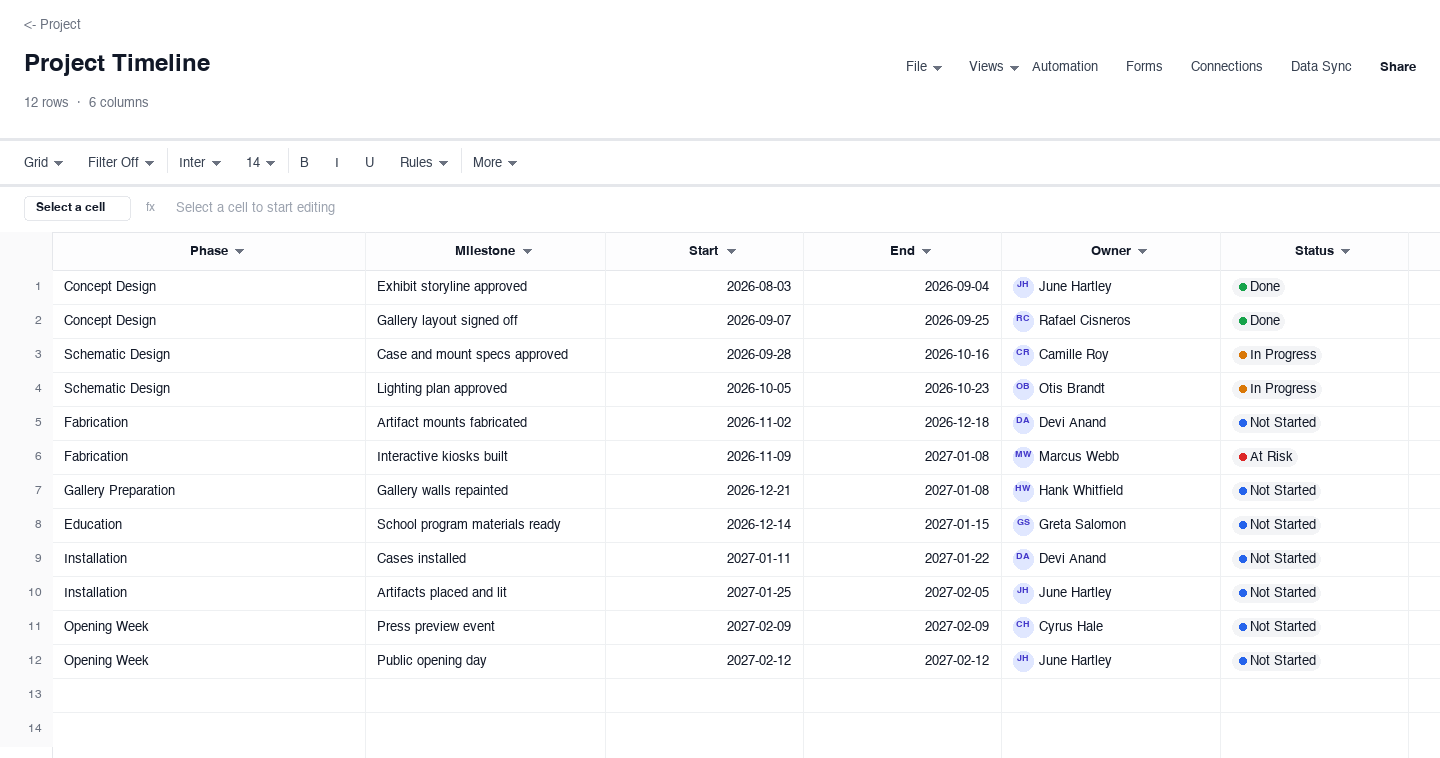
The project timeline is for any dated deliverable with phases and milestones: an exhibit buildout, a move, a renovation, a launch. Each row carries a phase, a milestone or task, a start and an end date, an owner, and a status, so the whole schedule reads as one list. The phase column is what keeps it honest, because grouping every line under Design, Fabrication, or Install shows at a glance which phase is eating the calendar when the finish date starts to slip, long before the milestone count tells the same story.
Product Launch Timeline
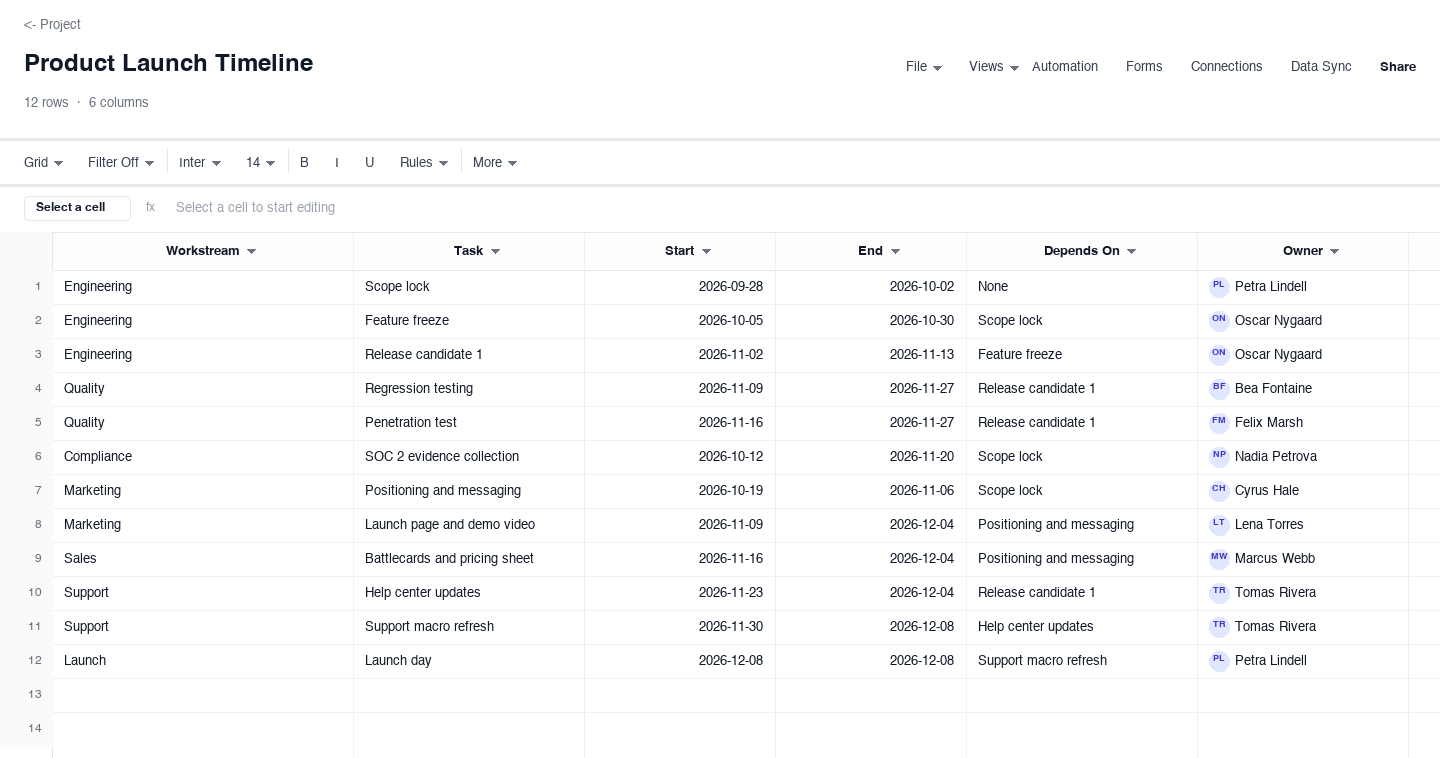
The product launch timeline is built for launches, where workstreams only make sense in one order. Each row carries a workstream, a task, start and end dates, the task it depends on, and an owner, so the sheet models the launch as a chain rather than a pile. The depends-on column is the control that earns its keep: in the weeks before a launch it exposes which assumption broke, because when one late task fans out into a column of blocked work you see the blast radius before you see the missed date.
Marketing Campaign Timeline
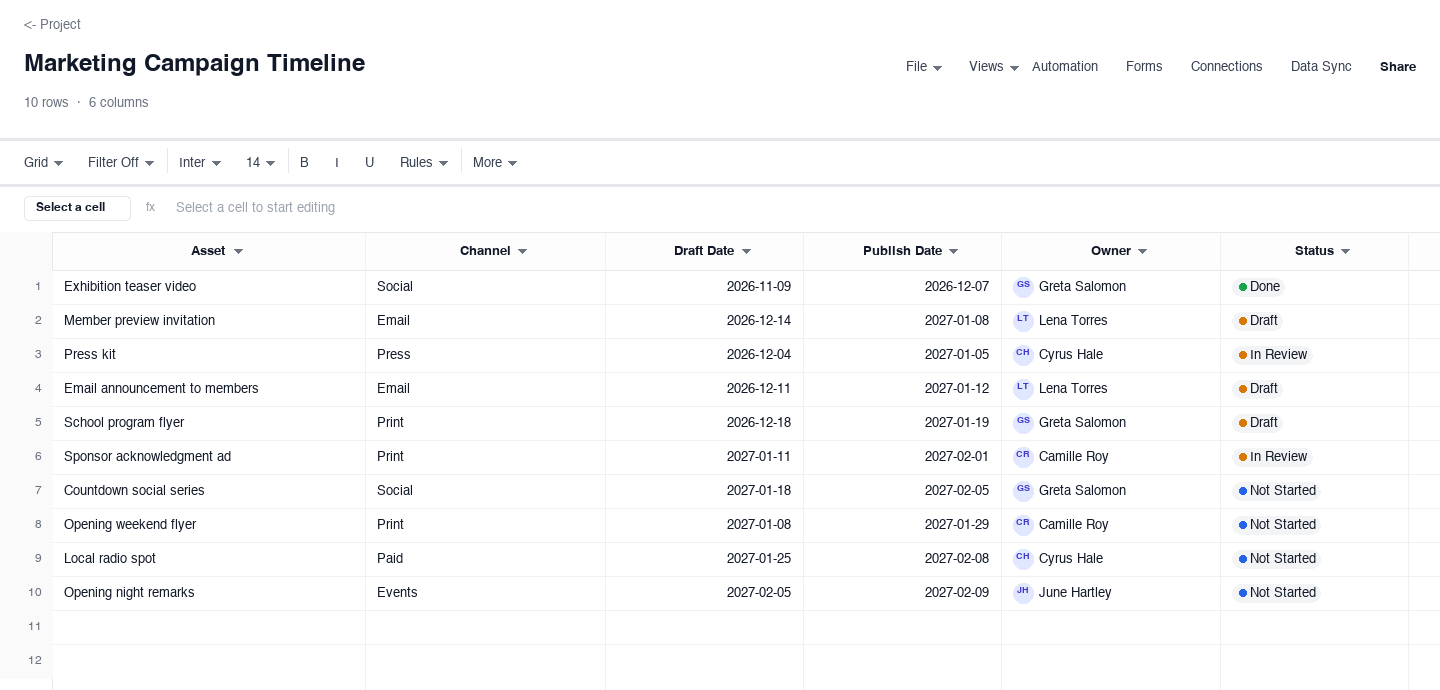
The marketing campaign timeline turns a calendar into an asset schedule: each row is an asset, its channel, a draft date, a publish date, an owner, and a status. It is for teams shipping a coordinated push across email, social, print, and events. The draft date earns its keep because the gap between draft and publish is where review actually lives, and seeing a two-day gap on a press kit is the early warning that the kit will go out with nobody left to proof it.
Historical Timeline
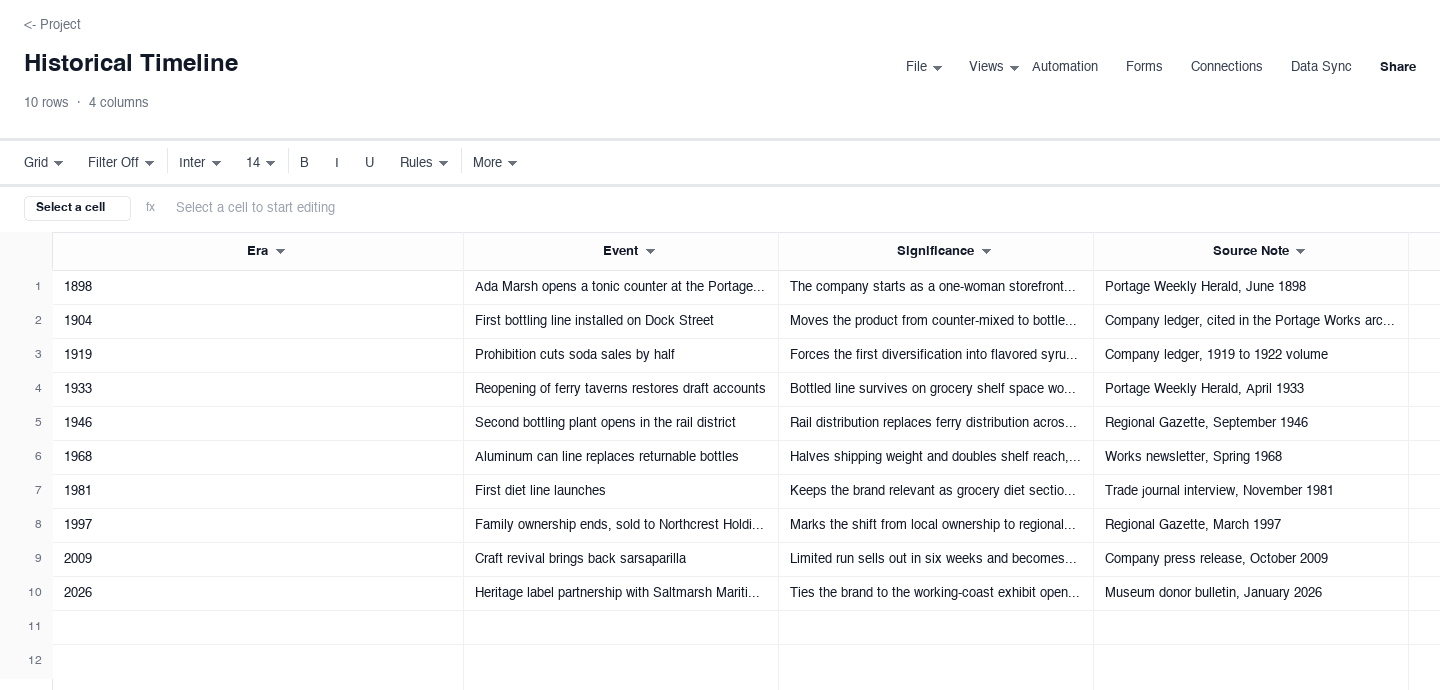
The historical timeline trades owners and statuses for record-keeping: each row is an era or date, an event, why it mattered, and a source note pointing at where the fact came from. It suits exhibits, reports, and retrospectives where accuracy is the point. The source note column is the quiet workhorse, because a timeline that cites its sources can be defended in a review meeting, and one that cannot gets quietly rewritten by whoever doubts it first.
How to build a timeline that stays accurate to the date
Anchor every row to calendar dates, not week numbers
Week numbers drift the moment the plan slips and nobody renumbers the weeks; calendar dates survive contact with reality. Pick the anchor date first, the opening, the launch, the gala, and record real calendar dates for every start and end, even when they are uncomfortable. A timeline built on dates shows slip immediately: one line moves and the whole right-hand side of the sheet tells you what the move costs. Week numbers hide that signal until the week itself arrives and the work is not done.
Name phases and milestones so a stranger can follow
A phase labeled Phase 2 means nothing to a sponsor, a volunteer, or a new hire; Fabrication or Install does. Write milestone names as finished states with a date: gallery walls complete, store submission approved, press kit published. Apply the stranger test: hand the timeline to someone outside the project and watch where they ask what a line means. Every question marks a name to rewrite. A timeline that passes the stranger test needs no narration in the meeting where it gets presented.
Attach one owner to every single row
A date with no name behind it is a hope. When a date is at risk, someone specific has to hear about it early enough to matter, so each row gets exactly one owner, not a team, not a slash pair of names. In a working sheet the owner is a real contact column, which means you can sort the whole timeline by person and see load at a glance: who holds three milestones in one week, who holds none. That sort takes ten seconds and it is how staffing problems surface before they become date problems.
Record dependencies in writing, not in your head
The most common timeline failure is not a bad estimate, it is an assumed order that was never written down: marketing drafts the announcement before the message is locked, install crews show up before the cases ship. Put the dependency in its own column, named after the task it waits on, and review that column weekly. When a task slips, search the column for its name and every downstream row lights up. That list is the conversation you need to have at the start of the week, not the surprise you get on launch day.
Set a standing weekly date review and actually hold it
Fifteen minutes, same slot every week, the owner and the timeline. Move dates that moved, mark statuses that changed, and kill rows that quietly became irrelevant. The review is what separates a timeline from a snapshot: without it, dates freeze on the sheet while reality moves, and within a month the document is fiction that still gets presented as fact. Keep the status vocabulary tiny, four or five values, so the review is a decision and not a debate about what In progress really means this week.
Cut a view per audience instead of one view for everyone
Sponsors want phases and milestones and nothing else; the team doing the work needs every task and every dependency. Maintain one timeline and filter it down per audience rather than maintaining two documents that drift apart. The sponsor view is the one that travels, and it is usually the one that ends up in a slide deck. The section below covers how to move the milestone rows into slide software honestly, without letting the deck become the source of truth that silently goes stale.
Need a project timeline template or a marketing timeline template?
Both searches land on the same artifact with a different calendar in mind, and both are covered above. The project timeline template searcher usually wants exactly the project-timeline version: phases, milestones, start and end dates, an owner per row, and a status that survives a weekly review. If that is you, download that variant and work through the steps in this guide, because most of the failure modes live in the dates and the naming, not in the grid itself.
The marketing timeline template search is the same discipline applied to a campaign: rows become assets, the channel gets its own column, and the dates that matter are draft and publish. The marketing-campaign-timeline variant above is built for exactly that, with the draft-to-publish gap visible on every line so review time stops being the thing that catches the team out the week of a launch.
Making a PowerPoint timeline from your spreadsheet
PowerPoint timelines are a real search for a real chore: the sponsor deck needs a visual, and the timeline has to get there. Be honest about the mechanics. Slide software has timeline shapes and smart diagram layouts that look right in thirty seconds, but they hold maybe twelve items before the text becomes unreadable, and they have no link back to your sheet. A screenshot of the spreadsheet is worse: it goes stale the day after the review and nobody trusts it by the next one.
The working habit is to treat the spreadsheet as the source of truth and rebuild the slide from it before every meeting: filter the timeline to phases and milestones only, then place those rows on the slide shapes by hand. Ten minutes before each steering meeting, and the deck is always current because the sheet is. If the audience only ever sees slides, the sheet dies; if the sheet dies, the dates in the slides are already wrong.
Frequently asked questions
What is a timeline template?
A timeline template is a pre-built spreadsheet for recording events in date order: each row carries a date or a start and end, a name, usually an owner and a status, so a whole sequence reads at a glance. The four versions above cover the shapes people actually maintain: phases and milestones for projects, workstreams and dependencies for launches, assets and publish dates for campaigns, and eras with source notes for history.
How do I make a project timeline?
Start from the finish date, because that is the one date that is usually fixed, and list the phases backward from it. Break each phase into milestones with dates, attach one owner to every row, then run a fifteen-minute weekly review where dates that moved get moved. The project-timeline variant above is the starting grid, and the guide on this page covers the failure modes: week numbers instead of dates, unnamed owners, and dependencies that live only in the head of one person on the team.
What is the difference between a timeline and a Gantt chart?
A timeline answers when in sequence: phases, milestones, and dates on a track, optimized for reading. A Gantt chart adds duration and dependency logic: bars with lengths, tasks linked to predecessors, a critical path. Use a timeline to communicate a sequence to people, and a Gantt chart when the lengths of tasks and the order they constrain each other are what you are managing. The Gantt chart template page covers that side, and the two pair naturally on bigger projects.
How do I create a timeline in PowerPoint?
Use the timeline or process shapes built into the slide app, and keep expectations modest: twelve items is about the ceiling before the text becomes unreadable, and none of it links back to your working sheet. The honest workflow is to maintain the full timeline in the spreadsheet, filter it down to phases and milestones for the audience, and rebuild the slide from those rows before each meeting. The section above walks through the habit in detail, including why screenshots of the sheet age so badly.
What should a marketing timeline include?
Every asset you owe the campaign, each on its own row, with the channel, the draft date, the publish date, the owner, and a status. The draft date matters as much as the publish date, because the gap between them is where review, legal, and the inevitable last copy change actually happen. A marketing timeline that only tracks publish dates discovers its problems on the publish date; one that tracks drafts discovers them two weeks earlier, which is when they are still cheap.
Can I use a timeline template for a history project?
Yes, and the historical-timeline variant above is shaped for exactly that: era or date, event, significance, and a source note per row. The discipline difference from a project timeline is that accuracy replaces urgency. Significance forces the one-sentence answer to why this mattered, and the source note means every claim can survive a review. For exhibits and reports, that column is what separates a timeline people cite from one people quietly correct.
Run it live instead of in a file.
The downloads above are yours either way. In Wisegrid the same template becomes a working sheet with owner contacts, status dropdowns, reminders, and dashboards. 7-day free trial, no credit card required.