Performance Review Template: Free Downloads and a Scoring Guide for 2026
A performance review template is the structure a manager and an employee write inside together: the competencies or goals being judged, the rating scale, the evidence that justifies each rating, and the development plan that comes out the other side. Without that structure, reviews drift into whichever meeting ran longest that week, and two employees in the same role get judged on different things by different standards. A good performance review template keeps the criteria stable, the evidence visible, and the conversation about the work rather than about the form.
The versions below cover the four shapes a review cycle actually takes. The annual review scores each employee against shared competencies, the 90-day review walks a new hire through probation milestones, the self-assessment captures the employee view beside the manager view before the meeting, and the goals-based review checks progress against targets agreed at the start of the period. The samples come from a fictional sixty-person software company and a fictional retail chain, so you can see the sheets carrying real ratings rather than empty scaffolding.
Four performance review templates, free to download
Each version below is a working spreadsheet, not a blank grid with a title row. The samples are filled with realistic content from a fictional software company and a fictional retail chain, so you can see how finished ratings, evidence notes, and development goals read, then overwrite them with your own team. What you download is an everyday spreadsheet file, compatible with all the usual tools. No email address required.
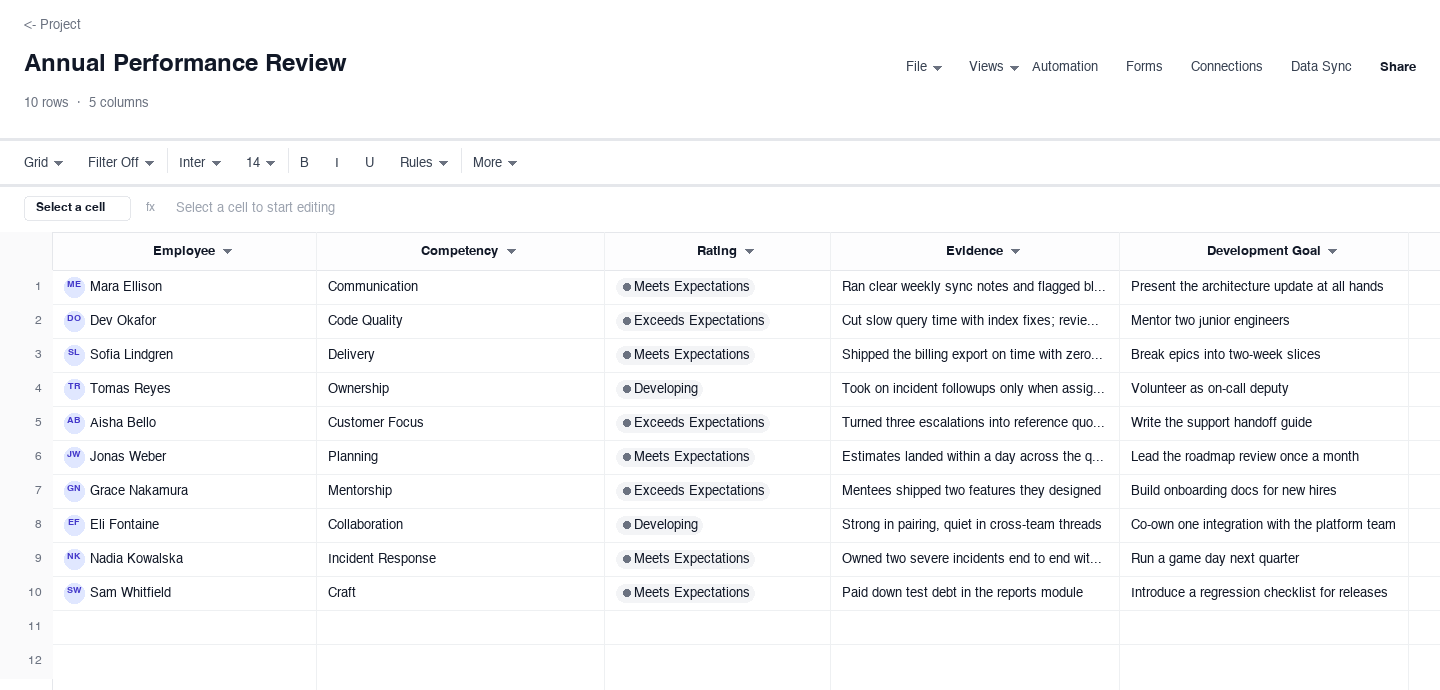
Annual Performance Review
The annual performance review scores one employee per row, or one competency per row for a single employee, with a rating dropdown, an evidence note that justifies the rating, and a development goal that turns the verdict into a next step. Use it for the yearly cycle of a small company or a department, like the sample from a fictional sixty-person software studio. The evidence column is what keeps ratings defensible: every score points at something that happened, not a general impression.
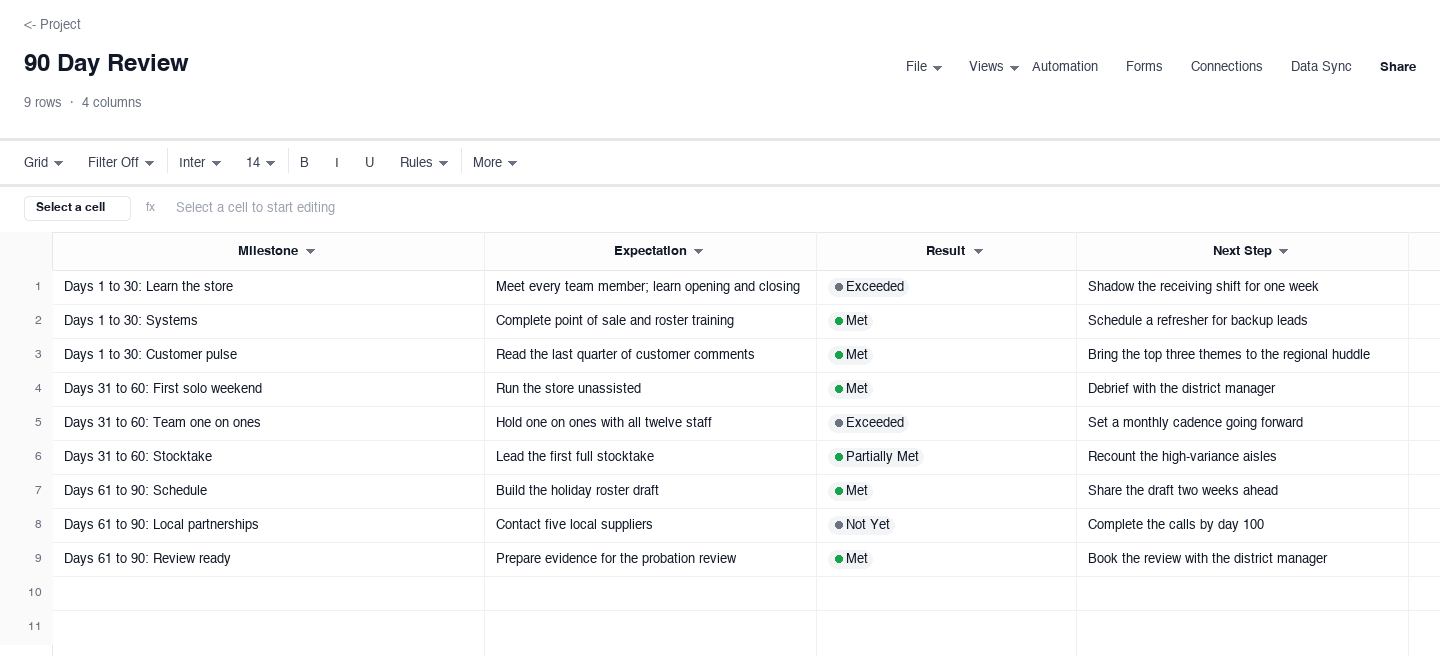
90 Day Review
The 90-day review breaks a probation period into milestones, one row each, with the expectation, the result, and the next step recorded side by side. Use it for new hires, internal transfers, or a newly promoted store manager, like the sample from a fictional retail chain. Splitting ninety days into three blocks keeps the review forward-looking: each row ends with what comes next, so the conversation is about the path, not a verdict arriving at day ninety.
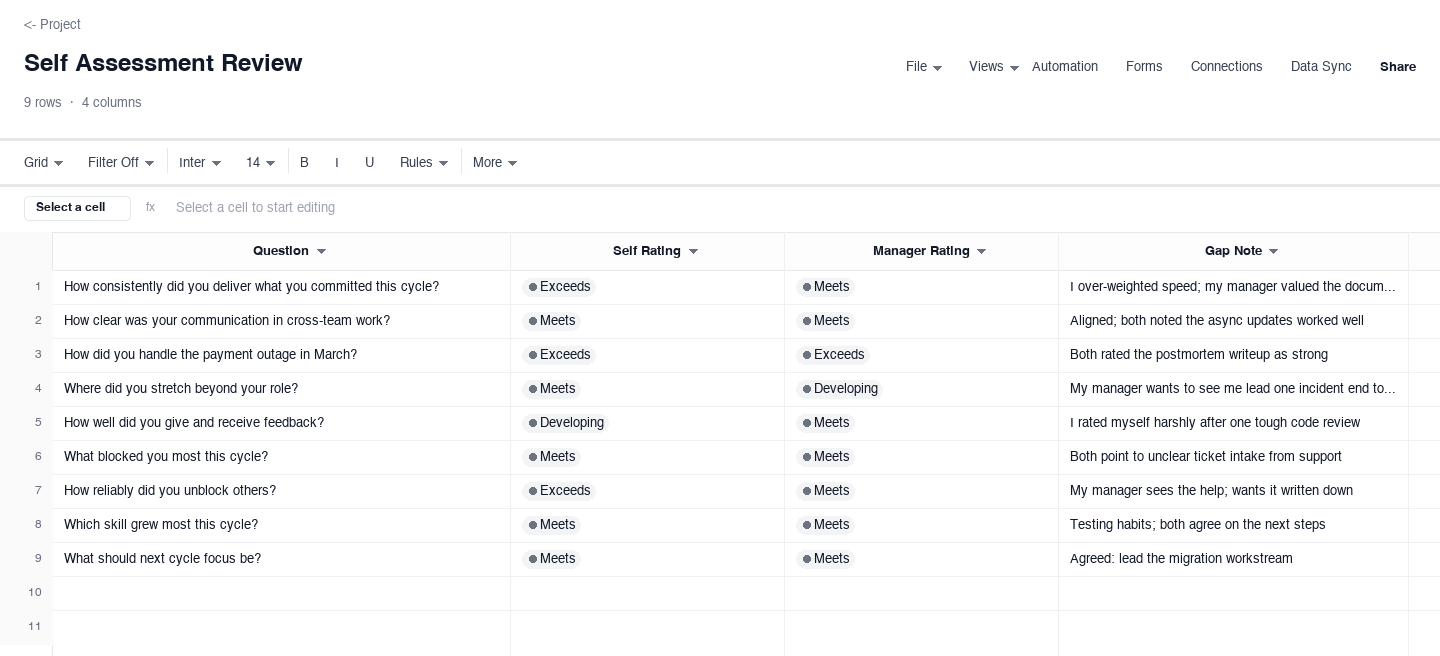
Self Assessment Review
The self-assessment review lists one reflection question per row, with the employee rating, the manager rating, and a gap note written before the meeting. Use it so both sides arrive with their scores already down, because the most useful moment in any review cycle is comparing the two columns: where they agree, the meeting confirms quickly, and where they diverge, the gap note carries the real conversation about what each side saw.
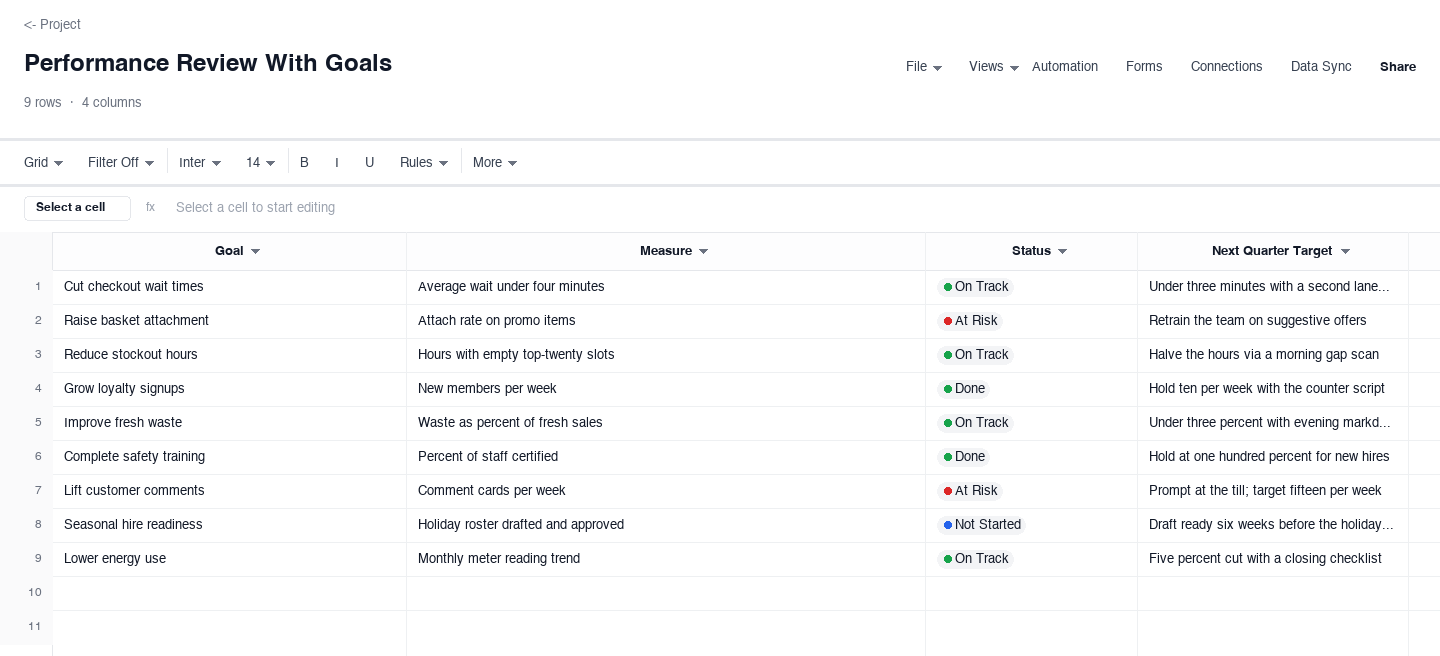
Performance Review With Goals
The goals-based performance review anchors the cycle to targets agreed at the start of the period: one row per goal, with the measure, the current status, and the target for next quarter. Use it when the review must answer a specific question: did we hit what we said we would hit. The status column keeps the meeting honest about risk early, an at-risk goal in month two is a conversation, not a failure, while the same goal at quarter end is a surprise everyone could have avoided.
How to run a performance review people trust
Write the criteria before you look at anyone
The single biggest source of review drama is criteria invented during the meeting. Before the cycle opens, write down the competencies or goals being scored, the rating scale, and what each level means, and share that document with the whole team. When employees know the rubric in advance, they spend the quarter collecting evidence instead of guessing what matters. The competency column in the annual version above exists for exactly this: stable criteria, applied to everyone.
Rate against evidence, not against the last meeting
Every rating should point at something observable: shipped work, incidents owned, customers helped, mentees grown. If a rating comes with no evidence, treat that as a prompt to collect some before the meeting, or to soften the rating until the evidence exists. Recency bias, where the last six weeks drown out the other ten months, is the default failure mode of annual cycles, and an evidence column written across the whole period is the cheapest defense there is.
Run the self-assessment before the manager assessment
Have the employee complete the self-assessment first, without seeing the manager draft, then compare the two columns row by row. Agreement confirms the criteria are understood; disagreement is the agenda for the meeting, and the gap note column is where each side records what the other saw differently. This ordering matters: an employee who writes after seeing the manager scores writes to agree, not to reflect, and the sheet loses its one honest signal.
Keep ratings about the work, in behavioral language
Write evidence as behavior plus outcome: owned two severe incidents end to end with clean writeups, not a natural leader. Behavioral language keeps the review actionable because the employee can repeat what worked and change what did not, and it keeps the document defensible if a rating is ever challenged. Avoid labels that describe a person rather than an act; they raise the temperature of the meeting without giving anyone a next step.
Turn every rating into one development goal
A review that ends at a rating is a report card; the value is in the development goal column. Each goal should name a behavior, an owner, and a timeframe short enough to check: present at all hands next quarter beats communicate better indefinitely. The goals-based version above makes this concrete by carrying the measure and the next-quarter target in their own columns, so the follow-up review opens by reading last quarter goals rather than by starting from a blank page.
Hold the review, record it, and calendar the follow-up
In the meeting, walk the sheet top to bottom and let the employee speak first on each row; people accept critical ratings far more readily when they have said the thing themselves. Record adjustments in the document during the meeting, not after, and note disagreements that remain rather than papering over them. Then calendar the follow-up before the meeting ends: ninety days out for a check-in, or the start of next quarter for goal review. A review with no scheduled follow-up is a complaint box, not a cycle.
Employee review template, evaluation template, or evaluation form?
The names differ by habit, not by function. An employee review template, an employee evaluation template, and an employee evaluation form all answer the same question: how is this person doing against criteria the company wrote down before anyone was judged. Searchers land on different phrases depending on where they last worked, and some organizations keep a form as the official record while others keep a running sheet. The structure that matters is identical: criteria, rating, evidence, and a development goal, which is the shape of every version above.
The practical difference is the record-keeping habit, not the layout. A form usually means one fixed document per employee per cycle, signed and filed, while a template usually means a working sheet that managers keep current between cycles. Spreadsheets serve both habits: maintain the working version in the sheet, where ratings and evidence stay easy to update, and export a dated copy to the personnel file when the cycle closes, so the signed record and the living source never argue about what was agreed.
Need a free employee performance review template for Word?
Plenty of small businesses and franchise offices still ask for the review as a Word document, usually because it gets attached to a personnel file or routed for a signature. The downloads above are spreadsheet files by design, because ratings, dropdowns, and goal tracking behave properly in a sheet, but they convert cleanly: open the file, set the print area, and export or print to PDF directly, which is the format most reviewers actually send anyway. From there, any office suite opens the PDF alongside the Word file it needs to sit next to in the folder.
If your organization keeps a Word review as the format of record, the workflow that holds up is the same one the exemplar buying documents use: maintain the working version in the spreadsheet, where dropdowns keep ratings consistent and the goals columns track themselves, then save a dated copy for the personnel file when the cycle closes. The reviewer gets one living source of truth during the quarter, the file cabinet gets the artifact it expects, and the employee name ties every version together.
Frequently asked questions
What should a performance review template include?
At minimum: the employee being reviewed, the criteria being scored (competencies or goals), a defined rating scale, an evidence field per rating, and a development goal per gap. The annual version above carries all five, and the self-assessment adds the employee view beside the manager view. What separates a working template from a formality is the evidence column: ratings tied to observable work survive scrutiny, while ratings without it collapse the first time an employee asks why.
How do I write a performance review without bias?
Anchor every rating to evidence written across the whole period, not to the last few weeks, and use the same rubric for everyone in the same role. Run the self-assessment before the manager assessment so the employee view is independent, then treat gaps between the two columns as the meeting agenda rather than as errors to correct. Behavioral language helps too: describe what the person did and what resulted, because labels about personality invite argument while observations about work invite discussion.
Is an employee evaluation form the same as a performance review?
Functionally, yes: both record how an employee performed against written criteria, and both should end in goals for the next period. The difference is mostly habit. A form usually means a fixed document per employee per cycle, kept for the personnel file, while a review run from a template usually means a working sheet that managers update between cycles. The same content serves both: keep the working version in a sheet and export a dated copy for the file when the cycle closes.
How often should performance reviews happen?
Annually is the legal and payroll rhythm in most companies, but it is too slow to be the only touchpoint. The pattern that works is a light quarterly check-in against goals, backed by a fuller annual review that scores competencies and sets development plans. New hires are the exception: run structured reviews at thirty, sixty, and ninety days, like the milestone version above, because early correction is cheap and late correction is a termination conversation nobody wanted.
Can I use this performance review template in Word?
The downloads are spreadsheet files, and that is where the ratings, dropdowns, and goal tracking behave properly, but the content converts to Word cleanly. Open the file, set the print area, and export or print to PDF, which is the format most organizations attach to personnel files or route for signature. If your office requires a Word file as the format of record, keep the working version in the spreadsheet during the quarter and save a dated copy for the file when the cycle closes, so both stay consistent.
What do I do when an employee disagrees with their rating?
First, separate the disagreement about the rating from the disagreement about the evidence, because those are solved differently. If the evidence is wrong or incomplete, correct the record; the sheet should be accurate, not victorious. If the evidence is agreed but the interpretation differs, note the disagreement in the document rather than arguing to consensus, and let the development goals give the next quarter a fresh, shared scoreboard. An employee who feels heard in the process accepts a rating they dispute far more readily than one who feels the number was fixed in advance.
Run it live instead of in a file.
The downloads above are yours either way. In Wisegrid the same template becomes a working sheet with owner contacts, status dropdowns, reminders, and dashboards. 7-day free trial, no credit card required.