Google Sheets Calendar Template: Monthly, Weekly, and Yearly Layouts for 2026
A Google Sheets calendar template is a calendar laid out as a spreadsheet: one row per date or month, columns for events, schedule, and notes, and none of the rigidity of a printed grid you cannot resize. It is the format content teams use for editorial calendars and families use for the week on the fridge, because a spreadsheet calendar sorts, filters, stretches, and shares without a second thought. The layouts below are built to work in any spreadsheet tool, and they upload to Google Drive and open in Google Sheets as-is.
The files here are ordinary spreadsheet files, which is the point. You are not locked into one app or one workflow: open the same file in a desktop spreadsheet, keep a copy in a shared drive, or print it when paper is what the week needs. The samples below show a fictional content studio planning an editorial month and a family planning a school week, so you can see the layouts carrying real plans rather than placeholder text.
Four Google Sheets calendar templates, free to download
Each version below is a working spreadsheet, not a blank grid with a title row. The samples are filled with realistic content from a fictional content studio and a fictional family, so you can see how a finished editorial month, a family week, and a habit tracker read, then overwrite them with your own plans. What you download uploads straight to Google Drive and opens in Google Sheets. No email address required.
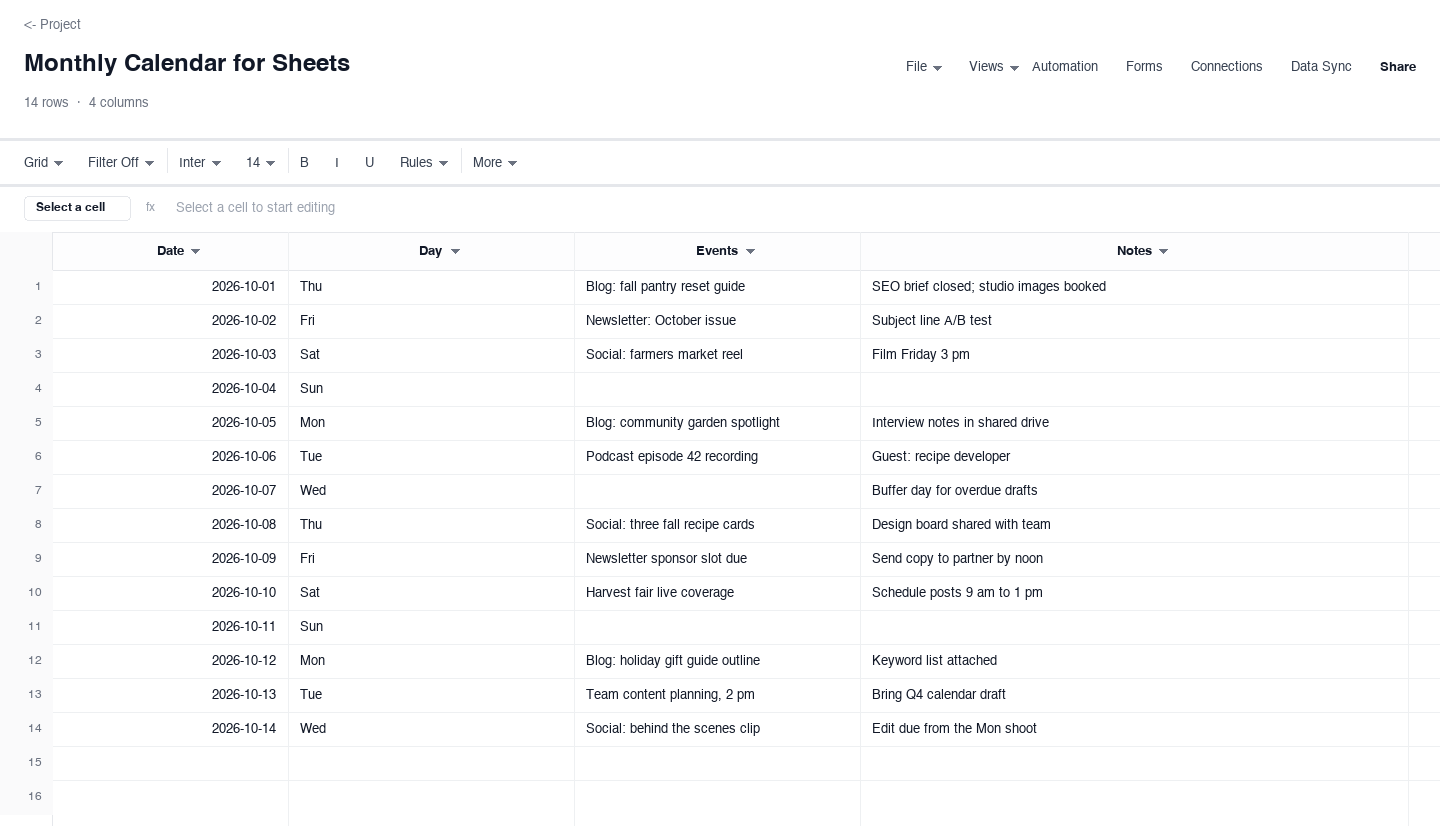
Monthly Calendar for Sheets
The monthly calendar gives you one row per day of the month, an events column for what ships or publishes that day, and a notes column for the detail behind it. Use it as an editorial calendar for a content team, where the sample rows show a blog, newsletter, social, and podcast schedule sharing one page. The date column stays a real date, so you can sort and filter the month, and the notes column swallows the briefs, links, and owner names that never fit in a calendar app slot.
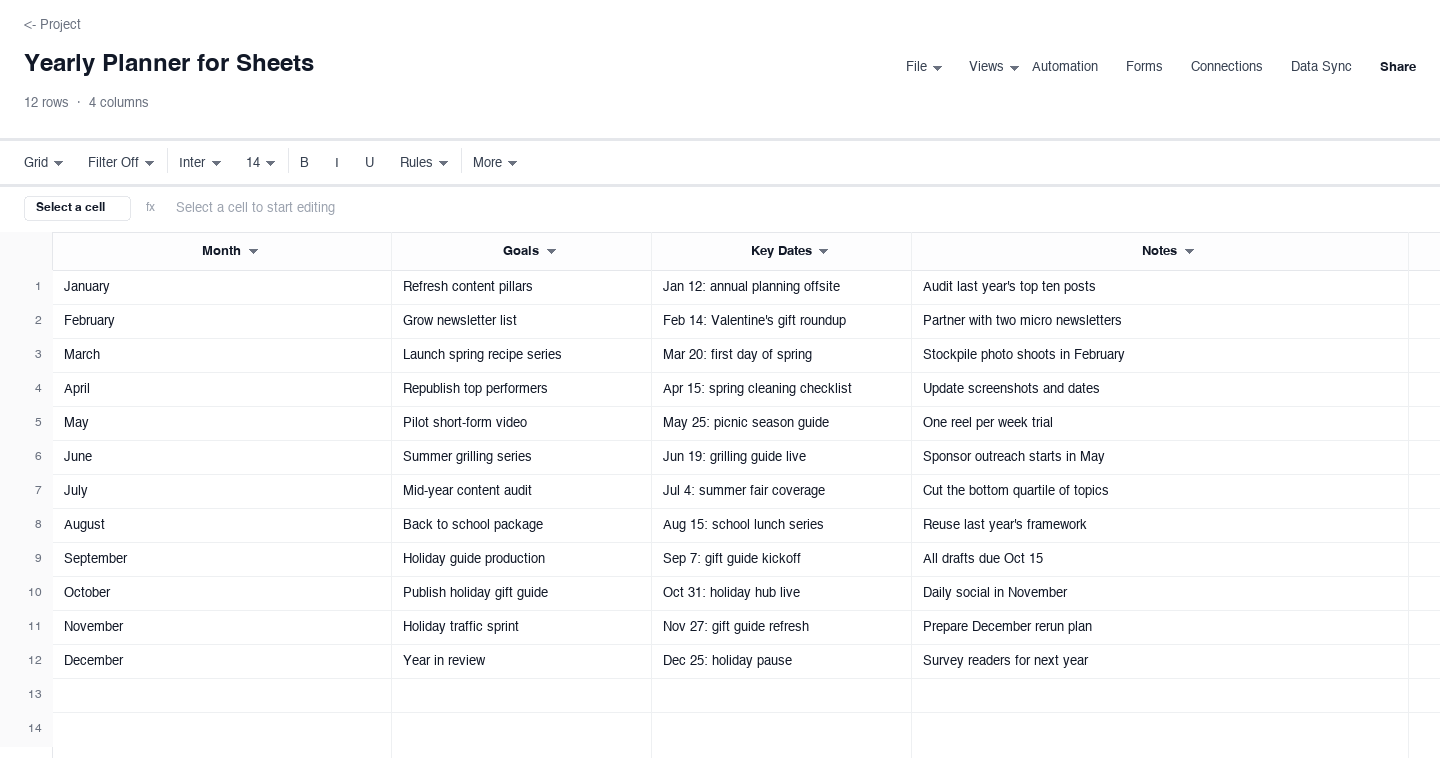
Yearly Planner for Sheets
The yearly planner puts one row per month on a single page, each with a goals column, a key dates column, and notes. Use it for the annual view of a content program, where launches, seasonal guides, and audits need to be seen together before anyone plans individual weeks. The sample rows carry a fictional studio year, but the structure drops straight into a family year of terms, trips, and renewals, or a club season of fixtures and events, without reformatting.
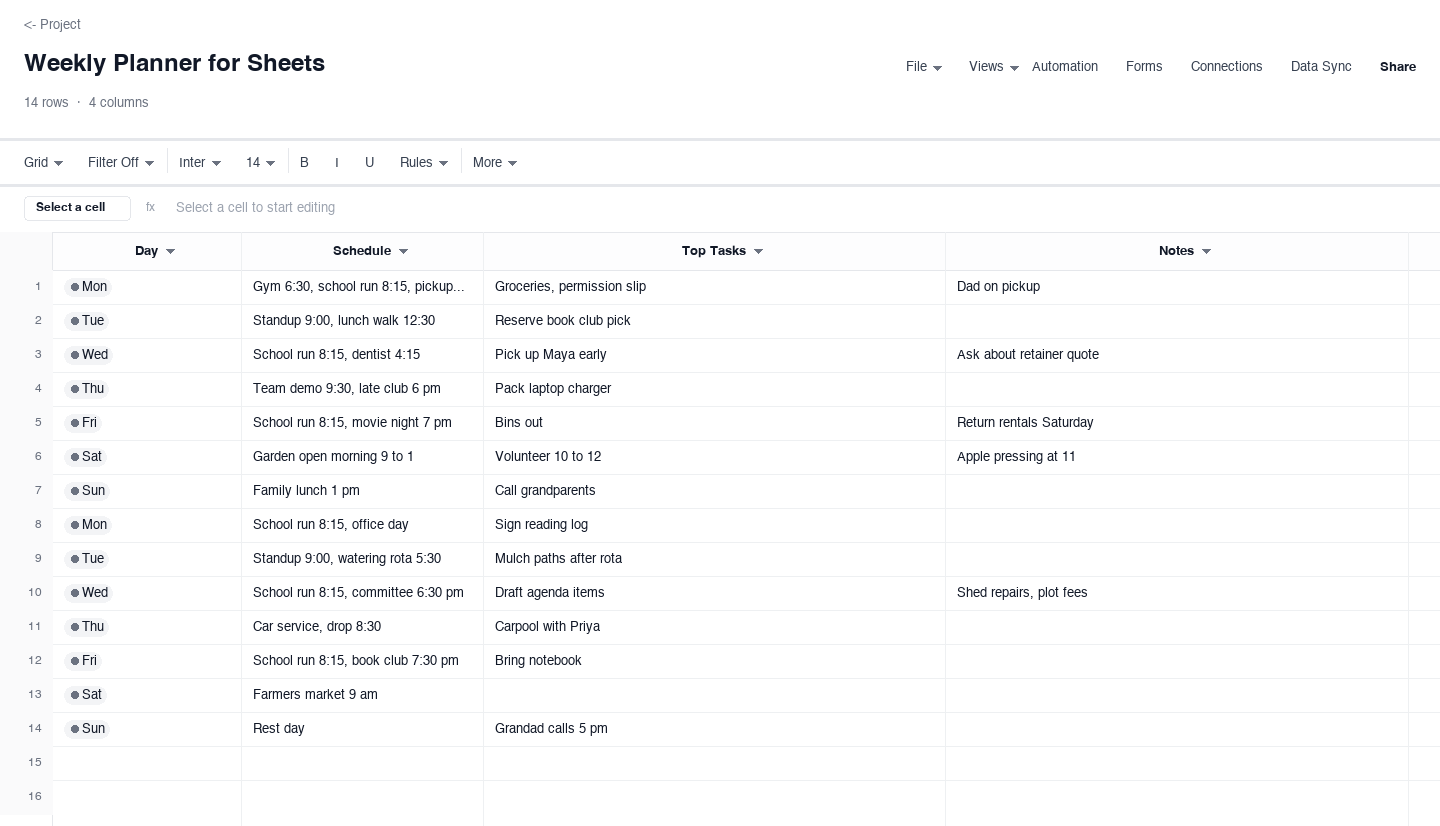
Weekly Planner for Sheets
The weekly planner gives every day a row with a schedule column for timed blocks, a top tasks column for the two or three things that must happen, and notes for the rest. Use it for the family week in the sample, or for your own seven days when a month view cannot hold the detail. It is the layout that replaces the fridge-door whiteboard: everyone reads the same page, and the shared file updates before the printed copy goes stale.
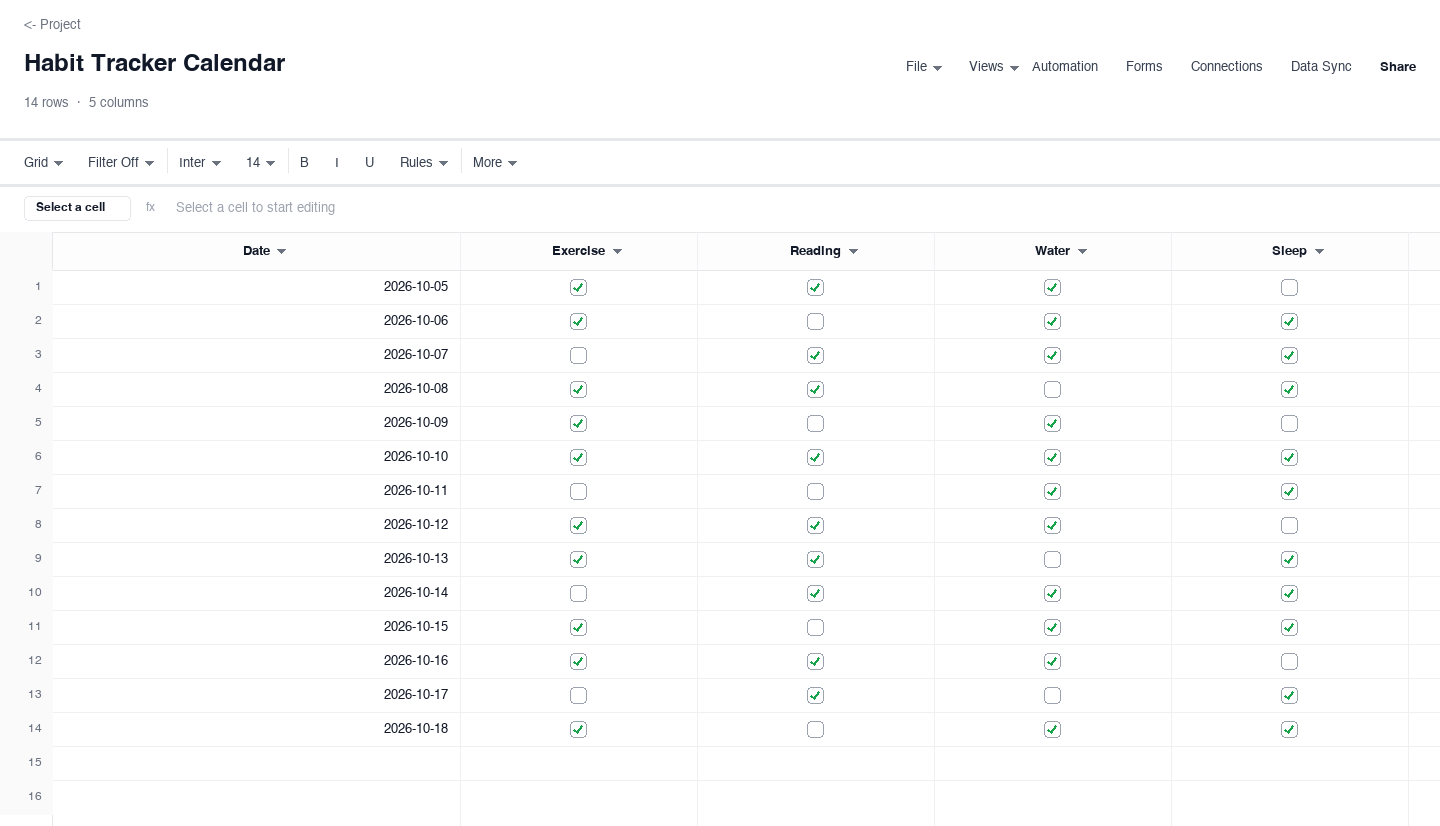
Habit Tracker Calendar
The habit tracker calendar pairs one row per date with checkbox columns for the habits you track daily: exercise, reading, water, sleep. Use it beside your main calendar so the streak and the schedule live in the same file, and a checkbox, not a vague intention, decides whether the day counted. The sample shows a realistic fortnight of mixed results, because a habit tracker you cannot keep honestly is decoration, not a tool.
How to set up a calendar in Google Sheets in minutes
Download the layout that matches how you plan
Start with the horizon you actually think in. Editorial teams usually want the monthly view, because publications and sends land on dates; families usually want the weekly view, because school runs and appointments land on days; annual planners want one row per month. Picking the right grain at the start matters more than the theme or the colors, because a calendar at the wrong grain stops being updated within a fortnight, and an updated plain calendar beats an abandoned pretty one.
Upload the file to Google Drive
The download is an everyday spreadsheet file, and Google Drive imports it directly. Open Drive, choose file upload, pick the downloaded sheet, and once it lands, right-click and open it with Google Sheets. The dates arrive as real dates, the columns keep their widths, and nothing needs retyping. If you keep your files in a shared team folder or a family folder, upload straight there so the calendar starts life where its audience already looks.
Replace the sample content with your own dates
The samples exist to show the intended shape: a content studio month, a family week, a fortnight of habit checkboxes. Highlight the sample rows, delete or overwrite them, and type your own events in the same columns. Keep the date column typed as dates rather than text, because that is what lets you sort the sheet chronologically and filter it later. If your year differs from the sample, change the first date and drag the rest down to follow.
Add the columns your workflow needs
A spreadsheet calendar earns its keep when you extend it. Content teams add an owner column and a status dropdown, so every item shows who is responsible and whether it is drafted, scheduled, or live. Families add a who column for pickups and a cost column for paid activities. Conditional formatting can shade overdue items or color each family member differently. Add these as new columns to the right rather than squeezing them into the notes field, and the sheet stays sortable.
Share one link, and agree on the editing rules
Share the sheet from Drive with view or edit access, and send the link instead of exporting copies, because copies fork the truth immediately. Agree on a simple rule set: anyone may add an item, one person tidies the sheet weekly, and nobody edits a row they do not own without a comment. The weekly tidy is the habit that keeps a shared calendar alive; without it the sheet accumulates stale rows until people stop trusting it.
Print the week or month when paper is better
The same file that lives in Drive can go on the fridge. Set the print area to the current week or month, choose fit to one page wide, and print. Paper is genuinely better in kitchens, on clipboards at events, and on desks during launch weeks, and because the paper is a printout of the shared file rather than a separate artifact, reprinting after a change takes a minute and the wall never disagrees with the drive.
Looking for a calendar template for Google Docs?
Some searches start in Google Docs rather than Sheets, usually because the goal is a calendar to embed inside a document, a meeting packet, or a proposal. A word-processing page can hold a small table of dates, but it is the wrong tool for a living calendar: the rows do not sort, the dates are just text, and every month means rebuilding the grid by hand. The calendar template for Google Docs that actually works is a spreadsheet, embedded in the document where everyone can see it and edited in the spreadsheet view where it behaves like a calendar.
The practical split looks like this: keep the working calendar in a spreadsheet file, upload it to Drive, and insert or link it into the Doc that needs to show it. The document then always reflects the current plan, and the people maintaining the calendar get the sort, filter, and share behavior that a table in a document cannot offer. Every layout above works for exactly this pattern.
A free Google Sheets calendar template for 2026
Everything on this page is a free Google Sheets calendar template for 2026: no email gate, no trial, no account on this site. You download the file, upload it to your own Drive, and it is yours. The sample dates are set in October 2026 so the screenshots match what you get, and moving the calendar to any other month of 2026 is a two-minute edit: retype the first date in the date column and drag the rest down, and every row follows in sequence.
Free matters here for a specific reason. A calendar is only useful if everyone who needs it has it, and paid or gated templates quietly push teams back to scraps of paper and memory. Because these files carry no license strings attached, you can hand the same file to a client, a volunteer committee, or the other parent, and every copy stays editable, printable, and shareable for the whole of 2026 and beyond.
Frequently asked questions
How do I put a calendar in Google Sheets?
The fastest route is a calendar built as a spreadsheet from the start, which is what these templates are. Download the layout you want, upload the file to Google Drive, and open it with Google Sheets. You then have one row per date or month, columns for events and notes, and real dates you can sort and filter. From there, extend it with owner or status columns, or keep it plain: the structure works either way, and it prints cleanly when you want paper.
Is there a free Google Sheets calendar template for 2026?
Yes, the four layouts on this page are free for 2026 and need nothing from you beyond the download: no email address, no account on this site, and no license to worry about when you share the file with family or colleagues. The sample dates are set in October 2026 to match the screenshots, and you can move any layout to a different month by editing the first date and dragging the column, so the same file serves the whole year.
Can I use these calendar templates in Google Docs?
Yes, through embedding rather than rebuilding. A calendar table typed directly into a document is static text that cannot sort or update, so the workflow that holds up is to keep the calendar in a spreadsheet, upload it to Drive, and link or embed it into the Google Doc that needs to show it. The document then stays current automatically, and anyone with edit access to the sheet can maintain the calendar from the spreadsheet side where it behaves properly.
Will these templates also work in Excel and other spreadsheet tools?
Yes. The downloads are standard spreadsheet files, so they open in Excel and other spreadsheet tools as ordinary workbooks, with the date columns arriving as real dates and the sample content intact. That portability is deliberate: many teams plan in one tool at work and another at home, and a calendar file that only works in one place forces someone to retype it. Here you upload the same file to Google Drive for collaboration, or keep a desktop copy, and both stay editable.
How do I share the calendar with my family or team?
Upload the file to a shared Google Drive folder, then share that folder or the single file with view or edit access, and send the link. View access suits a family fridge calendar where one person maintains it, and edit access suits a content team where several people add items. Agree on light editing rules before the link goes out, one owner per row and a weekly tidy is enough, because a shared calendar only stays trustworthy while everyone trusts that it is current.
Can I turn the monthly calendar into an editorial calendar?
Yes, that is exactly what the monthly layout is shaped for, as the sample month shows. Add an owner column and a status column with dropdown values like idea, drafting, scheduled, and live, and the same sheet that holds the dates becomes a working pipeline you can filter by status or by owner. Content teams commonly keep the monthly view for publication dates and the yearly planner for campaign arcs, with the weekly planner reserved for launch weeks when the days fill up.
Run it live instead of in a file.
The downloads above are yours either way. In Wisegrid the same template becomes a working sheet with owner contacts, status dropdowns, reminders, and dashboards. 7-day free trial, no credit card required.