Sign In Sheet Template: Free Printable Visitor, Meeting and Class Sheets for 2026
This sign in sheet template comes in three versions: a visitor sign-in sheet for a front desk, a meeting and event sign-in sheet for attendance, and a class and training sign-in sheet for course records. Every download has two tabs. The Printable tab is a clean, bordered page with a signature column, set to print landscape and fit one page wide. The first tab is the digital log, with formulas that count hours on site, attendance, walk-ins and completion for you.
A sign-in sheet answers three questions after the fact: who was here, when did they arrive and leave, and why. For a front desk that is a safety record, because in an evacuation the list of people still on site is the list that matters. For an event it is the attendance count that tells you whether the turnout justified the room. For training it is the proof that a person completed a required course.
Three sign in sheet templates, printable and digital
Each file is pre-filled with a short sample day so you can see how a finished sheet reads, followed by empty lines ready for real arrivals. If you only need paper, open the Printable tab and print it as many times as you like. If you log on a laptop or tablet, use the first tab and let the totals at the bottom keep count. No email address required.
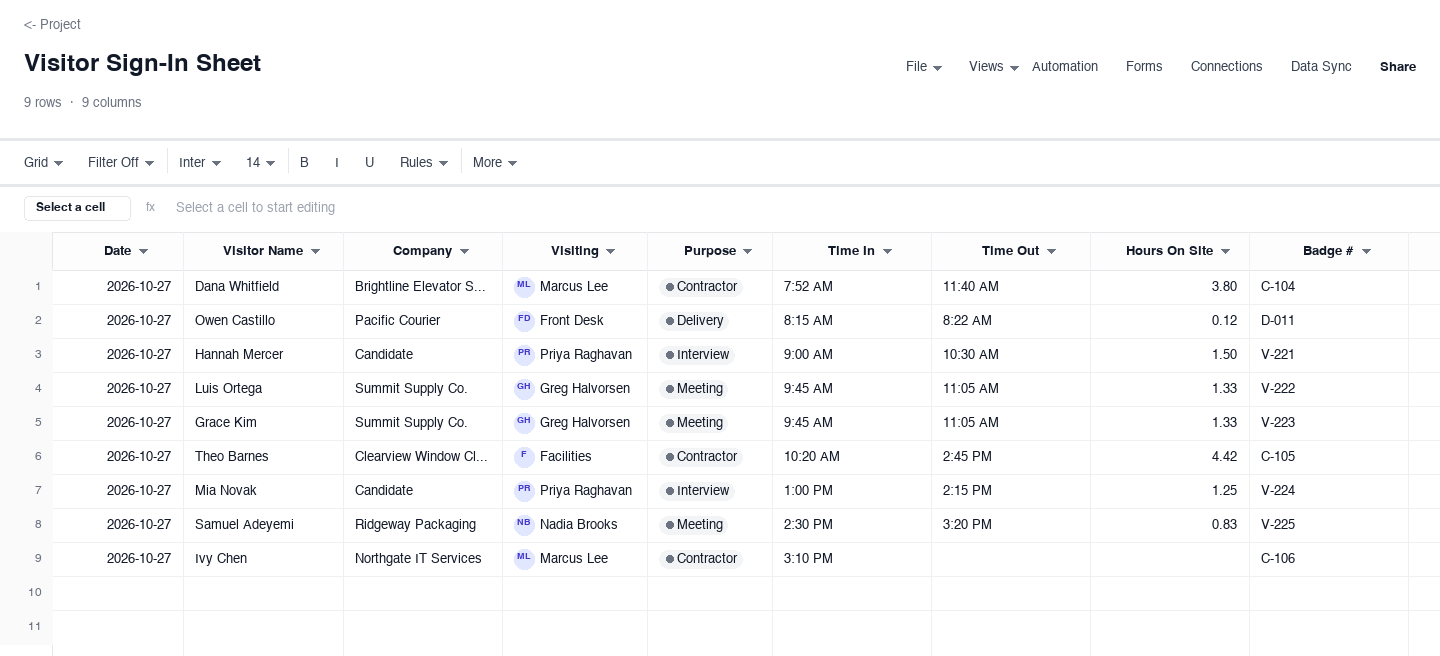
Visitor Sign-In Sheet
The visitor sign-in sheet is for reception desks, offices, warehouses, job sites and clinics. It records the date, visitor name, company, who they are visiting, the purpose of the visit, time in, time out and a badge number. Hours On Site is a formula that subtracts time in from time out, so a contractor who arrived at 7:52 AM and left at 11:40 AM shows 3.80 hours. The sample day has nine visitors, and the Still On Site count at the bottom finds the one who never signed out, which is exactly the list a fire warden needs. The Printable tab adds a Signature column for a paper copy at the desk.
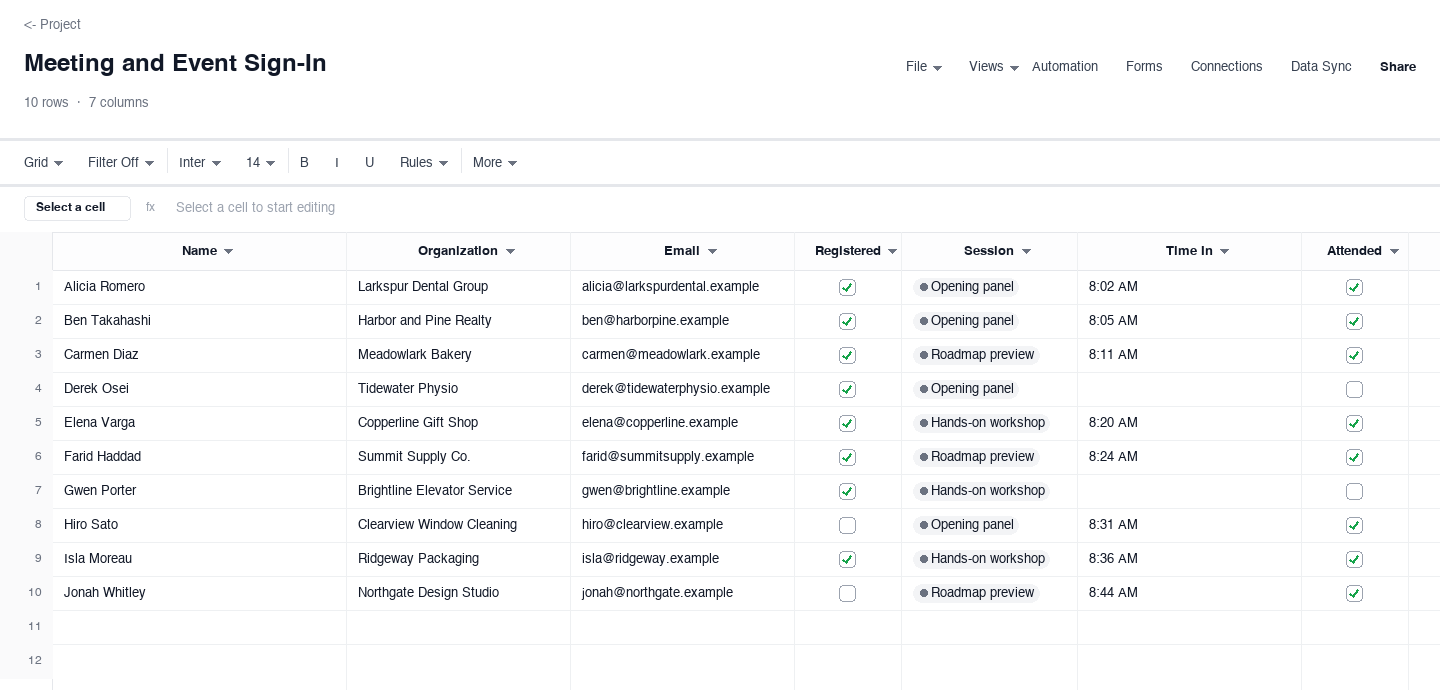
Meeting and Event Sign-In
The meeting and event sign-in sheet is for workshops, customer events, board meetings, open houses and volunteer nights. It lists name, organization, email, whether the person registered, which session they attended and the time they arrived. Attended is a formula that checks itself the moment a time in is entered. The footer counts registrations, attendance and walk-ins and works out the show rate: in the sample, 8 people registered, 6 of them came, 2 walked in without registering, and the show rate was 75 percent. That one number tells you how much to over-invite next time.
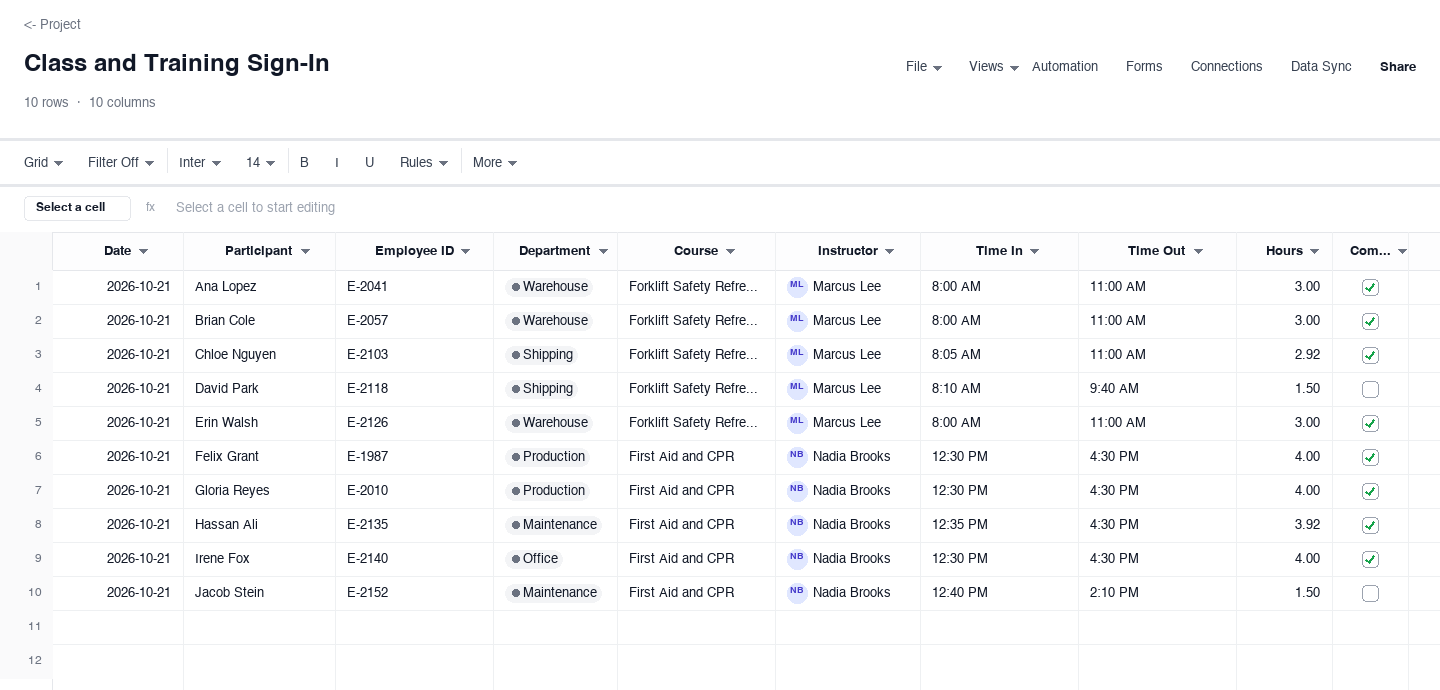
Class and Training Sign-In
The class and training sign-in sheet is for safety courses, onboarding sessions, continuing education and classroom attendance. Each row records the date, participant, employee ID, department, course, instructor, time in and time out, with Hours calculated per person and a Completed checkbox. The sample covers two courses on one day: a forklift safety refresher and a first aid and CPR class. Ten people attended, two left early, and the footer shows 30.84 total training hours and an 80 percent completion rate, which is the record an auditor or a certifying body will ask to see.
How to set up a sign in sheet people actually fill in
Ask only for what you will use
Every extra column slows the line at the desk and invites skipped fields. A visitor sheet needs name, company, who they are seeing, time in and time out; add a badge number only if you issue badges. An event sheet needs name and contact details. Decide what each field is for before you print, and drop the ones you would never look at again.
Put the date and location at the top of every page
A stack of sign-in pages without dates is useless a month later. The Printable tab in each download has a Date and Location line above the table for exactly this reason, and the digital log has a Date column on every row. If you run several sites or rooms, keep one sheet per site so the still-on-site count stays meaningful.
Record time in and time out, not just a signature
A signature proves someone was there; the times prove when. Times are what let you answer who was on site at 2 PM, calculate billable contractor hours, or confirm that a trainee attended the full session. In the digital tab, type times as 9:45 AM and the hours formula does the subtraction, rounded to two decimals.
Make signing out part of leaving
The most common gap in any visitor log is the missing time out. Put the sheet where people pass on the way out, ask the host to walk visitors back to the desk, and check the Still On Site count at the end of the day. Anyone still listed is either still in the building or forgot to sign out, and both are worth knowing.
Handle personal information with care
A sign-in sheet left open on a counter shows every previous visitor's name, company and email to the next person in line. Use a cover sheet, collect pages at the end of each day, and store them somewhere that is not the front desk drawer. A digital log or a form avoids the problem entirely, because nobody sees the entries above their own.
Turn the totals into a decision
Attendance data is only worth collecting if it changes something. Use show rates to size rooms and catering, use completion rates to schedule make-up sessions, and use visitor counts to staff the desk at the busy hours. The formulas in the footer of each template give you those numbers without a separate report.
Printable sign in sheet: how the paper version works
Open the download and switch to the Printable tab. It has a title, a Date and Location line, a bold header row, and 20 to 22 empty bordered rows tall enough to write in by hand, with a Signature column at the end. Page setup is already done: landscape, fit to one page wide, and the header row repeats if you extend the sheet past one page. Print it from Excel or import it into Google Sheets and print from there.
At the end of the day, typing the paper entries into the first tab takes a few minutes and gives you a searchable record with hours and counts calculated. For a small office that is often enough. When the transcription becomes the chore, it is time to skip the paper step.
Sign in from a phone instead of a clipboard
In Wisegrid you can put a form on the sign-in sheet and share its link, or print that link as a QR code at the desk with any QR generator. Visitors fill in the form on their own phone and each submission lands as a new row in the sheet. When the form asks for the visitor's email in a contact field, the row also records who submitted it and when, shown as Submitted by in the row details. Nobody can read the entries above their own.
The front desk then marks departures in the sheet itself, and because it is one shared sheet rather than a file on one laptop, the host, the desk and the site manager all see the same list at the same moment. Viewers are free, so a site manager can watch the live list without an editor seat; editors are $19 a month each.
Frequently asked questions
Is there a printable sign in sheet in the download?
Yes. Every file has a Printable tab: a title, a Date and Location line, a header row and 20 to 22 empty bordered rows with a Signature column, set to landscape and fit to one page wide. Print it as many times as you need. The first tab is the digital version of the same sheet, with formulas for hours and attendance.
What should a visitor sign in sheet include?
At minimum: the date, the visitor's name, their company, who they are visiting, time in and time out. Most offices add the purpose of the visit and a badge number, and regulated sites add a safety briefing or NDA acknowledgment. The visitor template carries all of the core fields plus purpose and badge, and calculates hours on site.
How does the template calculate hours on site?
Time In and Time Out are real time values, and Hours On Site takes the difference with MOD so a visit that runs past midnight still counts forward, then multiplies by 24 and rounds to two decimals. A visit from 9:45 AM to 11:05 AM shows 1.33 hours. While Time Out is blank the cell stays blank and the row counts toward Still On Site.
Does the sign in sheet template work in Google Sheets?
Yes. In Google Sheets, use File, Import, Upload and pick the downloaded file. The times, checkboxes and formulas (IF, ROUND, MOD, COUNTA, COUNTIF, COUNTIFS and SUMPRODUCT) all carry over and keep calculating, and the Printable tab keeps its borders. Print from Google Sheets with File, Print, and choose fit to width.
How do I track attendance and no-shows for an event?
Use the meeting and event sign-in sheet. Mark who registered before the event, then enter a time in as people arrive; Attended checks itself. The footer counts registered, attended and walk-ins and calculates the show rate. In the sample, 6 of 8 registered people came, a 75 percent show rate, and 2 more walked in.
Can people sign in on their phone instead of paper?
With the download alone, someone at the desk types the entries in. In Wisegrid, you can add a form to the sign-in sheet and share its link or a QR code of that link; each submission becomes a new row, and a form with a contact field records who submitted it and when. That removes the clipboard and the privacy problem of an open list.
How long should I keep sign in sheets?
It depends on why you collect them. Training records are often kept for as long as the certification they prove, and visitor logs are usually kept long enough to answer a security or safety question about a past date. Check the rules for your industry and location, set a retention period, and delete or shred anything older than it.
Run it live instead of in a file.
The downloads above are yours either way. In Wisegrid the same template becomes a working sheet with owner contacts, status dropdowns, reminders, and dashboards. 7-day free trial with $10 of AI credit, card required, cancel before day 7 and you pay nothing.