Release Checklist Template: Ship Every 2026 Release Off One Sheet, Not a Scramble
A release checklist template is institutional memory in sheet form: every step between code freeze and the post-release retro, each with an owner, a date, a status and a flag for whether it blocks the release. Teams do not skip the smoke test because they think it is optional; they skip it because at 4 pm on release day nobody remembers whose job it was. The checklist below ships pre-filled with a complete four-phase software release, so you can see the shape before you swap in your own steps.
The second sheet on this page answers the other release question, the one the go/no-go meeting exists for: how ready are we, actually. The status rollup takes each workstream's items done against items total and computes percent complete per row and for the whole release, with =ROUND([Done]@row / [Items]@row * 100, 0) doing the arithmetic. The meeting reads a number instead of polling a room for vibes.
Try the release checklist live. No signup.
This is an editable sheet, not a picture of one. Flip a status to Done, reassign an owner, mark an item blocking. Edits stay in your tab and vanish when you leave. When you want a checklist that keeps, one click makes it yours.
| Item | Phase | Owner | Blocks release | Status |
|---|---|---|---|---|
Sandbox only, edits don't persist. Want to keep your work? Start your 7-day free trial →
Three release checklist templates, free to download
The three files were exported from live Wisegrid sheets carrying a believable v2.4 release, not empty headers. Any .xlsx-capable app opens them, and the download links are direct, nothing to fill in first.
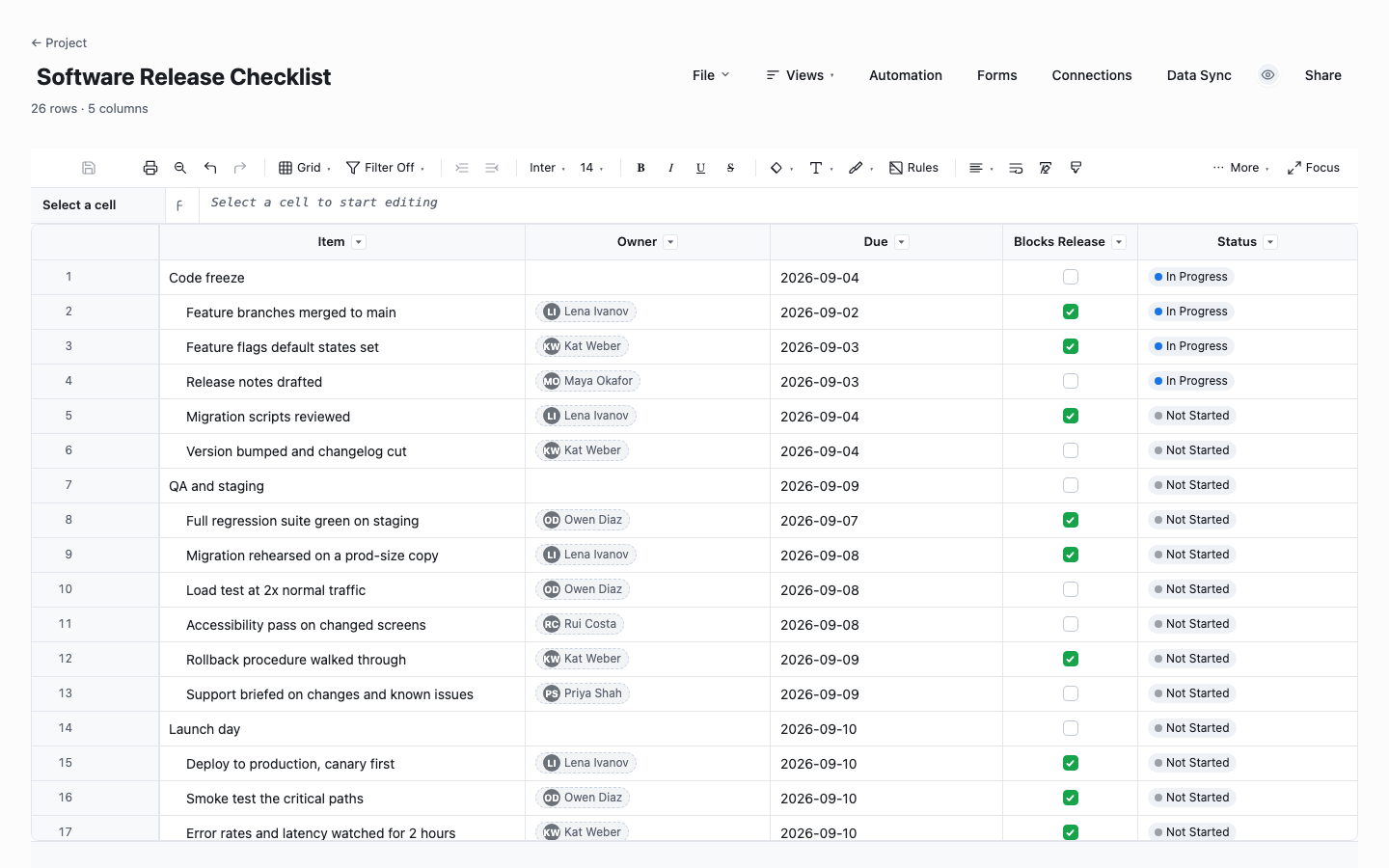
Software Release Checklist
The run-book itself: twenty-two items across code freeze, QA and staging, launch day and post-release, each with an owner, a due date, a status and a checkbox for whether it blocks the release. The phases are indented parent rows, so each section collapses and the go/no-go meeting reads one screen. The post-release phase is the one teams forget to write down, and the reason this checklist includes telling requesters their feature shipped.
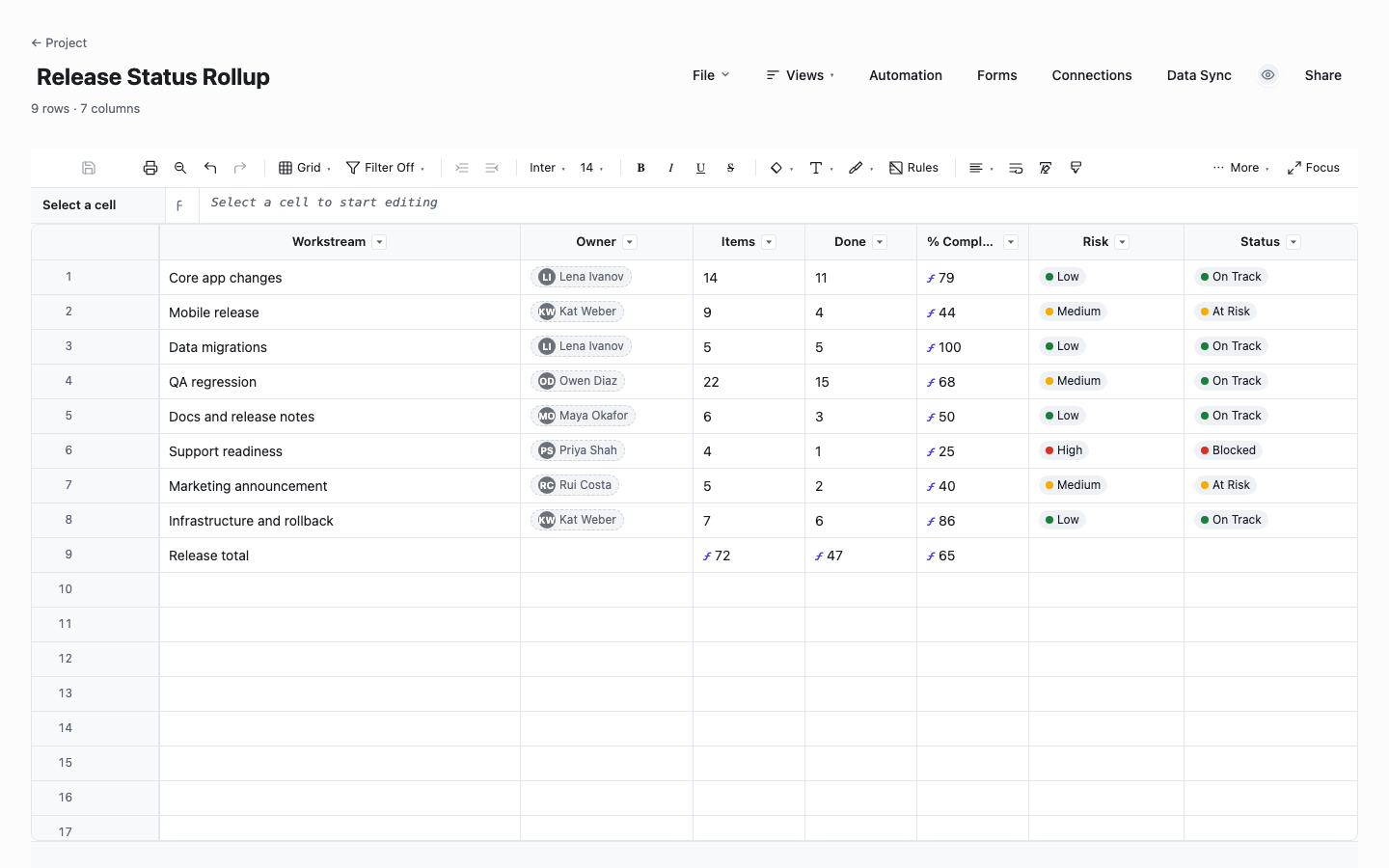
Release Status Rollup
The one-screen answer to how ready are we. Each workstream reports items done against items total, and the sheet computes percent complete per row with =ROUND([Done]@row / [Items]@row * 100, 0), then rolls the whole release up with a SUM-over-SUM formula on the total row. Risk and status columns say where the go/no-go conversation should start. Update two numbers per workstream and the readiness picture rebuilds itself.
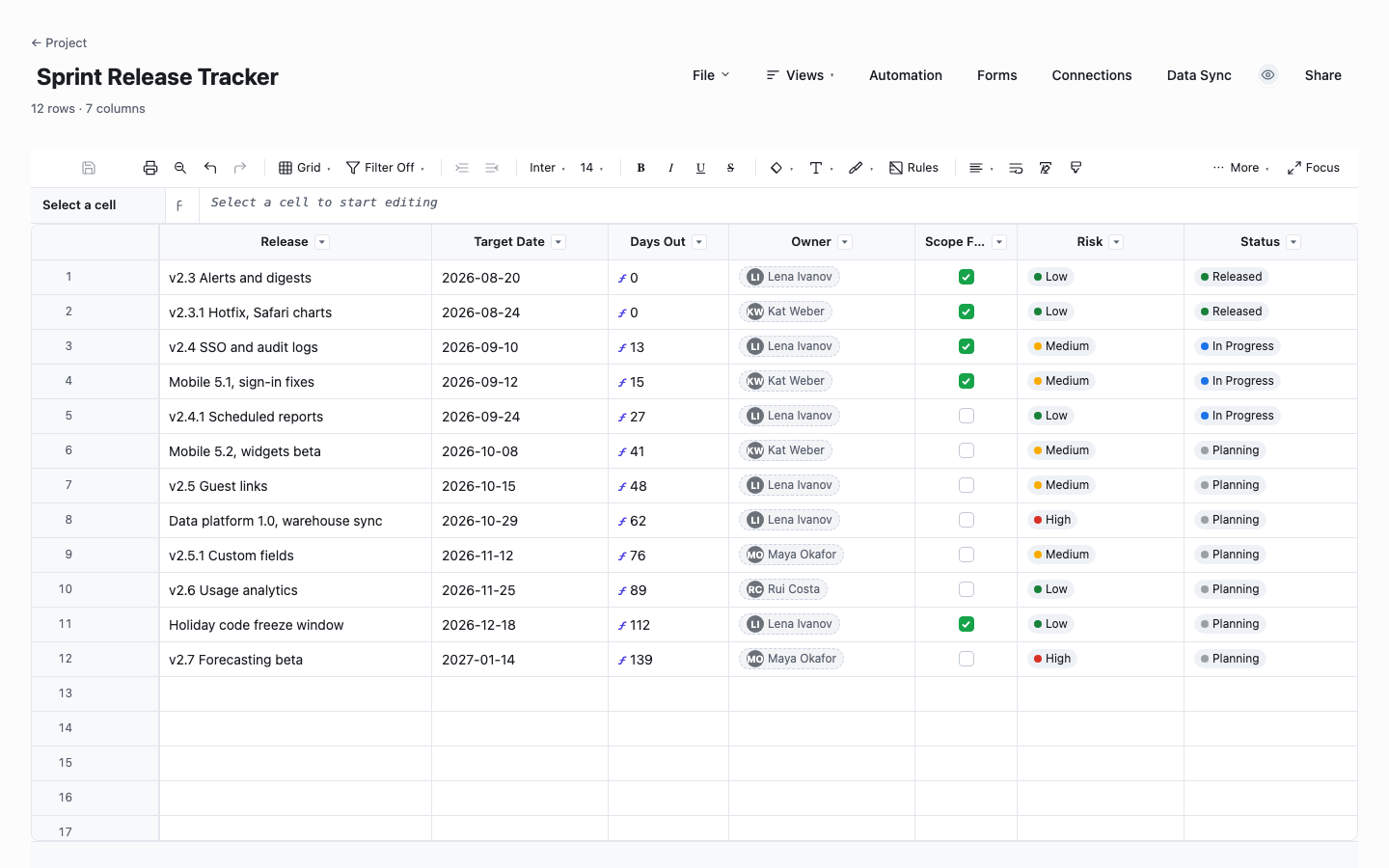
Sprint Release Tracker
The trains-not-tickets view for teams shipping on a cadence: every upcoming release on one sheet with its target date, a Days Out column the sheet counts down itself, whether scope is frozen, a risk call and a status. It exists to retire the question when does X land, which otherwise gets asked in chat eleven times a week and answered from memory. Sort by Days Out and the next month plans itself.
How to run a release checklist that actually prevents surprises
Write the checklist before you need it
A checklist drafted during the release is a to-do list; one drafted the week before, walked once as a rehearsal, is a run-book. Build the row list while things are calm, in time order, and let the team argue about it in review. The arguing is the point: every "wait, who does that" surfaced in a meeting is a launch-day incident that no longer happens.
Mark what actually blocks the release
Not every item on the list should be able to stop the ship. The Blocks Release checkbox splits the list into gates and chores: the migration rehearsal is a gate, the in-app announcement is a chore that can trail by a day. At go/no-go, the only rows that matter are blocking rows not yet Done, and the sheet can filter to exactly that list in one click.
One owner per row, even for team rituals
"QA owns regression" is how regression ends up half-run. Put a named person on every row, including the shared rituals like the go/no-go itself, because a name is what makes a checkbox answerable. Sorting the sheet by owner turns it into per-person punch lists for release week, which is also the fastest way to spot that one engineer owns nine blocking items.
Give the rollup two numbers per workstream, no more
The status rollup stays alive because updating it costs each lead ten seconds: items total and items done. The percent, the release total and the readiness picture compute themselves. Resist the urge to make leads write status prose; the risk dropdown plus a number they cannot fudge is more honest than a paragraph they can, and the formula never rounds optimistically.
Run the go/no-go off the sheet
The meeting opens the rollup, reads the release percent, then walks only the workstreams marked At Risk or Blocked and the blocking checklist rows still open. Twenty minutes, decision made, and the sheet leaves the meeting already current because the edits happened in front of everyone. If the meeting is longer than that, the sheet is missing a column the room keeps asking about.
Keep the post-release phase on the same sheet
A release is not done when the deploy is green. Day-one metrics against baseline, tickets tagged to the release, the retro, removing stale feature flags, and telling the people who asked that their feature shipped: these rows belong on the same checklist with dates, or launch week swallows them. The requester-notification row is the cheapest customer delight your team is currently skipping.
The rollup formulas that compute release readiness
The rollup sheet computes at two levels. Per workstream: =ROUND([Done]@row / [Items]@row * 100, 0), written once and expanded to every row by the engine, each row reading its own Done and Items cells. On the total row, SUM ranges do the release-level math: =ROUND(SUM([Done]1:[Done]8) / SUM([Items]1:[Items]8) * 100, 0) gives the whole release one honest percent, weighted by item count rather than by workstream, so a tiny finished workstream cannot flatter the number.
The sprint tracker uses the same trick on dates: =IF([Status]@row = "Released", 0, MAX(0, NETDAYS(TODAY(), [Target Date]@row))) counts down to every target and zeroes when a release goes out. In the Excel downloads these columns arrive filled in as computed values, no two spreadsheet apps sharing a formula dialect. Rebuilding them from the text above is a ten-minute job, or run the sheets in Wisegrid where they compute live.
Release checklist or sprint board?
The sprint board answers what is each person doing today and churns completely every two weeks. The release checklist answers is this specific release safe to ship and is mostly stable across releases, because the steps that make a deploy safe do not change per feature. Running a release out of the sprint board is how the migration rehearsal becomes a ticket that slid to next sprint without anyone deciding that.
Keep both, and let them reference each other: the checklist row "feature branches merged" is the bridge to the board, and the rollup's workstream counts can literally be the board's done counts. The checklist is also the artifact that survives: when the release retro asks what went wrong, the dated, owned rows are the record, while the board has already churned to the next sprint.
When the release process outgrows the file
A release checklist as a file has a coordination ceiling. The QA lead updates their copy, the eng lead updates theirs, and the go/no-go meeting starts by reconciling attachments. Worse, a file cannot nudge: nothing tells the support lead their briefing is due tomorrow, and nothing tells the PM a blocking row just flipped to Blocked.
In Wisegrid the same checklist is one shared sheet: phases collapse, the Blocks Release filter is saved as a view for the go/no-go, automations remind owners the day before a due date and alert the channel when a blocking row changes, and the rollup dashboard re-rolls as leads type. Everyone who only watches the release, support, sales, leadership, views free: $19 per editor is the whole bill. Import the .xlsx you just downloaded and the phases, checkboxes and dropdowns come with you.
Frequently asked questions
What should a software release checklist include?
Four phases cover it: code freeze (branches merged, flags set, notes drafted), QA and staging (regression, migration rehearsal, load test, rollback walkthrough), launch day (canary deploy, smoke test, monitoring window, flag flips, announcements) and post-release (metrics review, ticket triage, retro, flag cleanup). Every row needs an owner, a date, a status and a flag for whether it can block the ship.
What is a release status rollup?
A one-screen summary that computes release readiness from workstream counts: each workstream reports items done against items total, a formula turns that into percent complete per row, and a total row rolls the whole release into one number weighted by item count. Paired with a risk column, it gives the go/no-go meeting something to read instead of a room to poll.
How do I run a go/no-go meeting off this template?
Open the rollup, read the release percent, then walk exactly two lists: workstreams marked At Risk or Blocked, and blocking checklist rows not yet Done. Each gets an owner and a decision, ship, slip or scope out. Twenty minutes is enough when the sheet is current, and it stays current because updating it costs each lead two numbers and a dropdown.
Should the release checklist live with the sprint board?
Next to it, not inside it. The board churns every sprint and answers who is doing what; the checklist is stable across releases and answers whether this ship is safe. Folding the checklist into the board is how safety steps become tickets that quietly slide. Keep the checklist as its own sheet and let one row, features merged, be the bridge between them.
How do I track multiple releases at once?
Use the sprint release tracker: one row per release train with target date, a computed Days Out countdown, scope-frozen flag, risk and status. It answers the when-does-X-land question that otherwise interrupts the team all week. Give each major release its own checklist sheet, and let the tracker be the index that says which checklist is next to run.
Can I use this release checklist template in Excel?
Yes. All three downloads open in Excel or any app that reads .xlsx, with the phases, checkboxes, dropdowns and sample rows intact. The computed columns, percent complete and Days Out, arrive as values rather than live formulas; the section above prints both formulas so rebuilding them in your app takes minutes, or import into Wisegrid where they run live and the phases collapse.
Run it live instead of in a file.
The downloads above are yours either way. In Wisegrid the same template becomes a working sheet with owner contacts, status dropdowns, reminders, and dashboards. 7-day free trial, no credit card required.