Creative Brief Template: Free Downloads and a Fill-In Guide for 2026
A creative brief is the one-page agreement between the person asking for creative work and the person making it. A good creative brief template forces the answers that prevent rework: the objective, the audience, the single message, and the mandatories, written down before concepts start. Without it, creative reviews turn into taste debates, and taste debates are how a two-week project slips a month while everyone argues about fonts.
The brief is not a formality and it is not a mood board. It is a decision record. When the client says the work feels off, the brief is the document both sides return to: does it meet the objective, speak to the audience, and carry the mandatories? The four versions below cover the way briefs actually get used, from a working-session one-pager to a multi-channel campaign brief to a scoped design project brief for concrete deliverables.
Four creative brief templates, free to download
Each version below is a working spreadsheet, not a blank grid with a title row. The fields are pre-filled with realistic example content from a fictional outdoor-gear brand and the agency it works with, so you can see how a finished brief reads, then overwrite it with your own project. What you download is an everyday spreadsheet file, compatible with all the usual tools. No email address required.
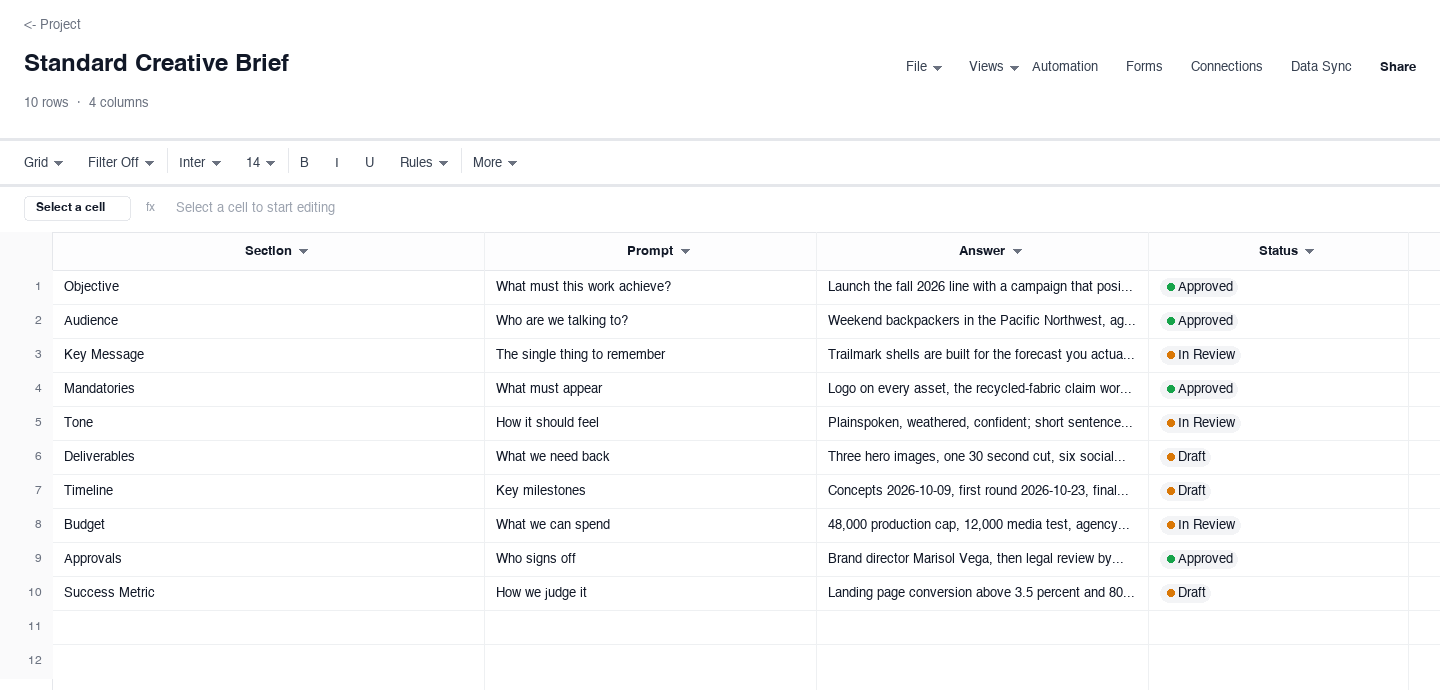
Standard Creative Brief
The standard creative brief is the working document a brand team uses to brief an agency or an internal creative group: sections for objective, audience, key message, mandatories, tone, deliverables, timeline, budget, and approvals, each with a prompt and a status. Use it when a project has more than one reviewer and the answers need signoff before work begins. The per-section status column is what earns its keep: it shows which sections are still being argued over without a status meeting, and it tells the creative team which answers are final enough to build on.
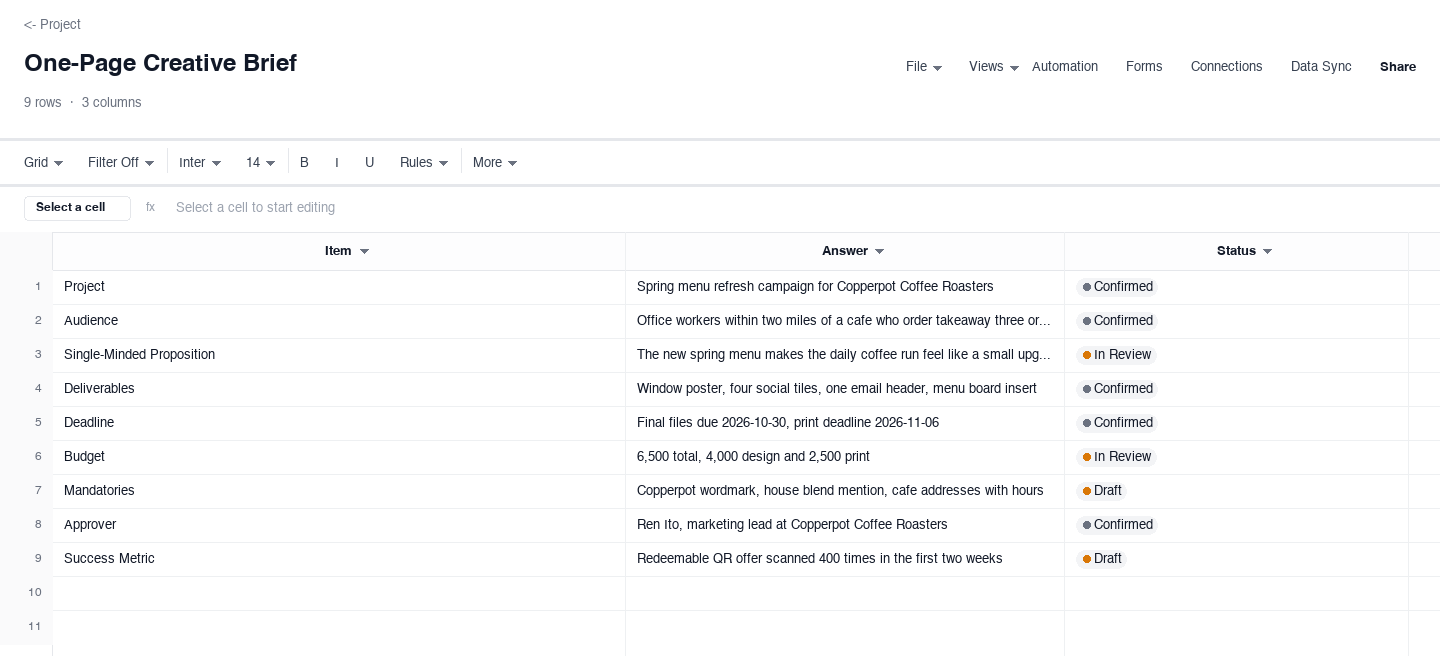
One-Page Creative Brief
The one-page creative brief compresses the whole job onto a single screen: project, audience, single-minded proposition, deliverables, deadline, budget, and approver, each with a confirmation status. Use it for small fast-turn jobs, or as the intake form a requester fills in before a full brief gets written. The discipline it adds is the single-minded proposition, one sentence the whole piece must serve, because the fastest way to weak work is a brief that asks the creative to say three things at once and hope one lands.
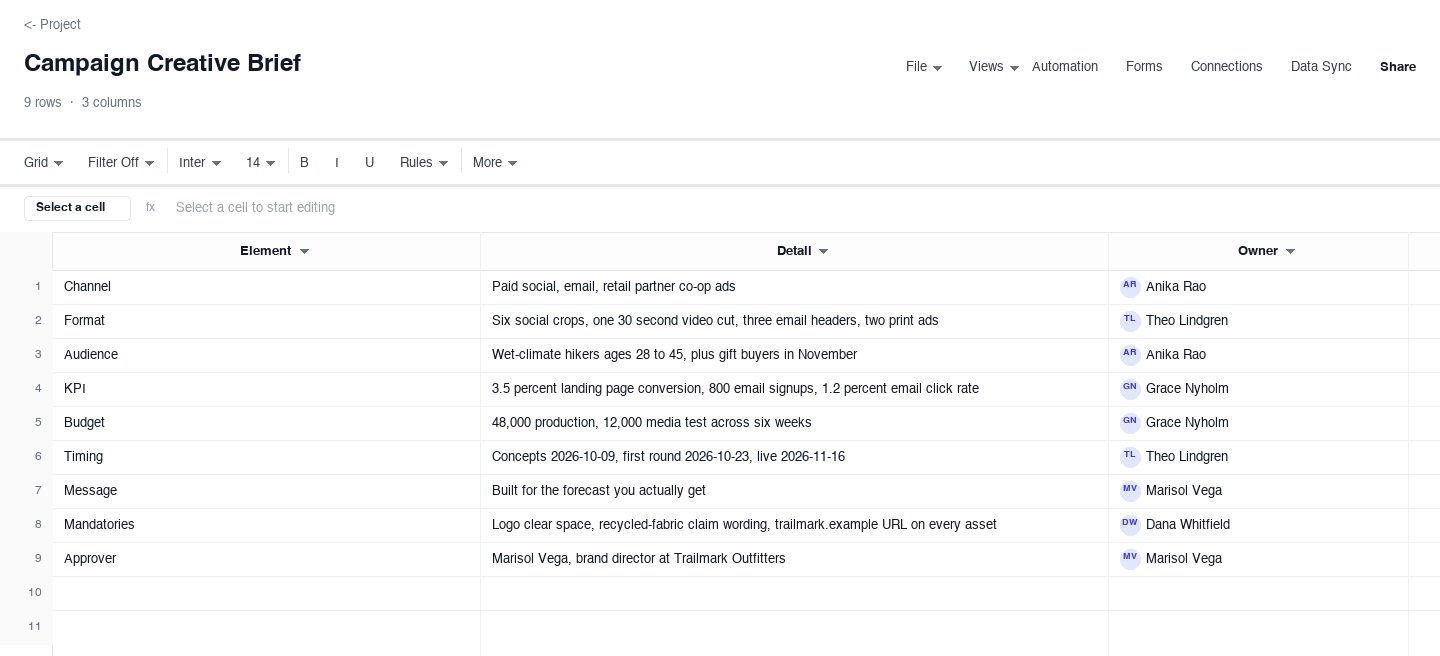
Campaign Creative Brief
The campaign creative brief is organized by element rather than by section, so channel, format, audience, KPI, budget, timing, owner, and message each get their own row with a named owner. Use it when one idea ships across several channels and each channel needs its own numbers attached. The KPI row is the one that pays for the template: it forces the conversation about what the campaign is for before media money gets committed, and it gives the retrospective something concrete to score instead of a shrug.
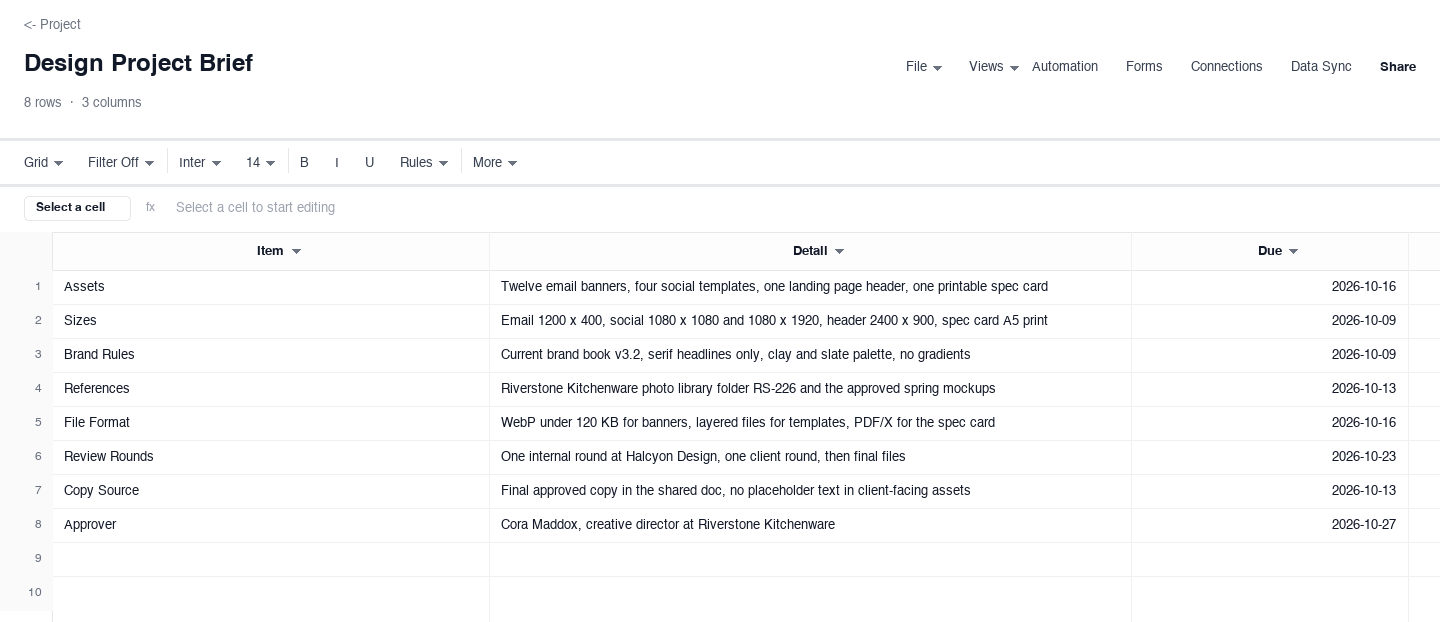
Design Project Brief
The design project brief is scoped for a design team producing concrete files: what to make, the sizes, the brand rules that apply, reference files to match, review rounds, and a due date per item. Use it whenever the deliverable is assets rather than concepts, from packaging renders to email banners. The sizes row prevents the classic failure where work arrives beautiful and unusable, because every required dimension was written into the brief before the first layout, not discovered at handoff when the fix is expensive.
How to write a creative brief that gets executed without guesswork
Write the objective as a business outcome, not a deliverable
Bad briefs ask for a video or a landing page; good briefs ask for a change. Write the objective as something measurable the business needs: 800 email signups, a 3.5 percent landing page conversion rate, a fall line that outsells last year. A deliverable is not an objective, and when the brief confuses the two, the creative team optimizes for shipping the asset rather than moving the number, which is how polished, expensive work completely misses the point it was hired to make.
Describe the audience as one person in a specific moment
Demographic buckets produce generic work because nobody can picture them. Write the audience as one real person in a specific situation: a weekend backpacker in the Pacific Northwest packing for a wet forecast, replacing a jacket that failed last season. Name what they believe now, what they do today, and what would make them switch. The test is whether a stranger could pick that person out of a crowd using only your brief, and if not, keep narrowing until they can.
Force the single-minded proposition into one sentence
The single-minded proposition is the one thing the audience should take away, and it has to fit in a single sentence without an "and" holding two ideas together. If your sentence needs an "and", you have two propositions, and a piece of creative asked to say three things says none of them. Write the sentence, then test every concept against it in the first review: does this work communicate exactly that sentence to exactly that audience? If yes, debates about taste become much shorter.
Write mandatories as a checklist that can be verified
Mandatories are the non-negotiables: the logo lockup, the legal line, the exact wording of a claim, the URL, the disclosure. Write them as discrete, checkable items rather than a vibe like "on brand", which cannot be verified and therefore cannot be enforced. Every mandatory should be a box a reviewer can tick in ten seconds. Vague mandatories are the top cause of last-minute rework, because they surface at the worst possible moment, when the work is finished and everyone thought it was approved.
Put the budget, the timeline, and the approval path in the brief
A brief that is silent on money and dates is asking the creative team to guess, and they will guess optimistically. State the budget as a number or a firm range, the timeline with real milestones for concepts, first round, and final files, and name one approver, not a committee. Committees produce contradictory feedback and political compromises; one named approver with a date produces decisions. If two executives both want the final say, settle who wins ties before the work starts, not during it.
Review the brief with the creative team before work starts
The brief is a contract, and contracts get signed by both parties. Hold a thirty-minute kickoff where the person who wrote the brief walks the creative team through it, the team asks the awkward questions, and every answer gets logged in the document itself. Questions you cannot answer are gaps in the brief, and finding them now costs a day, not a week. From that point on, changes to scope, budget, or mandatories are a conversation about the brief, not a surprise buried in round two feedback.
Need a creative brief template in Word or PDF?
Many brand teams keep the creative brief as a Word document or a PDF because it gets attached to vendor onboarding packs, routed for signatures, or filed as the record of what was agreed. The downloads above are .xlsx files by design, because a spreadsheet keeps statuses, owners, and due dates alive while the work is moving, but they convert cleanly: open the file, set the print area, and export or print to PDF directly, which is the format most agencies prefer to file.
If your organization keeps a Word brief as the format of record, a practical split is to run the working version in the spreadsheet, where the status column tracks which sections are final and the owner column names who signs off, then save a PDF copy for the vendor file at kickoff and at each approval. You keep one living source of truth and still hand every partner the artifact they can file, and the project name ties every version together.
Frequently asked questions
What is a creative brief?
A creative brief is a short document that defines a piece of creative work before it starts: the objective, the audience, the single message, the mandatories, the deliverables, the budget, and the approval path. It exists to prevent rework by getting the requester and the creative team to agree on the answers while they are still cheap to change. All four versions above, from the standard section-by-section brief to the one-page intake version, carry the same core fields in different shapes.
What is the difference between a creative brief and a design brief?
A creative brief defines the communication job: what to say, to whom, and what it must achieve, and it usually comes first. A design brief scopes the production of concrete assets: sizes, formats, brand rules, references, review rounds, and due dates. One campaign can produce both, the creative brief at kickoff and a design project brief per asset batch, which is why this page ships both shapes with consistent fields so they can reference each other cleanly.
How long should a creative brief be?
One page is the honest answer for most projects, and the one-page version above exists for exactly that. A brief should be as short as possible while still answering the objective, audience, single-minded proposition, deliverables, deadline, budget, and approver. Longer briefs get skimmed, and skimmed briefs produce work that misses requirements nobody noticed. If your project genuinely needs background research, links, or past campaign results, park them in a reference folder and link to them from the brief rather than pasting them in.
Who should write the creative brief, the client or the agency?
The client or brand team should write it, with the agency challenging it. A brief written by the agency alone guesses at business goals it cannot know; a brief the agency never sees becomes a form nobody reads. The healthy pattern is: brand team drafts the brief, agency reviews it in a kickoff and asks the questions that expose gaps, both sides log the answers in the document, and changes after that point are treated as scope changes. The status column in the standard brief above is built for that exchange.
What are mandatories in a creative brief?
Mandatories are the elements that must appear in the finished work no matter what the concept is: the logo and its clear space, a legal or compliance line, the exact wording of a regulated claim, a URL or phone number, a required disclosure. Write them as discrete checkable items rather than general direction, because vague mandatories surface at final review and cost the most expensive kind of rework. The standard and one-page versions above carry a dedicated row so they survive every review round.
How do I brief a campaign that runs across several channels?
Use a brief organized by element rather than by section: one row each for channel, format, audience, KPI, budget, timing, owner, and message, so every channel inherits the same core idea but carries its own numbers. The campaign creative brief above is shaped exactly for that. The two failure modes it prevents are channels drifting into different messages because the brief was silent, and media spend getting committed before anyone wrote down what the campaign was supposed to achieve.
Run it live instead of in a file.
The downloads above are yours either way. In Wisegrid the same template becomes a working sheet with owner contacts, status dropdowns, reminders, and dashboards. 7-day free trial, no credit card required.