Change Order Log Template: Stop Eating Extras in 2026
A change order log template is the running list of every extra on a job: what the homeowner asked for, the date they asked, what it costs, how many days it adds, and whether it is approved, pending, or declined. One row per ask, and a total at the bottom that tells you what the job is actually worth now, not what the contract said two months ago.
The extras are where small crews quietly lose their profit. "While you're here, could you also move that outlet" costs you a couple hundred dollars and half a day, and it never feels worth stopping to write up. Ten of those on one remodel is real money you built for free. The log fixes that with the lightest habit there is: say yes if you want to, but the ask goes in the log with a price on it the same day, every time.
Free change order log templates to download
Three working versions, each pre-filled with realistic extras from a residential remodel so you can see how a well-kept log reads before you start your own. The files are ordinary spreadsheets that anything on a jobsite laptop can open. No email address required.
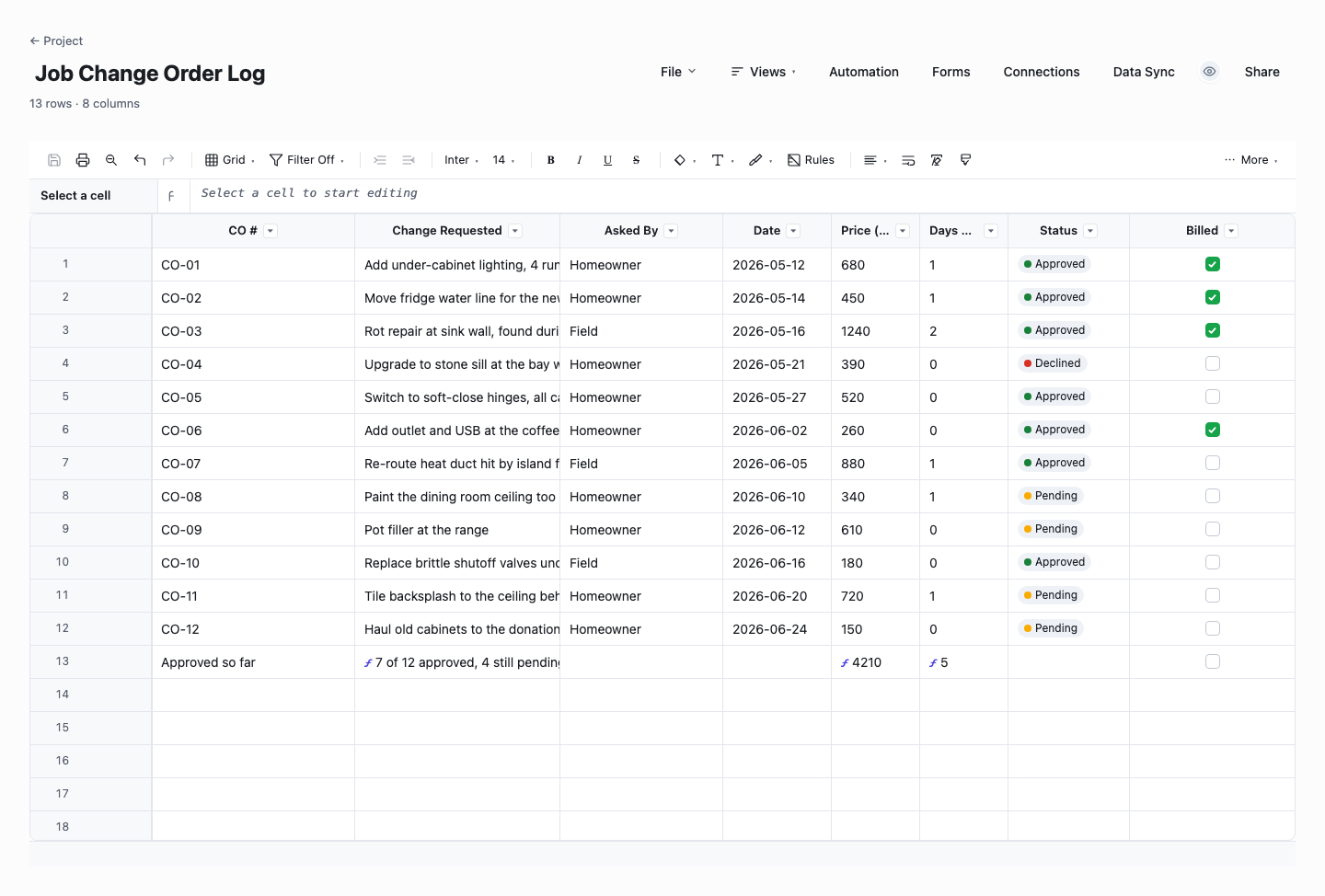
Job Change Order Log
The per-job log is the everyday version: change order number, what was requested, who asked, the date, the price, the days added, the status, and a billed checkbox so approved work cannot slip through unbilled. The totals compute themselves as you add rows, splitting what is approved from what is still pending, so before any money conversation you can read the job's real number off one line. Start here if extras have been eating you and you want the habit running by tonight.
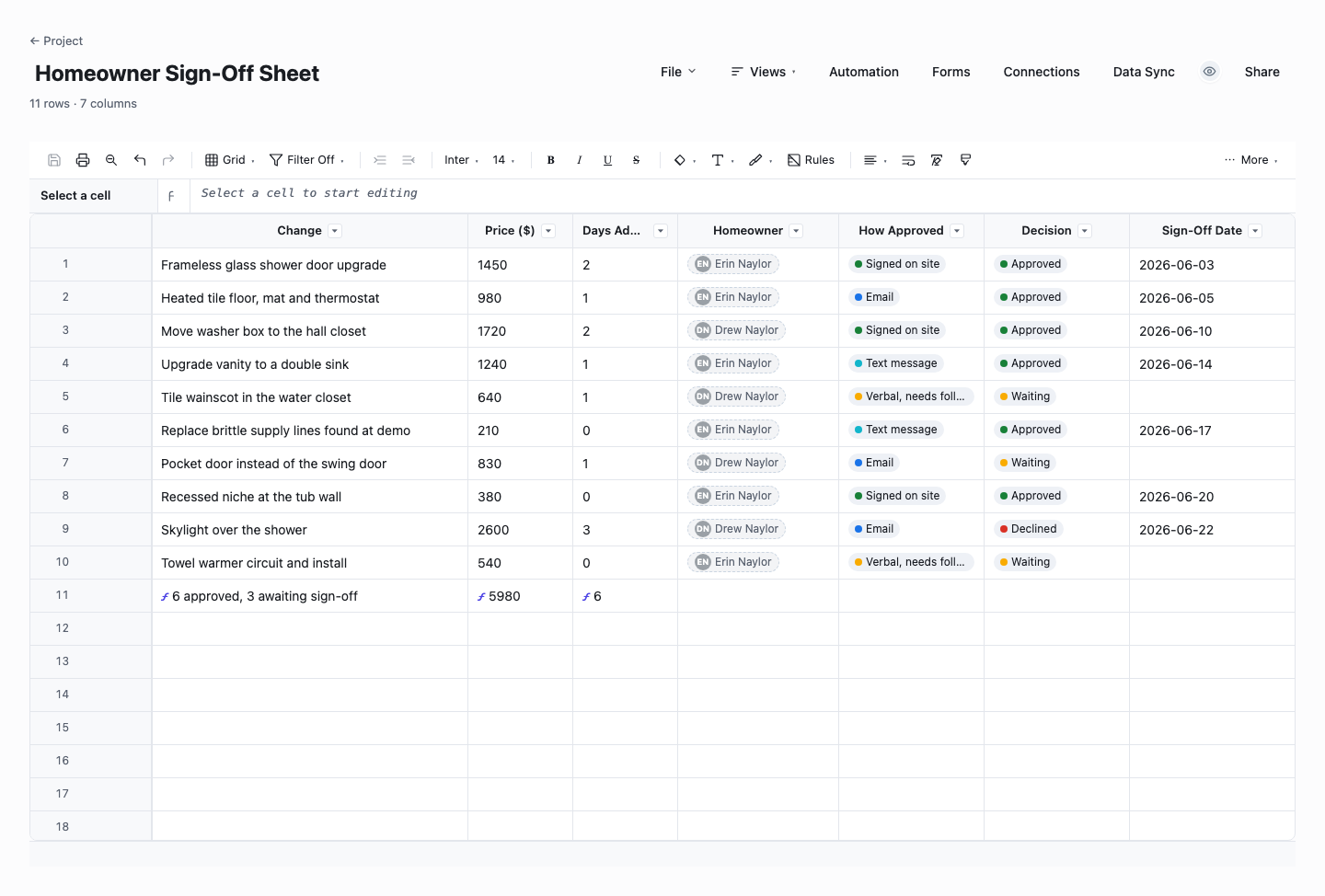
Homeowner Sign-Off Sheet
The homeowner sign-off sheet adds the decision trail: for each change, who approved it, how they approved it (in person, text, email), the decision, and the sign-off date, with a live count of asks still waiting on an answer. Use it when you want every yes on the record before the work happens, because "I never agreed to that" is a very different conversation when the sheet shows the date, the price, and how they said yes. It pairs with a proper signed change order form on bigger changes.
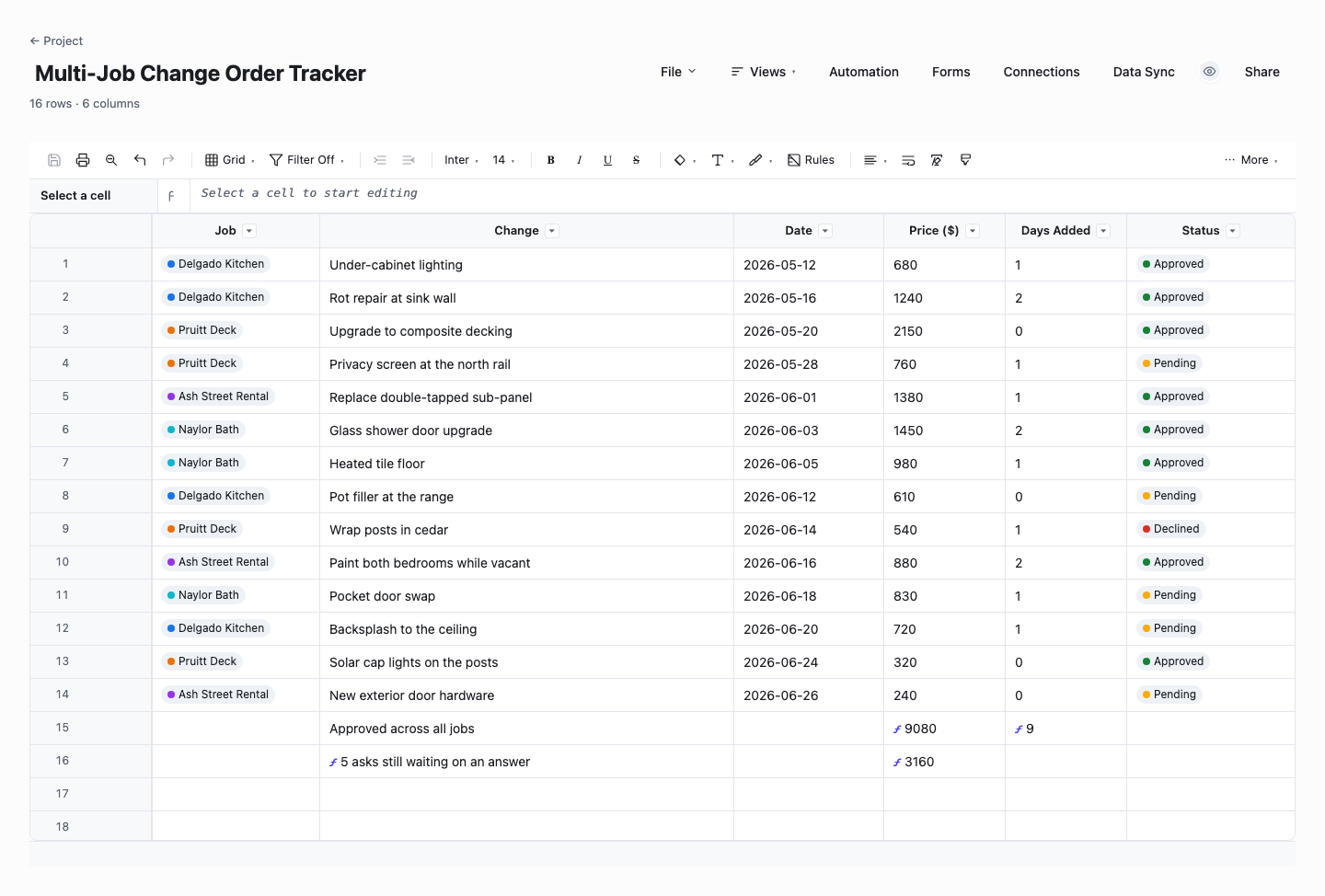
Multi-Job Change Order Tracker
The multi-job tracker runs the same log across every active job: job name, change, date, price, days added, and status in one sheet, with totals for approved money, added days, and the asks still hanging. Use it when you are juggling three or four jobs and the danger is not one big extra but the slow pile of small ones nobody rolled up. Friday afternoon, filter to pending, and you have your follow-up list for the week in about a minute.
How to run a change order log that saves you money
Log the ask the same day, price or no price
The log entry is not a commitment, it is a memory. When the "while you're here" lands, put the row in before you leave the site: what they asked, the date, your rough read on price and days. You can firm the number up tonight at the kitchen table. The extras that kill you are never the ones you wrote down, they are the ones you were sure you would remember and did not.
Put a price on everything, even the freebies
If you decide to throw in a small extra, log it anyway with its real price and mark it no charge. Two reasons: the homeowner sees what the favors are worth, which buys goodwill a silent freebie never earns, and at the end of the job YOU can see what saying yes all summer really cost. Free is a decision you make once per row, not a default the job drifts into.
Track days added, not just dollars
Every extra takes time, and the time compounds across the schedule in a way the money does not: three small extras that each add a day push the tile guy a week, and now the finish date you promised is a fiction nobody updated. Give every row a days number, even when it is zero, so when the homeowner asks why the job is running long, the answer is sitting in a column they already approved line by line.
Nothing gets built while its row says pending
The log gives you a one-word rule the whole crew can hold: if the row is not approved, the work does not start. That single habit ends the worst version of the extras problem, where the work is already in the wall before anyone talks about money and your only options are eat it or argue. A pending row costs nothing to leave pending. Changed work you built on a nod is a discount you did not agree to.
Show the homeowner the same list you see
Most change order fights are bookkeeping fights: two people remembering different lists. Kill the second list. Walk the log at the end of each week, or better, give the homeowner a view of the sheet itself so they watch the total move when they add work. In Wisegrid that is a share link with view-only access: same rows, same totals, no argument about what was said, because there is only one list to remember.
Bill from the log, not from memory
When the invoice goes out, the log is the source: every approved row lands on the bill, and the billed checkbox flips as each one is invoiced. That closes the last leak, the approved extra that everyone agreed to and nobody ever billed. It also makes the final invoice a non-event, because the homeowner has watched the same numbers accumulate all job long instead of meeting them for the first time on the last day.
Watch: the change order log (2 minutes)
Change order form vs change order log: you want both
A change order form is one change, written up properly: what is different from the original scope, the itemized price, the schedule impact, and signatures. A change order log is the index of all of them, one row per change with the running totals. The form protects you on any single big change, the log protects you from the pile of small ones, and it is the thing you open in the truck.
The practical split for a small crew: every ask goes in the log the day it lands, and anything real (structural, hundreds of dollars or more, or contract-touching) also gets a signed form before the work starts. Our free change order form template, linked below, is built to pair with this log: same fields, so a log row becomes a form in two minutes.
If you only adopt one, adopt the log. An unsigned but logged and texted-about extra is a survivable paperwork gap. An extra that exists nowhere at all is how you finish a profitable job and wonder where the money went.
Frequently asked questions
What is a change order?
A change order is a documented change to the original contract: work added or removed, a price adjustment, or a schedule change, agreed after the job has already started. On residential and commercial jobs alike it is the mechanism that turns "while you're here, could you also..." into scoped, priced, approved work instead of free labor. A change order records what changed, why, what it costs, how many days it adds, and who approved it, so the contract value everyone remembers matches the work that got done.
What is a change order log?
A change order log is a running list of every change on a job, one row per change, with what was requested, who asked for it, the date, the price, the schedule impact in days, and the current status: approved, pending, declined, or no charge. Its job is to keep the real value of the contract visible as the work changes, so the "while you're here" extras get priced and decided instead of quietly absorbed. The individual signed change order documents hang off it. The log is the index you work from day to day.
What should a change order log include?
Seven columns cover a small crew: a change number, a short description of the ask, who requested it, the date, the price, the days it adds to the schedule, and the status. A billed checkbox is worth adding so approved work cannot slip through uninvoiced, and a sign-off column (who approved it and how) if your jobs involve more than a handshake. Resist adding more than that. A log with fifteen columns stops getting filled in by the second week.
How do I charge for extras without upsetting the customer?
Separate the yes from the price. When the ask lands, the answer is "happy to, let me put a number on it tonight", which is friendly and commits you to nothing. The number goes in the log, the homeowner approves the row, and the work happens. Customers are rarely upset by a price stated before the work, they are upset by surprises after it. A visible log improves the relationship, because every favor you do throw in is on the record at its real value instead of invisible.
Do small extras really need a change order?
They need a log row, which takes thirty seconds, whether they need a full signed change order document depends on size. The reason small extras cannot be skipped entirely is arithmetic: a job rarely dies from one big change, because big changes get paperwork. It dies from a dozen hundred-dollar asks that each felt too small to write up. The log is deliberately lightweight so that "too small to log" stops being true.
What is the difference between a change order form and a change order log?
The form documents one change in full: scope difference, itemized price, schedule impact, and signatures, ready to put in front of the client. The log tracks all changes in one place with a row each and live totals for approved cost and added days. They pair: log every ask the day it lands, then raise a signed form for the changes big enough to warrant one. We publish free templates for both. The form version is linked from this page.
Can the homeowner see the change order log?
They should. A log the homeowner can see is what prevents the end-of-job argument, because both sides watched the same total grow with every approved row. With the spreadsheet version that means walking through it together at the weekly check-in or sending a copy. In Wisegrid the same log is a live sheet you share as a view-only link: the homeowner opens it on their phone any time, sees exactly what you see, and cannot edit a thing.
Run it live instead of in a file.
The downloads above are yours either way. In Wisegrid the same template becomes a working sheet with owner contacts, status dropdowns, reminders, and dashboards. 7-day free trial, no credit card required.