Build a risk register in Wisegrid
A risk register is one sheet that scores every project risk and keeps the worst ones in front of you. This guide builds one that rates itself: each risk gets a probability times impact score, high scores light up red, closed risks fade, an automation emails each owner when a risk is due for review, and a dashboard answers "what is still open, and how bad" without a status meeting. Everything here is included in your plan. Want the file first? The free risk register template has four Excel versions with no email gate, plus a live register you can edit without signing up. New to the concept? Start with what a risk register is, with a scoring matrix and worked examples; this guide is the hands-on build.
Create the register and score each risk
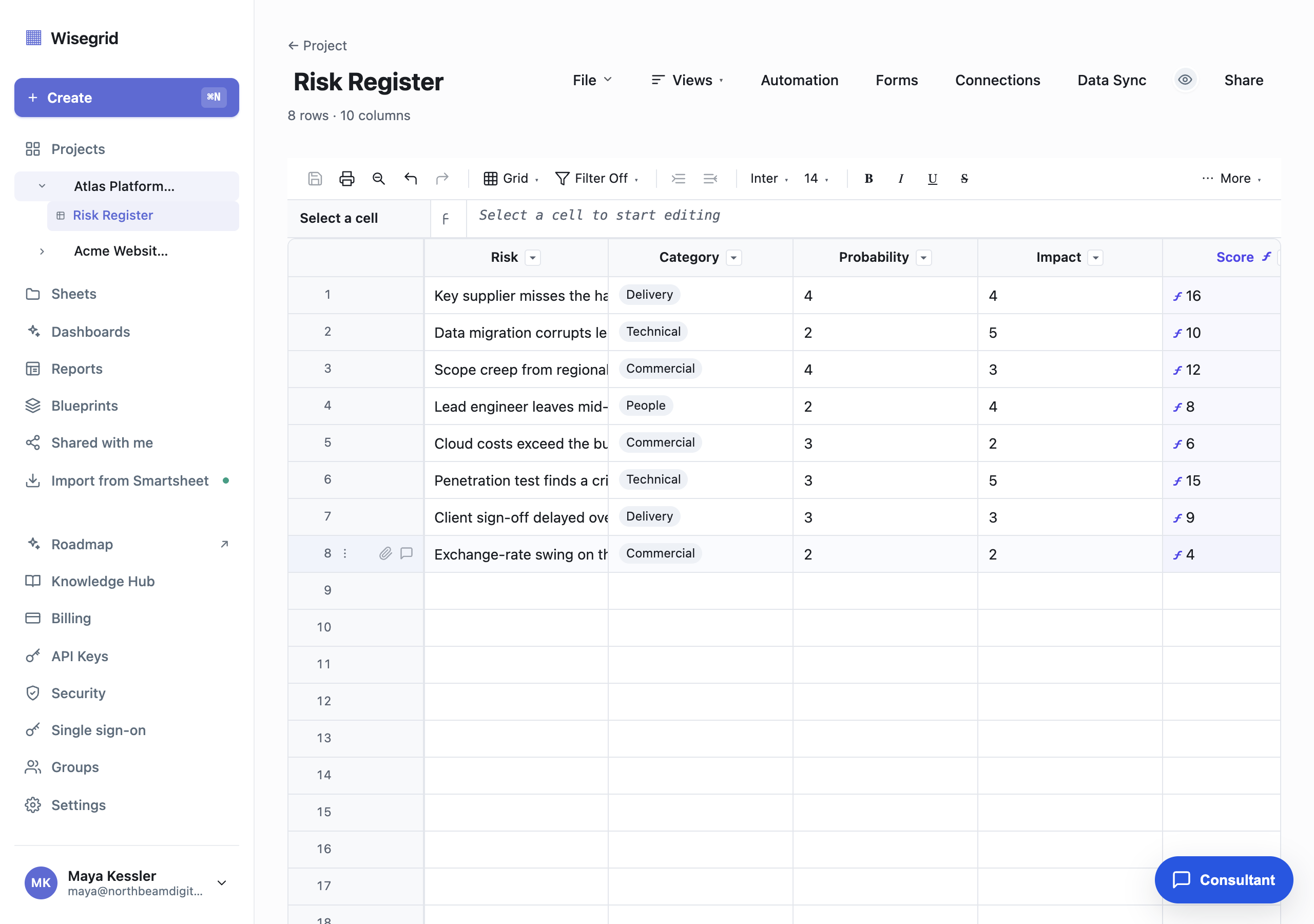
Create a new sheet named Risk Register and give every column a real type. Types are what make scoring, formatting, and filtering possible later, so set them up front. Click the caret on a column header, open Column details, and set each type (and, for dropdowns, the choices):
- Risk: Text. One line on what could go wrong.
- Category: Dropdown with
Delivery,Technical,Commercial,People. - Probability and Impact: Number, each rated
1to5. - Score: Text, driven by a formula (next). Number and date columns take a typed value rather than a formula, so the calculated column is a formula-capable text column.
- Rating: Symbol, for the red, amber, and green traffic light you wire up in step 2.
- Owner: Contact. The step 3 automation emails whoever is in this column.
- Response strategy: Dropdown with
Mitigate,Avoid,Accept,Transfer. - Review by: Date. Status: Dropdown with
Open,Mitigating,Closed.
=[Probability]@row * [Impact]@rowTo score every risk, click the first Score cell, type that formula, and press Enter. It multiplies the two 1-to-5 ratings, so a probability of 4 and an impact of 4 give 16. Then right-click the cell and choose Convert to column formula, and every row (new risks included) scores itself. A small ƒ mark shows the column is formula-driven.
Enter a handful of real risks as you build. Scores, colors, and widgets are far easier to sanity-check against rows you recognize.
Typed columns and formulas are included in your plan.
Add a self-rating traffic light
A number is easy to ignore; a red dot is not. Give the register a Rating symbol column that turns each Score into a red, amber, or green light on its own.
Open the Rating column, type this formula in its first cell, and choose Convert to column formula so every risk rates itself:
=IF([Score]@row >= 15, "red", IF([Score]@row >= 8, "yellow", "green"))Red lights up at a Score of 15 and above (a serious probability and impact combination), amber from 8, and green below that. Because it reads the live Score, the dot re-rates itself the instant a probability or impact changes, with zero upkeep.
If you would rather not type a formula, a Symbol column's guided Status rule builder generates one from conditions you pick, so you can build the same red, amber, green bands by describing them.
Formulas, symbol columns, and status rules are included in your plan.
Color the register with conditional formatting
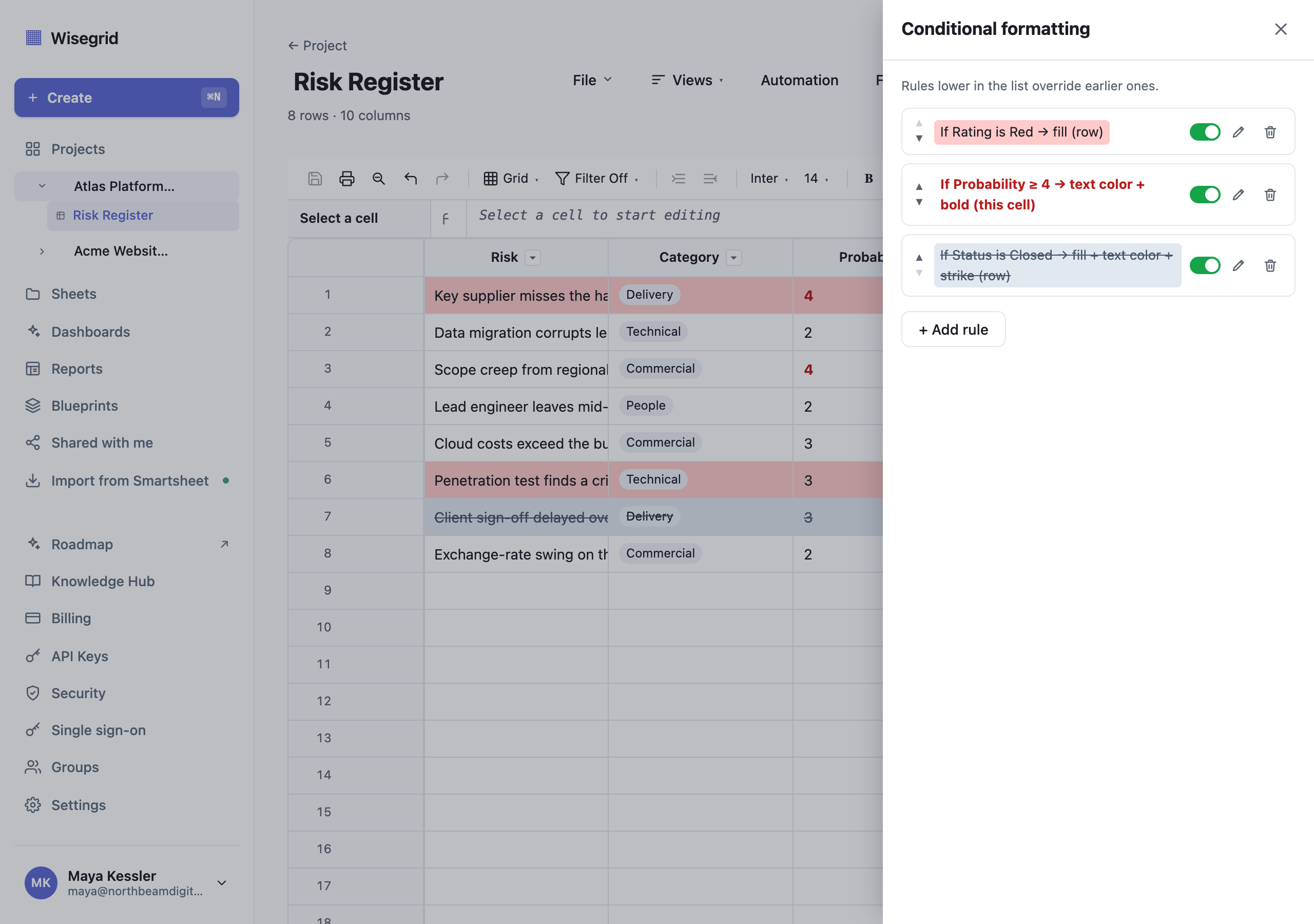
Open the sheet toolbar and click Conditional formatting. Rules are evaluated top to bottom and rules lower in the list win, so add the broad rule first and the sharp exceptions after it:
Ratingisred, format the whole row with a red fill. Every high-scoring risk becomes impossible to skim past.Probabilityis at least4, format just the tested cell with bold text in a warning color, so the risky probability figure stands out inside the row. (The rule readsProbability ≥ 4once saved.)StatusisClosed, format the whole row with a grey fill and grey strikethrough text. Sitting last, this wins over the rating rule, so resolved risks fade back instead of staying red.
Each rule is a column, a condition, and a format, plus a scope: paint the whole row or only the tested cell (a cell rule wins over a row rule on that same cell). A sheet holds up to 25 rules, and a toggle disables a rule without deleting it.
Conditional formatting is included in your plan.
Chase open risks on their review date
Colors only help people who open the sheet; the automation makes the register chase people instead.
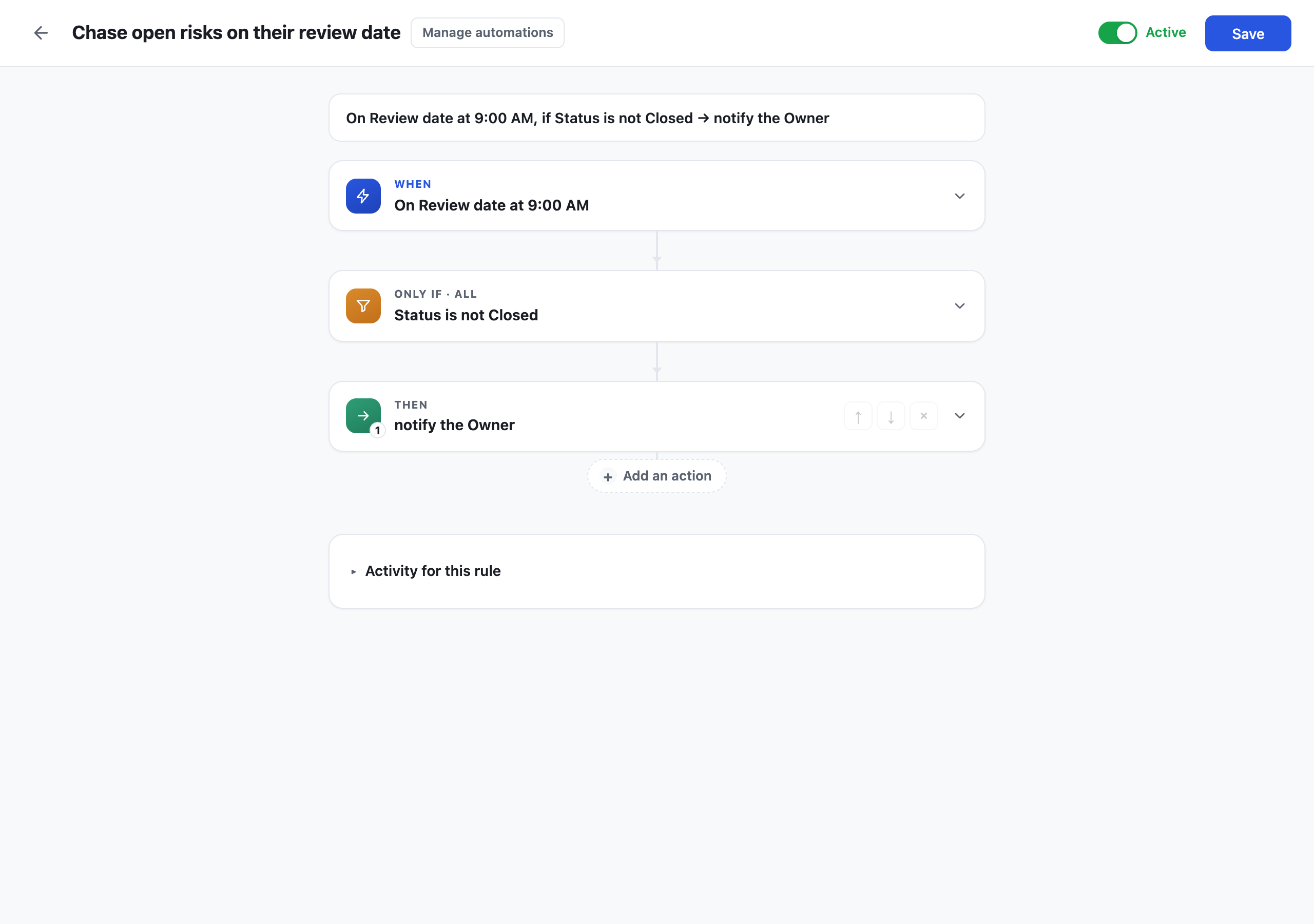
Open Automation from the sheet menu and build one rule. It reads as a single sentence, top to bottom:
- When: On a date, days set to
0, so it fires on theReview bydate at 9:00 AM. - Only if:
Statusis notClosed. - Then: Alert someone, and point the alert at the
Ownercontact column so it reaches whoever owns that risk (the rule then reads "notify the Owner").
That is the whole loop: any risk that reaches its review date while still open emails its owner, at most one nudge per review date. You can stack more actions on the same rule, for example Record a date to stamp when the review fired, and each rule keeps a run history so you can see when it last fired and on which rows.
Automations are included in your plan. There is no separate workflow tier.
Roll it up on a dashboard
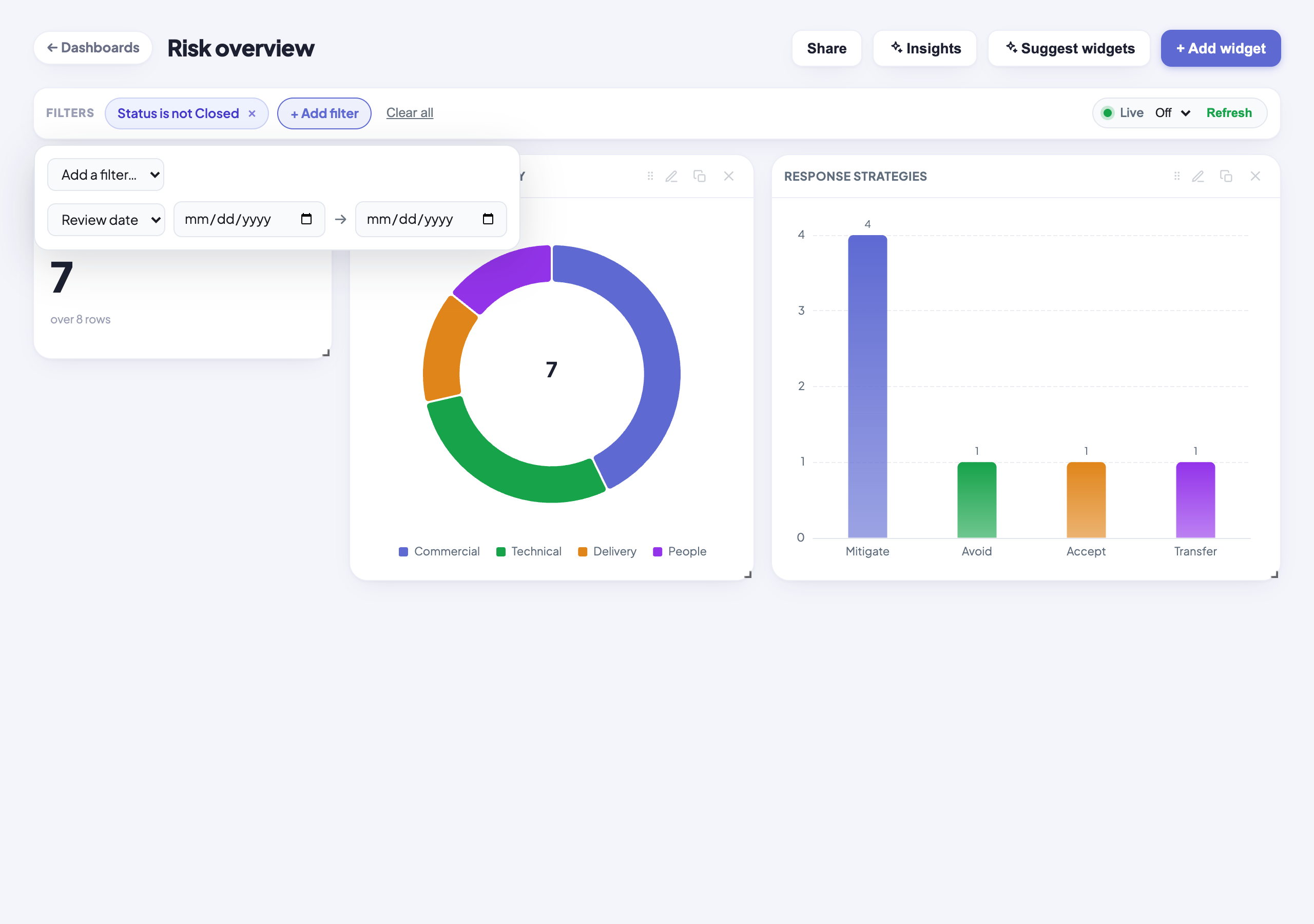
Finally, put the register's vital signs where stakeholders already look. Create a dashboard, click + Add widget, choose Visualize data, and point the guided builder at the Risk Register sheet:
- A Metric card with COUNT for the headline number of open risks.
- A Chart (a donut works well) with COUNT grouped by
Category, to show where the exposure sits. - A second Chart, a bar, with COUNT grouped by
Response strategy, to show how the open risks are being handled.
Then add a Status is not Closed chip in the dashboard Filters bar (the same "still open" test the automation uses). It narrows every widget at once, so the whole board reads open-risks-only: in the figure, 7 of the 8 risks are open, the donut splits them by category, and the response-strategy bar shows four being mitigated against one each avoided, accepted, and transferred. Widgets compute live on the server, so an open dashboard updates itself as the register changes.
What you end up with
- One typed sheet that scores every risk by probability and impact, with an owner, a response strategy, a review date, and a status.
- A Rating light that re-rates itself as scores change, plus formatting rules that make high, and closed, risks visually unmistakable.
- An automation that emails each risk's owner the day it comes up for review and is still open. The register does the chasing.
- A live dashboard with the open count, category split, and response-strategy breakdown, updating itself as the register changes.
Total build time is around 15 minutes, and every capability here (typed columns, formulas, conditional formatting, automations, dashboards) is included in your plan. If your risk register lives in Smartsheet today, the importer brings the sheet and its conditional formatting across.
Build it on your own data.
Start your 7-day free trial, or migrate your Smartsheet workspace with one token.