Stakeholder Register Template: The Best Way to Map Your Stakeholders in 2026
A stakeholder register is the working list of everyone who can affect your project or is affected by it: sponsors, users, department heads, regulators, the vendor, the security team that can veto your launch. A stakeholder register template gives each of them a row with contact details, role, what they care about, their influence and interest, and how you plan to engage them.
Projects rarely fail because someone missed a task, they fail because someone powerful was surprised. The register is the cheap insurance against exactly that: it forces the team to name who matters, agree on how much attention each person needs, and notice the stakeholder nobody has spoken to since kickoff, while there is still time to fix it.
Stakeholder register templates, free to download
Each version below is pre-filled with a realistic cast of stakeholders, ratings, and engagement notes, so you can see how a finished register reads before you build your own. Each download is a spreadsheet file like any other, readable by every tool you already use. No email address required.
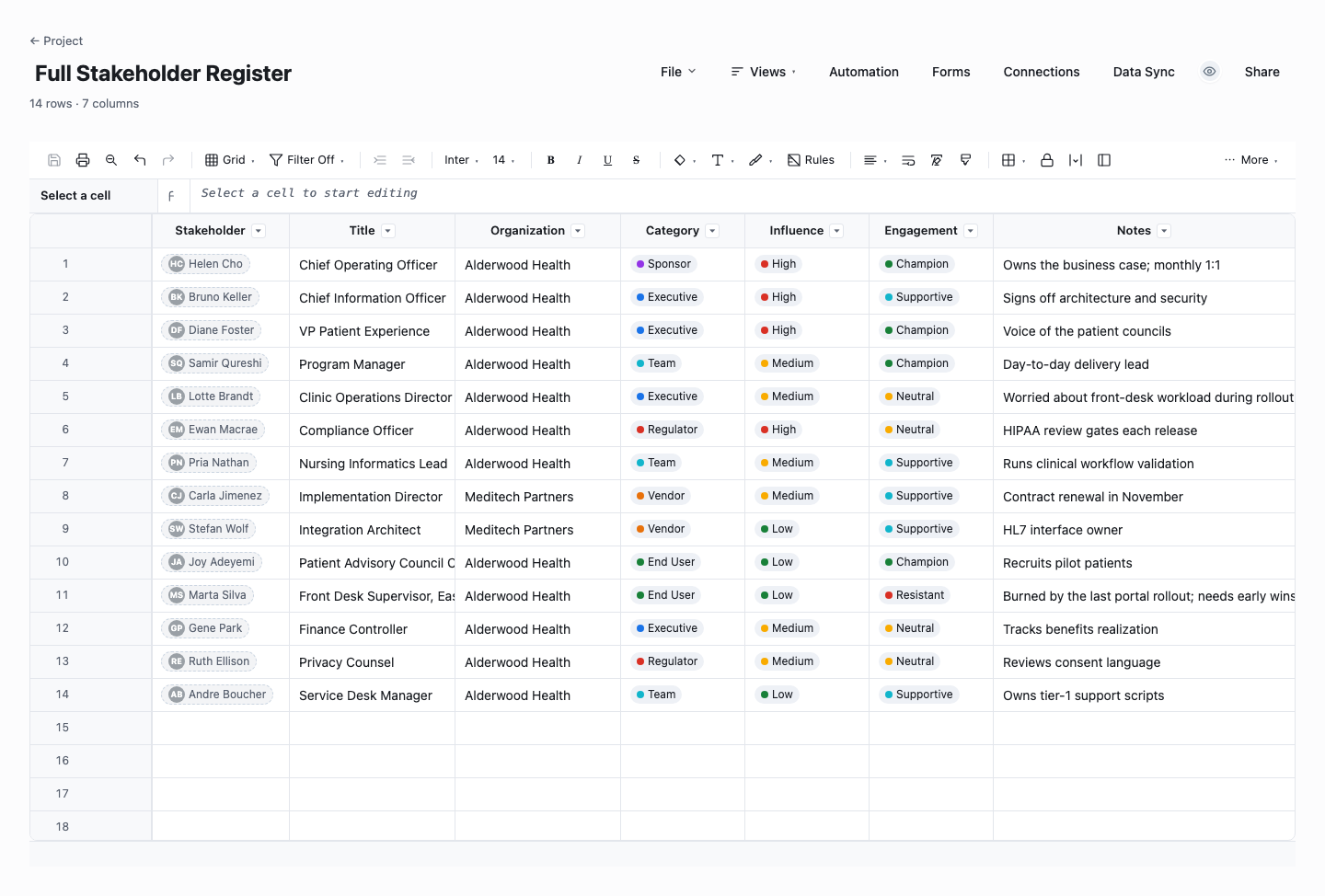
Full Stakeholder Register
The full register is the standard version: every stakeholder with their title, organization, category, influence level, current engagement stance, and notes, so the whole landscape of the project reads at a glance. Use it as the master list the other views derive from, built in the first week of the project and reviewed at each milestone. The engagement column is the one that earns the review time, because stances drift quietly and the register is where the drift becomes visible.
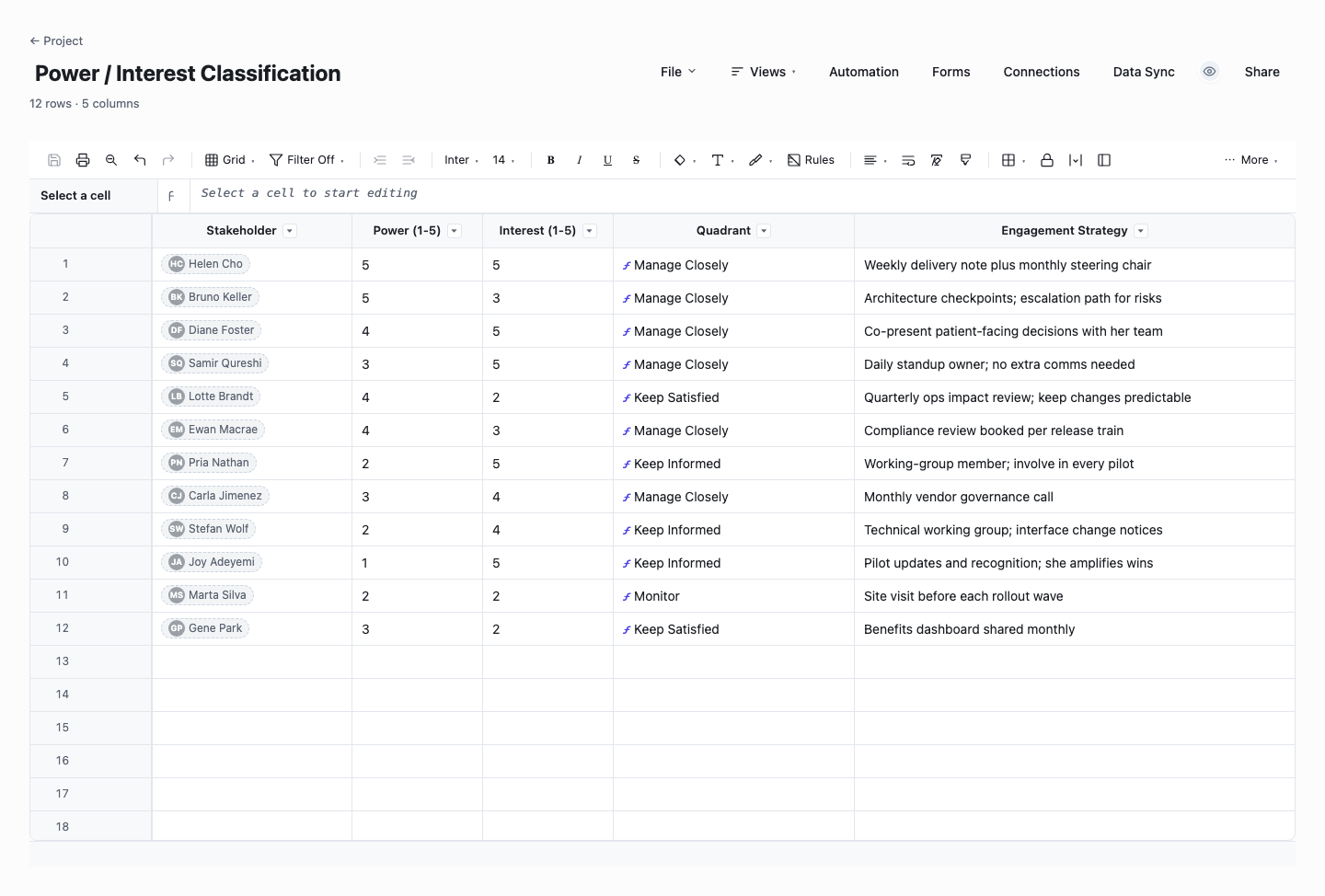
Power / Interest Classification
The power/interest version scores each stakeholder from 1 to 5 on both dimensions, and a live formula assigns the quadrant: Manage Closely, Keep Satisfied, Keep Informed, or Monitor. Use it when the raw register has grown past a dozen names and you need to decide deliberately where your limited attention goes. Because the classification is a formula, re-scoring a stakeholder after a reorganization re-files them instantly, which is exactly when the grid matters most.
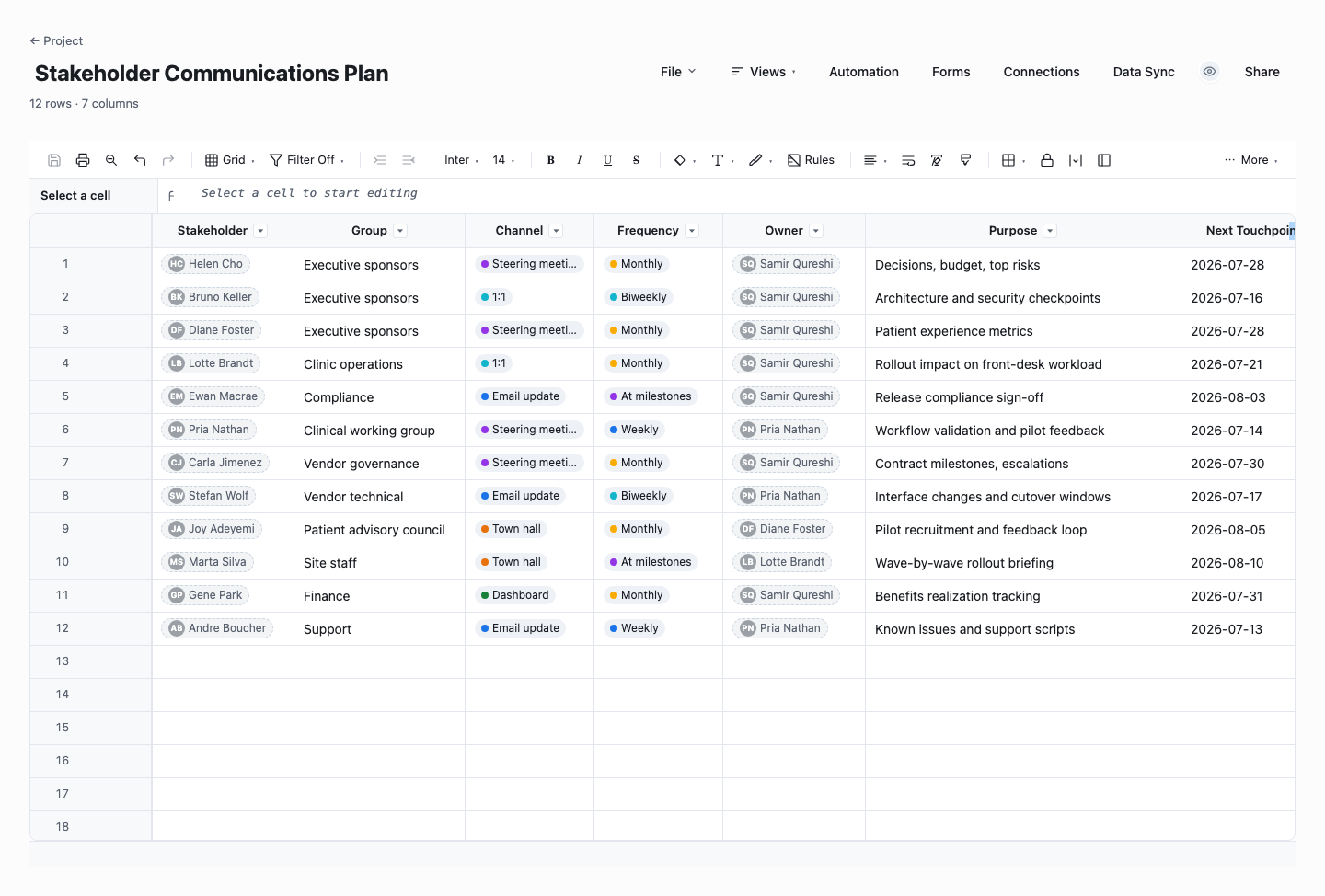
Stakeholder Communications Plan
The communications plan turns the register into an operating rhythm: who hears from you, through which channel, how often, who owns the relationship, and when the next touchpoint lands. Use it once the analysis is done and the real risk becomes execution, because stakeholder management fails less from bad analysis than from three busy weeks of nobody calling the sponsor. The dated next-touchpoint column is the discipline that prevents that.
How to build a stakeholder register that changes behavior
Cast a wide net first, then prune
Brainstorm every person and group who touches the project: who funds it, who uses the output, who supplies inputs, who can block it, who merely needs to know. Pull the project charter and the org chart while you do it, because the dangerous stakeholders are the ones nobody in the room thought of. It is far cheaper to add and later archive a row than to discover a veto in month four.
Record what each stakeholder actually wants
For every row, write one sentence on what this person cares about in their own terms: hitting a compliance date, protecting their team’s workload, looking good to their board. This column is the register’s real payload. Influence scores tell you who to talk to. The interests column tells you what to say, and it is the part that turns the register from a contact list into a strategy.
Rate power and interest, quickly and honestly
Score each stakeholder’s power (can they change or stop the project?) and interest (how much do they care day to day?) on a simple high or low, or a 1-to-5 if you want finer sorting. Do it fast and in pencil: the ratings are a sorting device, not a performance review, and they will change as the project moves through phases. The templates compute a quadrant from the two scores automatically.
Note current versus desired engagement
For each key stakeholder, record where they stand now (unaware, resistant, neutral, supportive, leading) and where the project needs them to be. The gap is your engagement to-do list, and it is wonderfully concrete: a high-power sponsor sitting at neutral is a named risk with an owner, not a vague worry. Most register reviews are really a walk down this gap column.
Give every key stakeholder an owner and a cadence
Decide who on the team manages each relationship and how often they touch it: a weekly one-to-one for the sponsor, a monthly digest for the compliance lead, a launch-week heads-up for the support desk. Communication that is nobody’s job does not happen. The owner column also stops the awkward pattern where three team members lobby the same executive with three different stories.
Review the register at every phase change
Stakeholders shift as the project moves: procurement matters early, operations matters late, and a reorg can rewrite the power column overnight. Re-walk the register at each milestone or monthly, whichever comes first, updating ratings, engagement status, and the cast itself. A register from kickoff describes a project that no longer exists, and the gap between the two is where unmanaged stakeholders live. Ten minutes at each phase gate is the entire cost of keeping the map aligned with the territory.
Power, interest, and the engagement each quadrant earns
The classic analysis places every stakeholder on two axes, power and interest, which yields four working strategies. High power and high interest: manage closely, these are your sponsor and your key customer, and they deserve individual attention and no surprises. High power, low interest: keep satisfied, briefly and at the right altitude, because over-communicating to this group is how you turn a neutral executive into an irritated one. Low power, high interest: keep informed, and be generous about it. These people are your early-warning network and your loudest advocates. Low power, low interest: monitor with light-touch updates, and resist spending scarce attention there.
The engagement scale adds the second dimension the grid misses: direction of travel. The standard five levels are unaware (does not know the project exists), resistant (knows and opposes), neutral (knows and does not care), supportive (wants it to succeed), and leading (actively championing it). Rate each key stakeholder twice, once for where they are and once for where the project needs them, and treat every gap as a piece of work with an owner. A resistant head of operations who must eventually run your output is not an annoyance to route around. She is the most important row in the register, and the engagement plan for her is real project work that belongs in someone’s calendar.
From those two ratings the communication plan writes itself, which is the practical payoff of the whole exercise. Sort the register by quadrant and the answer to "who gets what" falls out: the manage-closely group gets a named owner and a standing conversation, the keep-satisfied group gets the one-page executive summary on a monthly rhythm, the keep-informed group gets the working status update, and the monitor group gets the newsletter-grade note when something material changes. Write those defaults into the cadence column and you have converted an analysis exercise into a checklist the team can actually run, one that survives the week everyone is too busy to think about stakeholders, which is exactly the week it matters.
Treat the quadrant as a triage, not a verdict. Power shifts with reorgs and phases, interest spikes the week your change lands on someone’s team, and a "low priority" stakeholder with a grievance and a network can matter more than the grid admits. That is also why the register should stay a private working document: it contains honest judgments about named people, so keep the audience small and the language professional enough that an accidental leak embarrasses no one.
Frequently asked questions
What is a stakeholder register?
A stakeholder register is the project document that lists every person or group with influence over the project or a stake in its outcome, together with their contact details, role, interests, power and interest ratings, and the engagement approach for each. It is created early, usually alongside the project charter, and then maintained as a living document. Its job is simple: make sure attention goes where influence and impact actually are.
What is the difference between a stakeholder register and a stakeholder analysis?
The analysis is the thinking. The register just writes it down. Stakeholder analysis is the exercise of identifying stakeholders and judging their power, interest, and disposition, often with a power/interest grid. The register captures the results in one maintained table, adds the operational columns (contacts, owner, cadence, status), and gets updated as the analysis is repeated through the project. Do the analysis once and you have a snapshot. Keep the register current and you have a working tool the whole project can steer by.
Who counts as a stakeholder on a project?
Anyone who can affect the project or is affected by it: the sponsor and steering group, end users, the project team itself, department heads whose people or budgets are touched, internal gatekeepers like security, legal, and procurement, and external parties such as vendors, customers, and regulators. The common miss is the operational team that inherits the output after go-live. When in doubt, list them. A monitored stakeholder costs a row, an ignored one can cost the project.
Should stakeholders see the stakeholder register?
The full register, no. It records candid assessments of real people’s influence, attitude, and how you intend to manage them, and sharing that is both a relationship risk and, under privacy rules in many organizations, a genuine compliance question. Keep the working register within the core team, write every cell as if the person named might someday read it, and share filtered views (names, roles, communication plan) when transparency is useful. In Wisegrid that filtering is a per-recipient view rather than a second copied file.
How often should the stakeholder register be updated?
Review it at every project phase change and at least monthly in between, plus immediately after organizational changes like a reorg, a new executive, or a vendor swap. The update is usually ten minutes: adjust a rating, log an engagement, add the stakeholder who appeared in last week’s escalation. What you are guarding against is drift, because influence moves faster than org charts, and a stale register quietly points your communication effort at last quarter’s power map.
How does a stakeholder register relate to a RACI matrix?
They answer different questions and work best side by side. The register answers "who matters to this project, what do they want, and how do we engage them", covering people far beyond the delivery team. A RACI matrix answers "for each piece of work, who is Responsible, Accountable, Consulted, and Informed". A stakeholder often appears in both: the register tells you the CFO needs monthly reassurance, the RACI tells you she signs off on the budget change. Build the register first, since it supplies the cast the RACI assigns.
Run it live instead of in a file.
The downloads above are yours either way. In Wisegrid the same template becomes a working sheet with owner contacts, status dropdowns, reminders, and dashboards. 7-day free trial, no credit card required.