Executive Project Status Report Template: The Best Way to Report Up in 2026
An executive project status report template gives you the one-page format for reporting a project to people who will spend ninety seconds on it: overall health, the trend since last period, the handful of exceptions that matter, and the decision or help you need. It is written for altitude rather than activity, and it is judged by a single standard: can an executive act on it without scheduling a follow-up meeting to find out what it meant.
The discipline matters because reporting up is not a smaller version of reporting across. A team status meeting reviews tasks. An executive reads for risk, money, and dates, and files everything else under noise. The template below forces the translation: what changed, what threatens the commitment, and what you need from the reader. Done well, it earns you shorter meetings and faster decisions, which is the entire point of the document.
Executive status report templates, free to download
Each version below is a working spreadsheet with realistic example content filled in, so you can see how a finished report reads before you overwrite it with your own project. Every download is a plain .xlsx file that opens in Excel, Google Sheets, or any spreadsheet app. No email address required.
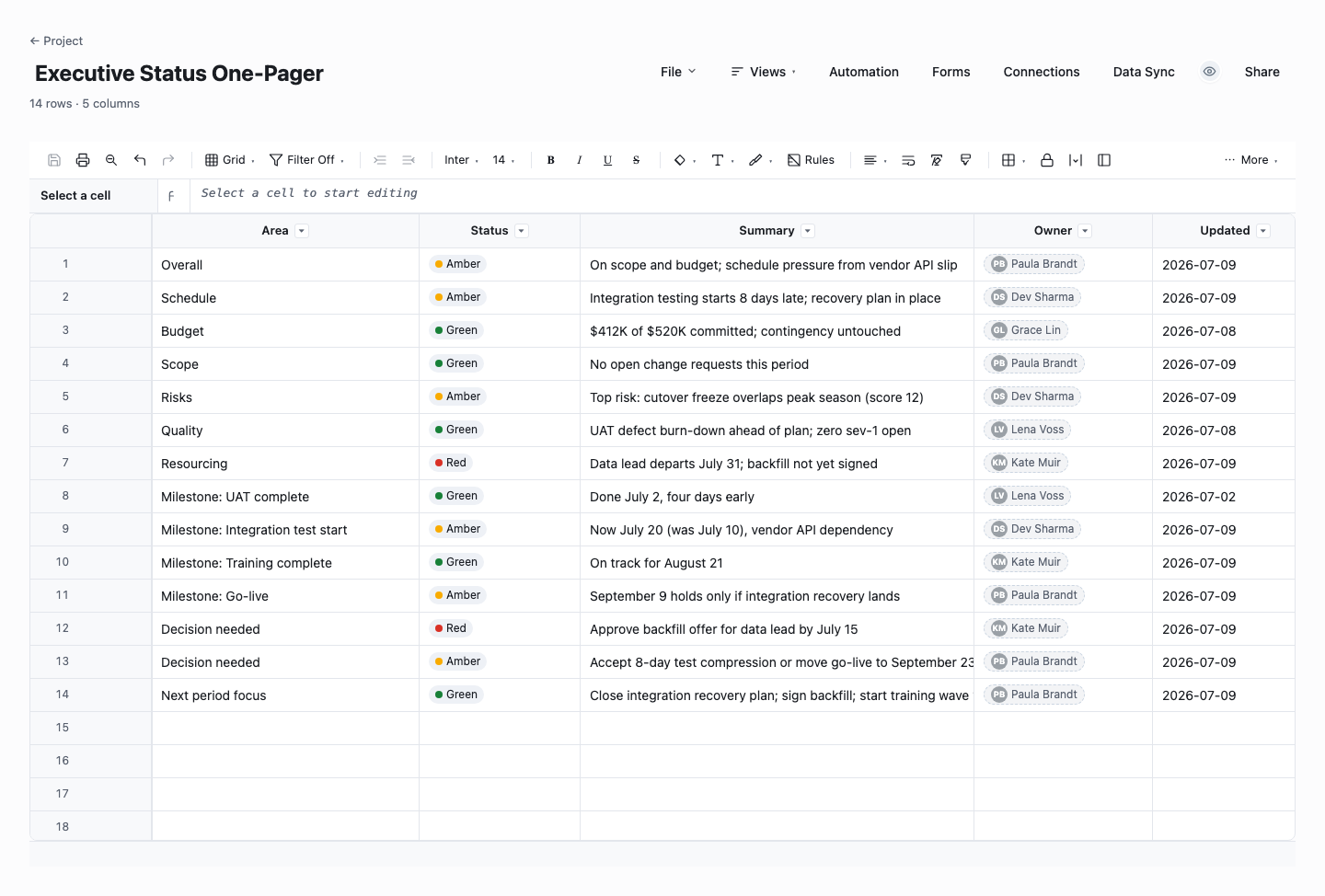
Executive Status One-Pager
The one-pager is the version this page is named for: every reporting area with a RAG status, a one-line summary, an owner, and a last-updated date, all on a single screen. Use it for the steering meeting and the sponsor update, where the reader gives you ninety seconds and decides everything else from whether you seem in control. The per-area owner column quietly raises the quality of the content, because a named person stands behind every line.
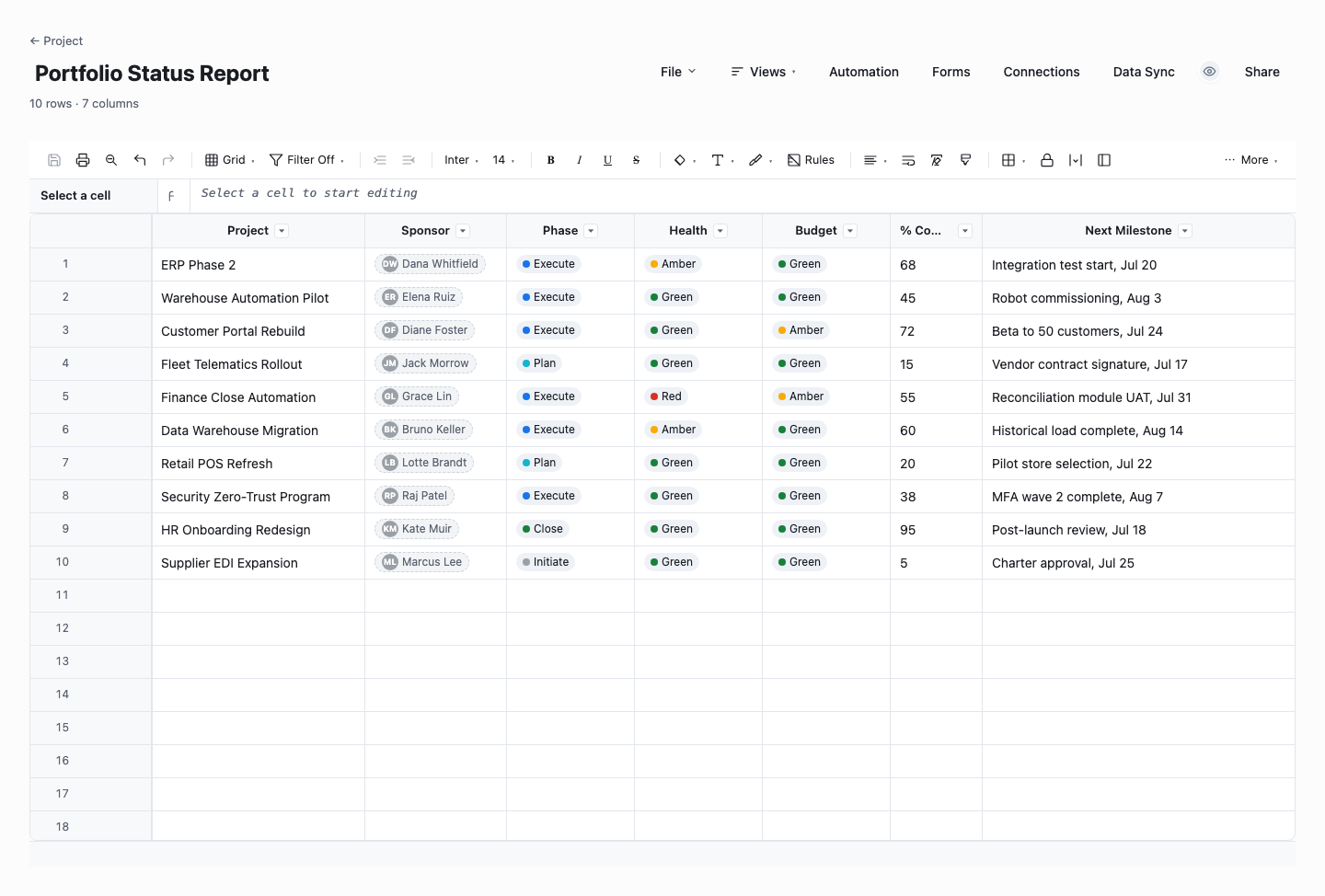
Portfolio Status Report
The portfolio version puts every project in the portfolio on one sheet: sponsor, phase, health and budget RAG, percent complete, and the next milestone per project. Use it for the monthly leadership review, where the question is not how any one project is doing but where across the portfolio attention and money should move. It is also the honest antidote to the slide-deck version of the same meeting, because a grid makes it much harder to hide a red project on page fourteen.
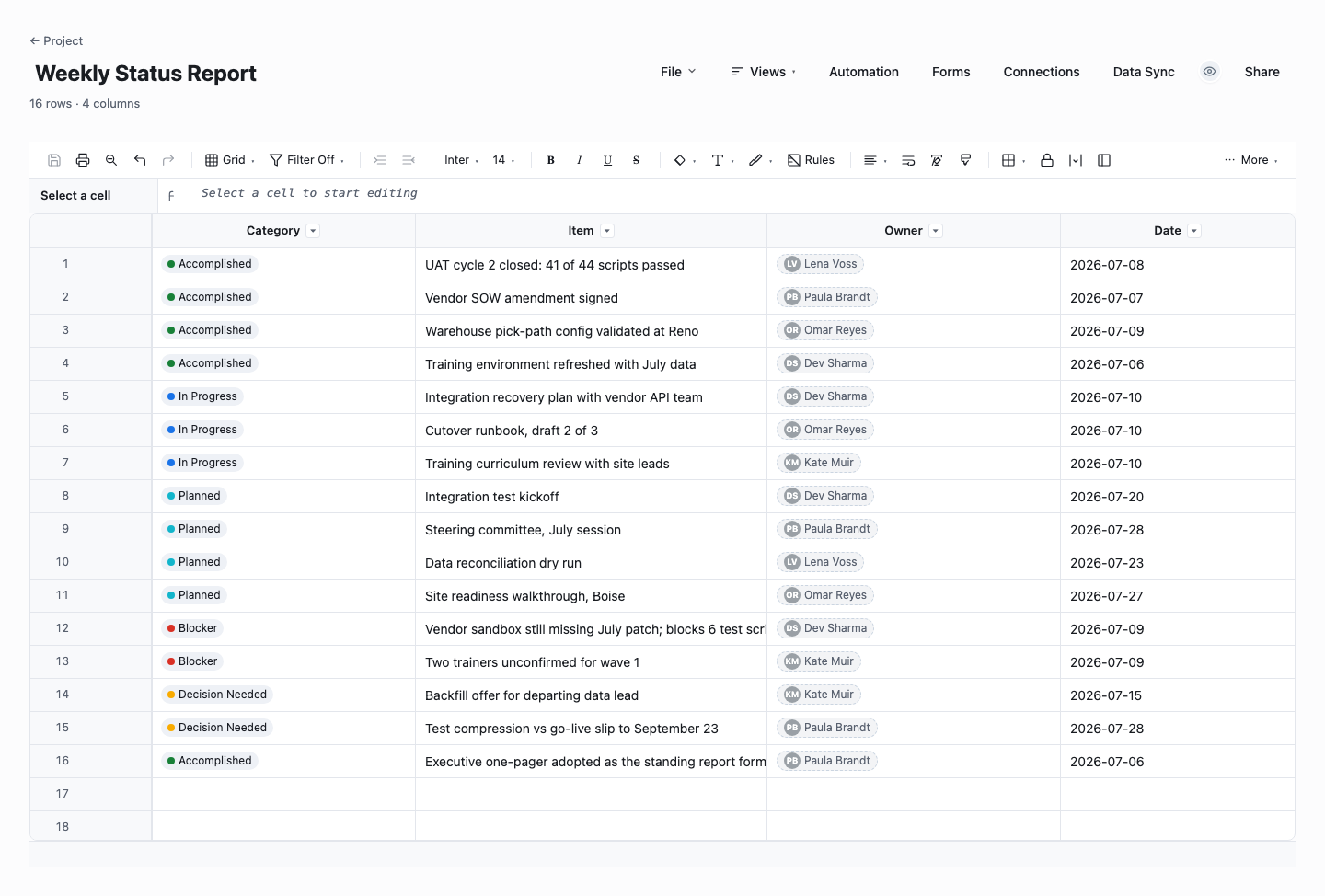
Weekly Status Report
The weekly version is the working-level report underneath the executive one-pager: accomplished, in progress, planned, and blocked items in one categorized list with owners and dates. Use it for the team-and-PM rhythm, where it takes minutes to update and seconds to read. Kept honestly, it also becomes the raw material the executive report summarizes, which is exactly the relationship the section above describes: same facts, two altitudes.
How to write an executive status report that gets read
Lead with the ask, not the background
If you need a decision, more budget, or an unblocked dependency, put it in the first line, phrased so the reader can say yes in one sentence. Executives triage. A report that buries its ask in the third paragraph has already failed. When there is no ask, say so explicitly, because "no action needed" is itself useful information, and it trains readers to trust that when you do ask, it is real.
Report status honestly, and define what red means
A RAG status only works when the colors have written definitions: green means on track for scope, dates, and budget, amber means a credible threat you are actively managing, red means a commitment will be missed without intervention from above. Publish those definitions on the report itself so nobody negotiates them later. Then treat red as a request for help rather than a confession, because on teams where red is punished, every project stays green until the week it fails.
Write exceptions, not an activity log
Nobody above you needs a list of what the team did, they need what deviates from plan. Cut the completed-task recital and report the three to five items that changed the risk picture: a slipped milestone, a vendor problem, a scope decision pending. The white space is deliberate. A one-page report with six sharp bullet points signals control. Three dense paragraphs of activity signal that you cannot tell signal from noise.
Show the trend, not just the snapshot
A project that is amber and improving is a different conversation from a project that is amber and sliding, and a single status color cannot tell the two apart. Carry last period’s status next to this period’s, and add one line explaining any change in either direction. Trend is what lets a reader catch a slow slide early, and it is the first thing an experienced steering committee looks for on the page.
Keep it to one page, ruthlessly
The one-page constraint is not aesthetic. It is the mechanism that forces prioritization. If the report does not fit, you have not yet decided what matters. Push detail into appendices or linked working documents for the curious, and keep the page itself to health, trend, milestones, budget, exceptions, and the ask. One page read every week beats five pages skimmed never.
Keep the structure identical every period
Executives read many reports, and a standing structure lets them build pattern recognition: the budget figure is always in the same corner, the risks always in the same block. Resist the urge to redesign the page around a good or a bad week. When the format never changes, a change in content stands out instantly, which is exactly what you want a status report to do.
Send it the same day, at the same time, every time
Cadence is part of the contract. A report that lands every Friday at noon becomes part of how leadership runs their week, a report that arrives whenever things happen to be calm reads as spin. Fix the day, set a reminder, and publish even in bad weeks, especially in bad weeks. Reliability is what converts a document into an instrument people steer by.
The project status report template underneath it: the weekly working version
The executive report is a summary of a summary. Underneath it, most teams run an ordinary project status report template at the working level: fuller milestone tables, task-level progress, every open risk and issue rather than the escalated few, and notes per workstream. That weekly version is written for peers and the delivery team, so it trades altitude for completeness, and it is where the numbers on the executive page come from.
The practical difference between the two is selection. The working report answers "what is happening". The executive version answers "what do you need to know, and what should you do." Keep both in the same file or sheet so they cannot drift apart: the working rows feed a summary block, and the summary block is what goes up. When the two documents disagree, credibility is the first casualty, so let one source feed both.
If the working report lives as a sheet rather than a document, the executive page can largely assemble itself: status columns roll up, milestone dates sort themselves, and the exceptions list is a filter on the risk log instead of a retyping exercise. That is the pattern the downloads above are built around, and it is why the same template works at both altitudes.
From weekly page to steering committee pack
A steering committee reads the same report with two additions: a decision log and a forward look. The decision log lists what the committee agreed last time and what happened as a result, which quietly enforces follow-through in both directions. The forward look names the decisions expected at the next one or two sessions, so members arrive briefed instead of ambushed, and pre-reads can go out with the report instead of after it.
Resist the slide-deck rebuild. The strongest steering packs are the standing one-page report plus one page per open decision: context, options, recommendation, and the cost of deciding late. Assembling a fresh deck each cycle burns hours, invites narrative drift, and breaks the pattern recognition the standing format spent months building. The report is the product. The meeting just reviews it.
Portfolio reporting works the same way one level up: each project contributes its status line, and the portfolio page is a table of those lines with trend arrows and the asks pulled to the top. If the project reports are honest and current, the portfolio view costs nothing extra to produce, which is the best argument for getting the single-project page right first.
Frequently asked questions
What should an executive project status report include?
Six things: overall health as a defined RAG status, the trend since last period, progress against the major milestones, the budget position, the exceptions that changed the risk picture, and the specific decision or support you need. Everything else is appendix material. The test for each line is whether an executive could act on it. Background that does not change a decision belongs in the working report, not on the executive page.
How is this different from a regular project status report template?
A project status report template for the working level covers everything in motion: full task and milestone tables, every open risk and issue, and per-workstream notes for the people doing the delivery. The executive version selects from it rather than repeating it: it compresses health into a status and a trend, shows only the escalated exceptions, and always states an ask. Same underlying data, different altitude, and a very different reader.
How often should you send an executive status report?
Weekly for most active projects, fortnightly or monthly for long steady programs, and immediately when something material breaks, because an executive should never learn about a red status from the calendar. Whatever cadence you pick, keep it fixed: same day, same time, same structure. Frequency matters less than reliability, since the report’s value compounds as readers learn exactly when and how it arrives.
What do red, amber, and green actually mean in a status report?
Only what your report defines them to mean, which is why the definitions belong on the report itself. A workable set: green is on track for scope, dates, and budget with risks managed, amber is a credible threat to one of those that the team is actively managing. Red means a commitment will be missed without help from outside the team. The key is that red is defined by the need for intervention, not by the degree of embarrassment.
What is watermelon reporting, and how do you avoid it?
A watermelon report is green on the outside and red on the inside: the summary says fine while the project underneath is in trouble. It happens when red is punished, when the status is an opinion instead of a definition, or when the summary is hand-assembled far from the working data. The fixes are cultural and mechanical: define the colors, tie them to observable facts like milestone variance and budget burn, show the trend so slides are visible, and make it explicitly safe to report red early.
Who should write the executive status report?
The project manager, in their own words, from the working data. Delegating it to a coordinator produces accurate-but-empty pages, and letting a PMO rewrite it launders the message until nothing is left to act on. A useful pattern is PM-writes, sponsor-reads first: the sponsor sees it before the wider audience, can ask for clarification, but does not soften the status. If the sponsor edits colors, the report stops being a measurement and becomes a negotiation.
Run it live instead of in a file.
The downloads above are yours either way. In Wisegrid the same template becomes a working sheet with owner contacts, status dropdowns, reminders, and dashboards. 7-day free trial, no credit card required.