By Ryan Kramer, founder of Wisegrid. Last updated July 2026.
Most “best alternatives” lists are affiliate placement in disguise. This one isn’t. Yes, Wisegrid is my product and yes, it’s #1 on this list, but I’ll tell you exactly when one of the others is the better choice, with real, sourced capacity numbers, not vibes. I came from Smartsheet, and I’ve used each tool below to know where it genuinely wins.
People leave Smartsheet for a handful of consistent reasons: the 500,000-cell-per-sheet wall, the User Subscription Model turning editors into surprise paid seats, silent overwrites when two people edit at once, and premium features gated to the top tier. The right alternative depends on which of those is hurting you most.
Key takeaways – Live in the grid (formulas, cross-sheet refs, hierarchy)? Wisegrid is the closest like-for-like swap: 1,000,000 cells per sheet, one plan at $19 per editor, free view-only collaborators. – Want visual boards over a spreadsheet? Monday. Relational data? Airtable. Task/project management? Asana. – Everything-app, don’t mind a learning curve? ClickUp. Docs-first, small data? Notion. – We’re honest about it: each of those beats Wisegrid for its own job, so match the tool to the pain.
Quick comparison table
We deliberately don’t publish competitor dollar prices, because pricing pages change and vary by contract, so a number printed here would go stale. Instead the table compares what actually decides the switch: pricing model, documented capacity, and whether you get a real Smartsheet-style grid. Capacity figures are each vendor’s own documented limits, not numbers we invented. The one Smartsheet number we cite, its 500,000-cell per-sheet cap, comes from Smartsheet’s own API documentation.
| Tool | Pricing model | Capacity ceiling | Smartsheet-style grid? | Best for |
|---|---|---|---|---|
| Wisegrid | One plan, per editor; view-only free | 1,000,000 cells/sheet (2x Smartsheet’s 500K) | Yes, by design | Smartsheet refugees who live in the grid |
| Monday.com | Per-seat, sold in seat bands | Item-based; automation/action limits by tier | Partial | Visual, color-coded team boards |
| Airtable | Per-user, tiered | Per-base record caps (50,000 records/base on Team, per Airtable’s plans) | No (record/relational) | Database-style relational work |
| Asana | Per-user, tiered | Task-based; no cell grid | No | Task and project management |
| ClickUp | Per-user, tiered; AI is an add-on | Task-based | Partial | All-in-one, feature-maximalist teams |
| Notion | Per-member, tiered | Databases slow past ~5,000 to 10,000 rows (widely reported) | No | Docs plus light databases |
One honest note on how to read that table: the capacity ceilings are each vendor’s own documented limits. The one figure we’ve measured ourselves is Wisegrid’s, in a test migration through our importer a real Smartsheet workspace of 4,863 rows across 14 sheets mirrored over with attachments intact and only 8 items flagged for review. Want to see where your own sheet lands against the 500,000-cell wall? The free Smartsheet cell counter does the rows-times-columns math in your browser, no sign-up.
1. Wisegrid, the closest like-for-like Smartsheet replacement
Best for: teams that genuinely use Smartsheet’s grid (formulas, cross-sheet references, hierarchy, forms) and just want the ceilings gone.
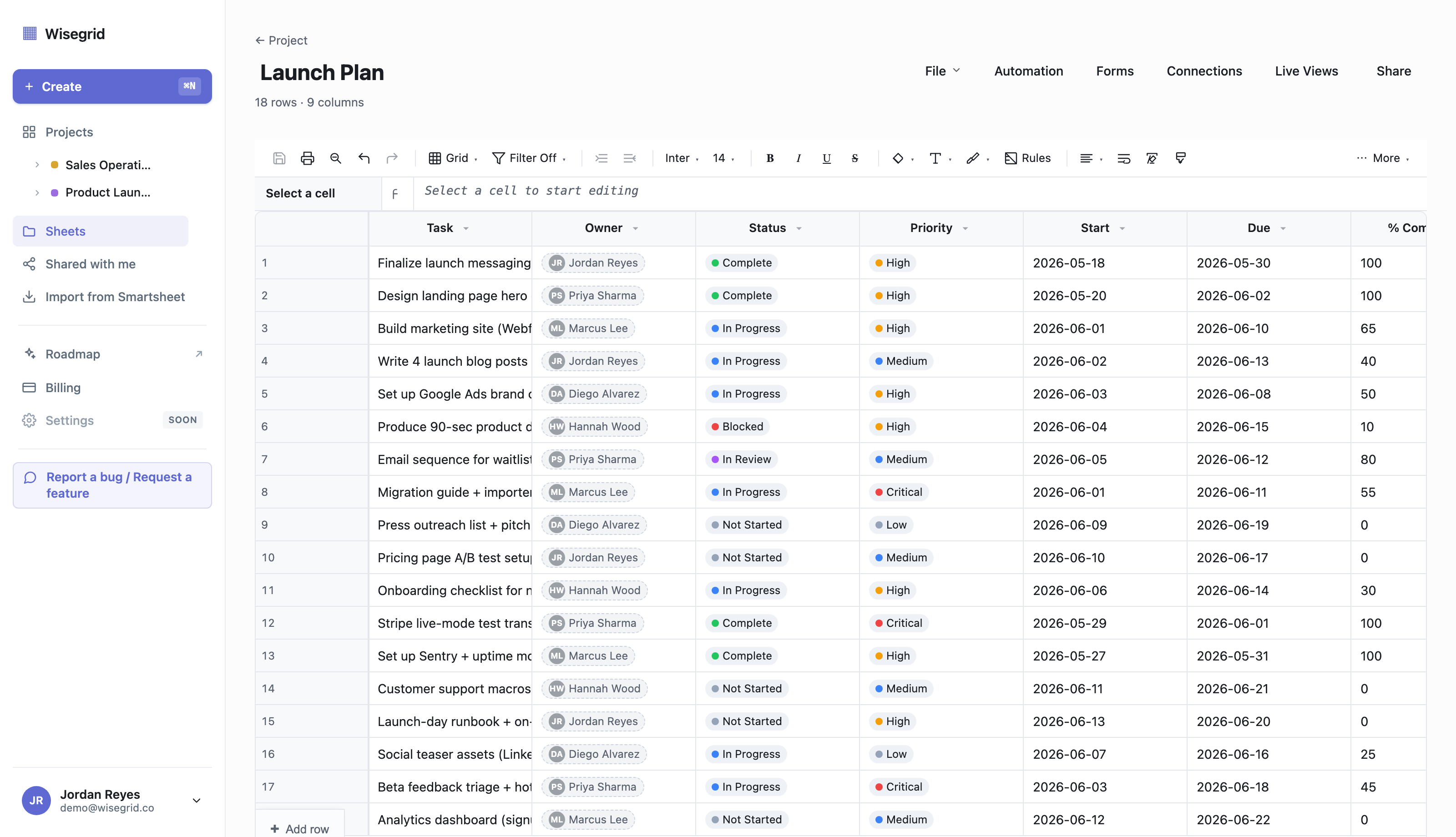
Most tools on this list ask you to rethink your work as boards, tasks, or relational tables. Wisegrid doesn’t. It’s built to feel like Smartsheet on day one (same grid, same column types, cross-sheet references, row hierarchies) and then remove the limits that make a growing Smartsheet workspace painful.
What’s shipped today:
- 1,000,000 cells per sheet (twice Smartsheet’s 500,000-cell cap), virtualized to stay smooth at scale, with in-product capacity meters that warn you at 80% instead of blocking you at the wall.
- Inline cross-sheet references: type
[Sheet]!A1inline (autocomplete as you type[), with no reference-picker modal and up to 500 distinct cross-sheet references per sheet, versus the 100 Smartsheet documents as its per-sheet cap. - Formulas use the same
[Column]@rowsame-row syntax as Smartsheet, so there’s nothing to relearn. - Row-version conflict detection: no silent overwrites; you get a banner and a choice when two people edit the same row.
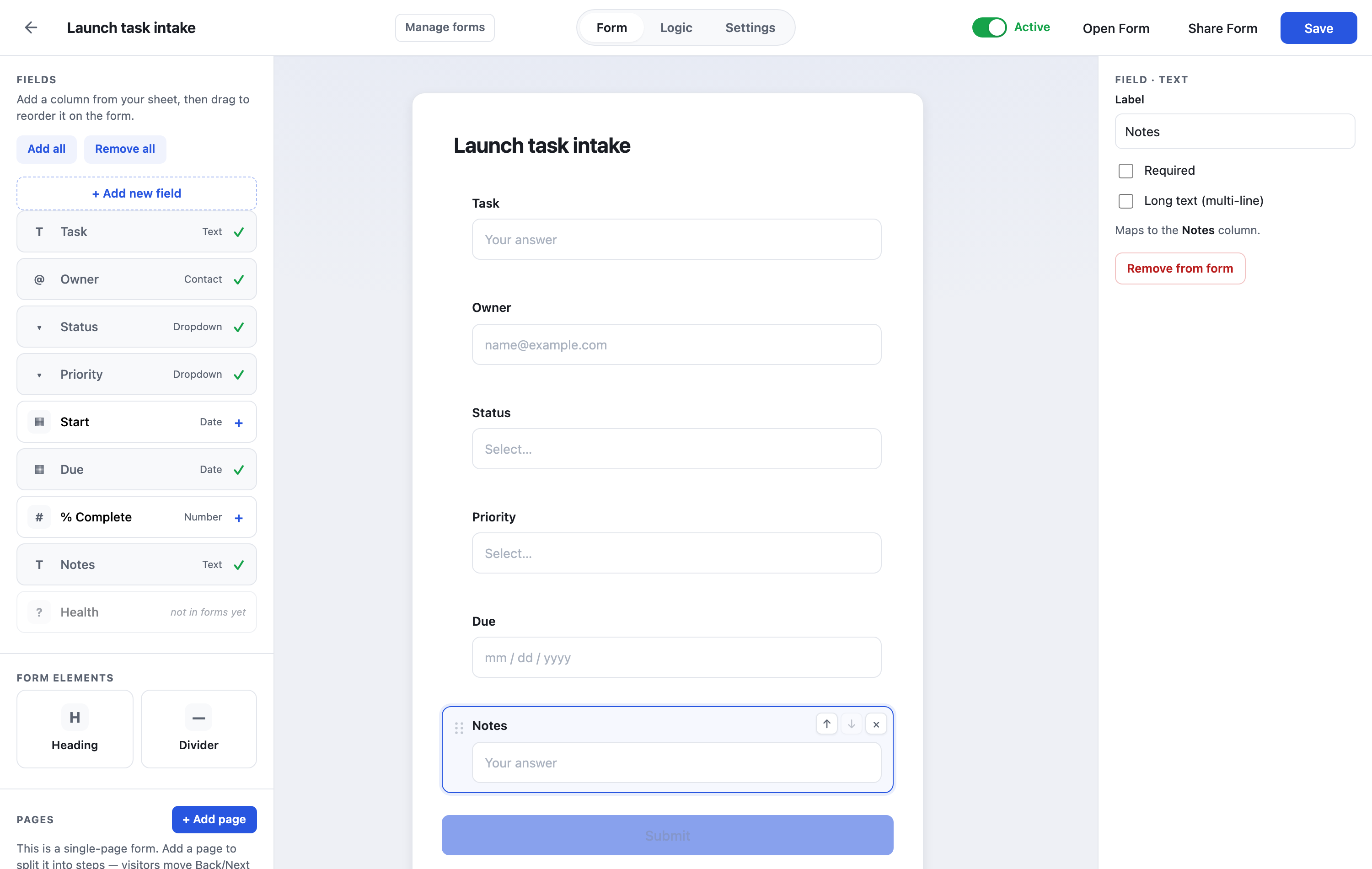
- Forms (builder, multi-page, conditional logic, unbranded by default and free), Gantt (with critical path), Automations (date-triggered, visual builder, run history), Dynamic Views, Reports and Dashboards, portfolio rollups across up to 200 projects, Blueprints with approval-gated intake, an included activity log anyone who can open the sheet can read, plus a public REST API and outbound webhooks.
- A one-click Smartsheet importer: paste an API token, and your sheets, formulas (translated), attachments, hierarchy, and cross-sheet references mirror over, with anything unclear flagged for review rather than silently changed.
- An Export Bundle (.zip) on every plan: the whole sheet as Excel plus every row attachment, so you’re never locked in either.
Pricing: one plan, $19 per editor per month, with every feature included and free view-only collaborators. There’s a 7-day free trial with no credit card required. The wedge is value-per-dollar (more capacity at the price you already pay), not undercutting.
Where it’s honest about gaps: VLOOKUP, HLOOKUP, INDEX, MATCH, XLOOKUP, and XMATCH all ship in the formula engine, alongside 100+ other functions. The dynamic-array functions FILTER, SORT, and UNIQUE, plus LET and LAMBDA, aren’t evaluated yet (the importer and formula tools flag them rather than returning a wrong value). Native mobile apps aren’t shipped (the web app is responsive, including rotate-to-landscape on phones, but there’s no iOS/Android app yet), and pre-built native connectors (Slack, Teams, Jira, Salesforce) aren’t built, though the public REST API and outbound webhooks are. If any of those is core to your day, weigh it.
Pros: familiar Smartsheet UX, double the capacity, no silent data loss, real migration path, no editing-triggered seat charges. Cons: newer product; native mobile apps and the dynamic-array functions are roadmap, not shipped.
See it in your own sheets – How the importer works – Wisegrid vs Smartsheet, in depth
2. Monday.com, visual work OS
Best for: teams that want colorful, board-driven project tracking more than a true spreadsheet.
Monday is polished and great at visual status tracking, but it’s an item/board model, not a Smartsheet-style grid with deep formulas and cross-sheet references. If your Smartsheet usage is mostly status boards, Monday can feel like an upgrade; if it’s spreadsheet-heavy, it’s a different paradigm.
Pricing model: per-seat, sold in seat bands, with automation and AI actions metered by tier. Annual billing is marketed at a discount to monthly.
Pros: strong visual UX, broad automation and AI actions per tier. Cons: per-seat pricing with seat-band friction; not a deep spreadsheet; the grid is secondary to boards.
3. Airtable, database-flavored work
Best for: teams whose data is really a relational database (linked tables, rich field types) rather than a spreadsheet.
Airtable is excellent if your work is relational (linked records, rollups across tables) and you don’t mind thinking in records instead of rows. It’s a common landing spot for Smartsheet users who’ve outgrown a flat grid. The catch is per-base record caps and per-editor pricing.
Pricing model: per-user, tiered, with the jump from the mid-tier to Business driven largely by lifting the per-base record cap. Capacity: per Airtable’s own plan documentation, records are capped per base (for example 50,000 records/base on the Team plan, more on Business).
Pros: powerful relational model, rich field types, strong API. Cons: per-base record caps; the mid-to-Business jump is a steep per-seat increase largely to lift the record cap; not a spreadsheet grid.
For the full three-way breakdown of when Airtable’s relational model beats a grid (and when it doesn’t), see Smartsheet vs Airtable vs Wisegrid.
4. Asana, task and project management
Best for: teams managing tasks, projects, and dependencies, not numbers in a grid.
Asana is a strong project/task manager, but it’s not a spreadsheet replacement. If your Smartsheet is mostly a task list with assignees and dates, Asana is a natural fit. If it’s full of formulas and cross-sheet math, it isn’t.
Pricing model: per-user, tiered, with time tracking, goals, and portfolios gated to the higher paid tier.
Pros: clean task/project UX, good timeline and dependencies. Cons: key features gated to the top paid tier; no spreadsheet grid; per-seat scaling.
5. ClickUp, the everything app
Best for: teams that want one tool for docs, tasks, goals, and light databases and don’t mind a learning curve.
ClickUp packs an enormous feature set, which is both its appeal and its most common complaint. It has grid-like views, but the gravity of the product is task/project management with everything bolted on.
Pricing model: per-user, tiered, with AI sold as a separate per-user add-on.
Pros: very broad capability for the price; flexible views. Cons: feature bloat and a real learning curve, the consistent reason teams shop away from ClickUp.
6. Notion, docs plus lightweight databases
Best for: docs-first teams who want lightweight databases attached to their knowledge base.
Notion is wonderful for docs and wikis with small embedded databases. It is not built for large datasets: widely reported testing puts noticeable slowdown above roughly 5,000 to 10,000 rows, and Notion’s own positioning suggests it isn’t the right tool at high record counts. For a Smartsheet user with big sheets, that’s a downgrade in capacity, not an upgrade.
Pricing model: per-member, tiered.
Pros: best-in-class docs, flexible blocks, friendly UX. Cons: databases degrade at scale; not a spreadsheet engine; weak for formula-heavy work.
7. Excel / Google Sheets, the honest fallback
Best for: small, self-contained sheets where you don’t need sharing controls, forms, automations, or cross-sheet structure at scale.
If you’re leaving Smartsheet because it’s too much, a plain spreadsheet might be enough. But you lose the things Smartsheet (and Wisegrid) give you: structured collaboration, permissions, forms, automations, and cross-sheet references that hold up as the work grows. Worth naming honestly so the list is complete.
Pricing model: bundled with Microsoft 365 or Google Workspace.
Pros: ubiquitous, cheap, familiar. Cons: no real collaboration or permission model at team scale; no native forms or automations; manual cross-sheet stitching.
How to choose
- You live in the grid and just want the ceilings gone: Wisegrid. It’s the only one here built to be a like-for-like Smartsheet replacement, with double the cells and a real importer.
- You want visual boards more than a spreadsheet: Monday.
- Your data is relational: Airtable.
- It’s really task or project management: Asana.
- You want one tool for everything: ClickUp.
- You’re docs-first with small datasets: Notion.
- You need almost nothing: a plain spreadsheet.
If “I want Smartsheet, but without the 500K-cell wall and the seat surprises” describes you, that’s exactly the gap Wisegrid was built for. And you don’t have to rebuild anything to try it: the one-click importer brings your sheets, formulas, and attachments across. You can also estimate the switch on your own numbers or check whether a Smartsheet formula already runs in Wisegrid first.
Smartsheet alternatives: direct answers
What is the best Smartsheet alternative for large sheets?
Wisegrid, if the problem is capacity. It gives you 1,000,000 cells per sheet, double Smartsheet’s documented 500,000-cell cap, so sheets you had to split can live in one. It also lifts the cross-sheet-reference ceiling to 500 per sheet (Smartsheet documents 100), so the workaround for a full sheet doesn’t hit its own wall.
Which Smartsheet alternative doesn’t charge per-seat true-ups?
Wisegrid. It never auto-converts a viewer into a paid seat: view-only collaborators are always free, and you only add a $19 editor when you deliberately choose to. Smartsheet’s User Subscription Model, by contrast, can convert a user with editor permissions into a billable seat at a quarterly or monthly true-up.
What is the best free Smartsheet alternative?
There isn’t a true like-for-like free Smartsheet grid on the market. Wisegrid offers a 7-day free trial with no credit card, so you can migrate your workspace and use the full product before you pay. Google Sheets is genuinely free but drops the forms, permissions, and cross-sheet structure that made you choose Smartsheet. Monday, Airtable, ClickUp, and Notion have limited free tiers with row, record, or feature caps.
Which Smartsheet alternative is closest to Smartsheet itself?
Wisegrid, by design. Same grid, same column types, cross-sheet references, row hierarchy, and the same [Column]@row formula syntax, so there’s no paradigm shift. The others (boards, records, tasks, docs) ask you to rethink how your work is modeled. See the head-to-head comparison.
What is the best Smartsheet alternative for a small team?
Wisegrid, because it has no seat minimum and no member tiers, so a two- or three-person team pays only for the editors it has. Smartsheet’s own pricing page documents a 3-member minimum on its Business plan and caps its Pro plan at 10 members, so small teams can pay for seats nobody fills or get pushed to a pricier tier for growing.
Which Smartsheet alternative keeps my formulas when I migrate?
Wisegrid. Its importer brings formulas across as live formulas and re-runs them, flagging anything it can’t evaluate for review instead of dropping it. Smartsheet’s own export to Excel doesn’t preserve formulas (“Formulas aren’t preserved”), so an export-and-reimport route into any other tool arrives as values only. See what Smartsheet’s export actually loses.
Is there a Smartsheet alternative that doesn’t put its branding on my forms?
Yes: Wisegrid. An unbranded form is the default, with your logo and colors and no “powered by” line, free. Smartsheet documents that only Business and Enterprise users can remove Smartsheet branding from a form’s footer, so on other Smartsheet plans a public intake form carries a line you didn’t choose.
What’s the best Smartsheet alternative for relational data?
Airtable. If your work is really linked tables and rollups across tables rather than a spreadsheet grid, Airtable’s relational model fits better than any grid, including Wisegrid’s. The trade-offs are per-base record caps and per-user pricing, so match it to genuinely relational work.
What’s the best Smartsheet alternative for visual project boards?
Monday.com. If you mostly run color-coded status boards rather than deep formulas and cross-sheet math, Monday’s board-first UX is a strong fit. It’s an item/board model, not a Smartsheet-style grid, so spreadsheet-heavy teams will feel the difference.
Does Wisegrid cost less than Smartsheet?
Wisegrid is one flat price, $19 per editor per month, with every feature included and free view-only collaborators. We don’t quote Smartsheet’s price. The wedge is more of everything (more cells, more cross-sheet references, no Enterprise-gated features) at one predictable number, not a discount. You can run the math on your own seat count and current rate to see where you land.
Can I move off Smartsheet without losing attachments?
Yes, with Wisegrid’s importer, which mirrors sheets, formulas, hierarchy, cross-sheet references, and attachments. Smartsheet’s own export lists attachments among the items “excluded from exports,” which is exactly why exporting to a spreadsheet and re-importing elsewhere loses them. The importer brings the files across directly instead.
Which Smartsheet alternatives are honestly not a fit for spreadsheet work?
Asana, ClickUp, and Notion, if your Smartsheet is formula-heavy. Asana and ClickUp are task and project managers, and Notion is docs-first with lightweight databases that slow down past a few thousand rows. All three are excellent at their own jobs, but none is a like-for-like grid with cross-sheet formulas.
How do I move my data off Smartsheet?
Smartsheet’s own export is lossy (formulas become values, attachments and groupings are dropped). Wisegrid’s importer mirrors the workspace instead: paste an API token and it brings sheets, formulas, hierarchy, cross-sheet references, and attachments across. See how to migrate off Smartsheet.
Try the closest thing to Smartsheet, without the walls
Paste your Smartsheet token and watch your workspace migrate in minutes, on one plan at $19 per editor with every feature included and free view-only collaborators.
Start free – How to migrate – Wisegrid vs Smartsheet
About the author Ryan Kramer is the founder of Wisegrid, a higher-capacity Smartsheet alternative built around a 1,000,000-cell-per-sheet grid, conflict-safe collaboration, and a one-click Smartsheet importer. He built Wisegrid out of first-hand experience hitting the walls in Smartsheet’s grid, pricing model, and capacity limits, and writes about leaving Smartsheet without losing your data. More from Ryan
</content> </invoke>