By Ryan Kramer, founder of Wisegrid. Last updated June 2026.
If you run real work in Smartsheet, you already know its strengths — and the walls you hit when a sheet gets big, a form keeps filling up, or two people edit the same row. This is a straight, detailed comparison: where Wisegrid wins, where Smartsheet is still ahead, and how to decide.
I built Wisegrid to feel like Smartsheet on day one — the same grid, the same column types, cross-sheet references, hierarchy — but to remove the ceilings that turn a growing Smartsheet workspace into a maintenance project. I spent years inside Smartsheet before building this, so I’ll be honest about what we haven’t built yet, too. Marketing pages that overclaim are how you lose trust with people who actually do the work.
Key takeaways – Capacity: Smartsheet hard-caps a sheet at 500,000 cells; Wisegrid’s normal sheet holds 1,000,000 — with every feature still working. – No silent data loss: Smartsheet uses last-write-wins; Wisegrid checks row versions and shows a conflict instead of overwriting a teammate. – Same price, more of everything — value-per-dollar, not a discount play. – One-click migration: paste a Smartsheet token, mirror your workspace (formulas translated) in minutes. – Honest gaps: Smartsheet still wins on Reports, Dashboards, native mobile apps, deep integrations, and enterprise governance today.
The 30-second version
- Capacity. Smartsheet caps a sheet at 500,000 cells. Wisegrid’s normal sheet holds up to 1,000,000 cells — twice the room — and every feature keeps working at that size. (More on why that “and everything still works” matters below.)
- No silent data loss. Smartsheet uses last-write-wins: two simultaneous edits to the same cell, and the last save quietly wins. Wisegrid checks the row version on every save and shows you a conflict instead of overwriting your teammate.
- Same price, more of everything. Wisegrid isn’t a discount play. We match Smartsheet’s per-user tier shape and price points, then raise the numeric limits at each tier.
- One-click migration. Paste a Smartsheet API token and Wisegrid mirrors your workspace — sheets, rows, columns, formulas (translated), attachments, hierarchy, and cross-sheet references — in minutes.
- Honest gaps. Smartsheet has Reports, Dashboards, a deep integration catalog, and native mobile apps. Wisegrid has shipped Forms, Gantt, Automations, and outbound webhooks, but Reports/Dashboards and native apps are still on the roadmap.
Side-by-side comparison
| Smartsheet | Wisegrid | |
|---|---|---|
| Cells per sheet | 500,000 (hard cap) | 1,000,000 |
| Beyond ~500K cells | “Large-scale sheets” — Enterprise-only, opt-in per sheet, with many features disabled | A normal sheet, every feature working |
| Concurrent edits to one row | Last-write-wins (silent overwrite) | Row-version conflict detection — you see a diff, nobody gets clobbered |
| Cross-sheet references | Created in a “Manage References” dialog; up to 100 distinct references per sheet | Type =Sheet2!A1 inline, with sheet-name autocomplete |
| Pricing shape | Per-user tiers (Pro / Business / Enterprise) | Per-user tiers, same price points, higher limits |
| Import from Smartsheet | n/a | Paste a token, mirror your workspace |
| Forms | Yes | Yes (builder, multi-page, conditional logic) |
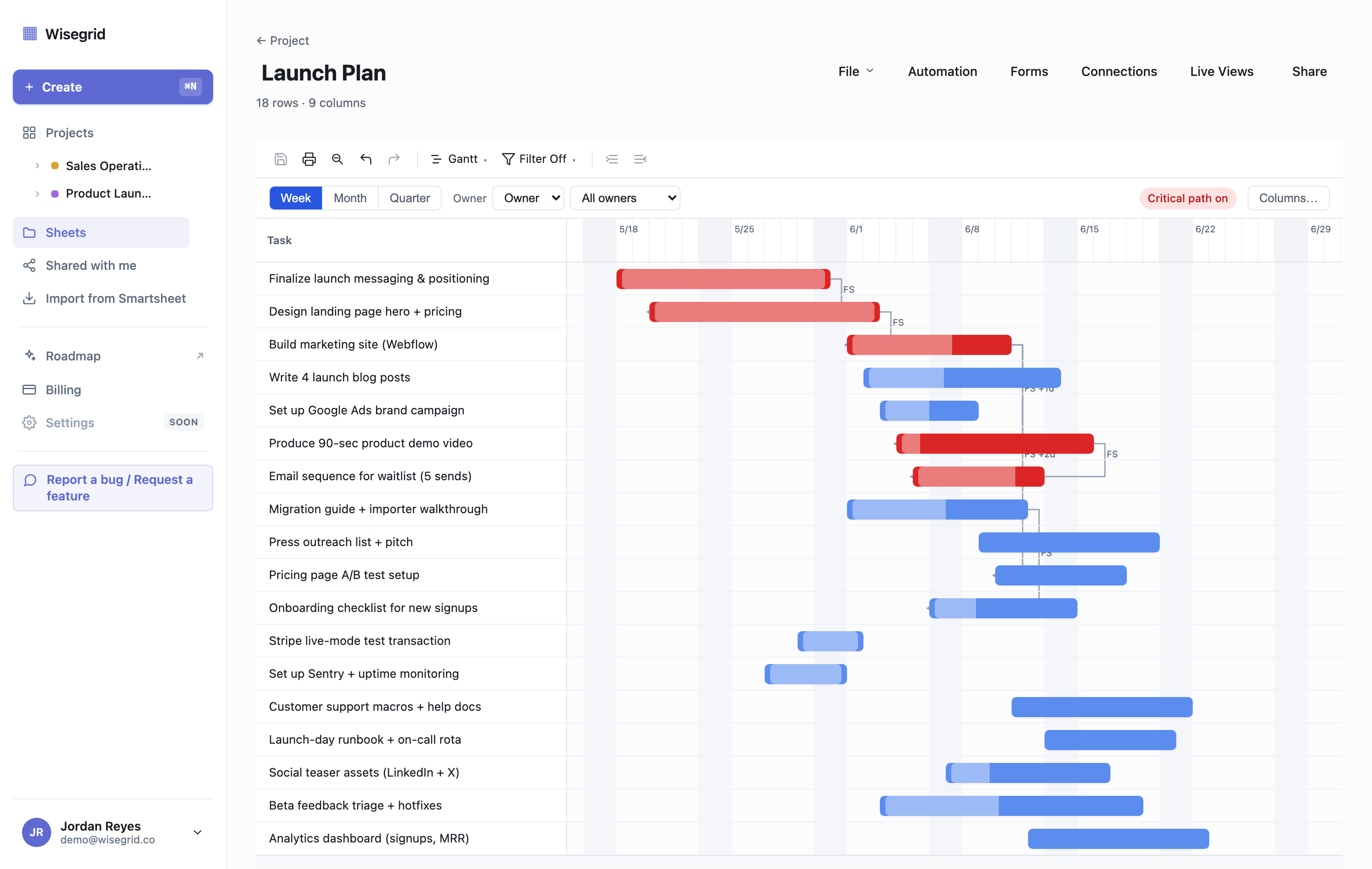
| Gantt / timeline | Business tier and up | Yes (critical path on Business) |
| Automations | Yes (broad action catalog) | Yes (date-triggered, visual builder, run history) — narrower action set today |
| Modern Excel lookups (XLOOKUP, XMATCH, INDEX/MATCH, VLOOKUP, HLOOKUP, LOOKUP) | Partial / varies by function | Shipped |
| Reports / Dashboards | Yes | Not yet — on the roadmap |
| Native mobile apps | Yes (iOS / Android) | Not yet — mobile-tuned web today |
| Integrations (Slack, Teams, Jira, Salesforce) | Broad catalog | Outbound webhooks today; native connectors on the roadmap |
A note on Smartsheet’s exact subscription prices: Smartsheet’s public pricing page is rendered in a way that’s hard to quote reliably, so we don’t publish their dollar figures here. The structural facts above (the 500K cap, the cross-sheet limits, last-write-wins, the large-scale-sheet behavior) are all from Smartsheet’s own documentation. See Smartsheet pricing, explained for the tier breakdown, and check smartsheet.com/pricing for current figures.
Capacity: 500K cells vs 1M cells
This is the difference most teams feel first.
A Smartsheet sheet “cannot exceed a total of 500,000 cells” — that’s the documented hard cap, and it’s a single number, not a separate row and column limit. Because the limit is rows × columns, a wide sheet hits the wall surprisingly early. Smartsheet’s own docs note that “a sheet with 400 columns can only have 1,250 or fewer rows,” and “a sheet with 20,000 rows can only have 25 or fewer columns.” A 40-column operations tracker runs out of room at roughly 12,500 rows.
When you cross that line, Smartsheet returns a cell-limit error and the practical fix is to split the sheet — archive old rows to a second sheet, or move columns out and pull them back with cross-sheet references. That trades one problem for a more fragile, harder-to-use topology (and runs straight into the cross-sheet reference limits below).
The part most comparisons miss: Smartsheet does offer a path past 500K cells — “large-scale sheets,” which reach up to 1,000,000 cells / 50,000 rows. But that mode is Enterprise-only, you have to opt in per sheet as an admin, and Smartsheet’s own documentation says plainly: “Not all Smartsheet capabilities are supported at this level of scale at this time.” The features that stop working above 500K cells include Reports, the public API, Search, mobile apps, Proofs, Pivot, and several connectors, and form creation is disabled.
So the honest comparison isn’t “500K vs 1M cells.” It’s:
- Smartsheet’s million-cell mode = Enterprise contract + admin opt-in + a long list of features turned off.
- Wisegrid’s million-cell sheet = a normal sheet on our entry tier, with Forms, Gantt, Automations, cross-sheet refs, and the rest all working.
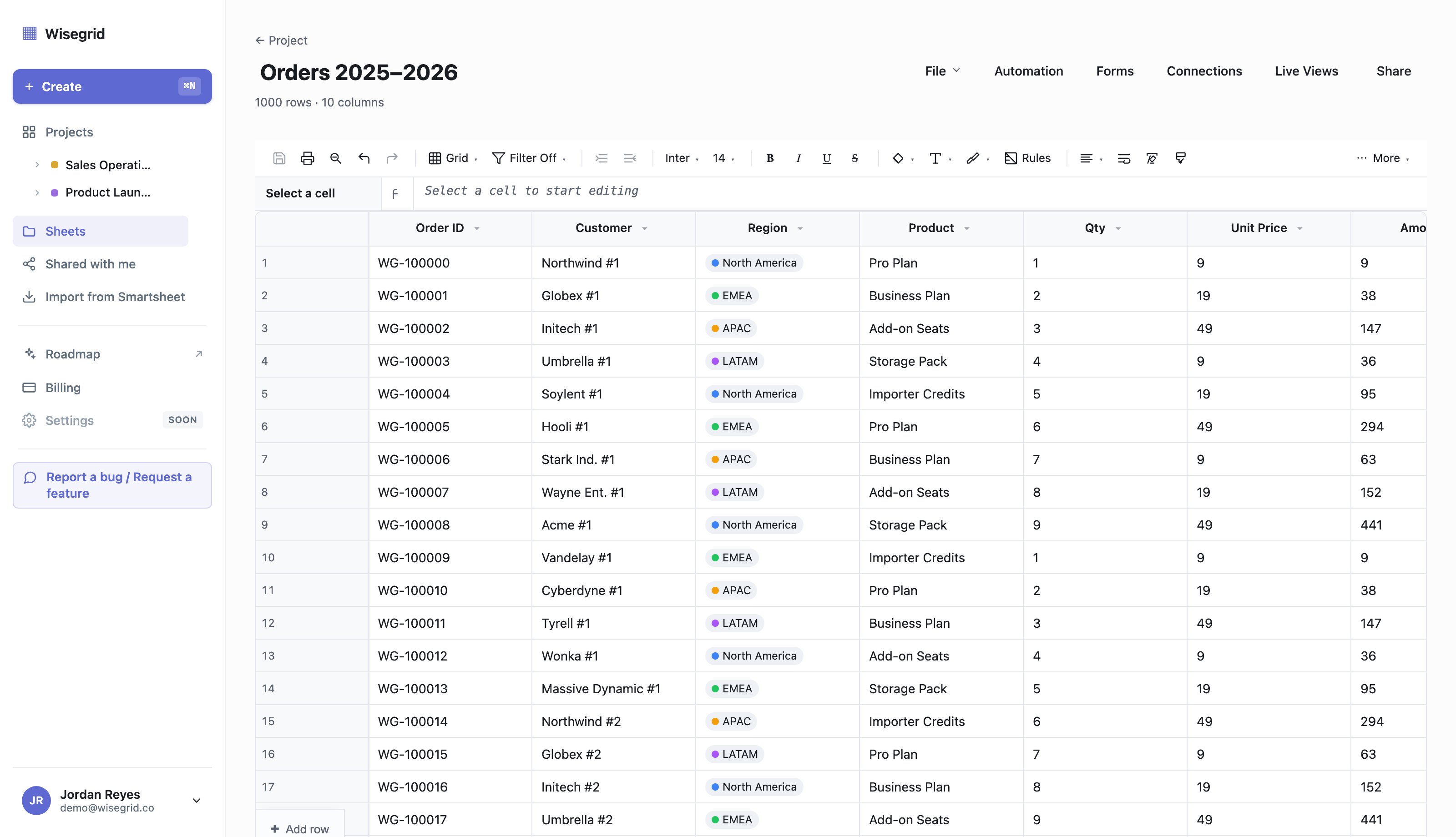
You don’t get downgraded for growing. If you’re staring at the wall right now, here’s exactly what Smartsheet’s 500,000-cell limit (and error 5636) really means. See the grid in your own data →
Cross-sheet references
In Wisegrid, you just type it. You write [Sheet]!A1 inline — autocomplete fires the moment you type [ and suggests every sheet in your project — with no reference-picker modal and no 100-cross-reference-per-sheet cap to ration:
=SUM([Sales]!A1:A100)Cross-sheet references are scoped to the project (the trust boundary), and the per-sheet allowance is generous: 200 cross-sheet references on Pro and 500 on Business. These limits are enforced in the shipped product.
Compare that to Smartsheet, where a cross-sheet reference is a named object you create through a “Manage References” picker, and a sheet can hold no more than 100 distinct cross-sheet references. There are tighter rules underneath: a reference range maxes out at 100,000 inbound cells, large-scale sheets can’t be referenced at all, and hierarchy functions (CHILDREN, PARENT, ANCESTORS) throw #UNSUPPORTED CROSS-SHEET FORMULA when they point at another sheet. So the moment you split a too-big sheet to beat the cell cap, you can also lose your rollups.
Collaboration: who wins when two people edit the same row?
Smartsheet is save-based, and its documented behavior when two people edit the same cell at once is last-write-wins: “the cell displays the last saved change.” There’s no live merge and no conflict prompt — you find out your edit is gone when you happen to reopen the cell, and your only recovery is Cell History, one cell at a time. There’s no live sync either; you refresh to pull in a collaborator’s saved changes.
Wisegrid keeps the same simple save model — no steep learning curve, no real-time-cursor complexity to fight — but adds two things Smartsheet doesn’t have:
- A change banner. When a teammate saves, you see “Jane saved changes to this sheet • Refresh.” Informational, never blocking.
- Per-row conflict detection. Every row carries a version number. If you try to save a row someone else changed since you loaded it, you get a side-by-side diff — your change vs the current value — and choose Keep mine / Use theirs / Merge. Rows you didn’t touch save with zero friction.
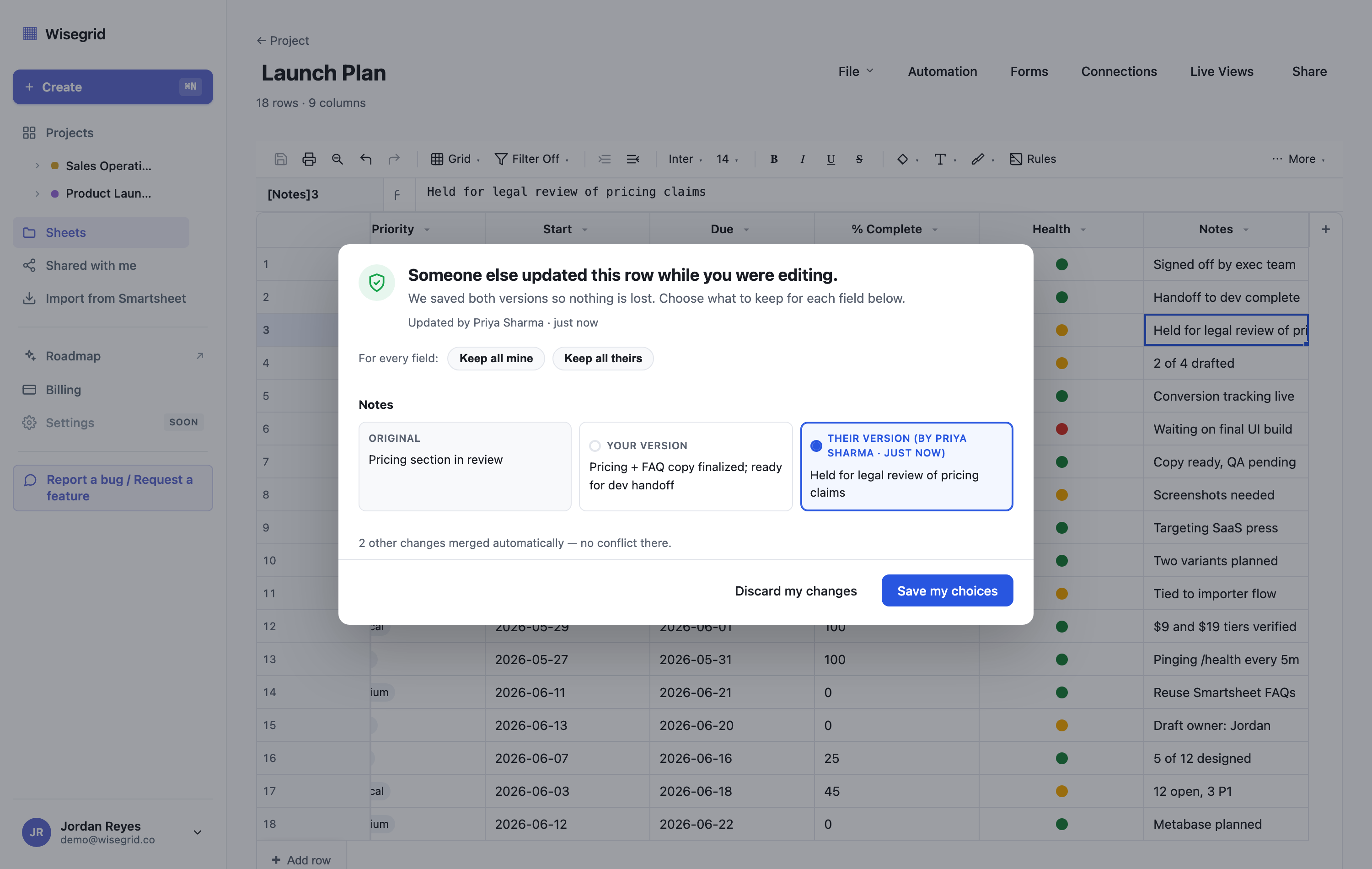
The result: you get the awareness of who’s editing without the silent overwrites. This is the single demo most Smartsheet refugees react to — and it’s why edits quietly disappear in ordinary shared spreadsheets but not here.
Pricing model
Both products use per-user tiers (Pro / Business, plus Enterprise on Smartsheet). Wisegrid’s deliberate choice is not to undercut on price — it’s to match Smartsheet’s price points and give you more at each one: more cells, more rows, more cross-sheet references, more included collaborators. “Same price you already pay, more of everything.”
One specific Smartsheet cost that drives a lot of switching is its User Subscription Model: a free Contributor who edits a shared item can trigger “provisional membership,” which converts to a billable seat at the next true-up unless an admin downgrades it in time — a recurring chore and a source of surprise charges. Wisegrid’s model doesn’t punish you for letting people edit.
For the full tier-by-tier breakdown, see Smartsheet pricing, explained and our own pricing page.
Migrating your data
The reason most people stay on a tool they’ve outgrown is the fear of moving. Two things make that fear rational with Smartsheet specifically:
- Smartsheet’s own export loses data. Per its documentation, exporting a sheet to Excel/Google Sheets doesn’t preserve formulas (you get values only), excludes attachments, groupings, and summary rows, and flattens dropdown / contact / checkbox / symbol columns to plain text. Gantt charts export as a flat task list. (Comments do export to a separate tab — we won’t claim otherwise.)
- So a manual move means rebuilding formulas, re-uploading files, and recreating column types by hand.
Wisegrid’s importer is built to avoid exactly that. You paste a Smartsheet API token; we discover your full landscape, translate Smartsheet formulas to Wisegrid syntax, and mirror sheets, rows, columns, cells, attachments, hierarchy, and cross-sheet references. Anything the formula translator can’t handle lands in a review queue with the original and our best-guess translation, so nothing changes silently. Reports, Dashboards, Forms, and Automations aren’t imported yet — they’re surfaced with a “notify me” option so you know exactly what’s pending.
In a test migration we ran through the importer, it mirrored 4,863 rows across 14 sheets — with attachments preserved — and flagged just 5 formulas, 2 columns, and 1 cell for manual review. Everything it couldn’t translate one-for-one landed in the review queue with the original and a suggested fix, so the only things needing a human look were those eight items, not the whole migration.
Step-by-step: How to migrate off Smartsheet · Start a migration →
Where Smartsheet is still ahead
We’d rather you hear this from us than discover it after switching.
- Reports and Dashboards. Smartsheet has mature cross-sheet reporting and dashboards. Wisegrid has the grid, Forms, Gantt, Automations, and Live Views, but Reports and Dashboards are on the roadmap, not shipped.
- Native mobile apps. Smartsheet ships iOS and Android apps. Wisegrid’s grid is reworked to be usable on a phone in the browser, but native apps are planned, not built.
- Integration breadth. Smartsheet has a large catalog (Slack, Teams, Jira, Salesforce, and more). Wisegrid ships outbound webhooks today and treats native connectors as roadmap.
- Enterprise governance. SSO/SAML and the deep admin controls live in Smartsheet’s Enterprise tier today. Wisegrid’s enterprise security work is roadmap.
If those are core to your workflow today, Smartsheet may still be the better fit — and our importer will be waiting when the gaps close.
Who should switch (and who shouldn’t)
Switch to Wisegrid if you:
- Have hit (or fear) the 500,000-cell wall and don’t want to shard your sheets.
- Have lost an edit to a silent overwrite and want conflict detection.
- Are tired of the per-seat true-up surprises and want predictable, value-per-dollar pricing.
- Live in the grid, formulas, cross-sheet refs, Forms, and Gantt — and want them all working at scale.
Stay on Smartsheet (for now) if you:
- Depend on Reports/Dashboards or native mobile apps day to day.
- Rely on a specific deep integration (Jira, Salesforce) that we don’t have a connector for yet.
- Need SSO/SAML and enterprise governance right now.
FAQ
Is Wisegrid cheaper than Smartsheet?
Wisegrid isn’t a discount play. We match Smartsheet’s per-user tier shape and price points and give you more capacity at each tier. The savings show up as not needing to upgrade or split sheets as you grow, and not getting surprised by seat true-ups. (More on Smartsheet’s cost mechanics in Smartsheet pricing, explained.)
Will my Smartsheet formulas survive the move?
The importer translates Smartsheet formula syntax to Wisegrid’s. Anything it can’t translate goes to a manual review queue with the original formula and a suggested translation — so it’s surfaced, never silently wrong. (For comparison: Smartsheet’s own export drops formulas to values-only.) See the Smartsheet formula translation guide for how each function maps over.
Does Wisegrid really hold 1,000,000 cells?
Yes, on a normal sheet, with features working. Smartsheet’s hard cap is 500,000 cells; its own million-cell mode is Enterprise-only and disables a long list of features.
What can’t Wisegrid do yet?
Reports, Dashboards, native mobile apps, native third-party connectors, the dynamic-array functions FILTER / SORT / UNIQUE (they need a spill model we haven’t built), and the LET / LAMBDA functions (those need parser-level work). The modern Excel lookups — XLOOKUP, XMATCH, INDEX/MATCH, VLOOKUP, HLOOKUP — are shipped. We keep an honest roadmap rather than overclaiming.
How does Wisegrid compare to other Smartsheet alternatives?
If you’re weighing the whole field — Monday, Airtable, Asana, ClickUp, Notion — see our honest best Smartsheet alternatives breakdown, including when one of them is the better choice than us.
Ready to see it in your own sheets?
Start free, or paste your Smartsheet token and watch your workspace migrate in minutes.
Start free → · Migrate from Smartsheet → · Compare features →
About the author Ryan Kramer is the founder of Wisegrid, a higher-capacity Smartsheet alternative built around a 1,000,000-cell-per-sheet grid, conflict-safe collaboration, and a one-click Smartsheet importer. He built Wisegrid out of first-hand experience hitting the walls in Smartsheet’s grid, pricing model, and capacity limits, and writes about leaving Smartsheet without losing your data. More from Ryan →