By Ryan Kramer, founder of Wisegrid. Last updated June 2026.
Smartsheet’s pricing is straightforward on the surface — a few per-user tiers — but the real cost of running it shows up in places the pricing page doesn’t lead with: who counts as a paid seat, what happens when a sheet gets big, and which capabilities are gated behind the top tier. This guide walks through the plans, then the gotchas that actually move your bill.
Here’s the short version of where this all lands: Wisegrid charges the same $9 Pro / $19 Business sticker prices Smartsheet does — and gives you 1,000,000 cells per sheet (more than 2× Smartsheet’s 500K), with no edit-triggered seats and no quarterly true-up chore. So as we walk each Smartsheet cost below, the answer to “how do I avoid this?” is the same every time. Keep that contrast in mind; we’ll point to it section by section.
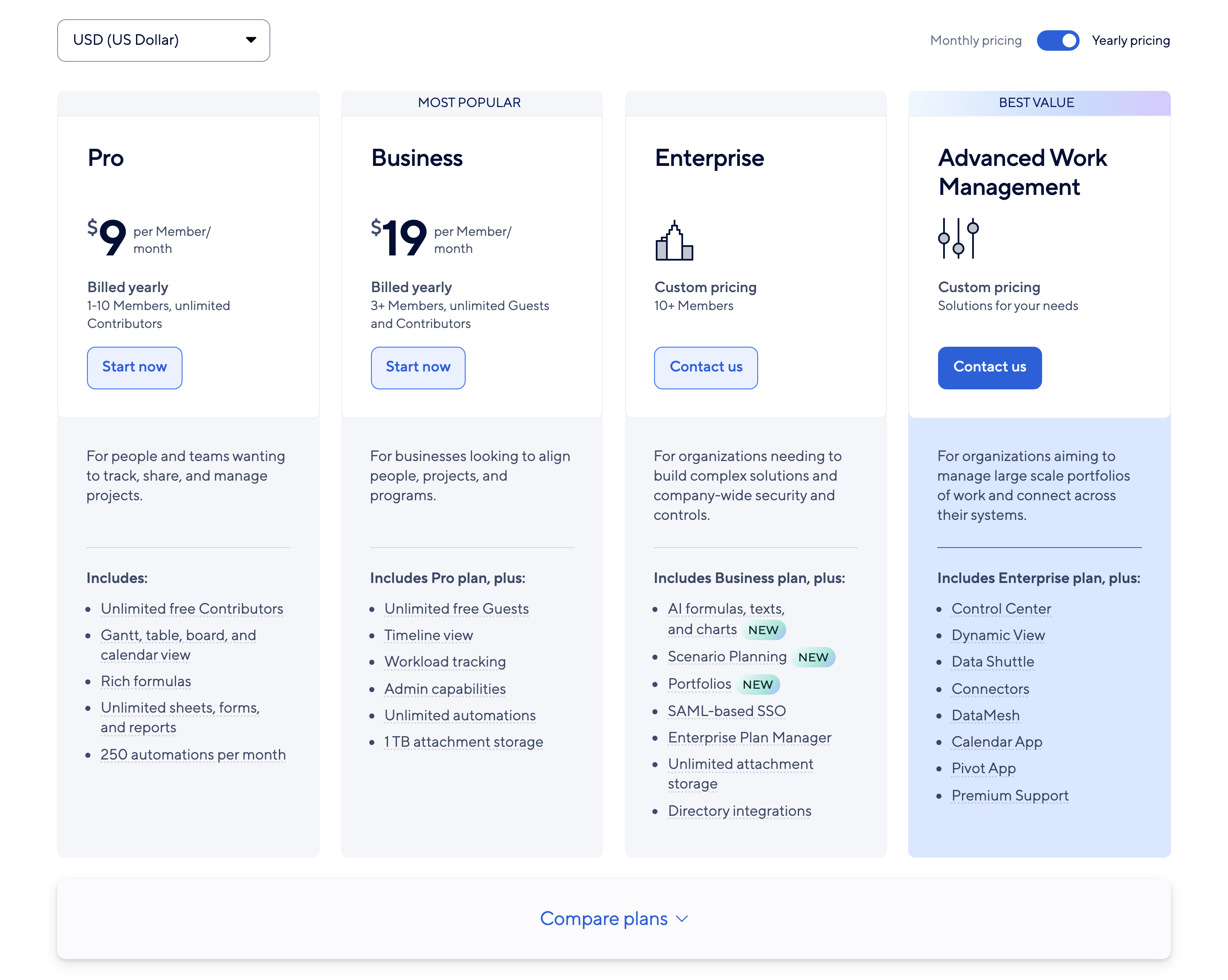
A note on honesty up front: Smartsheet changes its pricing, so instead of asserting figures from memory we show you a dated screenshot of Smartsheet’s live pricing page, captured June 4, 2026 (below), and we tell you plainly that prices change — confirm the current numbers on smartsheet.com/pricing yourself before relying on any of them. Everything below about plan structure, seat rules, and limits comes from Smartsheet’s own documentation and that dated snapshot. The reason we’re careful: we’ve watched the industry burn itself publishing wrong Smartsheet prices, and the headline seat price is the least interesting part anyway — what actually moves your bill is the per-Member-billed-yearly mechanics, the seat minimums, and the User Subscription Model true-ups, which the sticker doesn’t show.
Key takeaways – The seat rule that matters: only Members (paid seats) can edit; Contributors are view-and-comment only. – The bill-jump mechanic: a free Contributor who edits triggers provisional membership, which auto-converts to a billable seat at the next quarterly/monthly true-up unless an admin downgrades it. – Hidden cost #1: the 500,000-cell wall can force an Enterprise upgrade. – Hidden cost #2: Control Center, WorkApps, and Dynamic View are sales-gated add-ons, not base-tier features. – Dated snapshot, not a guarantee: the $9 Pro / $19 Business figures below are per Member, billed yearly, with seat minimums from a June 4, 2026 capture — prices change, so confirm them at smartsheet.com/pricing.
The plans at a glance
Smartsheet’s pricing page lists these plans:
| Plan | Price (June 4, 2026 snapshot, US/USD) | Who it’s for (per Smartsheet’s page) |
|---|---|---|
| Pro | $9 per Member/month, billed yearly | 1–10 Members, unlimited Contributors |
| Business | $19 per Member/month, billed yearly (“Most Popular”) | 3+ Members, unlimited Guests and Contributors |
| Enterprise | Custom — “Contact us” | 10+ Members; unlocks AI formulas, large-scale sheets, enterprise controls |
| Advanced Work Management | Custom — “Contact us” | Gates premium apps like Control Center, Dynamic View, Data Shuttle |
The plan names, the per-Member language, the seat minimums, and the custom “Contact us” pricing on Enterprise and Advanced Work Management are all straight from the dated screenshot below. Two things the sticker price hides: those $9 and $19 figures are **per Member, and they’re the billed-yearly rate (paid monthly costs more), and they carry seat minimums (Business starts at 3 Members). There’s also no free plan** — Smartsheet offers a 30-day trial instead. Prices change, so confirm the current numbers on smartsheet.com/pricing before relying on any of them.
Here’s the part that matters for anyone comparing: $9 and $19 are the exact same sticker numbers Wisegrid charges — but they don’t mean the same thing. Smartsheet’s are per Member, billed yearly, above a seat floor, and every casual editor risks becoming another billable Member through the User Subscription Model true-up (next section). The sticker looks identical; the cost of ownership is not, because the per-Member-plus-true-up mechanics are exactly what the pricing page doesn’t put on the card.
Members vs Contributors: the seat rule that matters most
This is where bills diverge from expectations. In Smartsheet’s User Subscription Model:
- A Member “can create, edit, and delete sheets, reports, dashboards, and workspaces” — and Members count against your plan’s paid seat total.
- A Contributor “can’t create items, edit content, or share items with others.”
In plain terms: the moment someone needs to edit, they need a paid Member seat. Free Contributors are view-and-comment only. For a team where lots of people touch the data — exactly the kind of cross-functional work Smartsheet is sold for — the paid-seat count can climb faster than you planned.
Wisegrid doesn’t work this way: editing never converts a collaborator into a billable seat, and included collaborators come standard at the same $9 Pro / $19 Business.
The User Subscription Model true-up
Here’s the mechanic that generates the “why did our bill jump?” complaints.
When an internal Contributor (a free seat) edits a shared item, that edit “goes beyond what the Contributor seat type allows,” so it triggers provisional membership. Smartsheet then runs review periods — “quarterly for annual plans and monthly for monthly plans, right before the auto-bill or invoice date” — during which an admin must confirm or downgrade those provisional members. If nobody does, the provisional Member auto-converts to a billable seat.
The practical consequences:
- Editing is a billing event. Someone helps out by updating a status, and they can become a paid seat.
- Admins inherit a recurring chore. Every quarter (or month), someone has to review and downgrade provisional members to avoid surprise charges.
- Budgeting gets harder. Your seat count drifts upward between true-ups unless actively managed.
None of this is hidden — it’s documented — but it’s not what most people picture when they see a per-seat price. We go deep on the exact provisional-membership chain — and how to audit it before the bill lands — in Smartsheet’s User Subscription Model, explained.
Wisegrid has no true-up. There’s no provisional membership, no quarterly downgrade chore, and no edit-triggered seats — the $9 / $19 you sign up at is the $9 / $19 you keep. See Wisegrid pricing →
A quick way to feel the mechanic without any dollar figures: count the people on your team who edit a shared sheet only occasionally — the colleague who updates a status once a week, the manager who fixes a date now and then. Under the User Subscription Model, each of those “just helping out” edits is what triggers provisional membership, and every provisional member that isn’t downgraded before the next review period converts to a billable seat. So take that count of occasional editors, multiply by whatever your Business or Enterprise seat price works out to on smartsheet.com/pricing, and that’s the upper bound of what casual editing can add to your bill in a cycle if nobody is actively managing the true-up. The number that surprises people isn’t the seat price — it’s how many “occasional editors” they actually have.
Hidden cost #1: the 500K-cell wall
Capacity is a cost, even when it’s not a line item. Every Smartsheet sheet is capped at 500,000 cells (rows × columns). Hit it, and your options are to split the sheet or move up. The only way to go beyond 500K cells is “large-scale sheets,” which are Enterprise-only, opt-in per sheet — and Smartsheet’s own docs warn “Not all Smartsheet capabilities are supported at this level of scale,” with Reports, the public API, Search, mobile, Proofs, and more disabled in that mode.
So “I outgrew 500K cells” can effectively mean “I need to be on Enterprise” — a real cost, even if it doesn’t appear on the Pro/Business comparison. We break down exactly what that wall is, and what Smartsheet’s own large-scale-sheet mode turns off, in Hit Smartsheet’s 500,000-cell limit?.
Wisegrid gives you 1,000,000 cells per sheet — more than 2× Smartsheet’s 500K — at the same $9 Pro / $19 Business pricing, on a normal sheet with every feature working. No Enterprise gate, no “Contact us,” no large-scale mode that disables Reports and the API.
Hidden cost #2: premium add-ons
Several of Smartsheet’s most-marketed capabilities aren’t included in the base tiers — they’re paid add-ons or higher-package inclusions:
- Control Center (blueprint-based project provisioning) — gated to Business / Enterprise / Advanced Work Management.
- WorkApps (no-code app shell over your sheets) — requires an Advance / Advanced Work Management plan, and “an additional purchase is required” to share a WorkApp with people who aren’t on a Smartsheet plan.
- Dynamic View (share rows without sharing the whole sheet) — a premium application on Business / Enterprise / Advance.
Pricing for these add-ons is sales-gated — Smartsheet’s own pages show “Contact our team” rather than a number — so we can’t quote a figure. The point isn’t a specific dollar amount; it’s that the sticker price of a tier isn’t the whole bill once you adopt these.
A quick honesty note on the Wisegrid side: we don’t claim feature parity with every one of these add-ons yet — some are on our roadmap. What we do guarantee is that the capacity wedge above (1,000,000 cells, no edit-triggered seats) is included at the base $9 / $19, not gated behind a “Contact us” tier.
How to estimate your real Smartsheet cost
A more honest estimate than “seats × tier price”:
- Count everyone who edits, not everyone who logs in. Each editor trends toward a paid Member seat.
- Add a true-up buffer. If provisional members aren’t actively downgraded each cycle, assume some convert to billable.
- Check your biggest sheets. If any are near 500K cells, factor in the Enterprise jump (or the engineering time to split them).
- List the add-ons you rely on (Control Center, WorkApps, Dynamic View) and price them with Smartsheet’s sales team — they’re separate from the base tier.
- Or skip the math. Wisegrid charges the same $9 Pro / $19 Business with no edit-triggered seats, no true-up buffer, and 1,000,000 cells per sheet — so steps 1–4 collapse into one flat, predictable number. Start free →
The Wisegrid angle: same price, more of everything
This is the section every cost above has been pointing back to. Wisegrid is built on the opposite philosophy of “pay more as you grow.” Our wedge is value-per-dollar at the same price points — not an undercut:
- Same tier shape, same price points (Pro at $9, Business at $19), with higher numeric limits at every tier.
- 1,000,000 cells per sheet — more than 2× Smartsheet’s 500K — at the same $9 Pro / $19 Business pricing. A normal sheet with every feature working, no Enterprise gate.
- Editing doesn’t trigger a billing surprise. No provisional membership, no quarterly true-up chore.
- Included collaborators come standard at each tier — collaborating on your data doesn’t quietly convert people into billable seats.
| Smartsheet Pro | Wisegrid Pro ($9) | Smartsheet Business | Wisegrid Business ($19) | |
|---|---|---|---|---|
| Cells per sheet | 500,000 | 1,000,000 | 500,000 | 1,000,000 |
| Beyond 500K cells | Enterprise large-scale mode (features disabled) | Just a normal sheet | Enterprise large-scale mode | Just a normal sheet |
| Editing triggers a billable seat? | Yes (provisional membership) | No | Yes | No |
See the full breakdown on our pricing page, or read the head-to-head: Wisegrid vs Smartsheet.
FAQ
How much does Smartsheet cost per month?
As of a June 4, 2026 snapshot of their pricing page (US/USD, billed-yearly view), Pro is $9 per Member/month and Business is $19 per Member/month, both billed yearly and with seat minimums; Enterprise and Advanced Work Management are custom “Contact us” pricing. Prices change, so check smartsheet.com/pricing directly — and remember the headline per-Member seat price isn’t the whole story once you account for the User Subscription Model true-ups and the premium add-ons.
What is Smartsheet’s User Subscription Model?
A seat model where editing capability requires a paid Member seat. A free Contributor who edits a shared item triggers “provisional membership,” which converts to a billable seat at the next quarterly/monthly true-up unless an admin downgrades it. Full mechanics: Smartsheet’s User Subscription Model, explained.
Why does my Smartsheet bill keep going up?
The most common cause is provisional membership: people who only meant to help edit get converted to paid seats at true-up. Capacity jumps (needing Enterprise for large-scale sheets) and premium add-ons are the other two.
Is there a cheaper Smartsheet alternative?
Wisegrid matches Smartsheet’s price points rather than undercutting, but gives you more capacity per dollar — twice the cells and no editing-triggered seat charges. See Best Smartsheet alternatives (2026) and the head-to-head with Wisegrid.
Want a bill that doesn’t surprise you?
Start free, keep the price you already pay, and get twice the room to grow.
Start free → · See Wisegrid pricing → · Migrate from Smartsheet →
About the author Ryan Kramer is the founder of Wisegrid, a higher-capacity Smartsheet alternative built around a 1,000,000-cell-per-sheet grid, conflict-safe collaboration, and a one-click Smartsheet importer. He built Wisegrid out of first-hand experience hitting the walls in Smartsheet’s grid, pricing model, and capacity limits, and writes about leaving Smartsheet without losing your data. More from Ryan →