By Ryan Kramer, founder of Wisegrid. Last updated June 2026.
You typed a value into a shared spreadsheet, saw it save, moved on. An hour later it’s gone — back to the old number, or to something a teammate typed. Nobody deleted it on purpose. There’s no error, no warning, no record of what happened except a quiet wrong value sitting where your work used to be.
This is one of the most common and most maddening failure modes of collaborative spreadsheets, and it isn’t a bug. It’s the designed behavior of how most multi-user spreadsheets resolve two people editing at once. The term for it is last-write-wins, and once you understand it, you can predict exactly when your edits are at risk — and pick tools and habits that protect them. When I built Wisegrid, I designed the save path so this can’t happen silently in the first place — more on exactly how below.
I spent years inside Smartsheet before building Wisegrid, so I’ll explain the general case first (it applies to Smartsheet, Excel for the web, and Google-Sheets-style shared editing in different degrees), then show the specific design choice we made to stop silent overwrites. This is written to be useful even if you never switch tools — the diagnosis matters more than the pitch.
Key takeaways – **Edits disappear because of last-write-wins concurrency: when two people change the same data against the same starting point, the last save quietly overwrites the earlier one. No conflict, no warning. – The risk spikes with stale reads: you opened the sheet, someone else saved, and you saved over their change without ever seeing it — common in save-based tools that don’t live-sync. – Real-time co-editing (Google Sheets style) hides most of this by syncing keystrokes — but it has its own loss modes (offline edits, paste-over, accidental overwrites of a whole range). – The structural fix is conflict detection:** the tool checks whether the data changed since you loaded it, and if so, saves both versions and asks you to choose instead of silently picking a winner. – Wisegrid ships row-version conflict detection — a shipped feature, not a roadmap promise. It’s row-level conflict safety on a save-based model, not full real-time cursors (I’m precise about that below).
What “last-write-wins” actually means
Picture the shared spreadsheet as a single authoritative copy living on a server. Everyone who opens it gets a snapshot — a read of how it looked at that moment. You edit your local view, then save, which writes your version back to the server.
Last-write-wins is the rule the server applies when two saves collide: whoever saves last, wins. The server doesn’t compare your starting point to the current state. It doesn’t notice that the cell changed between when you loaded it and when you saved. It just takes the most recent write and stamps it over whatever was there.
The quiet killer is the starting point. If you and a colleague both loaded the sheet when cell B12 said 40, and they changed it to 55 and saved, your view still says 40. You change B12 to 42, save — and your save overwrites their 55 with 42, based on a number that’s already an hour out of date. Neither of you ever saw a conflict. Your colleague’s 55 is simply gone.
That’s the whole mechanism. It’s simple, it’s fast, and it loses data whenever two people’s edits overlap.
The three ways edits vanish in a shared spreadsheet
Almost every “my edit disappeared” story is one of these:
- Stale-overwrite (the classic). You loaded the sheet, someone saved a change you never pulled in, and your later save clobbered it. This is the dominant failure mode in save-based tools that don’t push live updates to your screen. You’re editing against a snapshot that’s already wrong.
- Simultaneous same-cell edit. Two people change the same cell within the same save window. One value survives; the other is discarded by whatever resolution rule the tool uses (usually last-write-wins).
- Range/paste-over. Someone pastes a block, drags a fill, or deletes a range that happens to include cells a teammate just edited. Even in real-time co-editors, a careless paste over a populated range overwrites everything under it, and it can be hard to tell what was lost.
Notice that #1 doesn’t require true simultaneity at all. The two saves can be an hour apart. All it takes is one person reading a stale snapshot. That’s why “but we weren’t even editing at the same time” is no defense — the overlap is in the starting point, not the clock.
Why Smartsheet behaves this way (and it’s documented)
Smartsheet is a save-based collaborative spreadsheet, and its concurrency behavior is documented in its own help center. When two people change the same cell at roughly the same time, Smartsheet’s documentation states plainly: “the cell displays the last saved change.” (Source: Smartsheet, Work with multiple people on a sheet at the same time — help.smartsheet.com.)
That is last-write-wins, stated in product documentation. There is no conflict dialog, no merge prompt, and no “someone else changed this row since you loaded it” warning. The data loss is silent by design.
Two things make this sting in real Smartsheet use, and they’re worth naming because they generalize to other save-based tools:
- There’s no live sync of other people’s saves. To see a collaborator’s change, you refresh. Until you do, you’re editing against a stale snapshot — the exact precondition for a stale-overwrite.
- Recovery is per-cell and manual. When you do notice a value got clobbered, the forensic tool is Cell History — right-click the cell, read back the prior value, re-type it. One cell at a time. There’s no “restore my whole lost edit” button.
I’m not picking on Smartsheet here — I built a competitor, and I’m telling you their documented behavior, sourced. The point is that this is the norm, not an outlier. Most grid-style collaborative spreadsheets that are fundamentally “save the whole cell, last writer wins” share this shape.
Where real-time co-editing helps — and where it doesn’t
The other big design school is real-time co-editing, the Google-Docs/Google-Sheets model: as you type, your keystrokes stream to everyone else’s screen. This genuinely prevents most stale-overwrites — there’s no stale snapshot to begin with. If your priority is “two people typing in the same sheet, seeing each other live,” that model is excellent, and Google Sheets in particular is very good at it.
But real-time co-editing is not a magic shield against lost edits:
- Offline / flaky-connection edits can resolve in surprising ways on reconnect — edits dropped or reordered.
- Paste-over and range deletes still destroy data. Live sync just makes the destruction fast and synchronized.
- **Cell-level “last edit wins” still applies within a single cell.** Co-editing is best at different cells.
- It’s heavier and changes the model. Many teams running operational trackers prefer the predictability of “I save when I’m done” over a sheet that mutates under their cursor.
So the honest landscape is: save-based tools risk stale-overwrites; real-time tools reduce that specific risk but trade it for merge-edge-cases and a heavier model. Neither, by itself, tells you when your save is about to overwrite someone else’s work. That’s the gap conflict detection fills.
When last-write-wins is actually fine
It would be dishonest to tell you last-write-wins is always a disaster. It’s a reasonable default in plenty of cases:
- Single-editor sheets. If only you ever touch it, there’s no collision to lose.
- Append-only intake. A sheet where rows are only added (form submissions, logs) rarely has two people editing the same existing row.
- Low-overlap teams. If collaborators own different sheets, tabs, or column blocks by convention, edits rarely collide.
- Disposable / low-stakes data. If a wrong value costs nothing and is obvious on sight, the simplicity is worth it.
The danger zone is the opposite: a shared operational tracker, many editors, the same rows touched by different people, and decisions made off the numbers. Project status sheets, budget trackers, inventory, anything where “whose number is right” matters. That’s where silent overwrites turn into bad decisions and “who changed this?” arguments.
How to stop edits from disappearing (without switching tools)
You can reduce the risk in any collaborative spreadsheet today, no migration required:
- Refresh before you edit. In a save-based tool, reload the sheet right before making changes so your starting point is current. This is the single highest-leverage habit — it directly attacks the stale-snapshot precondition.
- Carve up ownership. Assign people to rows, sections, or tabs so two editors rarely touch the same cells. Convention beats collision.
- Edit narrowly, save often. Smaller, more frequent saves shrink the window in which someone else’s change can land between your load and your write.
- Never blind-paste over a populated range. Paste into empty space or check what’s underneath first. Range paste-over is a top cause of “a whole block disappeared.”
- Know your recovery tool. Learn where your tool keeps cell/version history before you need it, so you can restore a clobbered value fast.
- Use comments/locks for hot cells. If a cell is being negotiated, lock it or flag it with a comment so others don’t overwrite mid-discussion.
These habits help. But they’re discipline, and discipline fails under deadline pressure with ten editors. The durable fix is structural: a tool that simply won’t let one save silently destroy another.
The structural fix: conflict detection that saves both versions
Here’s the design choice that ends silent overwrites: instead of last-write-wins, the tool uses optimistic concurrency with a version check. Every row carries a version number. When you save, you also tell the server which version you started from. The server only applies your write if the row is still at that version. If someone changed it since you loaded it, the version won’t match — and instead of overwriting them, the server saves both versions and hands you a conflict to resolve.
This is shipped in Wisegrid today. Here’s what it does, concretely:
- Every row has a version. Your save includes the version you loaded plus the cells you changed.
- A stale save is rejected, not applied. If the row moved on since you loaded it, the write doesn’t go through. Nothing of yours is lost, and nothing of theirs is clobbered.
- You get a per-cell, three-way diff. Wisegrid compares what you started from, what’s there now, and what you typed — cell by cell. Cells only you changed auto-merge cleanly. Cells only your teammate changed are kept. Only true collisions — where you and they changed the same cell to different values — are flagged as a hard conflict for you to decide.
- You see who and when. The conflict shows the name of whoever produced the current value and when, so it’s a “let’s reconcile” moment, not a mystery.
- Both versions exist the whole time. Nothing is destroyed while you choose. That’s the headline: no silent winner.
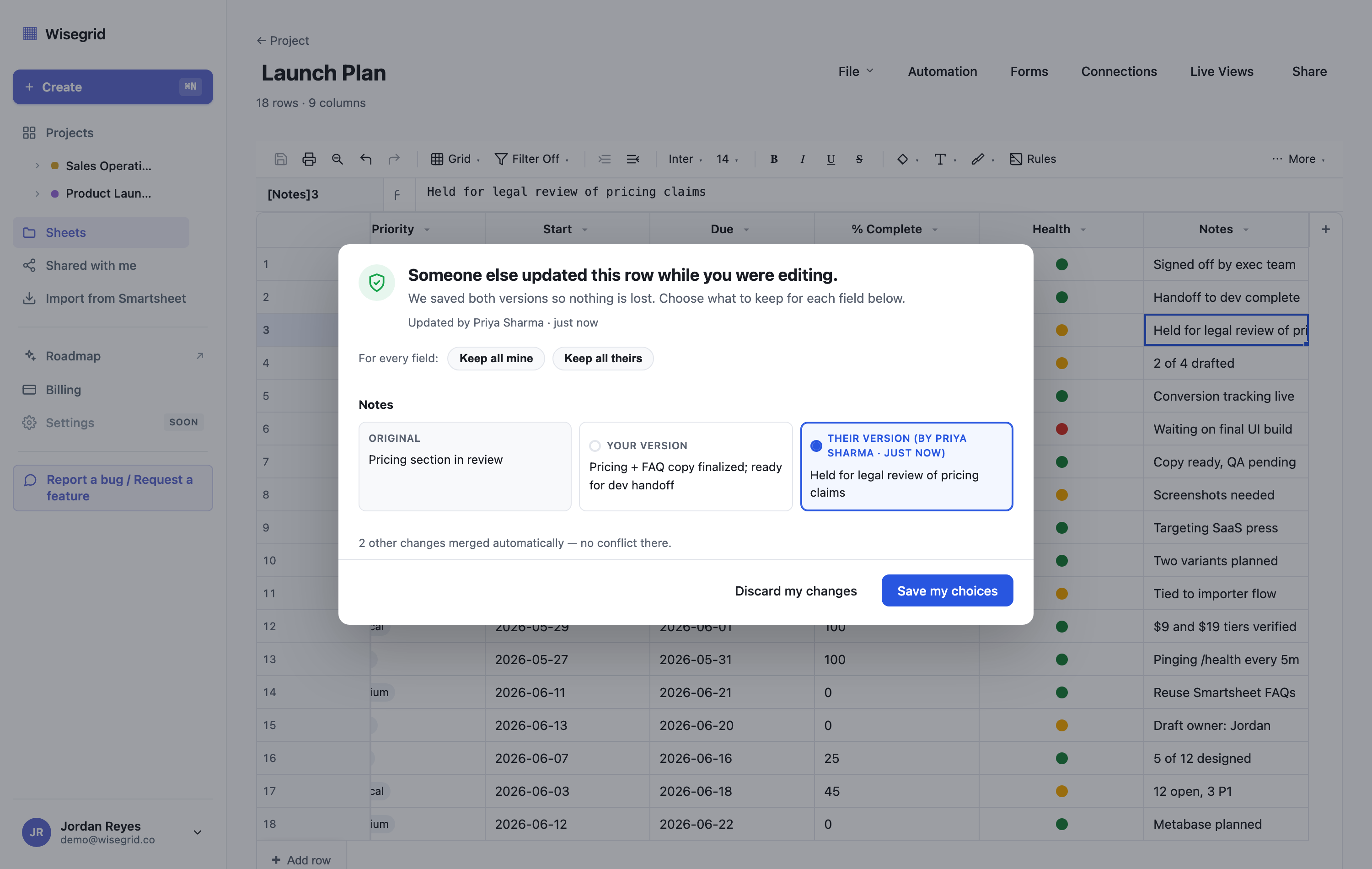
Let me be precise about the scope, because overclaiming is how you lose trust. This is row-level conflict safety on a save-based model — Wisegrid keeps the simple “save when you’re done” workflow (with a non-blocking “Jane saved changes • Refresh” banner so you’re aware), and adds the version check so a stale save can never silently win. It is not full real-time co-editing with live cursors today — live-cursor presence is on our roadmap, not shipped, and I won’t pretend otherwise. What is shipped is the part that actually stops data loss: if your save would overwrite someone, you see a diff and choose, instead of finding out an hour later that your number is gone.
If you’ve ever lost an edit to a silent overwrite, this is the difference you’d feel in the first hour. You can see exactly how it fits the rest of the grid on the Wisegrid features page.
This is also the structural reason a 20-year-old save engine struggles to retrofit conflict detection: changing the write path from “last writer wins” to “reject the stale save and diff it” is a deep change to behavior that millions of existing saves depend on. Building it in from day one — as a version integer checked on every write — is cheap. Bolting it onto a legacy save path is not.
Tired of re-typing edits a teammate clobbered? See how Wisegrid’s conflict detection keeps both versions →
A note on capacity, because the two problems compound
The teams that hit silent-overwrite pain hardest are usually the ones running big, busy shared sheets — lots of rows, lots of editors. And big shared sheets run into a second wall: hard cell caps. If you’re juggling both “edits keep disappearing” and “this sheet is getting too big to manage,” they’re related symptoms of outgrowing a save-based, capacity-limited tool. We dig into the capacity side in what Smartsheet’s 500,000-cell limit really means, and the full head-to-head — collaboration, capacity, pricing, migration — is in our honest Wisegrid vs Smartsheet comparison.
FAQ
Why did my edits disappear in a shared spreadsheet?
Almost always because of last-write-wins concurrency combined with a stale read: you loaded the sheet, a teammate saved a change you never pulled in, and your later save overwrote theirs — based on a starting point that was already out of date. No error appears because, in most tools, this is the designed behavior, not a fault.
What is “last write wins” in a spreadsheet?
It’s the rule that when two saves change the same data, the server keeps whichever was saved last and discards the earlier one — without comparing starting points or warning anyone. It’s simple and fast, but it silently loses data whenever two people’s edits overlap.
Does Google Sheets have this problem?
Less so for the stale-overwrite case, because Google Sheets uses real-time co-editing that syncs edits live, so there’s usually no stale snapshot to overwrite. But it still has loss modes: offline edits can resolve unexpectedly on reconnect, and pasting or deleting over a populated range destroys whatever was there. Real-time editing reduces one risk; it doesn’t eliminate all lost-edit scenarios.
How is conflict detection different from version history?
Version history is recovery after the fact — you go dig out a lost value and re-enter it, one cell at a time. Conflict detection is prevention at save time — the tool catches the collision before anything is overwritten, keeps both versions, and asks you to choose. History is a forensic tool; conflict detection means you rarely need it.
Does Wisegrid have real-time co-editing with live cursors?
Not today. Wisegrid is save-based with row-version conflict detection (shipped) plus a non-blocking “someone saved changes” banner. Live cursors / presence are on the roadmap, not shipped. The part that’s live is the part that stops data loss: a stale save is rejected and diffed instead of silently overwriting a teammate.
Is last-write-wins ever okay?
Yes — for single-editor sheets, append-only intake (forms, logs), teams with clean ownership of separate areas, and low-stakes data. It becomes dangerous on shared operational trackers where many people edit the same rows and decisions ride on the numbers.
See conflict-safe collaboration in your own sheets
Wisegrid keeps the simple save model you’re used to and adds a version check so a stale save can never silently overwrite a teammate. Both versions are kept; you choose.
About the author Ryan Kramer is the founder of Wisegrid, a higher-capacity Smartsheet alternative built around a 1,000,000-cell-per-sheet grid, conflict-safe collaboration, and a one-click Smartsheet importer. He built Wisegrid out of first-hand experience hitting the walls in Smartsheet’s grid, pricing model, and capacity limits, and writes about leaving Smartsheet without losing your data. More from Ryan →