By Ryan Kramer, founder of Wisegrid. Last updated June 2026.
If you’re coming from Smartsheet, the thing you’re most afraid of losing is your formulas — the [Column Name]@row references, the VLOOKUPs, the INDEX/MATCH you’ve leaned on for years. Here’s the short version: Wisegrid speaks the same formula language. Same-row references use the exact same [Column Name]@row syntax, the function names and behavior are the same, and the one place the two genuinely diverge — cross-sheet references — is a place where Wisegrid is easier, not harder.
This guide is written Wisegrid-first: here’s how formulas work in our grid, with a note alongside each one for anyone migrating from Smartsheet. At the end, there’s an honest scorecard of what the Smartsheet importer carries across automatically and the handful of functions (like LET and LAMBDA) that aren’t supported yet.
Key takeaways – Same-row references are identical.
[Column Name]@rowmeans the same thing in Wisegrid as in Smartsheet — and it comes across a migration unchanged, not rewritten intoB4. – The functions are the same.SUM,IF,VLOOKUP,COUNTIF,XLOOKUP,INDEX,MATCH— same names, same behavior. – **Cross-sheet references are where Wisegrid is better. Instead of a modal-picked{Reference Name}object you ration against a 100-per-sheet cap, you type=[Sheet]!A1inline — and it resolves to the live value on the other sheet and recomputes when that sheet changes. No modal, no cap. – Column-wide references use standardE:Ecell ranges — the one syntactic shift, and only for whole-column / specific-row references, never for same-row. –FILTER,SORT,UNIQUE,LET, andLAMBDAaren’t supported yet — they’re flagged for manual review on import rather than silently miscalculated. – Hierarchy functions (CHILDREN/PARENT/ANCESTORS/DESCENDANTS) work the same way** — same row hierarchy, same rollups.
How a Wisegrid formula is built
A Wisegrid formula has two kinds of pieces, exactly like Smartsheet:
- Functions —
SUM,IF,VLOOKUP,COUNTIF, and the rest. Same names, same behavior. If you know them from Smartsheet (or Excel), you already know them here. - References — how the formula points at data. This is the part that looks like a dialect, and the good news is Wisegrid uses the same dialect Smartsheet does for the common case:
[Column Name]@row— the value of that column in the current row (the workhorse — identical to Smartsheet)D5— a specific cell, by standard A1 addressD:D— a whole column[Sheet]!A1— a cell on another sheet, typed inline
So a Wisegrid formula like =[Hours]@row * [Rate]@row reads as “this row’s Hours times this row’s Rate” — the same formula you’d write in Smartsheet, character for character. The engine resolves [Hours]@row to the right cell on whatever row the formula lives in, and it survives column reordering because it points at the column by name, not by letter.
References: [Column]@row and the rest
Here’s every reference shape, Wisegrid-first, with the Smartsheet equivalent for anyone migrating:
| What you’re referencing | In Wisegrid | Coming from Smartsheet |
|---|---|---|
| This row’s value in a column | [Status]@row |
Identical — same [Status]@row |
| A specific row’s value | D5 |
was [Status]5 |
| A whole column | D:D |
was [Status] or [Status]:[Status] |
| A range across columns | D:E |
was [Status]:[Amount] |
| A cell on another sheet | [Q1 Sales]!A1:Z100 |
was {Q1 Sales} — a modal-picked named object |
The headline: the reference you’ll write 90% of the time — [Column Name]@row — is the same in both tools. It’s also genuinely the nicer way to write a same-row reference: [Hours]@row * [Rate]@row is self-documenting in a way =B4*C4 never is, and it doesn’t break when you drag a column to a new position. We kept it on purpose.
Where Wisegrid uses standard cell addresses — whole columns (D:D), specific rows (D5), cross-column ranges (D:E) — it’s because those are the lingua franca of spreadsheets and what most people already expect. Same-row stays named; the rest is plain A1.
Common functions
The everyday functions are the same name and the same behavior. Anything that operates on the current row is character-for-character identical to Smartsheet; the only shift is that column-wide references become standard E:E-style ranges.
| Function | In Wisegrid | Same as Smartsheet? |
|---|---|---|
IF |
=IF([Status]@row="Done", 1, 0) |
✅ Identical |
CONCAT |
=CONCAT([First]@row, " ", [Last]@row) |
✅ Identical |
IFERROR |
=IFERROR([Rate]@row, 0) |
✅ Identical |
SUM |
=SUM(E:E) |
column ref [Amount]:[Amount] → E:E |
COUNTIF |
=COUNTIF(D:D, "Done") |
column ref [Status]:[Status] → D:D |
SUMIF |
=SUMIF(D:D, "Paid", E:E) |
column refs → D:D, E:E |
AVERAGE / AVG |
=AVG(E:E) |
column ref [Amount]:[Amount] → E:E |
(Examples assume Status is column D and Amount is column E.)
The pattern holds for the long tail too — text functions (LEFT, RIGHT, MID, LEN, SUBSTITUTE), math (ROUND, CEILING, FLOOR, MOD, POWER), date math (NETWORKDAY, WORKDAY, EOMONTH, DATEDIF), and logical (AND, OR, NOT, IFS, SWITCH). The function never changes; only a whole-column reference swaps [Column]:[Column] for E:E.
The honest exception: LET and LAMBDA. Wisegrid’s engine doesn’t evaluate them yet, so on import they aren’t force-fed through and rendered as a wrong value — they’re routed to the review queue with their original syntax intact, so you can rebuild them deliberately. If your sheets lean heavily on LET/LAMBDA, know that going in.
Lookups: VLOOKUP, INDEX/MATCH, and the modern set
Lookups are the formulas people worry about most, because a broken lookup quietly corrupts a whole column. The honest status: all the common lookups work, and the modern lookup family is supported. The lookup value is usually a same-row [SKU]@row (identical to Smartsheet); the lookup table is the one part that changes — a Smartsheet {Reference Name} becomes a typed [Sheet]!range.
| Lookup | In Wisegrid | Supported? |
|---|---|---|
VLOOKUP |
=VLOOKUP([SKU]@row, [Price Table]!A1:Z100, 2, false) |
✅ |
HLOOKUP |
=HLOOKUP([Key]@row, [Rates]!A1:Z100, 3, false) |
✅ |
INDEX / MATCH |
=INDEX([Prices]!A1:Z100, MATCH([SKU]@row, [SKUs]!A1:Z100, 0)) |
✅ |
XLOOKUP |
=XLOOKUP([SKU]@row, [SKUs]!A1:Z100, [Prices]!A1:Z100) |
✅ |
XMATCH |
=XMATCH([SKU]@row, [SKUs]!A1:Z100) |
✅ |
LOOKUP |
=LOOKUP([SKU]@row, [Table]!A1:Z100) |
✅ |
FILTER |
=FILTER(...) |
❌ not yet (needs dynamic arrays) |
SORT / UNIQUE |
=UNIQUE(...) |
❌ not yet (needs dynamic arrays) |
XLOOKUP, XMATCH, INDEX, MATCH, VLOOKUP, HLOOKUP, and LOOKUP all evaluate in Wisegrid’s engine — that’s the shipped support set, not a roadmap promise. So an INDEX/MATCH you’ve leaned on for years, or an XLOOKUP you rewrote it into, both keep working. The dynamic-array functions — FILTER, SORT, and UNIQUE — aren’t supported yet (they need a spill model we haven’t built), so they’re flagged for manual review on import rather than silently miscalculated.
Cross-sheet formulas: where Wisegrid is easier
This is the one place Wisegrid and Smartsheet genuinely diverge — and it’s the place Wisegrid is better.
In Smartsheet, a cross-sheet formula doesn’t point at another sheet inline. You open a reference-picker modal, select a range on another sheet, give that selection a name, and Smartsheet stores it as a {Reference Name} object you then use in formulas. It works, but it has real ceilings: a sheet can include no more than 100 distinct cross-sheet references, and large-scale sheets can’t be used in cross-sheet references at all (both per Smartsheet’s own cross-sheet reference documentation). Every reference is a modal round-trip.
In Wisegrid, you just type it:
| Scenario | In Wisegrid | Coming from Smartsheet |
|---|---|---|
| Same workspace / project | [Q1 Sales]!A1:Z100 |
was {Q1 Sales} |
| Different project | [FY26 Finance][Q1 Sales]!A1:Z100 |
was {Q1 Sales} |
No modal, no naming step, no 100-reference cap to ration. Adding a cross-sheet lookup is =[Sheet]!A1 and you move on.
And it’s not just easier to type — it actually resolves to the live value on the other sheet. Type =[Beta]!A1 on Sheet A and the cell shows whatever Beta’s A1 holds right now; edit Beta and the formula on Sheet A recomputes to match. Cross-tab references that come in through the Excel importer (=Summary!B2, ='Q1 Sales'!C5) bind the same way — to the real target tab, as a live formula, not a frozen snapshot of the value at import time. This is the piece that was the most-watched item on our roadmap, and it shipped this month: a cross-sheet reference is a real, recomputing dependency, not a one-time copy.
One deliberate boundary: a cross-sheet reference respects who’s allowed to see the source. You can only point a formula at a sheet you have access to, and a viewer who can’t open the source sheet can’t pull its values through a reference either — the access boundary holds rather than leaking data sideways. (Worth contrasting with Smartsheet, where a cross-sheet formula a viewer lacks permission for surfaces as a #PERMISSION ERROR that breaks the formula for them. Same boundary, handled without breaking the calc for people who are allowed to see it.)
When you migrate, the importer resolves each Smartsheet {Reference Name} into its typed [Sheet]!range equivalent. The honest caveat: if a {Reference Name} points at a sheet you didn’t include in the migration, the importer can’t bind it to a real target — so rather than emit a reference that silently resolves to nothing, it flags it in the review queue for you to decide (import that sheet too, or repoint the reference).
Hierarchy formulas (CHILDREN, PARENT, ANCESTORS)
Wisegrid has the same row hierarchy as Smartsheet (parent/child indentation), and the same functions that traverse it: CHILDREN, PARENT, ANCESTORS, and DESCENDANTS. A parent row rolls up its children the same way — e.g. =SUM(CHILDREN([Amount]@row)).
There’s one small syntax difference in how you name the column being traversed: Smartsheet writes it as a bracketed reference, Wisegrid takes the column name as a quoted string.
| Function | In Wisegrid | Coming from Smartsheet |
|---|---|---|
CHILDREN |
=SUM(CHILDREN("Amount")) |
was =SUM(CHILDREN([Amount]@row)) |
PARENT |
=PARENT("Status") |
was =PARENT([Status]@row) |
ANCESTORS |
=COUNT(ANCESTORS("Task")) |
was =COUNT(ANCESTORS([Task]@row)) |
DESCENDANTS |
=SUM(DESCENDANTS("Amount")) |
was =SUM(DESCENDANTS([Amount]@row)) |
The honest limit — and it’s a limit Smartsheet shares: hierarchy functions don’t work across sheets. In Smartsheet, a CHILDREN/PARENT/ANCESTORS call that reaches into another sheet returns #UNSUPPORTED CROSS-SHEET FORMULA (per Smartsheet’s formula error message documentation). Wisegrid has the same constraint, and the importer flags the same case for review rather than producing a wrong rollup. It’s a shared limit, surfaced honestly — one more reason the 500K-cell wall is worse than it sounds, since the official “split your sheet” fix breaks the cross-sheet rollups that stitch the pieces back together.
Migrating from Smartsheet: what carries across
Putting it together, here’s the honest scorecard for a Smartsheet → Wisegrid migration:
| Carries across automatically | Needs a human look (review queue) |
|---|---|
[Column Name]@row — preserved unchanged |
A formula referencing a column that no longer exists |
Specific-row [Col]N and column ranges [A]:[B] → standard D5 / D:E |
{Reference Name} pointing at a sheet you didn’t import |
| All supported functions (see the lists above) | LET / LAMBDA (not supported yet) |
{Reference Name} → typed [Sheet]!range when the target is imported |
FILTER / SORT / UNIQUE (need dynamic arrays) |
CHILDREN/PARENT/ANCESTORS/DESCENDANTS (single-sheet) |
@cell and standalone @row markers |
Cross-project refs [Project][Sheet]!range |
Cross-sheet hierarchy (#UNSUPPORTED in Smartsheet too) |
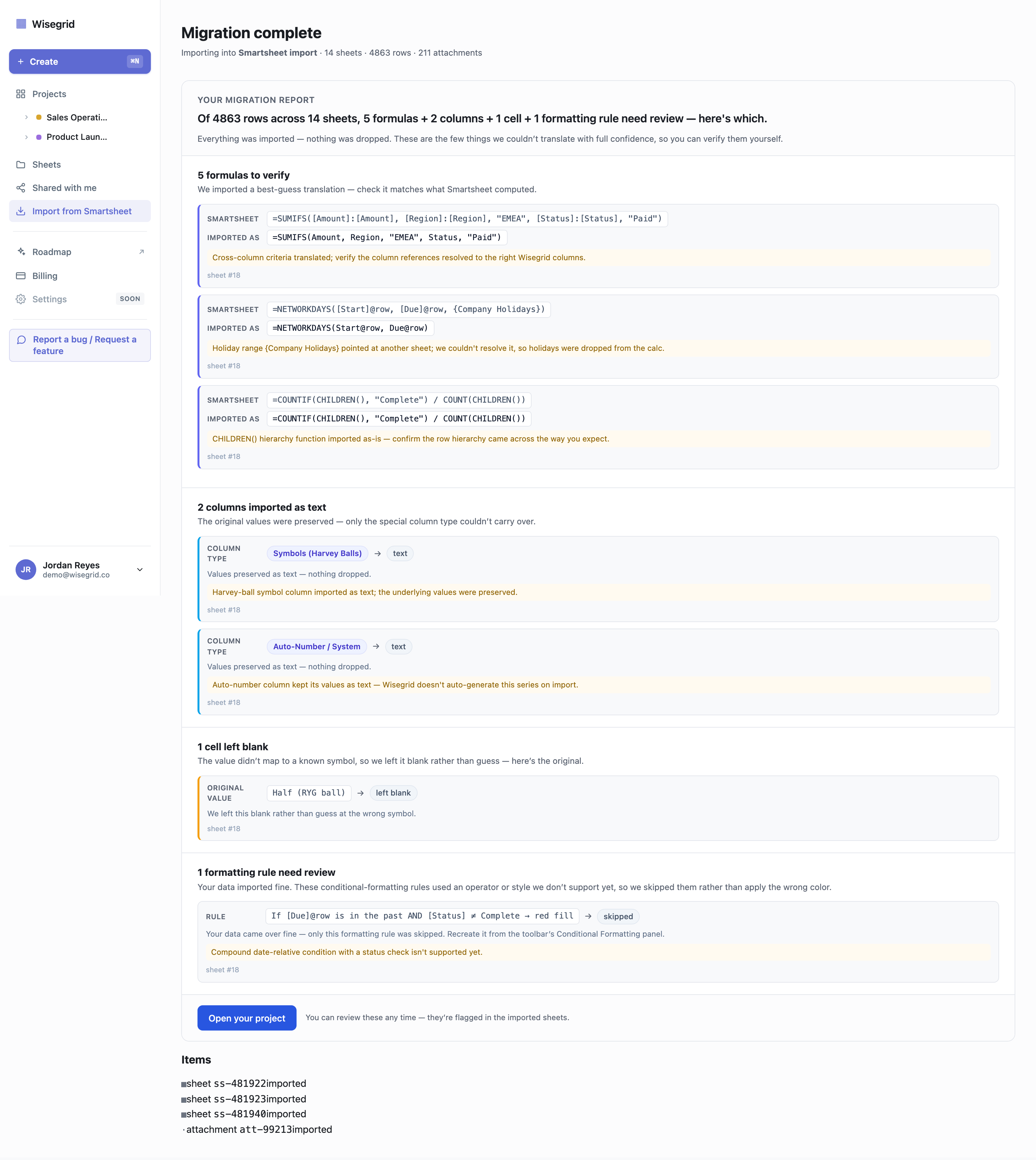
The thing that makes this trustworthy isn’t that everything converts — it’s that same-row references come across exactly as you wrote them, and anything that can’t be carried over is shown to you, with its original syntax and a suggested fix, instead of being passed through to render a wrong number in a cell you’ll never think to check. On a real test migration we ran end-to-end, the importer mirrored 4,863 rows across 14 sheets and carried everything across except eight items (five formulas, two columns, one cell) — which all landed in the review queue.
For the full picture, the step-by-step guide to migrating off Smartsheet walks through the whole importer flow, and what Smartsheet’s export actually loses explains why the manual export route drops your formulas entirely (to values-only) in the first place.
FAQ
Does Wisegrid use the same formula syntax as Smartsheet?
For the common case, yes. Same-row references use the identical [Column Name]@row syntax, and the function names and behavior are the same. The one difference is cross-sheet references: where Smartsheet uses a modal-picked {Reference Name} object, Wisegrid uses a typed [Sheet]!A1 reference — with no 100-reference-per-sheet cap. Whole-column and specific-row references use standard A1 ranges (D:D, D5).
What does [Column Name]@row mean?
It means “the value of this column in the current row” — a relative same-row reference. It works the same way in Wisegrid as in Smartsheet, and because it points at the column by name rather than by letter, it’s self-documenting and survives column reordering. [Hours]@row resolves to the Hours cell on whatever row the formula lives in.
Do my [Column]@row formulas change when I migrate from Smartsheet?
No — same-row [Column]@row references are preserved unchanged on import. The formula you wrote in Smartsheet is the formula you’ll see in Wisegrid. What gets rewritten is cross-sheet references (the {Reference Name} object becomes a typed [Sheet]!range) and, in aggregations, whole-column references ([Amount]:[Amount] becomes the standard E:E).
Does Wisegrid have VLOOKUP and INDEX/MATCH?
Yes. VLOOKUP, HLOOKUP, INDEX, MATCH, plus the modern XLOOKUP and XMATCH and the classic LOOKUP all evaluate in Wisegrid’s engine. A Smartsheet lookup that uses a {Reference Name} cross-sheet table comes across with that table rewritten to a typed [Sheet]!range.
Which Smartsheet formulas don’t carry across automatically?
The dynamic-array functions FILTER, SORT, and UNIQUE aren’t supported yet (they need a spill model we haven’t built), and neither are LET and LAMBDA — all five are flagged for manual review rather than miscalculated. Cross-sheet hierarchy functions (CHILDREN/PARENT/ANCESTORS reaching into another sheet) also don’t translate — but those return #UNSUPPORTED CROSS-SHEET FORMULA in Smartsheet too, so it’s a shared limit. And any formula referencing a missing column, an @cell marker, or a {Reference Name} whose target sheet you didn’t import gets surfaced for review instead of guessed.
What happens to formulas the importer can’t carry across?
They go to a visible review queue with the original Smartsheet syntax and a suggested fix, so you handle the handful that need it instead of trusting that thousands of cells came over clean. Nothing is passed through to render a silently-wrong value.
How many cross-sheet references can I have?
In Smartsheet, a sheet can include no more than 100 distinct cross-sheet references, and large-scale sheets can’t be used in cross-sheet references at all (both per Smartsheet’s cross-sheet reference documentation). Wisegrid has no such cap, and references are typed inline (=[Sheet]!A1) instead of built one modal at a time.
Does a cross-sheet reference show a live value or a frozen copy?
A live value. A =[Sheet]!A1 reference resolves to whatever that cell holds right now, and when the source sheet changes, the formula recomputes — it’s a real dependency, not a one-time copy. Cross-project references ([Project][Sheet]!A1) and cross-tab formulas brought in by the Excel importer bind the same live way. The one boundary: a reference only resolves to a sheet you have access to — a viewer who can’t open the source sheet can’t read its values through a reference.
See your own formulas come across
The cleanest way to know how your formulas migrate is to run them through the importer. Paste a read-only Smartsheet token and Wisegrid mirrors your workspace — same-row formulas preserved, the few exceptions surfaced in a review queue — at the same price you already pay.
Start your migration → · How to migrate off Smartsheet → · What Smartsheet’s export loses →
About the author Ryan Kramer is the founder of Wisegrid, a higher-capacity Smartsheet alternative built around a 1,000,000-cell-per-sheet grid, conflict-safe collaboration, and a one-click Smartsheet importer. He built Wisegrid out of first-hand experience hitting the walls in Smartsheet’s grid, pricing model, and capacity limits, and writes about leaving Smartsheet without losing your data. More from Ryan →